IT'S TECH THURSDAY AT ABI
WINDOWS 10
REMOVE WIDGET & CUSTOMIZE TASKBAR
Remove Widget for Weather & News
The “News and Interests” widget started rolling out to Windows 10 PCs in June 2020. It’s pretty hard to miss when it appears. You’ll see a weather forecast in a small box next to the clock and notification area. Selecting the widget opens a panel with more weather info, stocks, sports scores, news, and more.
Not interested in having a Bing-powered weather and news widget on your taskbar?
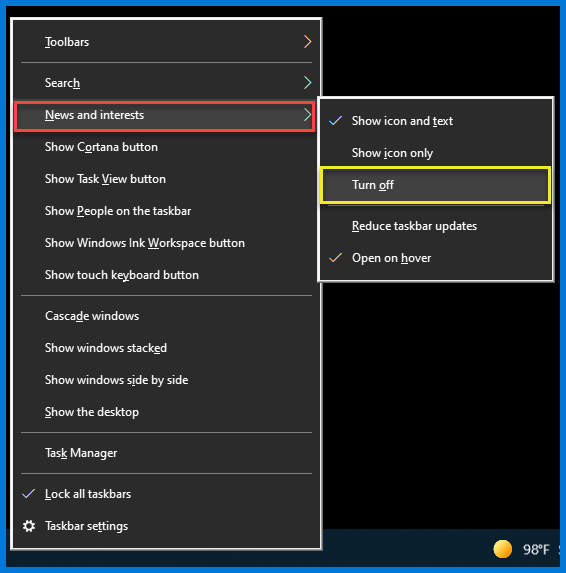
No problem, it’s easy to get rid of it. First, right-click anywhere on the taskbar.
From the menu, select “News and Interests” and then click
“Turn Off” from the sub-menu.
That’s it! The weather widget will no longer be present in your taskbar.
If you’d like to bring the News and Interest widget back at any time,
simply open the same menu and select “Show Icon and Text.”
Use the taskbar for more than seeing your apps and checking the time. You can personalize it
in many ways—change the color and size, pin your favorite apps to it, move it around on your screen, and rearrange or resize taskbar buttons.You can also lock the taskbar to keep your options, check your battery status, and minimize all open programs momentarily so that you can take a look at your desktop.

For suggestions, questions, or to add your employees to this email list contact bonnie@abinnovations.com
Thank you for joining us on #ABIMSPtechthursday