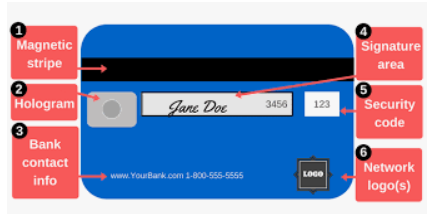
You can perform almost all your banking need by using either your bank or credit union's website or app - except get cash!
|
|
Your
bank's website will be listed on the reverse side of your bank card.
- Do not search for the website or phone number as this may lead to fake results resulting in identity theft.
- Do not use public Wi-Fi to conduct any financial transactions.
- Federal Law – Electronic Banking Protection: Electronic Funds Transfer Act of 1978 (also known as Regulation E). Reg E applies to electronic funds transfers (EFTs) in bank accounts.
- For example, your debit card is protected because it pulls directly from your checking account.
- Your credit card uses different rules: Credit cards are generally safer than debit cards when it comes to consumer protection.
- Some prepaid cards are covered, while others are not.
|
|
|
|
GETTING TO YOUR
BANK'S WEB ADDRESS
|
Carefully type the web address into your computing device's browser (Microsoft Edge, Safari, Firefox, Chrome, etc.)
Double-check your typing before proceeding.
- To complete any task on your account you will need to Sign On (see below).
- On your computing device you can then proceed to any of the available tasks, e.g. open a new account, check balances, pay bills, view account balances, transfer money between accounts and to others, etc.
|
|
On your mobile device (smartphone or tablet) you can do all of the above
plus deposit checks (see below)
.
- Download their app (from the "Get the App" link on their website to avoid going to fake websites from the App Store or Google Play Store).
- Is your phone not a smartphone? Mobile banking also gives you internet-free access by using SMS (texting) features.
|
|
|
To start banking online with your existing account, you’ll need to sign up for electronic services. In most cases, that’s just a matter of going to the bank’s website, looking for “Online Banking” or something similar, and clicking “Register” when asked for a username and password.
- If you use mobile devices, you can do everything there instead—just download your bank’s app and register for a username and password.
- You can also use Face or Touch ID if your mobile device and bank support it. But, as always, don't forget your bank's password.
- If the process is confusing for you, don’t hesitate to call your bank: use the phone number on your bank card, not from a web search. Then ask customer service to walk you through the process. They are eager to get you online because you’ll handle routine service requests on your own and use up less staff time in the future.
|
|
|
|
One of the most useful features of online banking is free online bill payment. Instead of writing checks and mailing in payments, you can have your bank do all of that for you plus you won’t have to go out for stamps.
- There are two basic types of bill pays:
- Automatic, for example paying your Electric Bill monthly on a certain date.
- One Time.
- As each bank is different, we suggest you contact yours to ask them for assistance in setting this up.
|
|
|
|
You will need a mobile device with a camera.
- Endorse the check, and your bank may require a restrictive endorsement, e.g. for deposit only. Some checks contain a checkbox on the back of the check, which when checked, takes the place of this language.
- Availability of Funds: After you deposit your check, you may need to wait anywhere from one day to several days before spending the money. Banks often make a portion available (the first $200 or so) the same day while placing a hold on the remaining funds until a later date.
- Safety: Reputable banks and credit unions use industry-standard encryption in their apps, so your account details should be safe. In addition, check images and entered data are not stored on your mobile device. That said, do not use public Wi-Fi for any sensitive information or anything requiring your bank password; use a secure wired or wireless connection or your mobile phone’s data connection if you want to avoid exposing sensitive information.
|
|
|
|
SeniorNet at FSL-LI hopes this helps while we are spending more time at home.
Stay safe & healthy!
|
|
We want to keep you apprised of technology issues during this health crisis.
SeniorNet at FSL-LI is looking forward to re-engaging with everyone for our Summer semester.
|
|
|
|
|
|
|