Please click Trust Sender if prompted by your email application. This will help ensure you receive important HMIS updates and see all available materials provided in our messages.


HMIS TX-500 Newsletter

October 2026


HMIS Record Request Policy Training

The HMIS Team held virtual training session this month. If you missed it, a recorded session is available! This policy will help participating agencies respond consistently when they receive requests for HMIS client records or client-related information.


The policy explains how to handle requests from clients, authorized third parties, agencies, attorneys, courts, government entities, Homelink/Coordinated Entry partners, and other requesters. It provides a clear process for verifying identity and authority, determining whether the request can be handled by the agency or must be routed to HMIS, CTH/CoC, Legal, or Security/Compliance, and documenting the final response.


The policy covers key request types, including:

  • client record requests;
  • client-authorized third-party disclosures;
  • agency-owned and cross-agency records;
  • Homelink / Coordinated Entry records;
  • legal requests, subpoenas, affidavits, and certifications;
  • privacy or security concerns involving PHI/PII, audit logs, metadata, or unsecured communication.


Before records are released, agencies must confirm requester identity, verify authority, review data ownership, apply minimum necessary standards, check for redaction or withholding needs, and use an approved secure delivery method.


The standard timeline is 5 business days for initial acknowledgment and 30 business days for a final outcome once the request is complete. Additional time may be needed for large requests, older records, cross-agency review, Homelink/CE approval, legal review, or security concerns.


This policy will help protect client privacy, reduce unauthorized disclosure risk, improve documentation, and give providers a practical tool for handling real client record request scenarios.

HMIS will provide a training session to walk agencies through the policy, request routing, common examples, secure delivery, and documentation steps.


HMIS Username Update Postponed

The previously announced HMIS login page and username update has been postponed.


Immediately following the update, the system experienced unexpected issues, including prompts for a company code, error messages, and users being logged out after successfully signing in. In response, the HMIS Team worked with our software vendor to revert the changes.


The login page has now been restored to the version users are familiar with.


Our software vendor is continuing to troubleshoot and address the issues with the enhancement. A new launch date has not yet been scheduled. The HMIS Team will notify the community once a new implementation date has been confirmed.


We apologize for any disruption this may have caused and appreciate your patience as we worked through these issues.


Support Tickets: Ability to re-open tickets Update

The support ticket re-open window has been adjusted to 7 days. This means the end user who originally submitted a ticket can re-open it for up to 7 days after it has been closed.


After the 7-day window has passed, a new ticket must be submitted. This change will help us maintain accurate ticket metrics, including time to resolution, and ensure that re-opened issues are routed to the appropriate HMIS team member.


If the 7-day re-open window has closed and you need to follow up on a previously closed ticket, please create a new ticket and reference the original ticket number in the body of the new ticket. This will help the HMIS Team quickly connect the new request to the original issue and provide the appropriate follow-up.


Data Quality Send Out

To help the community prepare for the upcoming federal reporting season, this month’s Data Quality Report will cover the full 2026 fiscal year (October 1, 2025–September 30, 2026).


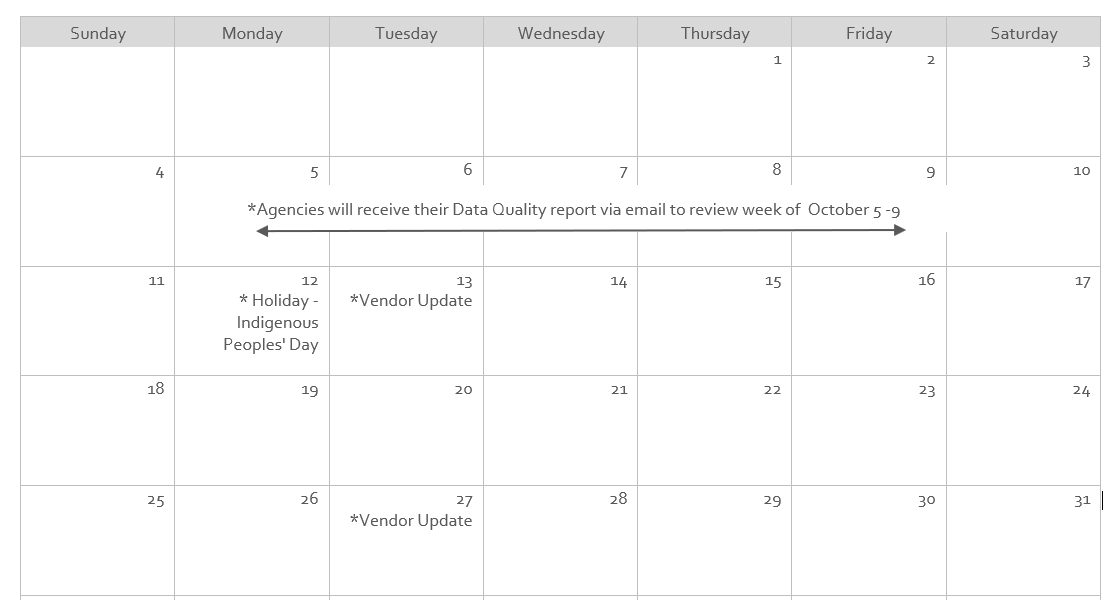
The HMIS Team will send the report to each agency/project’s designated Data Quality Point of Contact the week of October 5th-9th. Please review the report when received and address any identified data quality issues as needed.


HMIS Mobile Portal

Updates & News


  • Feature Highlight - New: Encampment Map Design: The HMIS Team has made updates to the design of the encampment map to make it more mobile friendly. This new design includes a new background and larger icons for pins with more contrast to more easily see.


Known & Resolved Issues


  • Services: When user attempts to add multiple services at the same time, only one service is recorded.


Status- Currently investigating issue with Vendor.


October 2026 Calendar

Hints, Memos, Inklings, & Shortcuts!

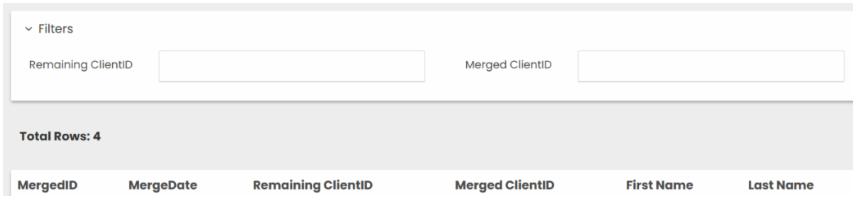
Client Merge Log - Audit Resource

This report enables users to view client profiles that have been merged. Users can search by the new or previous client ID. If the profile was included in a merge, the report will display both profile IDs and the date the merge occurred.


Click Path: Reports > Operational > Client Merge Log


Purpose: The Client Merge Tool was created, in part, to help agencies document why a client’s ID in HMIS may differ from the client ID recorded in their physical file or other documentation.


Using the tool provides a way to document the reason for the difference and maintain a clear record of the change. This documentation is especially important when preparing for audits, as it can help explain discrepancies between HMIS records and other client documentation.

Permanent Housing Projects: Documenting Housing Changes

Situations may arise in Permanent Housing projects (PH, PSH, and RRH) that raise questions about how to properly document changes in HMIS.


For example:


  • A client leaves their living situation but continues participating in your project.
  • A client moves from one unit to another unit within the same project.


The HMIS Data Standards provide guidance on how to properly document these situations in HMIS. Reviewing this guidance can help ensure that client records accurately reflect changes in housing and project participation.


"If the client vacates a housing situation and the project stops paying rental assistance, staff should exit the client from the project with an accurate ‘Project Exit Date’ and ‘Destination’ and create a new ‘Project Start Date’ in a second enrollment for the client on the same or following day. The ‘Prior Living Situation’ in the new enrollment must reflect the location where the client slept the night before the new ‘Project Start Date.’ The project should continue working with the client until a new unit is found, at which point a new ‘Housing Move-In Date’ would be recorded on the second project record. This will ensure that the client’s history of housing is preserved.


If the client moves directly from one unit into another unit, with no days of homelessness in between, it is not necessary to exit and re-enter them because their ‘Housing Move-In Date’ would still accurately reflect the day they entered permanent housing within that enrollment record.


If a client is transferred into a PSH, RRH, or other permanent housing project having already moved into a permanent housing unit, the client’s ‘Project Start Date’ and ‘Housing Move-in Date’ will be the same date. It is not appropriate to have the ‘Housing Move-in Date’ reflect the original move-in, since the purpose of the data element is to distinguish between housed and homeless statuses during a single enrollment."

HMIS Data Standards, pg. 72-73

Reminders & Resources

  • Google Chrome is the recommended browser for using HMIS.
  • Make sure your pop-up blocker is set to allow pop-ups from HMIS.
  • Contact the HMIS Team within 24 hours of employee termination/departure for account deactivations.
  • Project Managers: Please inform the HMIS Team if projects are no longer being used so we can deactivate them.
  • Vendor updates occur every two weeks.
  • Client Merges occur nightly for clients with the same first name, last name, SSN & DOB.
 

Why am I receiving this email?

If you are receiving this email, it is because you either have an active San Antonio/Bexar County HMIS account, or you are designated as an important point-of-contact for HMIS-related updates. As an HMIS User, it is important for you to stay up-to-date on all major updates regarding the database.


We ask that you do not Unsubscribe from these alerts as long as you use HMIS.


If you believe this description no longer applies to you, please submit a ticket to HMIS.Support@Havenforhope.org to request your account be deactivated.


(Our Contact lists are uploaded on a monthly basis, so please allow time to account for this.)