|
|
MONTHLY
NEWSLETTER
DECEMBER 2024
| |
Welcome 2025 SCWMLS Board Officers & Director
We are thrilled to welcome our incoming officers and new director to the 2025 SCWMLS Board of Directors. The 2025 Board brings together experienced leaders with a passion for real estate, committed to supporting our growth and enhancing services for agents, brokers, and clients alike.
| |
|
Bobbi Brandt, President
Castle Rock Realty LLC
| |
David Stark, Treasurer
Stark Company Realtors
| |
|
Raegen Trimmer, Vice President
RE/MAX Preferred
| |
Courtney Prentice, Director
Rally Appraisal
| |
|
|
License Renewal Due
It's a license renewal year for all agents and brokers. Hopefully you are saying - I'm done with my CE!
If not, you are running out of time - as renewal needs to be completed before December 14, 2024. Click here to access the new DSPS LicensE portal to renew.
| | | |
|
|
DUE: REALTORS® Association Dues
You should have received your annual RASCW dues billing via email a few times now. If you have paid, thank you!
If you have not received your invoice, please email member@wisre.com or call 608-240-2800 (option 4) to request a copy. 2025 dues were due on December 1st.
| | | |
Find Tours/Open Houses on the Market Monitor
On the right side of the home screen, the Market Monitor is a quick way to access data relating to the Market, your individual listings (My Info), your branch office, or your entire Firm/Brokerage.
The “Day(s)” field at the bottom of the section defines the number of days looking forward. The maximum number of days you can search for is 30, which is helpful for planning out your week(s)! To see if there are any Tours and Open Houses, coming in the next 2 weeks:
- Type the number of days (14) in the Day(s) field
- Click the word Refresh on the right side
- Click on the number of results in either the Tours or Open House section(s) to view details
NOTE: if you don't want to use the Market Monitor, you can also run a Tour/Open House search by clicking the detailed instructions below. This method allows for more options to narrow down your search, as well as allowing you to look forward more than 30 days.
| |
Trouble uploading photos? Check the file type!
Many agents use their smartphone to take photos for their listings. There is a setting that will cause the photo files to be saved in an incompatible format called ‘heic’. If this happens, you won’t be able to upload them to your listing because that file format is not currently supported in Paragon.
To make sure this doesn’t happen, check the settings in your camera app.
| |
-
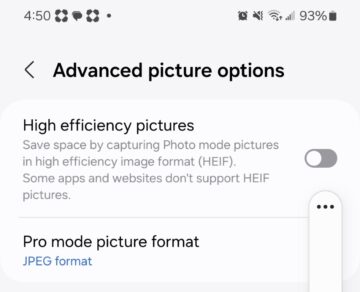
On Android, open the camera app and tap the gear wheel icon at the top left to access the settings.
- Tap Advanced picture options, and make sure High efficiency pictures is toggled off.
| |
-
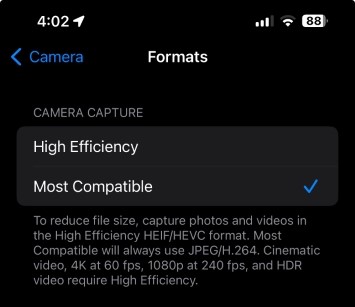
On iPhone: go to Settings, Camera, and tap Formats.
- Make sure Camera Capture is set to Most Compatible.
|
|
|
But what if you already took a lot of photos and they are saved in the 'heic' format? One workaround is to email the photos from the phone, because emailed photos are sent as jpegs.
If they are already saved on your computer in 'heic' format, use a conversion tool such as iMazing Converter.
| |
New Construction - Stages of Completion
The Type feature pick list contains 3 distinct stages for properties that are under construction or newly built:
-
Building Plan with Lot = Proposed home is not yet started. Building plans are allowed on the MLS only if they include land with the sale and only one building plan per lot may be entered. If there are additional floorplans or finish options, these can be noted in the remarks.
-
Under Construction = Foundation hole has been dug & construction is underway. The estimated date of completion (or stage of completion at the time of listing) is required in the first line of the public remarks.
-
New/Never Occupied = Construction is complete & the home is move-in ready. A photo of the front exterior of the home is required at this stage.
It is important to update the Features in the MLS as a home moves through these stages (from plan, through construction, to completed). If you add upgrades or finish more square footage than the original listing states, please adjust the price and applicable fields/features in the MLS to reflect these changes. We often see the sale price several thousand dollars more than the list price due to additions/upgrades, which makes it difficult to use these sales for appraisals and CMAs.
| |
Limited Service Listings
If you are working with a buyer on the purchase of a listing that is marked Limited Service = Yes, please notify the listing agent when an offer is accepted - and again once the property has closed.
With limited service listings, the cooperating agent often works directly with the seller and the listing agent is not informed of accepted offers &/or closings. Taking this extra step to notify the listing agents to update the MLS ensures all members have access to accurate and timely data.
| |
New Rule for Increased Transparency on Auction Listings
To improve clarity & transparency for buyers searching on public websites, the SCWMLS Board of Directors recently passed a new requirement for the word “Auction” to prominently display on the main photo of all auction listings. We are finding that consumers do not always read the MLS remarks, and are often confused about the price that displays.
Below is an example of an acceptable disclosure. Photo labels in Paragon do not display on public websites, so please add the disclosure to the photo itself. If an auction listing is entered into the MLS without “Auction” prominently noted on the main photo, it will automatically be added for you.
| | |
|
Additional information and requirements for auction properties can be found here. As always, if you have any questions regarding this new policy, please contact MLS staff at listings@wisre.com. | |
|
New Feature:
Set Preferred Title Company
TrustFunds recently introduced a new feature allowing agents & brokers to select their preferred title company directly within their profile settings. This enhancement is designed to:
- Save time by moving both the agent’s & broker’s preferred title company to the top of the title company list on the Notify Buyer screen
- Provide flexibility by enabling users to customize their workflows according to their preferences
| |
|
Here's how to set your preferred title company:
-
In Paragon, click the Resources icon from the Paragon top menu bar and then choose TrustFunds:Agent Access (or TrustFunds:Broker Access).
- Click on your name in the upper-right hand corner and select Profile.
- Select Profile Information.
-
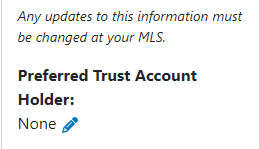
On the left side (at the bottom of your profile info), click the blue pencil next to Preferred Trust Account Holder.
- Select the company you want from the dropdown menu and click Save.
| |
|
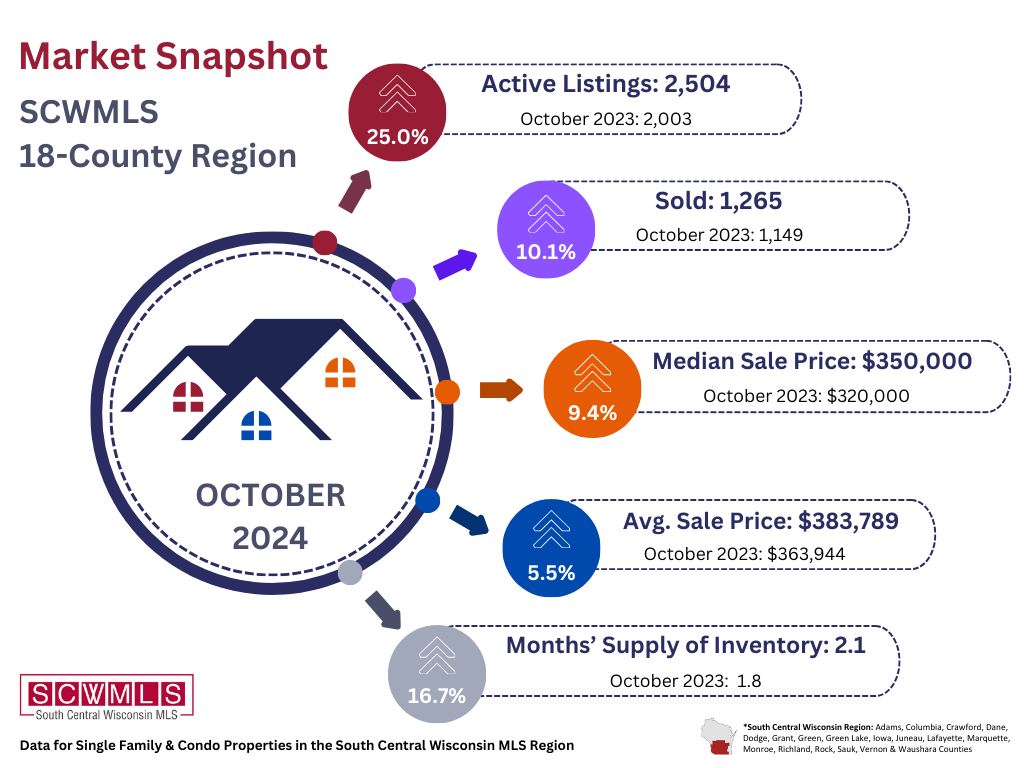
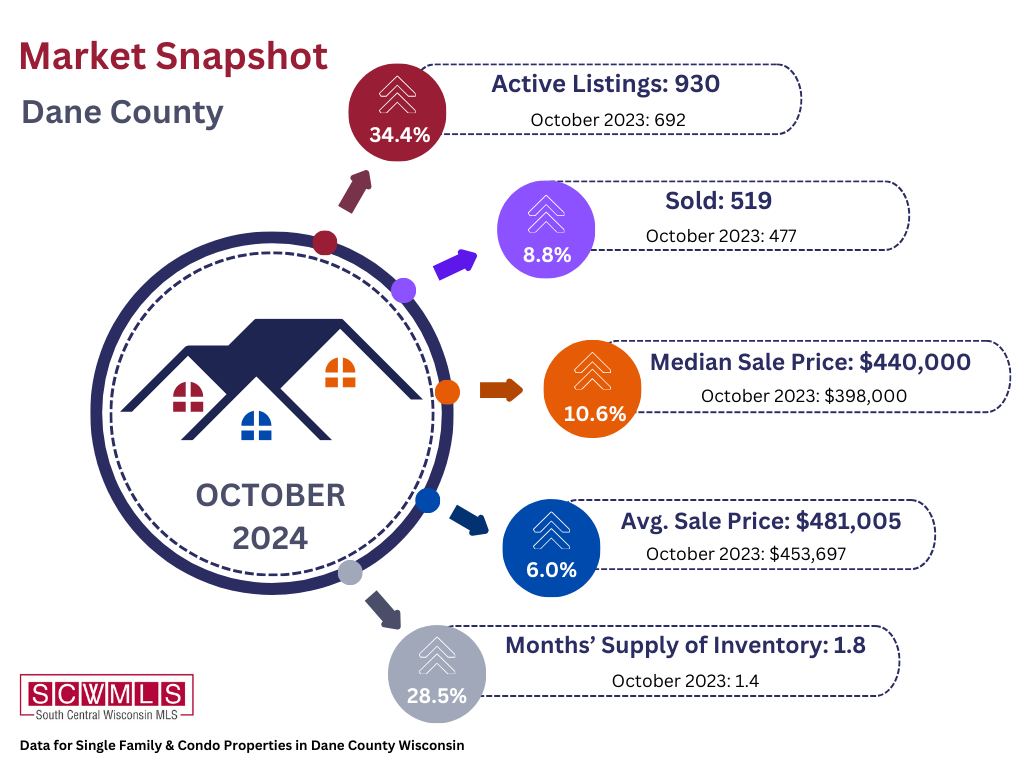
Inventory, Supply & Prices Continue to Rise | |
UPCOMING TRAINING OPPORTUNITIES | |
|
PARAGON BASICS
Virtual Learning
| |
Join us online for this free, introductory session on the most common and helpful features in Paragon.
Next Session:
DATE: December 6, 2024
TIME: 9:30 am - 11:30 am
LOCATION: Webinar (Zoom)
| |  |
|
Bring your laptop or tablet for this introductory session on the most common and helpful features in Paragon.
Next Session:
DATE: December 13, 2024
TIME: 9:00 am - 12:30 pm
LOCATION: SCWMLS Office
| | |
|
MAP SEARCH
Virtual Learning
Learn to use Paragon's Map Search functions to hone in on specific geographies and opportunities quickly.
Next Session:
DATE: December 20, 2024
TIME: 10:00 am - 10:30 am
LOCATION: Webinar (Zoom)
| |
|
COLLAB CENTER
Virtual Learning
The Collab Center can help with property notifications and provide insights into buyer preferences. Learn to build sites for your buyers.
Next Session:
DATE: December 19, 2024
TIME: 10:00 am - 10:30 am
LOCATION: Webinar (Zoom)
| |
|
PARAGON CONNECT
Virtual Learning
Join Dave to learn how to use
the mobile version of Paragon (Paragon Connect) on your smartphone.
Next Session:
DATE: December 12, 2024
TIME: 10:00 am - 10:30 am
LOCATION: Webinar (Zoom)
| | | | |