One Cool Tip Newsletter

October 13, 2026

Your daily dose of tech-savvy brilliance!

😀 Greetings! Happy Tuesday, Cool Tipper!


Get ready to streamline your digital life with simple, actionable tips delivered straight to your inbox.


Cool Tip Theme: ChatGPT Shareable Profiles


Create a ChatGPT Shareable Profile to introduce yourself, showcase your Sites, and share your work while keeping conversation titles and content private.


New here? Subscribe to the One Cool Tip Newsletter for daily updates. It's FREE!

3️⃣

If you enjoy the One Cool Tip Newsletter, please forward this newsletter to THREE friends or colleagues or share it on social media using the links below.


Leave a $$$ Tip!


Share this One Cool Tip Newsletter!

X Share This Email
LinkedIn Share This Email
Pinterest Share This Email

🚨 Scammers Change Their Stories, but These Red Flags Stay the Same🚨


Scams come in many forms, but the Consumer Financial Protection Bureau says they often rely on the same tricks to separate you from your money.


Fraudsters may impersonate someone you trust, threaten you, promise prizes or services, or pretend there is an urgent problem with your bank account.


Be especially suspicious when someone demands payment through gift cards, wire transfers, payment apps, or cryptocurrency, since these payments can be difficult to trace or recover.


Artificial intelligence is making some scams even more convincing by allowing criminals to clone voices and create realistic images and videos.


If an unexpected caller or message asks for money or personal information, stop and independently contact the person, company, bank, or government agency using contact information you know is legitimate.


The Cool Tip:


When urgency, secrecy, and an unusual payment request appear together, slow down and verify before you send a cent.


And in Other News...


  • ChatGPT Just Got a GPT-6 Upgrade


OpenAI has launched GPT-6 Sol and GPT-6 Luna for ChatGPT users worldwide, including both free and paid plans.


The new models replace GPT-5.6 Sol and GPT-5.6 Luna in ChatGPT.


The versions incorporate updated safety training based on real-world use, with stronger protections against high-risk misuse in areas such as cybersecurity, biology, and violence.


The Cool Tip:


If you use ChatGPT, you may already be interacting with GPT-6, so put it to the test with one of your everyday writing, research, or brainstorming tasks.

Cool Tip Poll

🤔 What would you showcase on a ChatGPT profile?

Cool Deals of the Day

  • Have you tried the Upside app? Everyday cash back on gas, groceries and dining.


Help support One Cool Tip. Use this Amazon link when you shop online.


Check out these Cool Deals:

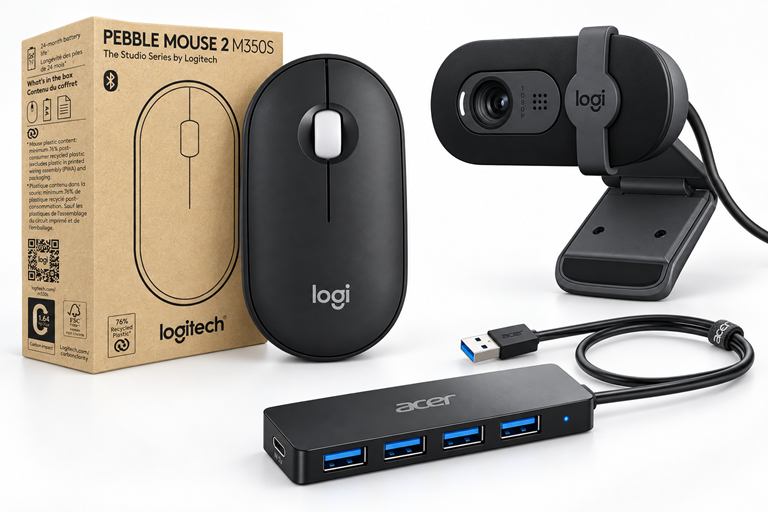
🖱️ Logitech Pebble Mouse 2 M350s: A compact Bluetooth mouse to consider for a portable editing setup. 

Overall Pick. Now $23.99. 4.5 Stars. Check it out on Amazon!


🎥 Logitech Brio 101 Webcam: An optional webcam for calls and walkthroughs when presenting the projects you create. 

Save 8%. Now $36.98. 4.4 Stars. Check it out on Amazon!


🔌 Anker 4-Port USB 3.0 Data Hub: Consider a hub if your desktop accessories compete for USB connections, after checking your computer’s port compatibility.

Save 17%. Now $9.99. 4.6 Stars. Check it out on Amazon!


*Prices accurate when originally published.

One Cool Tip may earn a commission from qualifying purchases.

Fuel Your Adventure

Try Big Mike's Jerky!


bigmikesjerky.com


Today's Cool Tip

Give Your ChatGPT Creations a Home With Shareable Profiles

Give people a place to meet you and explore what you build with ChatGPT.


Shareable Profiles combine a personal introduction with a showcase of your Sites, with controls over what you display.

By Rodger Mansfield, Technology Editor

October 13, 2026

Subscribe


You build a useful tool with ChatGPT, share it with a friend, and then build something else. 


Soon, your creations are scattered across messages and bookmarks. 


When someone asks what you have been making, you find yourself collecting links again.


A profile gives visitors a place to start. Introduce yourself, then point people toward your most useful creations.


Here’s a Cool Tip: Create a ChatGPT Shareable Profile and feature your most useful Sites.


Feature Explanation


OpenAI introduced profile sharing and a Sites showcase as a way to bring your bio, activity, and selected creations together. 


Personal profiles start private; shared profiles omit conversation titles and content.


Sites are websites or interactive tools built with ChatGPT. 


The practical benefit of a showcase is context: visitors can learn who you are, see what you make, and choose a project to explore. 


Lead with finished, useful examples rather than unfinished experiments.


Choose projects that solve recognizable problems. 


A working packing planner tells people more than a vague claim that you enjoy experimenting with AI.


What You’ll Gain


  • Give visitors a clear introduction to your work.
  • Make useful projects easier to discover together.
  • Curate a collection that reflects your interests.


Step-by-Step Instructions


Here's how to do it.


Web/Desktop:


  1. Sign in and open chatgpt.com/profile.
  2. Edit your name, username, photo, and bio.
  3. Hover over Showcase and select Edit to pick Sites you own to add to the showcase. For a public personal profile, each featured Site must be public and belong to the same workspace as the profile.
  4. Review the page, select Share at the upper right, and choose public sharing.
  5. Copy the profile link and ask another signed-in ChatGPT user to test it. 


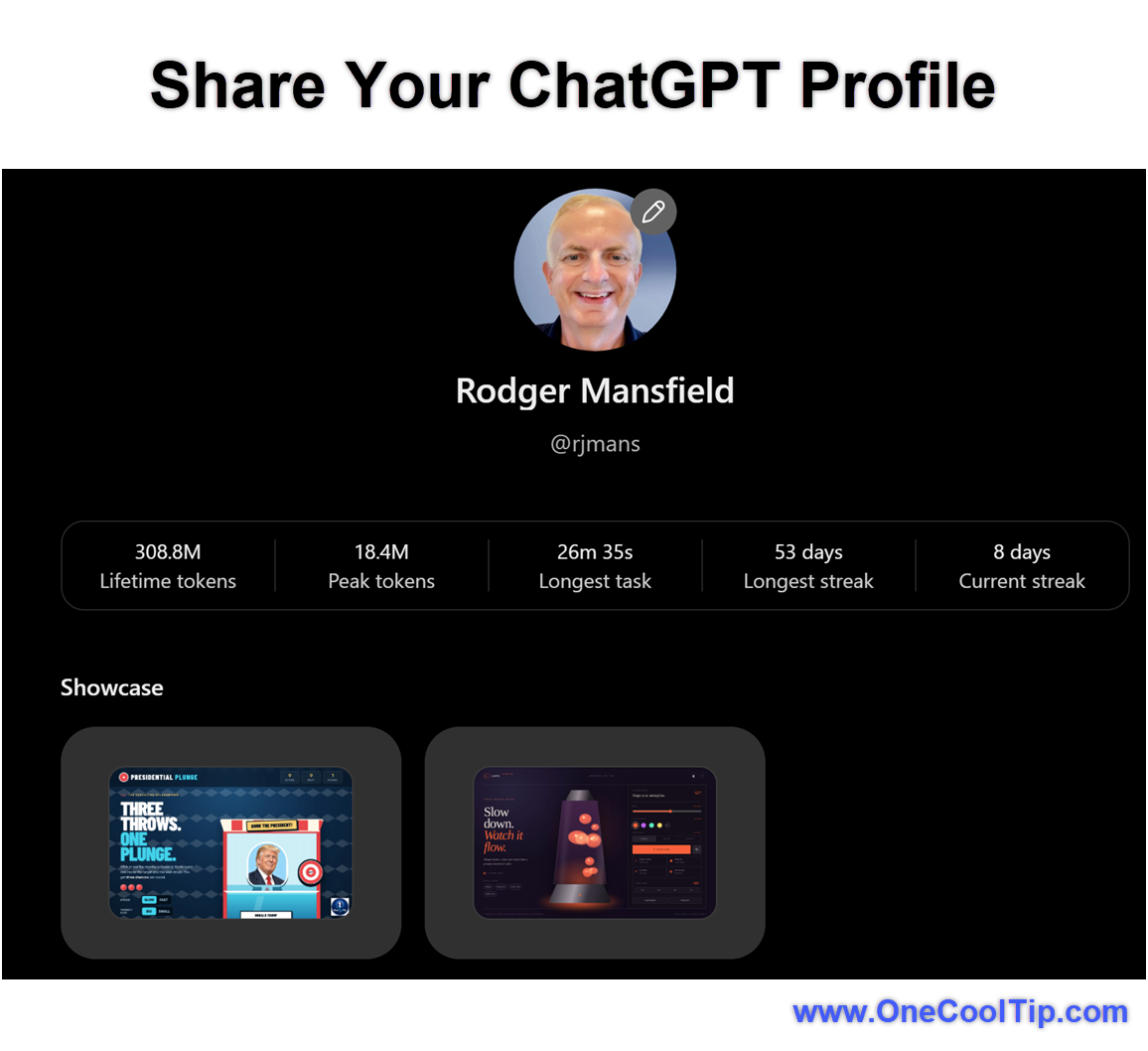
fig. 1 - Share Your ChatGPT Profile

Pros and Cons


Pros:


  • A curated collection gives your projects context.
  • A short bio helps visitors identify your specialty.
  • A useful demo can make a professional introduction more concrete.


Cons:


  • Readers face a sign-in requirement. 
  • Another public page creates another place to maintain.
  • Usage activity can distract from your actual work.


Who Should Skip This


Skip public sharing if you mainly use ChatGPT for private assistance or have no projects to show. 


A profile is also less compelling when your existing website already gives readers an organized collection. 


Consider whether another destination serves your audience.


Real-World Examples


  • Small business: A consultant could feature a public calculator to demonstrate a planning method. Use sample information rather than a client’s working figures.
  • Educator: A teacher could showcase a practice game and explain which learning objective it supports. The introduction should help another teacher judge its usefulness quickly.
  • Creator: A technology publisher could group a puzzle, a productivity tool, and an interactive demo.


Troubleshooting and Limitations


Problem: A Site is missing.

Why it happens: Its ownership, workspace, or permissions may make it ineligible.

Fix or workaround: Check those settings. Adding a Site to your showcase does not change its access permissions.


Problem: The link stopped working.

Why it happens: Changing your username invalidates the previous profile URL, which uses the format https://chatgpt.com/u/your-username.

Fix or workaround: Replace the link wherever you published it. 


Problem: Visitors do not know which project to try.

Why it happens: Titles describe the technology rather than the benefit.

Fix or workaround: Rename projects around a task, such as “Plan Your Weekend Packing,” and put the most useful example first.


Privacy and Data Notes


  • Anyone signed in to ChatGPT can view a public personal profile; specific viewers cannot be blocked. 
  • Personal profiles cannot share ChatGPT Skills.
  • Review each featured project as carefully as the profile. 
  • The protection for chat titles and content does not cover information you deliberately publish inside a Site. 
  • Use sample data. 
  • Personal and Business profile sharing settings are separate.


Feature Access


Profiles are available for Free, Go, Plus, Pro, and Business plans. 


Profile sharing and the showcase are supported on web and desktop. 


Profiles are available in all countries, with Enterprise coming soon. 


Score

Criterion | Score (0–10) |  Justification
Value |  7
Useful for people with projects to share. Less valuable for readers who mainly chat.
Usability |  8
A direct profile page makes setup approachable. Audience sign-in adds friction.
Wow Factor |  6
A convenient portfolio feature with a familiar idea behind it.
Total: 21/30 | 👍 Good
A worthwhile addition for creators who need a convenient home for their ChatGPT work.
Compared with a personal website, the appeal is keeping the introduction close to the creations you already make in ChatGPT.


Key Takeaways


A good profile earns attention through useful examples and a clear introduction. 


Start with a focused collection, test what visitors can access, and keep the page current.


Cool Tip Snapshot


  • Feature Name: ChatGPT Shareable Profiles
  • Platform(s): Web/Desktop
  • Quick Benefit: Introduce yourself and organize a project showcase.
  • Best For: Creators, educators, and small businesses.
  • Access Type: Free and paid plans.
  • Difficulty: Easy


Learn More


OpenAI’s guide explains customization, visibility, and showcase eligibility. 


Read it before deciding what to publish.


Try It Yourself


Create your introduction and select a project worth exploring. 


Tell us what you would showcase, subscribe to the One Cool Tip Newsletter for FREE, and share this Cool Tip with family, friends, and coworkers.


READ MORE


Read the Full Cool Tip!

Check Out These Cool Tips & Tricks


  • Clear Purpose: A focused introduction helps visitors understand your work. Draft a sentence naming who your projects help and what they do.


  • Useful Titles: A benefit-focused title makes a project easier to evaluate. Describe the task your Site helps someone complete.


  • Best First: Lead with the project you would recommend to a new visitor. Review your collection and move that project to the front.


  • Fresh Bio: Your introduction should reflect your current interests. Revisit its wording whenever your work changes.


  • Visual Consistency: A consistent portrait and name make your profile recognizable. Use the same approved branding you use in other professional channels.


  • Sample Data: Demonstration content helps explain a tool without exposing client material. Replace working figures and names before publishing a project.


  • Visitor Test: Testing catches confusing instructions and access problems. Ask a trusted signed-in reader to open your link and try a featured project.


  • Short Introduction: A concise bio gives projects more room to speak. Delete generic claims and keep the detail that distinguishes your work.


  • Link Audit: Outdated links frustrate visitors. Review the profile links in your newsletter and social bios whenever you change your username.


  • Routine Review: A small maintenance habit keeps your collection useful. Schedule a periodic check of each project’s title, content, and access.

ICYMI - In Case You Missed It ...

Put Google Gemini on Your Windows Desktop in Seconds


Google released a native desktop application for Windows, bringing AI assistance straight to your PC through a quick keyboard shortcut. Here is how to install the app, summon it over your open windows, and pull data from your Google Workspace files without switching browser tabs.


Read the Full Version.


Read the Newsletter Version.

Looking for your next adventure?


Call Denise at Travel For You.

314.660.3039


Sign Up for the Monthly Newsletter


http://www.travelforyouvacations.com/


https://www.facebook.com/TRAVEL.FOR.U/


See You Tomorrow

Tomorrow's Cool Tip is waiting to amaze you.


Until then, go forth and conquer the tech world with your newfound knowledge!


Be sure to visit www.OneCoolTip.com for Cool Tech Tips for a Cooler Life!


And if you Like One Cool Tip, please support with TipJar!


Enjoy!


Rodger

Chief Cool Tipper

onecooltip.com@gmail.com


What Do You Think?

What do you think of today's One Cool Tip Newsletter?
Positive        Neutral        Negative
X Share This Email
LinkedIn Share This Email

Connect with One Cool Tip!

Facebook  X  Instagram  Web  Pinterest  YouTube  LinkedIn
 

As an Amazon Associate, One Cool Tip may earn a small commission from qualifying purchases.


Our media content is intended solely for informational purposes. Please do not construe anything here as legal, tax, investment, financial, marital or other advice.


Copyright © 2026 | www.OneCoolTip.com | All Rights Reserved