One Cool Tip Newsletter

May 14, 2026

Your daily dose of tech-savvy brilliance!

😀Greetings! Happy Thursday, Cool Tipper!


Get ready to streamline your digital life with simple, actionable tips delivered straight to your inbox.


Cool Tip Theme: iOS 26.5


New here? Subscribe to the One Cool Tip Newsletter for daily updates. It's FREE!

3️⃣

If you enjoy the One Cool Tip newsletter, please forward this newsletter to THREE friends or colleagues or share it on social media using the links below.


Leave a $$$ Tip!


Share this One Cool Tip Newsletter!

X Share This Email
LinkedIn Share This Email
Pinterest Share This Email

🚨Fake Invoices Target Small Businesses🚨


If you run a small business, scammers may try to slip fake invoices into your mail or inbox, hoping you’ll pay for products or services you never ordered.


The Federal Trade Commission warns that these bogus bills often look official, sometimes even marked “past due,” and may impersonate well-known companies like tech support or domain registrars.


How to stay safe:


  • Verify every invoice. Make sure your team knows which vendors are approved and double-check unfamiliar charges.
  • Search before you pay. Look up the company name with words like “review” or “scam” to see what others report.
  • Report fraud fast. File complaints at ReportFraud.ftc.gov.


And in Other News...


  • New iCloud Storage Scam Targeting iPhone Users


A new phishing scam is hitting iPhone users with fake iCloud storage warnings that look like real Apple alerts.


Scammers send texts or emails claiming your iCloud storage is full and urging you to click a link to “upgrade” or “manage” your account.


These links lead to convincing fake Apple sites designed to steal your Apple ID, credit card details, or even install malware.


What to watch for:


  • Messages saying your iCloud storage is full, your payment failed, or your account is blocked.
  • Buttons that say “Update Storage,” “Manage Account,” or “Renew Now.”
  • Emails or texts that push urgency, threaten data loss, or mimic Apple branding.


How to stay safe:


  • Do not click links in unsolicited messages.
  • Check your storage directly: Settings > Your Name > iCloud.
  • Remember: Apple will never ask for passwords or payment info through text or email.
  • Report phishing: forward suspicious emails to reportphishing@apple.com.


Stay alert.


These scams are designed to look real and trigger panic, especially when they mention losing photos or videos.


A quick pause before tapping can protect your entire digital life.

Cool Deals of the Day

Help support One Cool Tip. Use this Amazon link when you shop online.


Check out these Cool Deals:


  • 📱 Anker Portable Charger. Compact fast-charging battery ideal for travelers and heavy iPhone users. Save 30% $29.99 Check it out on Amazon!


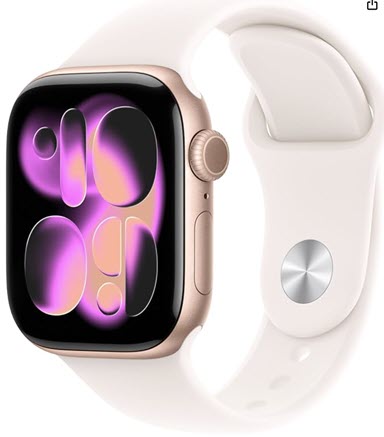
  • ⌚ Apple Watch Series 11. Pairs tightly with iOS 26.5 features and ecosystem updates. Save 25% $299. Check it out on Amazon!


  • 📷 ESR iPhone 15 Stand Case. Durable case for iPhone 15 with kickstand convenience. Check for Latest Low Price! Check it out on Amazon!


*Prices accurate when originally published.

One Cool Tip may earn a commission from qualifying purchases.

Fuel Your Adventure

Try Big Mike's Jerky!


bigmikesjerky.com


Now on TikTok!


Today's Cool Tip

iOS 26.5 Finally Fixes One of the Biggest iPhone Messaging Problems


Secure texting between iPhone and Android users is finally arriving. iOS 26.5 also adds smarter Maps suggestions, new customization options, and several under-the-radar improvements that make everyday iPhone use better.


Apple’s iOS 26.5 update may not be the flashiest iPhone release of the year, but it quietly solves a long-standing frustration for millions of users. 


If you regularly text Android users, this update brings a major privacy and messaging upgrade that makes cross-platform conversations significantly more secure.


Have you ever noticed how conversations between iPhones and Android phones still felt stuck in the past?


For years, iPhone users enjoyed encrypted iMessage chats with other Apple users, while messages sent to Android devices lost some of those protections. 


Group chats broke, reactions looked strange, videos compressed badly, and security varied depending on carrier support.


Here's a Cool Tip:  Upgrade to iOS 26.5.


The headline feature is end-to-end encrypted RCS messaging between supported iPhone and Android devices. 


That means your conversations can now receive the same kind of privacy protection that iPhone users already expect from iMessage. 


Apple also added improvements to Maps, new wallpaper customization options, and several quality-of-life enhancements throughout the operating system.


This is one of those updates that improves daily life without requiring users to learn an entirely new app or workflow.


Feature Explanation


The biggest addition in iOS 26.5 is encrypted RCS messaging.


RCS, short for Rich Communication Services, is the modern replacement for traditional SMS text messaging. 


It supports higher-quality photos and videos, typing indicators, message reactions, read receipts, and better group chats.


Apple added basic RCS support previously, but one important feature was missing: end-to-end encryption between iPhones and Android devices.


With iOS 26.5, Apple and Google are now rolling out encrypted RCS conversations on supported carriers and devices. 


When encryption is active, your messages are protected while traveling between devices, preventing carriers or third parties from reading message contents. 


Apple indicates encrypted chats with a lock icon and “Encrypted” label.


The update also introduces:


  • Suggested Places in Apple Maps.
  • New Pride Luminance wallpapers.
  • Additional Maps personalization features.
  • Improvements for App Store subscription billing.
  • More than 50 bug fixes and security updates according to multiple reports.


What You’ll Gain


  • More secure conversations with Android users.
  • Better group messaging reliability.
  • Smarter recommendations in Apple Maps.
  • Improved customization and privacy controls.


Step-by-Step Instructions


Here's how to do it.


iPhone / iOS


How to Install iOS 26.5


  1. Open Settings.
  2. Tap General.
  3. Select Software Update.
  4. Tap Update Now.
  5. Allow the iPhone to restart and complete installation.


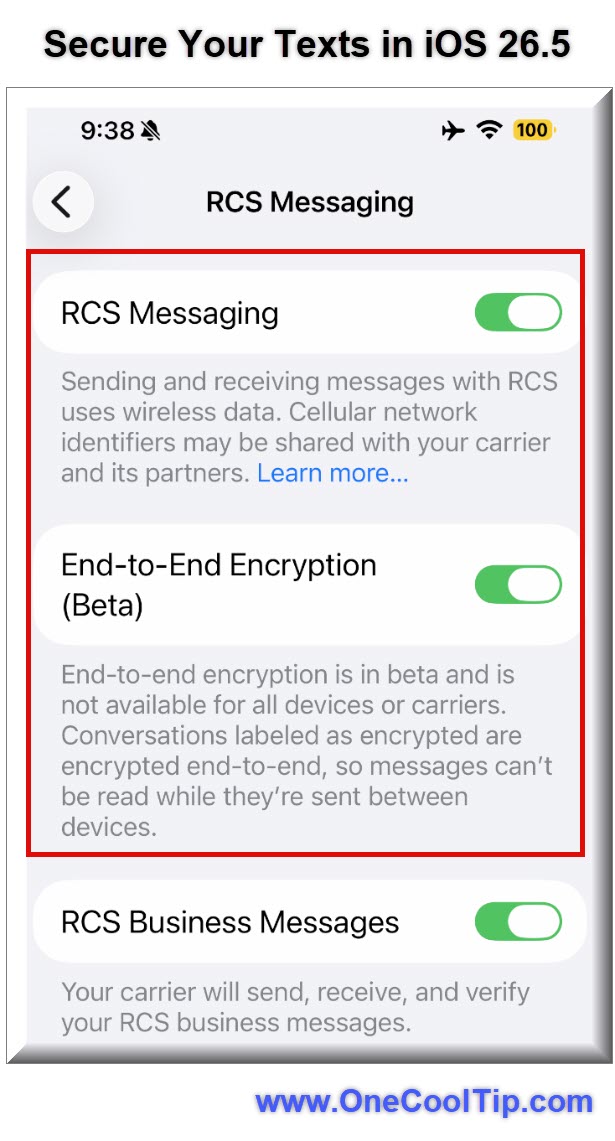
How to Enable Encrypted RCS Messaging


  1. Open Settings.
  2. Tap Apps.
  3. Select Messages.
  4. Tap RCS Messaging.
  5. Turn on End-to-End Encryption (Beta) if available.


fig. 1 - Secure Your Texts in iOS 26.5

Pros and Cons


Pros:


  • Stronger privacy for iPhone-to-Android messaging.
  • Better media quality in conversations.
  • Improved group chat functionality.
  • Automatic encryption when supported.
  • Maps becomes more context-aware.


Cons:


  • Encryption support depends on carriers.
  • Some users may not immediately see the feature.
  • Group chats lose encryption if one participant lacks compatibility.
  • Suggested Places and local ads in Maps may concern privacy-focused users.


Feature Access


iOS 26.5 is currently available for supported iPhones.


Encrypted RCS messaging currently requires:


  • iOS 26.5
  • Supported carriers
  • Latest Google Messages app on Android
  • Gradual rollout participation


Score

Criterion | Score (0–10) | Justification 
Value | 9
Secure cross-platform messaging solves a major frustration for millions of users.
Usability | 8
Most features work automatically once updated, though carrier support can complicate availability.
Wow Factor | 7
The improvements are meaningful but subtle rather than visually dramatic.
Total: 24/30 👍 Good
iOS 26.5 delivers one of the most practical iPhone messaging improvements in years and finally narrows the gap between iPhone and Android conversations.


Key Takeaways


iOS 26.5 focuses on practical improvements that users will notice every day. 


The addition of encrypted RCS messaging is the standout feature and significantly improves security for conversations between iPhone and Android users.


The update also modernizes Maps and adds useful customization improvements without overwhelming users with unnecessary complexity.


Cool Tip Snapshot


  • Feature Name: iOS 26.5
  • Platform(s): iPhone
  • Quick Benefit: Secure encrypted texting between iPhone and Android users
  • Access Type: Free software update


Try It Yourself


Update your iPhone to iOS 26.5 and test encrypted RCS messaging with an Android user. 


Send this article to friends, family, and coworkers who still complain about “green bubble” texting.


READ MORE


Read the Cool Tip on OneCoolTip.com.

Check out these Cool Tips & Tricks.


  • Lock Check: Look for the lock icon before discussing sensitive information. To do this, open an RCS conversation and check the top banner.


  • Better Photos: Send vacation photos through RCS instead of SMS for improved quality. Update both devices to the latest software first.


  • Typing Alerts: See when Android users are replying in real time. Enable RCS Messaging in Messages settings.


  • Quick Update: Keep automatic updates enabled for faster security fixes. Go to Settings → General → Software Update.


  • Battery Prep: Charge your iPhone before large iOS updates. Plug into power before installing updates.


  • Maps Explore: Use Suggested Places while traveling. Open Apple Maps and tap the Search bar.


  • Privacy Boost: Enable encryption whenever your carrier supports it. Check the Messages settings menu.


  • Cleaner Chats: Use message reactions instead of extra replies. Press and hold a message bubble.


  • Wallpaper Fun: Try the new Pride Luminance wallpaper customization. Go to Settings → Wallpaper.


  • App Refresh: Update Google Messages on Android devices for compatibility. Visit the Google Play Store and install updates.

ICYMI - In Case You Missed It ...

Organize Your Research with Notebooks in Google Gemini


Turn scattered notes and documents into a structured knowledge base using the new integrated Notebooks feature in Gemini.


Read the Full Cool Tip.


Read the Newsletter Version.

Looking for your next adventure?


Call Denise at Travel For You.

314.660.3039


Sign Up for the Monthly Newsletter


http://www.travelforyouvacations.com/


https://www.facebook.com/TRAVEL.FOR.U/


See You Tomorrow

Tomorrow's Cool Tip is waiting to amaze you.


Until then, go forth and conquer the tech world with your newfound knowledge!


Be sure to visit www.OneCoolTip.com for Cool Tech Tips for a Cooler Life!


And if you Like One Cool Tip, please support with TipJar!


Enjoy!


Rodger

Chief Cool Tipper

onecooltip.com@gmail.com


What Do You Think?

What do you think of today's OneCoolTip newsletter?
Positive        Neutral        Negative
X Share This Email
LinkedIn Share This Email

Connect with One Cool Tip!!

Facebook  X  Instagram  Web  Pinterest  YouTube  LinkedIn
 

As an Amazon Associate, One Cool Tip may earn a small commission from qualifying purchases.


Our media content is intended solely for informational purposes only. Please do not construe anything here as legal, tax, investment, financial, marital or other advice.


Copyright © 2026 | www.OneCoolTip.com | All Rights Reserved