Tech Talk News
From Your IT Professionals

July 8, 2021 - Volume 9
Special Issue
Windows Print Spooler Exploit Fix

In our last blast we spoke about an exploit with the print server that allowed bad actors to potentially have a way onto your devices.
 
There is good news on this matter now as Microsoft has released an update that patches this on your computers - just make sure your computers downloads and installs the update to be sure your computer is no longer at risk from this exploit.

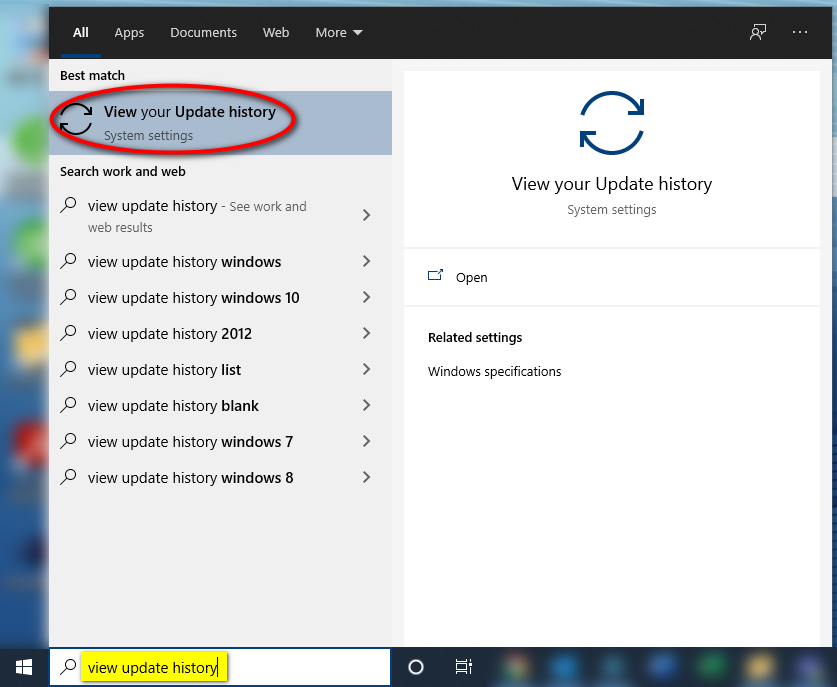
To check if your computer has the update, type "view update history" into the search bar in the bottom left-hand corner of your screen and select the option to "View your Update history" that comes up. This process can be seen in the below image.

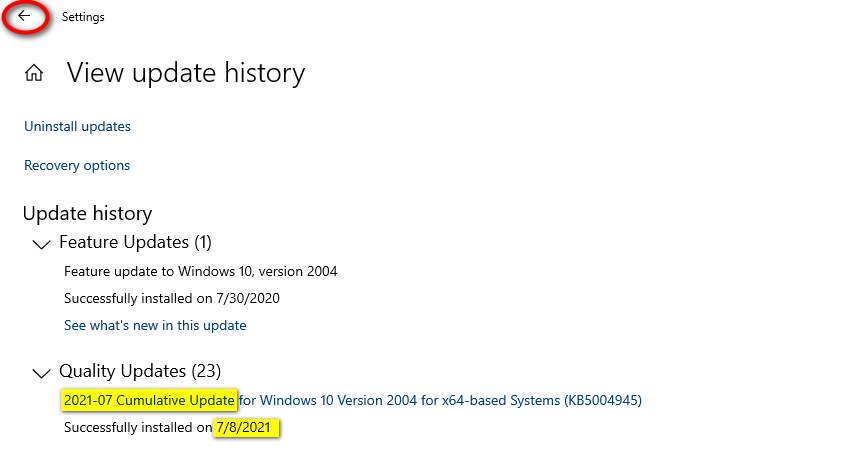
The update with the fix is the "2021-07 Cumulative Update", which can be found under the "Quality Updates" section. Since this was released on 7/7/2021, so the date of install would have to be that day or later.

If the update does not appear in your list, you will want to hit the back arrow in the upper left-hand corner of the tab as seen in the below image.

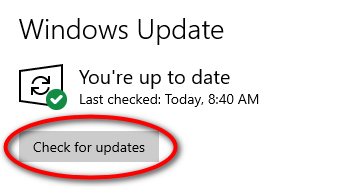
Clicking that arrow should take you to the Windows update screen, where you should see a button to "Check for updates" as seen in the picture to the left. If the update was not present when you checked, click this button and it will download updates for you.
This particular update should be expected to take about 15 minutes and will prompt for a restart when it is ready to be implemented. A restart button should replace the "Check for updates" button above when the computer is ready.

It should be noted that it may take more time to download the update if there are older updates that will also need to be downloaded alongside it. The computer can be used while update download, but the restart process will take longer than usual and the computer will not be usable during this time.

As always, please feel free to share this email with others if they need it so that they can patch their computers as well.
Don't Forget
_
___If you are engaging service or support with a software or third party vendor in which our services may be required, always make sure to give Ridge Support as much advanced notice as possible. These situations include but are not limited to:
  • Changing of an internet service provider
  • Changing phone service providers
  • Updating of websites
  • Software and hardware migrations, upgrades, and installations
  • Addition or deletion of user accounts
We ask this in an effort to be able to provide you with the steadfast and professional service that you have come to expect of us.
Ridge Support Technologies
610-323-3351 | service@ridgesupport.com | http://www.ridgesupport.com