|
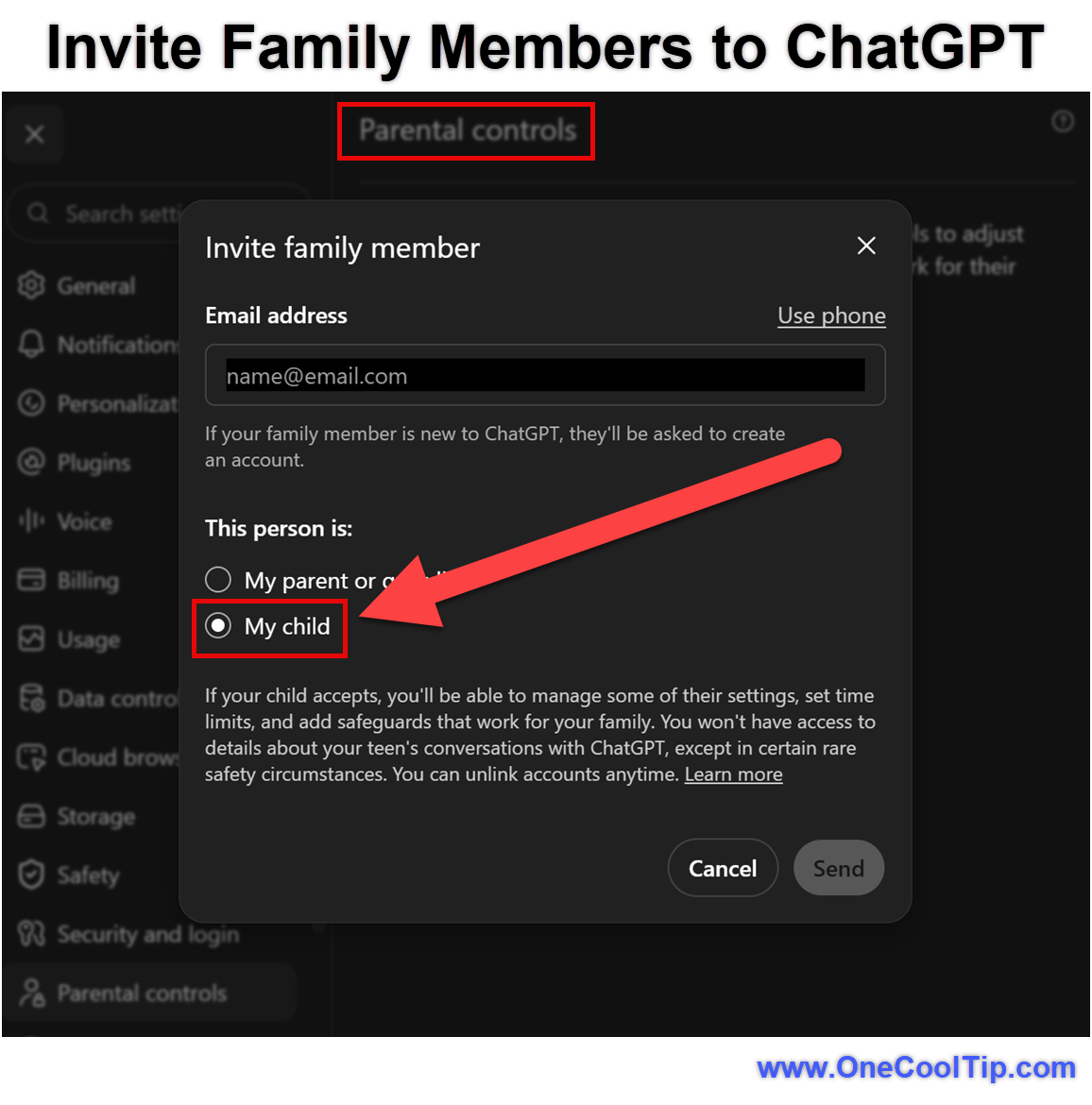
A teen can start the process by opening Settings > Parental controls > Invite a parent.
Each teen can connect with one parent or guardian at a time.
One adult account can be linked with multiple teen accounts.
How to Configure Study Hours
- Open Settings > Parental controls.
- Select the teen’s name under Family members.
- Turn on Study hours.
- Select the days and times when Study Mode should start automatically.
- Start a new regular conversation during the scheduled period to confirm that Study Mode activates.
Study Hours do not block access to ChatGPT.
They cause eligible new conversations to begin in Study Mode during the selected schedule.
The schedule does not apply to existing conversations, Temporary Chats, GPTs or Projects.
How to Configure Quiet Hours
- Open Settings > Parental controls.
- Select the teen’s name.
- Turn on Quiet hours.
- Select a start and end time.
- Add additional time blocks if the family needs different weekday and weekend schedules.
Unlike Study Hours, Quiet Hours prevent the teen from using ChatGPT during the scheduled period.
How Teens Can Start Study Mode
Study Mode is available across ChatGPT plans on the web, iPhone, iPad and Android.
Web
- Start a new regular conversation.
- Type @study in the message box, or select + and search for Study.
- Select Study from the suggestions.
- Describe the subject, grade level and specific problem.
Students can also open Study Mode directly at ChatGPT.com/studymode.
iPhone and iPad
- Start a regular ChatGPT conversation.
- Tap + beside the message box.
- Select Study.
- If it does not appear, search for it in the tools menu.
- Android
- Start a regular ChatGPT conversation.
- Tap + beside the message box.
- Search for and select Study.
The tools and menu layout may vary by app version.
Study Mode is not available in Temporary Chats, GPTs or Projects.
Pros and Cons
Pros:
-
Learning comes first: Study Mode favors explanations, questions and practice over simply delivering an answer.
-
Flexible family controls: Parents can manage Quiet Hours, Study Hours, Voice Mode, memory, image generation and model-training preferences.
-
Privacy-conscious linking: Linking accounts does not let a parent read the teen’s chats or monitor activity in real time.
-
Cross-platform access: Study Mode works on the web, iPhone, iPad and Android.
-
Automatic protections: Age-appropriate safeguards apply when an account is identified as belonging to a teen.
Cons:
-
ChatGPT can still be wrong: Students must verify important facts, calculations and citations.
-
Controls are not monitoring tools: Parents cannot see what a teen asks ChatGPT.
-
Study Hours have exceptions: The schedule does not apply to existing conversations, GPTs, Projects or Temporary Chats.
-
Age prediction can make mistakes: An adult account could be placed into the teen experience and require age verification.
-
School rules still apply: A teacher or school may prohibit or limit generative AI use.
Privacy and Data Notes
Linking accounts does not give parents access to a teen’s conversations, chat history or real-time activity.
Either person can end the connection, although the parent is notified if the teen disconnects the accounts.
In certain limited, high-risk situations, OpenAI may send the linked parent a safety notification.
A notification may identify the type of concern, but it does not include conversation transcripts.
These notifications are not real-time monitoring and may not detect every serious situation.
Parents can turn off Improve the model for everyone if they do not want the teen’s conversations used to improve ChatGPT’s models.
They can also disable memory and limit image or voice features.
Students should avoid uploading private photographs, passwords, school login details, home addresses, medical information or documents containing another person’s personal information.
Feature Access
- ChatGPT for Teens applies to consumer accounts identified as belonging to users ages 13 through 17. OpenAI requires parental consent for people in that age range.
- Study Mode is available across ChatGPT plans globally on the web, iOS and Android. Available models, uploads, message limits and other tools still depend on the account’s plan.
- The age-prediction system considers account-level and behavioral signals, including a user’s stated age, the age of the account, activity times and usage patterns. Availability and individual controls may vary by account, region and app version.
Score
Criterion | Score (0–10) | Justification
Value | 9
The experience helps teens learn with AI while giving families practical controls.
Usability | 8
Account linking is straightforward, but the difference between Study Mode, Study Hours and Quiet Hours requires explanation.
Wow Factor | 8
Scheduled learning behavior and automatic age-adjusted protections represent a thoughtful adaptation of the standard ChatGPT experience.
Total: 25/30 | 🌟 Excellent
ChatGPT for Teens is a valuable upgrade for families that want AI to behave more like a patient tutor and less like an answer generator.
Unlike conventional parental-control software, it focuses less on surveillance and more on shaping how the AI responds and when it can be used.
Key Takeaways
ChatGPT for Teens adds learning-focused behavior and stronger default safeguards without giving parents access to private conversations.
Linking accounts provides the most useful controls, particularly Study Hours, Quiet Hours and feature restrictions.
Cool Tip Snapshot
-
Feature Name: ChatGPT for Teens.
-
Platforms: Web, iOS and Android.
-
Quick Benefit: Guided AI learning with age-appropriate protections.
-
Best For: Students ages 13 through 17 and their families.
-
Access Type: Included with eligible ChatGPT consumer accounts.
-
Difficulty: Easy.
Try It Yourself
Link a teen account, schedule a regular homework period and try Study Mode with an upcoming assignment.
Share your experience in the comments, subscribe to the One Cool Tip newsletter, and send this Cool Tip to family, friends and coworkers who help students use AI responsibly.
READ MORE
Read the Full Cool Tip.
|