Computer/ Internet Tips & News
December 2021

  • 2 new iPhone features you should turn on now
  • Microsoft pushing new Windows 11, Edge browser updates
  • Protect your mobile number from hackers
  • The latest scams to avoid
  • We can help with more than just computers...
  • ICYMI: Previous articles you may have missed or want to read again are available on our website and newsletter archives
Reno's PC & Technology Help Experts since 2003 

Affordable PC Repair - Experienced IT Consultants 
In-Home Service & Remote Support

No Geek Speak: Local techs that speak 
a language you can understand
Support for Windows - macOS - iOS - Android
2 new iPhone features you should turn on now
Apple recently added two new features to their latest iOS 15 operating system that will help you and someone you trust access your Apple account and mobile device should you forget your password or when you die.

Setting up a Recovery Contact now will allow someone you know and trust help you regain access to your Apple/iCloud account or device should you forget your account password or device passcode.

Adding a Legacy Contact now will allow someone you know and trust access data such as your photos, messages and notes after your death.

For more details and instructions, read more...
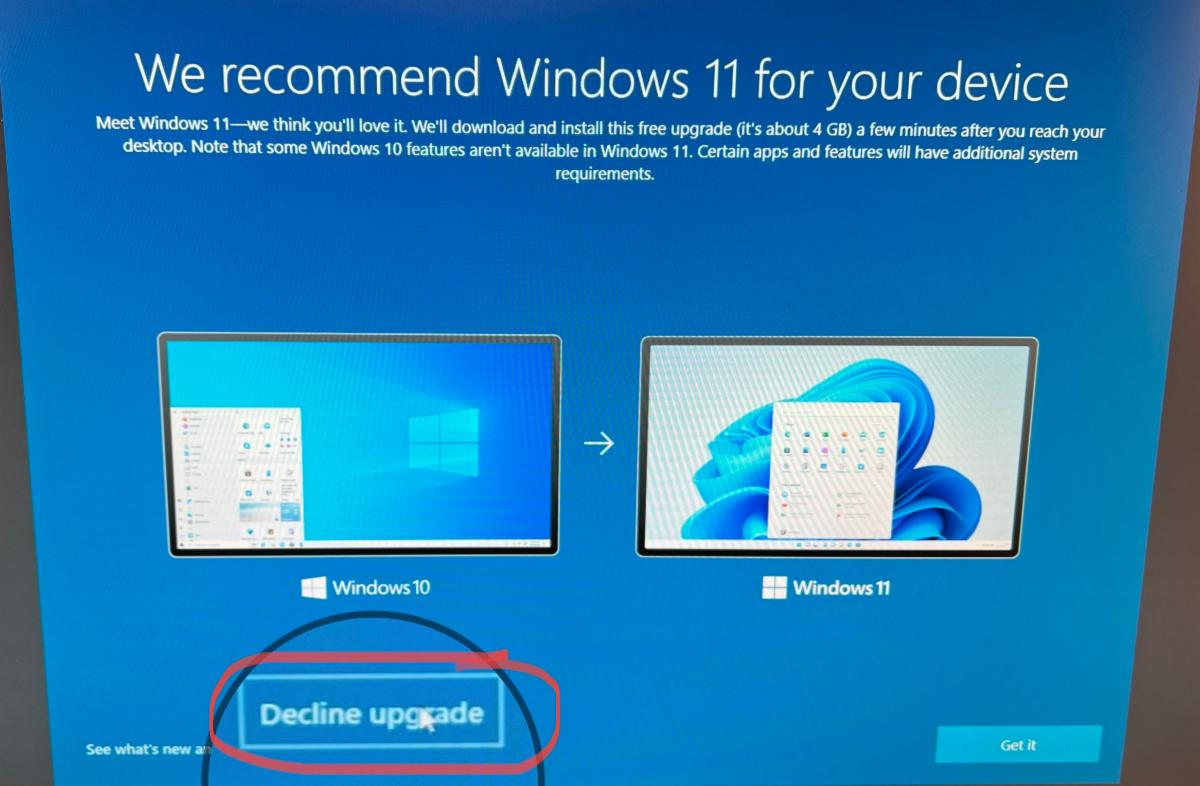
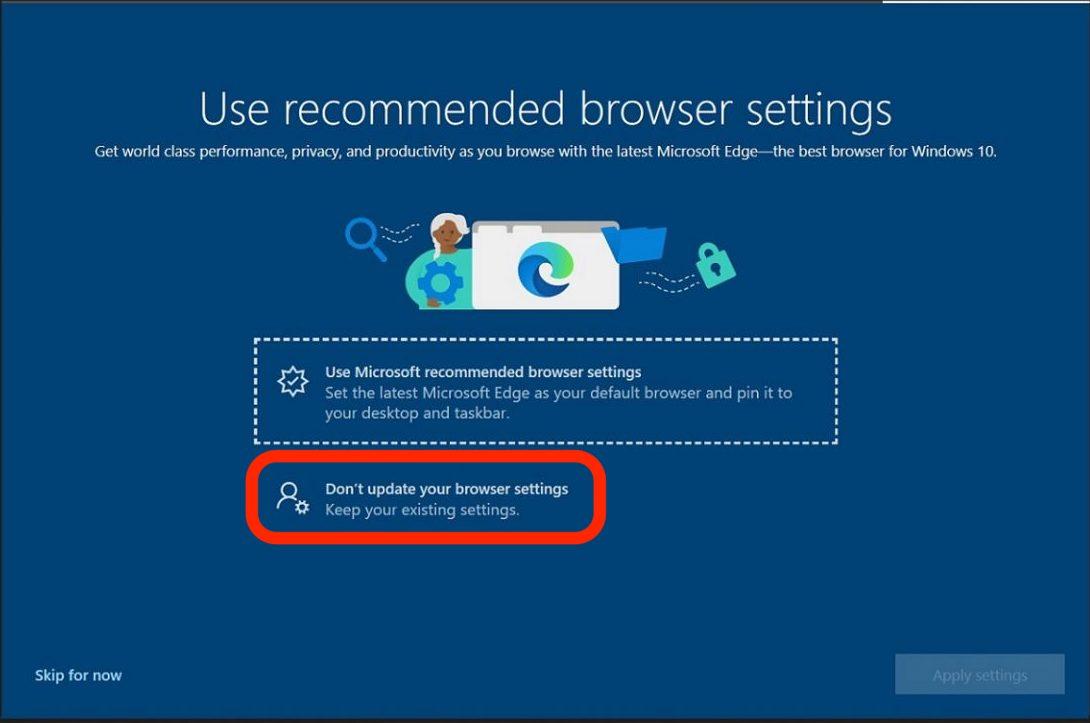
Microsoft pushing new Windows 11, Edge browser updates
In the past few months Microsoft has been pushing suggested updates to Windows 11, and setting Microsoft Edge as your default web browser. But it's you computer - and you can just say NO to their recommendations.

Our advice is not to update to Windows 11 on your existing computer at this time. Also, when Microsoft wants to change your default browser to Microsoft Edge, you can decline their recommendation as well.

If you get prompted by Microsoft, the screenshots below show where to click to decline the Windows 11 upgrade and Microsoft Edge browser settings update.
If you've already upgraded to Windows 11 and change your mind, you have 10 days to downgrade back to Windows 10. See Microsoft's instructions here, or contact Computer Techs for help.
Protect your mobile number from hackers
Your mobile phone number has become increasingly valuable because it’s the way that hackers can gain access to your online financial, email and social media accounts. We now are encouraged to use our smartphone and attached phone number to prove who we are – often via Multi-Factor Authentication (MFA), a method that requires not only entering your username/email address and password into a website, but also entering a code or responding to a prompt sent to your cell phone.

But what if someone gained access to your mobile phone – or increasingly more common – your mobile phone number? Hackers that successfully SIM swap or port-out your phone number would have access to reset/change “forgotten” passwords and gain access to online financial, email and social media accounts.

Fortunately the major wireless carriers have taken steps to let you thwart hackers and prevent your phone number from being taken from you without your prior knowledge.

The latest scams to avoid
If you've read our information about scams before, it's worth taking a few minutes to review this important money-saving information and catch up on how to avoid falling victim to the latest scams.
Every month we help people who have been scammed. But had they read our newsletters and printed our website articles, they wouldn't have been scammed out of hundreds or thousands of dollars. Scammers are becoming increasingly clever. By using technology - automated email and phone dialing - hackers and scammers take advantage of the anonymity of the internet to reach millions of potential victims in attempt to trick them into giving up their money. With a little bit of knowledge of scams and how they work, you won't become a victim yourself.

In the past few months common types of scams that we've been hearing about include:

  • An email or phone call notice of a charge for a product or service - such as computer security protection - that you don't recall ordering
  • A scary computer pop-up window telling you to call to fix a problem with your computer
  • Email scams appearing to come from someone that you know asking for a favor in the form of purchasing a gift card

In the first example, you may get an email stating that your account will be charged unless you call the number provided. They use common company names so that the "charge" may seem legitimate - Microsoft, Apple, Amazon, Norton, McAfee, Best Buy, etc. Some are intentionally vague - such as a charge for "Technical Support" or "Antivirus Protection" - to pique your interest to get you to call the number. Don't do it!

Secondly, while browsing the internet you may get a scary pop-up window alerting you that there's a problem with your computer or device. The alert will present a number for you to call and tell you not to turn off your computer. Scammers have crafted the message in this fashion because they know most people will be scared into calling the number - where a scammer is waiting on the other end - to coerce you into paying for non-existent problems. The reason you're told not to turn off your computer is because that's how to fix the problem and make the scary message go away.

In the last example, a hacker has gained access to one of your friends email account and sends an email to all of their contacts asking for a favor. That favor is usually purchasing a gift card for them, which they will pay you back later. Don't fall for it - it's a scam. If you get an email like this from someone you know, do not reply to the email - the reply is sent to the scammer. Instead call or text your friend to let them know about the email that you received.

Always assume an unsolicited email/call/text message is fake until proven otherwise. A careful inspection will reveal clues about its authenticity. Look at ALL of the following in a message you may receive - parts of it can easily be forged:

  • Is the email address or phone number shown from a reputable company - or a personal email address/phone number?
  • Is the message personalized with your name - or simply "Dear customer"
  • Are there misspellings, grammatical errors, capitalization errors?
  • Is there a sense of urgency to get you to act quickly without thinking things through or talking to a trusted relative, friend or computer tech?

Most scams typically start with an email, website pop-up, phone call or text message from a well-known company or your operating system. You are notified about a large purchase that has been (or will be) charged to your account - or there's a problem with your account or device/computer. You're told to call, click a link or talk to a fraud/account representative to confirm the purchase or account information. No matter how legitimate it sounds - it's a scam! Never conduct business or financial transactions initiated from an unsolicited email. The most common method of payment to a scammer is via a gift card, because once purchased you can't get your money back in most circumstances.

We can help with more than just computers...
Did you know that Computer Techs can help with more than just computers? Check out some of our services that you may have not known about:

  • New computer or mobile device (smartphone/tablet) buying advice
  • New computer or mobile device set-up & transfer settings and apps from an old device
  • Help with recovery of forgotten passwords or hacked accounts
  • Printer troubleshooting or setup
  • TV streaming media device setup
  • Smart speaker / voice assistant device setup
  • Wireless camera and security device setup
  • Software installation
  • Microsoft Office help
  • Email setup/customization
  • Wireless router & Internet set-up
  • Wi-Fi optimization and troubleshooting
  • Computer data back-up solutions
  • Diagnose misc. software or hardware problems
  • Telecom bill audit/review to help you save money on your phone/internet/TV services
  • & much more

ICYMI: In Case You Missed It
You can also view the Computer Techs YouTube playlist at youtube.CTreno.com
You can easily access tips and news from previous newsletters on our newsletter archives webpage. Articles you may have missed or wish to read again include:

  • Check out our video playlist on YouTube
  • Google requiring 2-Step Verification to sign-in
  • Windows 11 released in October - what you need to know
  • Chip shortage likely to cause lower supply, higher prices
  • Top 5 password tips that you need to know
  • Reveal the passwords stored in your browser - and check for the logins exposed in a data breach
  • Verizon sells off Yahoo and AOL
  • Emergency Broadband Benefit will provide a discount of up to $50/month towards broadband internet service for eligible households
  • How to make it easier to read articles in your web browser - use Reader Mode
  • FTC Identity Theft website guides victims through the recovery process
  • How to spot scams that pop-up on your screen - and how to get rid of them
  • How to spot emails, texts and pop-ups that "phish" for your private information
  • Your old cellphone may stop working soon
  • We can help with more than just computers and smartphones
  • How to fix most printer problems
  • Watch the world from home
  • How to send a message or email from your phone correctly
  • Ad blockers becoming less effective
  • Why you don't need to buy AntiVirus for your device
  • Is it time to replace or optimize your Wi-Fi?
  • Be proactive about computer maintenance
  • Why you should keep your computer ON when you're not using it
  • Canceling your TV service
  • Why you should never unsubscribe from certain emails
  • How ads follow you around the internet
  • Are you prepared if you lost your data?
  • Check to see if your email address was exposed in a data breach
  • Are you fed up with your internet provider's email "service"?
  • The one spec your next computer must have

Please consider recommending us on Nextdoor
If you use the neighborhood social network Nextdoor, please consider recommending Mark Cobb @ Computer Techs Reno to your neighbors. We get lots of referrals from neighbors looking for a good "computer tech".


For more information about benefiting from our referral program click more...
Get regular computing device maintenance and priority support
It's time to be proactive about maintaining your computing devices - rather than calling after problems get out-of-control. With reports of websites and databases getting hacked occurring on a daily basis, and the increasing chance of your personal information being compromised, it’s more important than ever to keep your computing devices secure, up-to-date and maintained.

Thanks to the peace-of-mind that our Computer Maintenance Plan provides, clients that sign-up for the plan don't have to worry about the seemingly constant barrage of updates, security patches and computer hackers. They also get priority callbacks and messaging replies.

With our Computer Maintenance Plan we will maintain, update and check the security on your computer - and other devices (when performed on-site) - on a convenient regularly scheduled basis.

For more information read more...


Thank you!

Mark Cobb
Owner/Technician/IT Consultant