Microsoft New Promotions
For the 1st time in a decade, Microsoft has added a new Suite known as E7, which is a Step up from E5.
This is Microsoft's big bet on winning over corporate wallets to invest in CoPilot and Azure.
Part of the Microsoft strategy to win over customers will be many offers, incentives, promotions and discounts, some of them could be quite complicated to unpack to see if you really do benefit (or not)!
This is a new section of TOP STORIES dedicated to telling about these promotional offers where almost every offer will need to be unpacked for YOUR specific situation to determine whether you could really benefit (or not), so connecting with your First Technology Account manager will be essential.
Nobody wants to hear afterwards that there was a Microsoft promotion available that you could have benefited from....
There are MANY offers in play right now, but for this week, starting this new section... here is the first one...
Considering moving SQL to Azure?
Microsoft could write you a cheque!
Microsoft has launched the Azure Frontier Offer designed to fund customers moving SQL Server databases and related data workloads to Azure.
This means that if you are planning to modernise your SQL environment, move databases into Azure, start using Microsoft Fabric, or build new AI-ready data platforms, Microsoft could fund the project by subsidising the deployment and initial running cost.
This is not just another “Microsoft has renamed something again” announcement, though of course they have wrapped it in Microsoft terminology to frighten even a licensing specialist!
We may be able to help with this Microsoft offer to cost of the move in two main ways (including decrypting the "Microsoft Speak").
Professional services funding
This can help pay for the specialist work required to plan, migrate, modernise and deploy the solution properly.
According to the offer information shared with us, this can be up to $500,000 for qualifying projects.
Azure credits
These help offset Azure usage costs.
This is especially useful during the awkward phase where you may need to run your old environment and your new Azure environment at the same time.
Databases do not magically move themselves over a weekend, no matter how optimistic the project plan looks.
Microsoft’s public “Azure Accelerate” material explains that Azure credits and partner engagement funding can help lower project costs from planning through deployment, and that Azure Accelerate for Databases includes delivery funding and Azure credits designed for AI-ready data modernisation.
The offer is aimed at genuine Azure data and platform projects.
More than half of the new first-year Azure usage needs to come from database, Microsoft Fabric, or Azure AI Foundry-related workloads.
So, this is not a random “move something small and claim a cheque” type of offer.
Azure Accelerate projects cannot simply be claimed by a customer browsing Microsoft portals.
Customers can register interest, but partner-led Azure Accelerate engagements need to be assessed, structured and nominated through Microsoft’s approved partner workflows, either by a qualified Azure partner in Partner Centre or by Microsoft’s account team.
Eligible partners include Azure Expert MSPs and partners with relevant Azure specialisations, with selected benefits also available to partners holding Azure Solutions Partner designations.
Within First Technology Group, customers have access to Microsoft Azure Expert MSP capability through our group companies, and Microsoft Solutions Partner for the Microsoft Cloud.
This places us in a VERY small, highly differentiated group of Microsoft Azure partners globally.
Contact your First Technology Group account manager so we can connect you with the right Azure specialists, check whether your project qualifies, and help structure it properly before the opportunity disappears into the Microsoft ether.
If you are already looking at any of the following, you should pause before you sign off the project:
• SQL Server modernisation.
• Database migration to Azure.
• Microsoft Fabric adoption.
• AI-ready data platforms.
• Azure AI Foundry projects.
• Analytics modernisation.
• Dual-running old and new environments while you migrate.
This could be one of those situations where planning a few weeks earlier can make a very material difference to the cost of the project.
| |
Microsoft Build - the highlights
Microsoft Build conference was packed with announcements and some interesting angles, like what Microsoft is doing with Enterprise OpenClaw, as well as the future of Quantum computing as Microsoft sees it.
CNET has posted a supercut of the build conference, which can help you get through the highlights, which were, of course, mostly AI-oriented.
The most interesting piece to watch very carefully is how Microsoft wants AI to "take the wheel", starting with their first Agentic Autopilot AI called Scout.
We are heading for customers needing to start thinking about AI agents the way they think about cloud workloads.
A badly governed agent could become the new forgotten Azure VM...... except this time it may also be reading your email, calling APIs and spending credits while pretending to be helpful.
So the old conversation was: “Do we have enough licences?”
The new conversation will be: “Who is allowed to create agents, what can they access, and who is watching the meter?”
What do these announcements mean?
Microsoft Build 2026 was not about one product.
It was about Microsoft trying to make itself the default control plane for enterprise AI.
Customers need to start preparing for:
-
AI agent governance - Entra, Purview, Defender, Intune and audit trails become even more important.
-
Data readiness - messy permissions and badly classified data will become a bigger risk when agents can act.
-
Consumption control - Copilot Credits and agent usage need budget controls from day one.
-
Developer readiness - GitHub Copilot, Foundry, Windows AI APIs and agent frameworks are becoming mainstream development tools.
-
Platform lock-in decisions - Microsoft’s “better together” approach will be attractive, but customers need to understand the long-term dependency.
Microsoft is not trying to win AI by having the cleverest chatbot. It is trying to make sure that when AI agents start doing real work inside organisations, they do it inside Microsoft’s identity, security, data, developer and billing ecosystem.
That may be the safest enterprise path for many customers.
But safe does not mean simple, and certainly not cheap.
Please contact your First Technology account manager to connect you with our experts to assist in understanding how these announcements could start impacting you in the near future.... and this will happen sooner than you may expect with a visit from Microsoft telling you about M365E7 - best be prepared!
| |
Microsoft's AI Strategy: It’s not about the licence,
it’s about the meter!
Directions on Microsoft has published a very important article that neatly ties together what we saw at Microsoft Build 2026.
The mistake would be to look at all of this through the narrow lens of “is CoPilot giving me ROI yet?”
That is the wrong question.
In the AI world, the licence is not where the story ends, it is where the meter starts.
Microsoft is not trying to win the AI race by simply selling the shiniest AI toy in the cupboard (though the NVIDIA Spark is VERY shiny!).
It is trying to become the default enterprise AI platform, exactly the same playbook it used with Windows, Office and Azure: embed into the ecosystem, become the default infrastructure, and then monetise at scale.
At Build, Microsoft showed the pieces of that platform coming together: cloud and edge compute, Microsoft and partner models, enterprise context, agents that execute work, and the control plane sitting underneath it all..... identity, governance, security and compliance.
The real lock-in is not the AI model. Models will come and go. Some will be from OpenAI, some from Microsoft, some from Anthropic, and probably a few from companies we haven’t heard of yet.
The lock-in happens when your data, workflows, agents, identity model, governance and your security controls are all wired into one execution layer.
At that point, changing AI platforms is not like changing a licence. It is more like changing how the business works.
And this is where customers need to slow down a little.....not to stop, but to make sure the right people are in the room.
Buying the licence is the easy part. Honestly, that is just a line item.
The hard part is understanding what happens after the licence is bought.
AI is moving software away from neat, predictable per-user licensing and into consumption billing - tokens, compute, agent activity, automation runs, API calls, Copilot Credits, Azure OpenAI usage, Fabric capacity, Purview scanning, Sentinel ingestion, and the list will keep growing.
Directions specifically warns that AI consumption can become far more volatile than normal software licensing because autonomous agents can keep working, and therefore keep consuming, even when no human is staring at a screen.
This is why the old way of treating the EA, Azure and Microsoft 365 as separate conversations is becoming dangerous.
The customer does not have three Microsoft relationships. They have one Microsoft relationship, with costs showing up in different places.
Please contact your First Technology Group account manager to connect you with our licensing, Contract Negotiation, Azure, FinOps, security and AI specialists to help you negotiate properly upfront - and, more importantly, to manage the Azure consumption and billing afterwards.
| |
Microsoft Agent 365 Licensing Guide May 2026
Microsoft has published a new Agent 365 Licensing Guide for May 2026, complete with the usual licensing placemats that try to explain what you already get with a Microsoft cloud subscription, and what needs the full Agent 365 licence.
This guide is "customer facing" so if you cannot download it, please contact your First Technology account manager to assist.
Microsoft’s view is that every agent has a human boss. The licence is assigned to a user, not to the agent, because the agent is either acting on behalf of a person, or has a human sponsor or manager watching over it.
Agent 365 is priced at $15 per user per month, or included as part of Microsoft 365 E7. Importantly, it does not give the agent its own mailbox, OneDrive, Teams, Word, Excel, or other productivity rights.
That is of course a separate licensing discussion.
The real value is not the licence itself. It is observability, governance and security for agents. That includes agent registry, usage insights, agent mapping, lifecycle controls, tool controls, policy templates, data loss prevention, insider risk management, threat detection, and control of unsanctioned local agents.
As AI agents start crawling around your business, you need to know what they are, who owns them, what data they can touch, and how to stop them before they do something expensive, stupid, or both.
Please contact your First Technology Group account manager to connect you with our Microsoft licensing, security and Copilot specialists to help work out what you already have, what you actually need, and where Agent 365 or Microsoft 365 E7 may make sense.
| |
Microsoft REALLY wants you to switch to New Outlook
Microsoft has published 15 reasons why Classic Outlook users should move to the New Outlook.
Some of the improvements are genuinely useful, including pinned mail, snooze, Sweep, schedule send, better calendar handling, saved calendar views, easier folder sharing, themes, dark mode and configurable keyboard shortcuts.
So yes, New Outlook is getting better.
But let’s not pretend the villagers have put down the pitchforks (I'm still waving mine)
The internet is still full of complaints about speed, missing features, the web-app feel, weaker feature parity and corporate workflows that still depend on Classic Outlook. Microsoft clearly knows this, which is why the enterprise opt-out phase has been pushed to 2027, while Classic Outlook remains supported until at least 2029.
Microsoft does have good reasons for doing this. A modern, cloud-aligned Outlook is easier to support, easier to secure, easier to integrate with Microsoft 365, and far better positioned for Copilot than a 20-year-old desktop client full of COM add-ins and legacy baggage.
The message is not “panic”, and it is definitely not “ignore it”.
Start testing now. Find the COM add-ins, PST dependencies, offline workflows and power users who will scream first.
If you need help to find these dependencies, contact your First Technology Group account manager to connect you with our Exchange and Microsoft 365 specialists before Microsoft makes the decision for you.
| |
Computex Announcements
It was no surprise that the NVIDIA N1X SPARK announcement overshadowed everything and that the NVIDIA keynote got the most attention, so below is a link with the highlights in 12mins.
| |
Microsoft Announces Surface Ultra
The PC finally gets its “Apple Silicon moment”?
Microsoft, with NVIDIA, dropped a bombshell at Computex with the announcement of Surface Ultra.
The chip that has been floating around as N1X has now appeared as NVIDIA RTX Spark, a Windows on Arm “superchip” combining a 20-core Arm CPU, a Blackwell RTX GPU, up to 6,144 CUDA cores, up to 128GB unified memory, and up to 1 petaflop of AI performance.
In short, this is not just another AI PC with a little NPU hiding in the corner.
This is a full NVIDIA workstation-class architecture squeezed into thin Windows laptops and small desktops. NVIDIA says it is aimed at local agents, AI development, creation and gaming, with CUDA running natively on the platform.
The headline machine is Microsoft’s new Surface Laptop Ultra, which Microsoft is pitching as the most powerful Surface Laptop ever built.
It is engineered with NVIDIA from the silicon up, with a Blackwell RTX GPU, up to 128GB unified memory, full CUDA support, and the ability to run up to 120-billion-parameter models locally.
It also gets a 15-inch mini-LED PixelSense Ultra screen, up to 2,000 nits HDR brightness, HDMI, USB-C, USB-A, SD card and headphone jack — in other words, ports that creators actually use, which is always refreshing when somebody remembers the real world exists.
The first wave is not only Microsoft.
Confirmed RTX Spark / N1X machines include ASUS ProArt P14, ASUS ProArt P16, Dell XPS 16 Creator Edition, HP OmniBook X 14, HP OmniBook Ultra 16, Lenovo Yoga Pro 9n, Microsoft Surface Laptop Ultra, and MSI Prestige N16 Flip AI+.
NVIDIA and Microsoft say these machines start arriving later this year, with Acer and Gigabyte following.
The Dell announcement is particularly important for us because it positions the XPS 16 Creator Edition as a serious creator-class Windows alternative to the MacBook Pro. Dell says RTX Spark enables smoother 4K timeline playback, faster exports, more responsive AI-assisted creation, and up to 128GB unified memory, while the XPS 16 adds a Tandem OLED display, HDMI and SD card reader. In other words, Dell has remembered that creators do not want to live in dongle hell.
| |
CNET's 10 Favourite Laptops from Computex
The range of laptops with the latest Intel and AMD processors is also extensive, and we will finally be able to get very high-performance, slim laptops with Intel Panther Lake and Wildcat Lake CPUs. More important than ever before, use the opportunity to completely review your users' hardware specifications, remembering that 32 gig remains the minimum, but now you also need to start considering 18" notebooks as corporate workhorses.
Please contact your First Technology Group Account manager to arrange a time to sit with our hardware experts to review your endpoint computing roadmap, as the world is changing rapidly and the RAM crisis is not going away either.
| |
26GB/s Coming to a Notebook near you (soon)!
Phison has shown its new PCIe 6.0 X3 SSD controller at Computex, claiming up to 28 GB/s of throughput, 6.8 million IOPS, and support for SSDs up to 2 petabytes. Yes, petabytes, not terabytes.
At this speed, you can transfer an ENTIRE Blu-ray movie in 1 second!
The first versions are aimed at data centres, but this is how the future normally arrives. First in the racks, then eventually in the workstation, then in the notebook you complain is too expensive.
The other interesting bit is power. Phison also showed a PCIe 5.0 E37T controller delivering near flagship performance while using only 4.5W.
This is really interesting, as fast storage that cooks the inside of your notebook is not progress, it is just a small toaster with a keyboard that eats battery life.
The point is simple. AI may be getting all the headlines, but the whole PC and server platform is moving fast. CPUs, GPUs, memory, networking, and storage are all shifting at once - which of course plays back into the AI narrative. AI at the endpoint is just as important as AI in the cloud.
When planning your next hardware refresh, do not just buy for today. Speak to your First Technology Group account manager and make sure the platform you choose will still make sense when PCIe 6, faster SSDs, and heavier AI workloads become normal, and that will be sooner than what you think
| | | | |
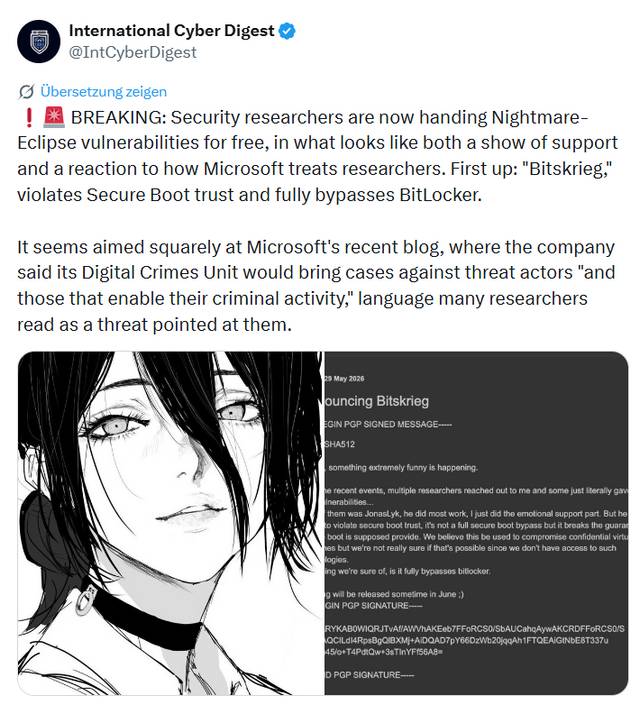
Bitskrieg - YellowKey reprise. Read Carefully:
Your car is worth less than your notebook!
Most crooks now know that a notebook almost assuredly runs Windows 11, and that notebook (in particular, the contents) is probably infinitely more valuable than the car it has been locked up in - and yes, it might even be locked in a Bentley!
That mitigation for YellowKey only closed the barn door briefly.
Now it is wide open again!
In TOP STORIES #167, we warned about YellowKey. In #168 Microsoft had mitigation guidance.
Now Jonas L has published a follow-up BitLocker attack called Bitskrieg.
The important bit is this: the demonstration starts with Windows 11, Secure Boot, VBS, TPM and BitLocker enabled, and still gets to the decrypted drive.
And, TPM+PIN bypass is waiting in the wings to be published.
The question is no longer just, “Was BitLocker enabled?”
It is now, “Was it patched, hardened, correctly configured, and can we prove that at the time the notebook disappeared?” - and we have to assume it has been compromised.
The thief breaking into the car may not be after the notebook because it can be sold. The notebook may just be the container for the real prize which could be the board pack, pricing model, HR file, customer export, cached OneDrive data, browser session, VPN profile or developer secrets.
TPM-only BitLocker was convenient. That is also the problem. High-risk users, especially executives, finance, HR, legal, developers and administrators, need stronger protection such as TPM+PIN, current firmware, Secure Boot, protected UEFI settings, restricted boot paths, WinRE mitigation and proper endpoint reporting.
Also review Sleep.
A sleeping notebook is more dangerous because it is not really “off”. Windows has already booted, BitLocker has already unlocked the drive, and running programmes, documents and security secrets may still be sitting in memory.
When the machine resumes from Sleep, the user is normally coming back to the Windows lock screen, not going through the full pre-boot BitLocker protection path again.
Microsoft’s own BitLocker guidance warns that Sleep keeps running programmes and documents in memory, and recommends hibernation or shutdown for higher-risk scenarios.
A sleeping notebook has not put the jewels back in the safe, It has just closed the lid.
Hibernate is different because the machine powers down and the drive is locked again. With TPM+PIN, the user must provide the PIN when resuming from hibernation, which is a much better position than hoping the lock screen is enough.
Stolen devices have to be treated as a data breach incident.
Disable the device, revoke sessions, reset credentials, review MFA methods, check sign-in logs, rotate stored secrets, and decide whether sensitive data exposure must be escalated, and wave the "remote wipe wish wand".
Hogwarts has them on special, I believe........
Please contact your First Technology Group account manager to connect with our security and endpoint specialists to review BitLocker, TPM+PIN, WinRE mitigation, Intune compliance, Defender visibility, Sleep and Hibernate policies, and stolen-device response.
| |
AI Can Now Fake the Call Every Parent Fears
This one is deeply nasty.
Scammers are using AI voice cloning to make parents believe their child has been kidnapped.
The call is designed to create panic, not logic.
A frightened voice sounds like your child, a criminal demands money, and you are told not to call anyone.
That is the whole trick.
The child is usually safe. The voice is fake. The panic is real.
The FBI has already warned about virtual kidnapping scams using manipulated photos, videos and fake “proof of life” material taken from social media.
The FTC has also warned that a short audio clip from online content can be enough to clone a loved one’s voice.
This is why “trust your ears” is now terrible security advice.
Families and businesses need the same basic discipline, slow down, verify through another channel, use a known number, and agree a private code word for real emergencies.
If money is demanded urgently, treat that as a red flag.
For companies, this is not just a family safety story. It is the same technique that will be used against executives, finance teams, assistants, helpdesks and anyone who can be pressured into acting quickly.
Please contact your First Technology Group account manager to connect you with our security and training specialists. Your users need to be trained for the scams that are coming, not just the phishing emails they learnt to spot five years ago.
| | | | |