Welcome to the first issue of Tiger Bytes. You can expect this monthly dose of technology tips and tricks created by your Secondary BTIL team members and delivered to your inbox for you to use.


Google Tips & Tricks: Document Tabs in Google Docs

by Linsey Zimmerman & Traci Walsh

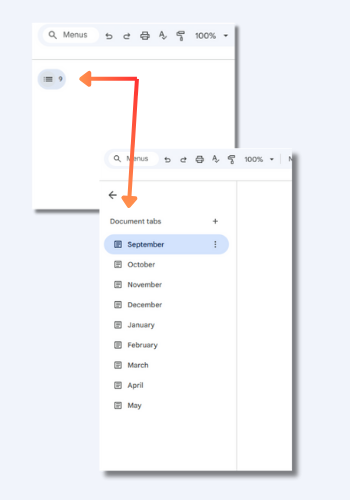
Create and manage document tabs in Google Docs to help organize your documents, or prevent the never-ending scroll for students in a lengthy document by dividing it into document tabs!


From the left panel in a Google Doc you can create new document tabs, view the document structure at any time, and use the tabs as sections for easier navigation of your document. Rename the tabs, reorder them as needed, duplicate tabs to prevent reinventing the wheel, or link one document tab to part of another document tab!


Teacher Cheat Code Hacks: 
Meet PowerBuddy- Your AI Assistant in Schoology

by Steph Groen & Josh Green


PowerBuddy is an AI powered assistant integrated directly within the Schoology platform to support both teachers and students.


For Teachers: A Time-Saving Tool

  • Instant Content Creation: Quickly generate educational materials like assignments, quiz questions, discussion prompts, and more!
  • Customized for Your Class: Tailor all content to specific grade levels and subjects.


For Students: A Personalized Tutor

  • On-Demand Help: Get instant guidance and support on your assignments.
  • Critical Thinking: PowerBuddy employs a question-based approach to help students discover answers independently and develop their problem-solving skills.


Interested in trying it out? Watch the short video clip below or contact a BTIL member for help.


Curriculum Connections: Accessing SAVVAS content in more places!

by Danae Dieken


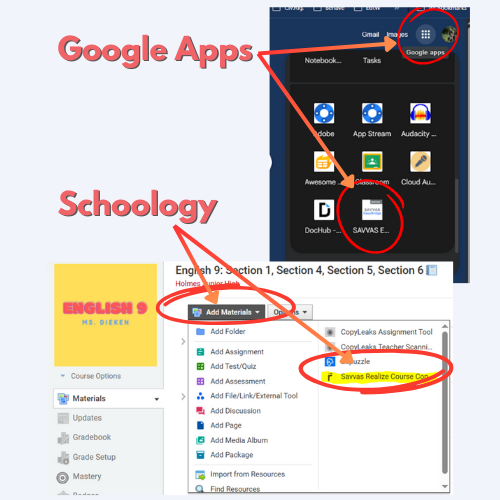
Since we have transitioned from HelloID, there are two shortcuts that can result in fewer clicks for you and your students!


The first shortcut is using your Google Apps shortcuts to get to SAVVAS.


The other shortcut is accessing SAVVAS through Schoology.


I’ve used the Google Apps shortcut link for benchmark testing in English Enhancement. In English 9, I’ve added the digital versions of the texts to Schoology so students can easily access the audio for the stories we’re reading.