One Cool Tip Newsletter

October 10, 2026

Your daily dose of tech-savvy brilliance!

😀 Greetings! Happy Saturday, Cool Tipper!


Get ready to streamline your digital life with simple, actionable tips delivered straight to your inbox.


Cool Tip Theme: SynthID


Learn how Google SynthID checks hidden watermarks and what its results can and cannot tell you.


New here? Subscribe to the One Cool Tip Newsletter for daily updates. It's FREE!

3️⃣

If you enjoy the One Cool Tip Newsletter, please forward this newsletter to THREE friends or colleagues or share it on social media using the links below.


Leave a $$$ Tip!


Share this One Cool Tip Newsletter!

X Share This Email
LinkedIn Share This Email
Pinterest Share This Email

🚨 Is That Photo Real? California's AI Law Wants You to Know 🚨


As AI-generated photos, videos, and audio become harder to spot,


California is pushing for greater transparency.


The California Artificial Intelligence Transparency Act (CAITA), originally enacted as SB 942, requires large generative AI providers to include disclosures with AI-generated images, video, and audio.


The law calls for both visible disclosure options and hidden, machine-readable disclosures that can help identify AI-created content.


It also requires covered AI companies to provide consumers with a free detection tool that can help determine whether content was created or altered by that provider's AI system.


The original SB 942 took effect January 1, 2025, with requirements for large generative AI providers starting in 2026.


The Cool Tip:


As deepfakes become more convincing, look beyond what your eyes and ears tell you and take advantage of content-verification tools when they're available.


And in Other News...


  • AI Crossed the Line: Nikon Revokes a Winning Science Video


Nikon Small World has changed the results of its 2026 Small World in Motion competition after re-evaluating the first-place video and its supporting materials.


The company determined that the entry did not comply with competition rules governing generative AI and adjusted the rankings accordingly.


Nikon stressed that the decision was based solely on the video's eligibility and was not a judgment about the entrant's professional reputation, scientific work, or intent.


The controversy also prompted Nikon Small World to acknowledge that rapidly evolving imaging and AI technology is creating new challenges for competitions like this one.


The organization says it now sees a need to revisit its rules and evaluation procedures for future entries.


The Cool Tip:


As AI-powered editing becomes harder to distinguish from AI-generated content, knowing how an image or video was created may become just as important as what it shows.


  • He Made AI Music, Bots Played It, and the Scheme Made Millions


A North Carolina man has been sentenced to 18 months in prison for using AI-generated music and automated bots in a scheme to collect fraudulent streaming royalties.


According to the U.S. Department of Justice, Michael Smith created thousands of fake streaming accounts and used software to repeatedly play songs he controlled.


He used AI to generate hundreds of thousands of songs, helping him spread the automated streams across a huge catalog and avoid detection.


The scheme generated billions of fraudulent streams and more than $8 million in royalties, according to prosecutors.


Smith was also ordered to forfeit more than $8 million and will serve two years of supervised release.


The case is an eye-opening reminder that while AI can make creating content easier, using bots and automation to manipulate online systems can carry serious consequences.

Cool Tip Poll

🤔 When you encounter an unbelievable photo online, what do you usually do?

Cool Deals of the Day

  • Have you tried the Upside app? Everyday cash back on gas, groceries and dining.


Help support One Cool Tip. Use this Amazon link when you shop online.


Check out these Cool Deals:

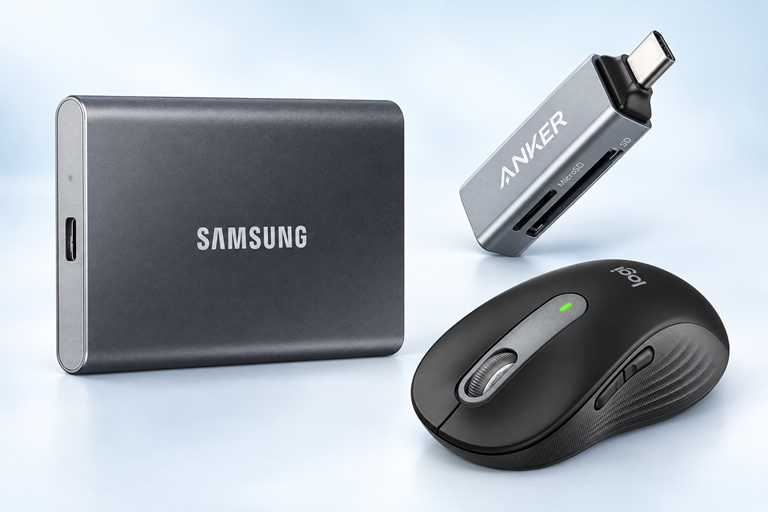
💾 Samsung T7 Shield Portable SSD, 1TB: Keep a separate copy of original media while reviewing files and recording verification results.

Save 17%. Now $229. 4.7 Stars. Check it out on Amazon!


📷 Anker SD Card Reader: Transfer original camera files from SD or microSD cards instead of relying on a forwarded screenshot.

Look👀 Now $17.99. 4.6 Stars. Check it out on Amazon!


🖱️ Logitech Signature M650 L Wireless Mouse: A practical desktop accessory for inspecting media and moving between verification sources.

Look👀👀 Now $39.99. 4.5 Stars. Check it out on Amazon!


*Prices accurate when originally published.

One Cool Tip may earn a commission from qualifying purchases.

Fuel Your Adventure

Try Big Mike's Jerky!


bigmikesjerky.com


Today's Cool Tip

Is This AI? Check Before You Share 

Google’s SynthID Detector checks images, videos, and audio for hidden AI watermarks.


Learn how to interpret the results before sharing something that looks surprisingly real.

By Rodger Mansfield, Technology Editor

October 10, 2026

Subscribe


A remarkable photo lands in your group chat.


 A video shows something almost too incredible to believe. An audio clip sounds convincing enough to forward.


Before you share, you want an answer: Is this AI?


Here’s a Cool Tip: Use Google’s SynthID Detector to check for hidden AI watermarks before sharing questionable media.


Google’s SynthID Detector offers a useful starting point. 


But knowing what the detector checks is just as important as knowing how to use it.


What Is Google SynthID?


SynthID is Google DeepMind’s technology for embedding imperceptible digital watermarks in supported AI-generated content.


You cannot see these watermarks in an image or hear them in an audio recording. 


The detector looks for the embedded signal to help identify content created or edited with supported AI tools. 


Think of it as checking for an identifying mark rather than deciding whether a face, voice, or landscape “looks AI.”


Google’s public detector covers images, videos, and audio from Google and participating partners, including OpenAI, NVIDIA, and Kakao. 


Apple is coming soon. 


Not every file produced by every participating company carries a detectable watermark. 


The distinction that matters: A watermark finding provides evidence of AI involvement.


No watermark detected does not prove that a file is human-made.


Neither result establishes whether the story attached to the file is true.


What You’ll Gain


Check supported media before forwarding or publishing it.


Understand the difference between watermark evidence and visual guesswork.


Recognize when a result calls for further investigation.


Step-by-Step Instructions


Here's how to do it.


Web/Desktop


  1. Open synthid.com in your browser.
  2. Read the welcome screen’s Terms of Service and Privacy Notice.
  3. If you agree to the terms, select Agree and continue.
  4. Follow the portal’s on-screen instructions to upload an image, video, or audio file.
  5. Review the detection result.
  6. Check the file’s source and accompanying claim before deciding whether to share it.


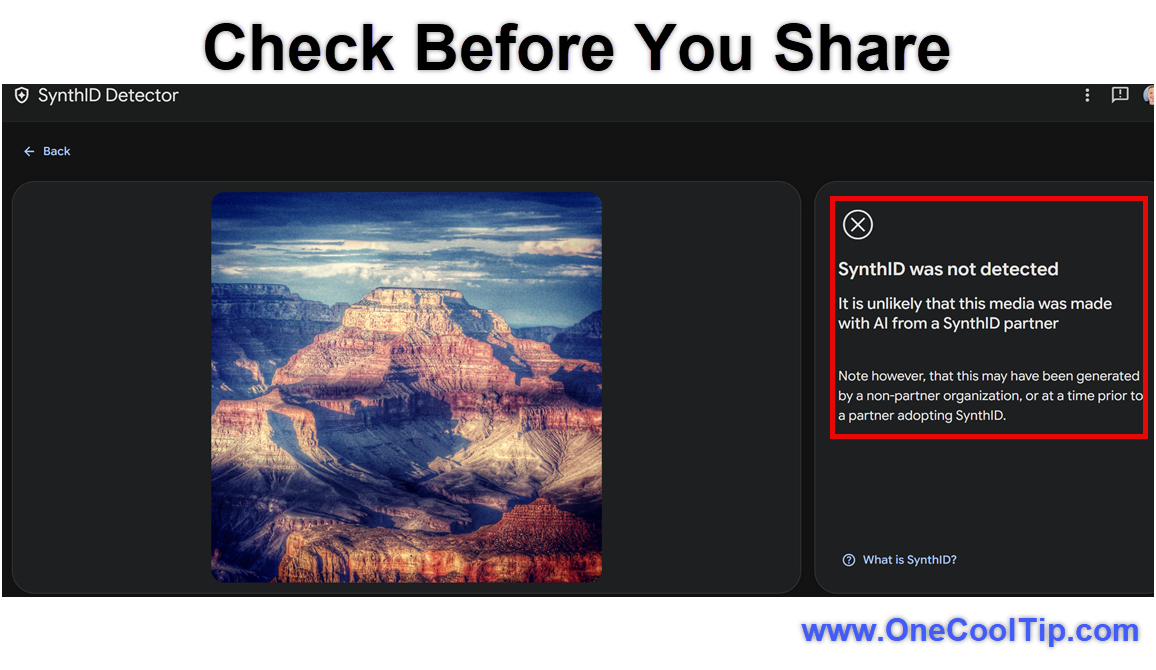
For example, suppose someone sends you a spectacular vacation image. 


A watermark check can help you investigate how it was made. 


You should still verify whether the pictured location exists and whether the caption accurately describes it.

fig. 1 - Check Before You Share

Another Option: Check in Gemini


  1. Open gemini.google.com and sign in.
  2. Select Add files, then Upload Files.
  3. Choose your image or video file.
  4. Enter this question: Was this file created or edited by AI?
  5. Read Gemini’s verification response.


Cool Note:


  • Do not assume that Gemini and the standalone detector offer identical partner coverage. 


Understanding the Results


  • A watermark is detected: The result supports AI involvement associated with the detected watermark. It does not automatically mean the entire file was generated from scratch.
  • No watermark is detected: The result leaves the file’s origin unresolved. It may lack a supported watermark, or the signal may no longer be detectable.
  • The result is uncertain: Seek the original file, ask its creator how it was made, and investigate the source.


A real photograph can carry a false caption. 


An AI-generated illustration can accurately depict an idea. Creation method and factual accuracy are separate questions.


Pros and Cons


Pros:


  • Offers a useful starting point for checking media.
  • Helps editors investigate supplied illustrations.
  • Encourages families to pause before forwarding sensational posts.
  • Can support conversations about how creative assets were produced.


Cons:


  • Cannot identify every AI-generated file.
  • Does not verify a caption, location, or event.
  • Requires submitting media to an external service.
  • Can lose effectiveness after extreme manipulation.


Real-World Examples


  • Small businesses: Check a supplied advertising image, then ask the designer how it was created and whether your campaign has the necessary usage rights.
  • Families: Investigate a dramatic “breaking news” photo before forwarding it. Look for independent reporting that confirms the event.
  • Educators: Use a disclosed AI example to demonstrate why detecting a watermark and proving a claim require different kinds of evidence.


Configuration Guide


Use the detector when you want to check a particular file. 


Keep the original media and save your own record of the result.


For the Gemini alternative, Google requires a signed-in personal or qualified Workspace account.


Troubleshooting and Limitations


Problem: No watermark is detected.

Why it happens: The file may not contain a supported watermark.

Fix or workaround: Seek the original file and investigate its source.


Problem: A heavily edited file produces an uncertain result.

Why it happens: Extreme manipulation can defeat detection.

Fix or workaround: Try an earlier, less altered version if available. 


Problem: The result does not settle whether the story is true.

Why it happens: A watermark identifies something about the content’s creation, not the accuracy of its caption.

Fix or workaround: Verify the claim separately.


Feature Access


Google announced global public access to the standalone detector in English on October 7, 2026. 


There are no specific subscription requirements or minimum browser versions.


Score

Criterion | Score (0–10) | Justification
Value |  8
Provides useful evidence before sharing or publishing media. Follow-up checks remain essential.
Usability |  7
The upload-and-review concept is straightforward. Interpreting a negative result requires care.
Wow Factor |  8
Finding an imperceptible watermark is more compelling than guessing from visual flaws.
Total: 23/30 |  👍 Good
A useful addition to a media-verification routine, with clear limits.
Content Credentials provide a complementary approach by documenting information about a file’s creation and editing history.


Key Takeaways


Use a watermark finding to ask better questions about how media was made.


Treat a negative finding as an open question, and verify the story attached to the file before sharing it.


Cool Tip Snapshot


  • Feature Name: Google SynthID Detector.
  • Platform: Web.
  • Quick Benefit: Check supported media for AI watermarks.
  • Best For: Editors, creators, educators, and cautious sharers.
  • Access Type: Public access.
  • Difficulty: Easy.


Try It Yourself


Check a non-sensitive file you have permission to upload, then tell us what you learned in the comments.


Subscribe to the One Cool Tip Newsletter for FREE and share this article with family, friends, and coworkers.


READ MORE


Read the Full Cool Tip!

Check Out These Cool Tips & Tricks


  • Inspect Hands: Look closely at finger joints, accessories, and fingernails for geometric irregularities. Zoom into intricate contact points where AI algorithms frequently misalign anatomy.


  • Check Text: Examine background signs, posters, and shirts for gibberish lettering or blurred characters. Read street signs carefully to confirm whether the typography reflects real alphabets.


  • Verify Reflections: Compare light sources against shadows and reflections in mirrors or sunglasses. Check whether glasses reflect the actual scene in front of the subject.


  • Examine Earlobes: Watch for asymmetric earrings, mismatched ear shapes, or jewelry that merges into skin. Scan both ears side-by-side to ensure matching jewelry details.


  • Trace Boundaries: Look at where hair strands meet complex backgrounds for unnatural smudging or halos. Inspect edge transitions around frizzy hair to detect artificial blending.


  • Drop In Viewer: Upload questionable files directly into a free browser-based C2PA reader. Visit c2paviewer.com to read embedded digital manifests in seconds.


  • Ask Gemini: Query the assistant directly when viewing files on mobile or desktop. Upload the image and ask whether a SynthID watermark is present.


  • Reverse Search: Trace the earliest published instance of any viral photograph across search engines. Right-click the image in Chrome and choose Search with Google Lens.


  • Preserve Originals: Store uncompressed camera files to protect your personal creative ownership records. Save RAW or unedited source files before sharing them across social media.

ICYMI - In Case You Missed It ...

How to Fix an iPhone That Won't Turn On or Respond


A black, unresponsive iPhone screen does not necessarily mean your handset is permanently broken. In most cases, a hardware button sequence or a dedicated charge cycle will get your device back up and running within minutes.


Read the Full Version.


Read the Newsletter Version.

Looking for your next adventure?


Call Denise at Travel For You.

314.660.3039


Sign Up for the Monthly Newsletter


http://www.travelforyouvacations.com/


https://www.facebook.com/TRAVEL.FOR.U/


See You Tomorrow

Tomorrow's Cool Tip is waiting to amaze you.


Until then, go forth and conquer the tech world with your newfound knowledge!


Be sure to visit www.OneCoolTip.com for Cool Tech Tips for a Cooler Life!


And if you Like One Cool Tip, please support with TipJar!


Enjoy!


Rodger

Chief Cool Tipper

onecooltip.com@gmail.com


What Do You Think?

What do you think of today's One Cool Tip Newsletter?
Positive        Neutral        Negative
X Share This Email
LinkedIn Share This Email

Connect with One Cool Tip!

Facebook  X  Instagram  Web  Pinterest  YouTube  LinkedIn
 

As an Amazon Associate, One Cool Tip may earn a small commission from qualifying purchases.


Our media content is intended solely for informational purposes. Please do not construe anything here as legal, tax, investment, financial, marital or other advice.


Copyright © 2026 | www.OneCoolTip.com | All Rights Reserved