One Cool Tip Newsletter

January 6, 2026

Your daily dose of tech-savvy brilliance!

😀Greetings! Happy Tuesday, Cool Tipper!


Get ready to streamline your digital life with simple, actionable tips delivered straight to your inbox.


Cool Tip Theme: WhatsApp About Feature


New here? Subscribe to the One Cool Tip Newsletter for daily updates. It's FREE!

3️⃣

If you enjoy the One Cool Tip newsletter, please forward this newsletter to THREE friends or colleagues or share it on social media using the links below.


Leave a Tip!


Share this One Cool Tip Newsletter!

X Share This Email
LinkedIn Share This Email
Pinterest Share This Email

Don’t Get Hooked by Spoofing and Phishing


Scammers are getting smarter, and sneakier.


The FBI warns that spoofing and phishing attacks are on the rise, with criminals impersonating trusted sources to steal your data, money, or identity.


  • Spoofing: When a scammer disguises their phone number, email address, or website to look like someone you trust, like your bank, a coworker, or even the FBI.
  • Phishing: When they bait you with fake messages or links designed to trick you into revealing sensitive info or clicking malware.


Cool Tips:


  • Never click links or download attachments from unexpected messages.
  • Verify requests by contacting the sender through a known, separate channel.
  • Use multi-factor authentication and keep software updated.


Stay alert, stay skeptical, and share this Cool Tip with your team and family.


Cool Deals

Help support One Cool Tip. Use this Amazon link when you shop online.


Check out these Cool Deals:


  • 💻 Samsung ViewFinity 34-Inch Monitor: A massive ultrawide screen is perfect for viewing your WhatsApp chats. Save 39% $359.99 Check it out on Amazon!


  • 🖱️ Logitech MX Master 3S Mouse: The infinite scroll wheel is a lifesaver when navigating WhatsApp. Overall Pick! $121.45 Check it out on Amazon!


  • ⌨️ Keychron Q1 Pro Mechanical Keyboard: If you are going to be editing your WhatsApp About, do it on a keyboard that feels amazing to type on. Save 8% $193.19 Check it out on Amazon!


*Prices accurate when originally published.

One Cool Tip may earn a commission from qualifying purchases.

Fuel Your Adventure

Try Big Mike's Jerky!


bigmikesjerky.com


Now on TikTok!


Today's Cool Tip

WhatsApp’s Improved About Feature Finally Makes Status Updates Useful Again


Short updates. Clear context. Less noise. WhatsApp’s refreshed About feature brings subtle but meaningful improvements to how you share what you’re up to, especially in professional and group-heavy conversations.


How often have you opened a chat and wondered whether the other person is available, busy, traveling, or simply ignoring messages? 


For years, WhatsApp’s About field existed but felt outdated and easy to forget. 


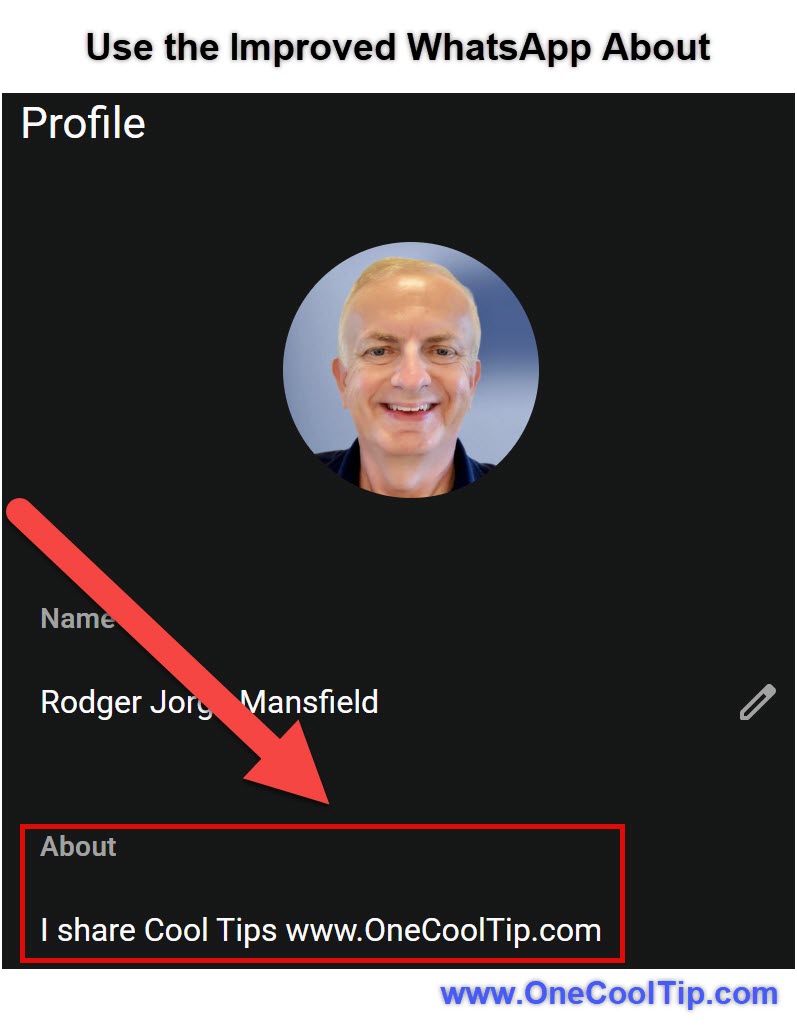
Here's a Cool Tip:  Check Out WhatsApp's Improved About Feature.


The newly improved version repositions About as a lightweight status signal that actually fits how people communicate today.


This is not a flashy redesign. It is a small change with outsized impact on clarity, expectations, and context.


Feature Explanation


The improved About feature in WhatsApp modernizes the short profile message that appears under your name in chats and profile views.


Instead of feeling like a static bio line, About now works as a flexible, timely indicator of what you are doing, how reachable you are, or what matters right now. 


You can update it more fluidly, and others see those updates more prominently in the places where context matters most.


Why it matters:


  • It reduces friction in one-to-one and group conversations.
  • It provides soft context without broadcasting a full status post.
  • It supports professional signaling without forcing a formal profile rewrite.
  • Think of it as a quiet status layer that sits between “online” indicators and full Status stories.


What You’ll Gain


  • Clearer availability signals for colleagues and contacts.
  • Fewer interruptions during focus time or travel.
  • Better context inside busy group chats.
  • A low-effort way to communicate intent without messaging everyone.


Step-by-Step Instructions


Here's how to do it.


Web and Desktop (Windows)


  1. Open WhatsApp Desktop or WhatsApp Web.
  2. Click your profile photo in the top-left corner.
  3. Select your current About text.
  4. Type a short update such as “In meetings until 3 PM” or “On vacation.”
  5. Save changes.


iOS


  1. Open WhatsApp.
  2. Tap Settings.
  3. Tap your name at the top.
  4. Tap About.
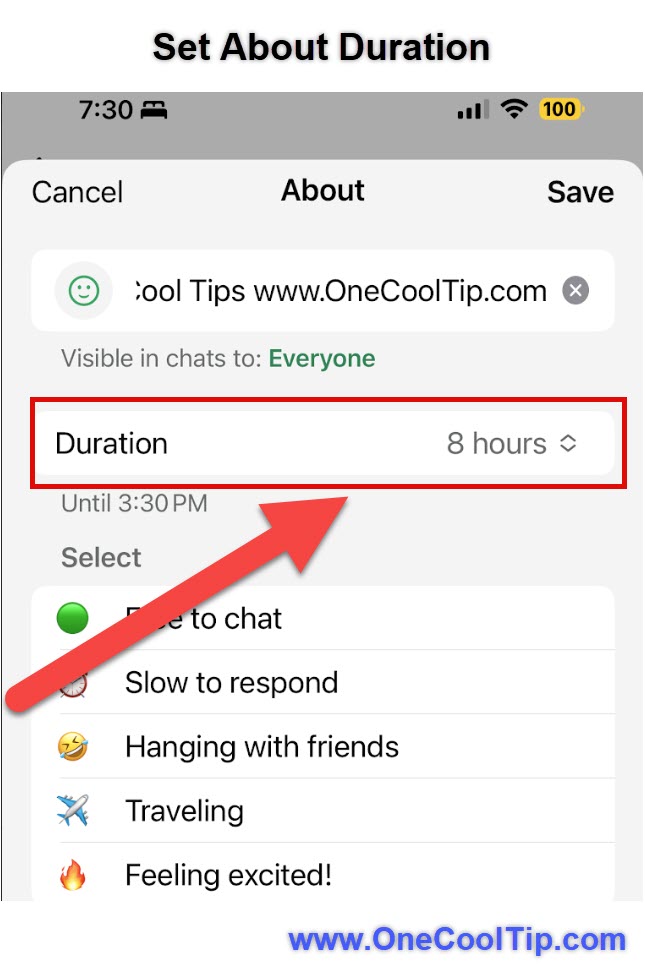
  5. Choose a preset or enter custom text.
  6. Tap Save.

fig. 2 - Set WhatsApp About Duration

Android


  1. Open WhatsApp.
  2. Tap the three-dot menu.
  3. Tap Settings.
  4. Tap your profile name.
  5. Tap About.
  6. Select or enter your update and save.


Pros and Cons


Pros


  • Low effort, high clarity for contacts and teams.
  • Works quietly without creating notifications.
  • Useful in both personal and professional contexts.
  • No learning curve.


Cons


  • Easy to forget to update if habits are not formed.
  • Not time-bound yet, so manual updates are required.
  • Limited character length may feel restrictive for some users.

Feature Access


  • Platforms: iOS, Android, Web, Desktop
  • Accounts: Free WhatsApp accounts
  • Availability: Currently rolling out globally


Score

Criterion | Score (0–10) | Justification
Value 8
Small feature with daily impact on clarity and expectations.
Usability 9
Intuitive, fast, and requires almost no setup.
Wow Factor 6
Subtle improvement rather than a dramatic change.
Total: 23/30 👍 Good
A practical upgrade that quietly improves communication hygiene, especially compared to Status posts that are easy to miss.


Key Takeaways


WhatsApp’s improved About feature turns a neglected profile field into a useful context signal. 


It helps people communicate availability without friction. 


For anyone juggling multiple chats, the payoff is immediate.


Cool Tip Snapshot


  • Feature Name: Improved About.
  • Platform(s): iOS, Android, Web, Desktop.
  • Quick Benefit: Share availability and intent without messaging.
  • Access Type: Free, currently rolling out.


Try It Yourself


Update your WhatsApp About today with a real, time-relevant message and see how it changes response expectations. 


Share your favorite About ideas in the comments, and pass this Cool Tip along to your team, family, and friends.


READ MORE


Read the Full Cool Tip.

Check out these Cool Tips & Tricks for WhatsApp:


  • Quick About: Update your About before meetings to set expectations. Tap Profile > About.


  • Preset Use: Choose a preset for speed. Edit under Profile > About.


  • Focus Mode: Pair About with Do Not Disturb for fewer interruptions. Enable DND in phone settings.


  • Travel Signal: Set “Traveling” when away to avoid follow-ups. Edit About text manually.


  • Work Hours: Use About to show reply windows. Update text daily.


  • Group Context: Helps group chats stay calm. Keep About short and clear.


  • Privacy Check: Review who sees your profile info. Settings > Privacy.


  • Status Balance: Use About for quiet signals, Status for announcements. Choose intentionally.


  • Consistency: Match About tone with profile photo. Edit both together.


  • Reminder Habit: Update About at the start of your day. Make it part of your routine.

ICYMI - In Case You Missed It ...

The 2025 'Must Install' Apps From Apple and Google Play


The 2025 App Store Awards and Google Play Best of 2025 lists are out, and they are a shortcut to the handful of apps that are actually worth your time. Here is a practical guide to the standout winners on both platforms and how to put them to work in your day, not just admire them from a press release.


Read the Full Cool Tip.

Read the Newsletter Version.

Looking for your next adventure?


Call Denise at Travel For You.

314.660.3039


Sign Up for the Monthly Newsletter


http://www.travelforyouvacations.com/


https://www.facebook.com/TRAVEL.FOR.U/


See You Tomorrow

Tomorrow's Cool Tip is waiting to amaze you.


Until then, go forth and conquer the tech world with your newfound knowledge!


Be sure to visit www.OneCoolTip.com for Cool Tech Tips for a Cooler Life!


And if you Like One Cool Tip, please support with TipJar!


Enjoy!


Rodger

Chief Cool Tipper

onecooltip.com@gmail.com


What Do You Think?

What do you think of today's OneCoolTip newsletter?
Positive        Neutral        Negative
X Share This Email
LinkedIn Share This Email

Connect with One Cool Tip!!

Facebook  X  Instagram  Web  Pinterest  YouTube  LinkedIn
 

As an Amazon Associate, One Cool Tip may earn a small commission from qualifying purchases.


Our media content is intended solely for informational purposes only. Please do not construe anything here as legal, tax, investment, financial, marital or other advice.


Copyright © 2026 | www.OneCoolTip.com | All Rights Reserved