|
ChatGPT 5.4: What’s Changed, What You Can Do, and Why It Matters for Web and Mobile Users
OpenAI’s GPT 5.4 represents the company’s most capable foundation model yet, improving accuracy, reasoning, business productivity, and long-context workflows across web and mobile platforms. This update sets a new baseline for real-world AI tasks in both home and business settings.
When you ask an AI to help with a complex task, you want an answer that’s fast, accurate, and useful without repeated clarifications.
GPT 5.4 aims to deliver that by tackling some of the hardest challenges users face: multi-step reasoning, document and spreadsheet work, tool use, and maintaining context over long interactions.
Early adopters say it feels faster and more reliable than earlier models, whether you’re drafting presentations or asking for detailed research summaries.
Feature Explanation
GPT 5.4 is a new version of OpenAI’s flagship generative model.
It combines high-level reasoning, coding capabilities, and professional task execution into a single model family.
It powers two main variants: GPT 5.4 Thinking for reasoning and interactive planning, and maximum performance on complex tasks.
These run inside ChatGPT on web and mobile, and are also available via the OpenAI API and developer tools.
Core improvements include:
- Planning and mid-response steering, letting you adjust outcomes while the model is still processing.
- Better handling of web research and multi-source synthesis.
- Enhanced spreadsheet, document, and presentation understanding.
- First general-purpose model with native computer-use capabilities in developer contexts.
What You’ll Gain
- More accurate and relevant responses, especially for long tasks.
- Stronger productivity in business workflows like spreadsheets and reports.
- Ability to tweak model thinking without restarting queries.
- Consistent experience on web, iOS, and Android versions of ChatGPT.
Step-by-Step Instructions
Here's how to do it.
Web (Browser)
-
Open ChatGPT in a supported browser, www.chatGPT.com.
-
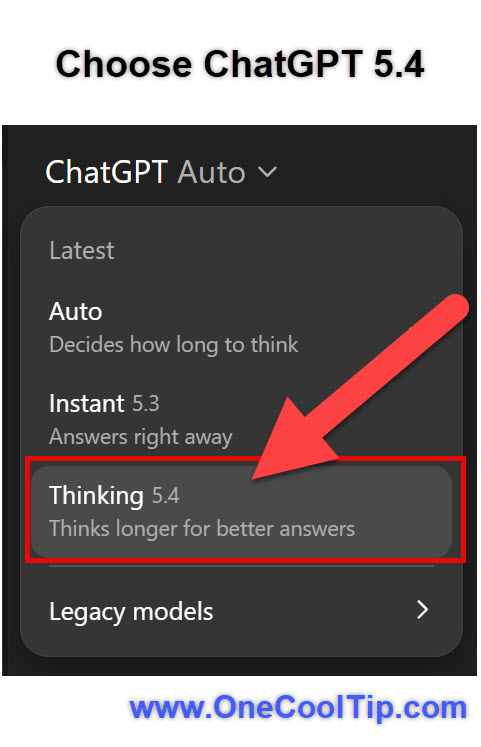
In the model selector, choose Thinking GPT 5.4.
-
Enter your prompt; for complex tasks, start with a clear goal.
-
Use the planning outline that appears to refine direction mid-response.
|