|
One Cool Tip Newsletter
October 18, 2026
| Your daily dose of tech-savvy brilliance! | |
😀 Greetings! Happy Sunday, Cool Tipper!
Get ready to streamline your digital life with simple, actionable tips delivered straight to your inbox.
Cool Tip Theme: Facebook: Your Algorithm.
Facebook now lets you tell Your Algorithm what you want in Feed and Reels using plain English prompts that update in real time.
New here? Subscribe to the One Cool Tip Newsletter for daily updates. It's FREE!
| |
3️⃣
If you enjoy the One Cool Tip Newsletter, please forward this newsletter to THREE friends or colleagues or share it on social media using the links below.
Leave a $$$ Tip!
Share this One Cool Tip Newsletter!
| | |
🚨 Election Scam Warning: AI Is Making Phishing Harder to Spot 🚨
The FBI and CISA are warning that cybercriminals may use increasingly convincing phishing emails and scam text messages during the 2026 U.S. midterm elections.
New AI tools can help criminals create polished messages without the spelling errors and awkward language that once made many scams easier to recognize.
Scammers can also use deepfake audio and video to impersonate real people or create convincing fake identities.
The agencies advise consumers to carefully evaluate unexpected emails and mobile messages, especially those requesting login credentials, financial information, or other sensitive data.
Using phishing-resistant multi-factor authentication can provide another layer of protection for important accounts.
The Cool Tip:
Perfect grammar and a familiar face are no longer proof that a message is legitimate, so verify unexpected requests through a trusted second channel before taking action.
And in Other News...
- Millions of Scam Accounts Just Got Shut Down
A major international crackdown is taking aim at the organized criminal networks behind many online scams.
Meta says it joined 14 other technology companies and law enforcement agencies from 10 countries to disrupt scam networks operating in West Africa.
As part of the operation, Meta removed more than 3.7 million Facebook and Instagram accounts, pages, and groups, while law enforcement reported 28 arrests and the rescue of 117 trafficking victims forced to work in scam operations.
The networks were linked to investment, job, romance, impersonation, non-delivery, and even scam-recovery schemes that targeted people around the world.
The operation included companies such as Microsoft, Google, OpenAI, Coinbase, and Meta, showing how fighting online fraud increasingly requires cooperation across the technology industry and law enforcement.
The Cool Tip:
Even with millions of fraudulent accounts being removed, stay skeptical of unexpected investment offers, job opportunities, romantic contacts, and anyone asking you to send money online.
| |
| 🤔 How will you use Facebook's Your Algorithm first? | | | |
-
Have you tried the Upside app? Everyday cash back on gas, groceries and dining.
Help support One Cool Tip. Use this Amazon link when you shop online.
Check out these Cool Deals:
| | |
🔋 Anker Power Bank 10000mAh: Keep your phone charged while you fine-tune Feed and Reels
Save 20%. Now $20.89. 4.5 Stars. Check it out on Amazon!
📚 Smartphone Photography Guide Book: Create better Reels that match your algorithm goals
Save 48%. Now $16.51. 4.3 Stars. Check it out on Amazon!
🎧 Wireless Earbuds: Listen to Reels without disturbing family while you curate
Save 46%. Now $26.99. 4.3 Stars. Check it out on Amazon!
*Prices accurate when originally published.
One Cool Tip may earn a commission from qualifying purchases.
| | Take Control of Facebook: Meet Your Algorithm | | |
Tired of Facebook guessing wrong about what you want to see?
Your Algorithm lets you describe your interests in plain English and watch your Feed and Reels respond right away.
| | |
By Rodger Mansfield, Technology Editor
October 18, 2026
Subscribe
Your Facebook Feed has always learned from what you click, not what you actually want.
You watch one video about sourdough and suddenly you are a bread influencer. You like a cousin's baby photo and now you see parenting groups.
Facebook is changing that approach.
On October 13, 2026, Meta announced Your Algorithm, a set of AI tools that let you tell Facebook directly what you want more of and less of, in your own words.
Here’s a Cool Tip: Talk to your Feed and tell it what you really want to see.
Feature Explanation
What it is:
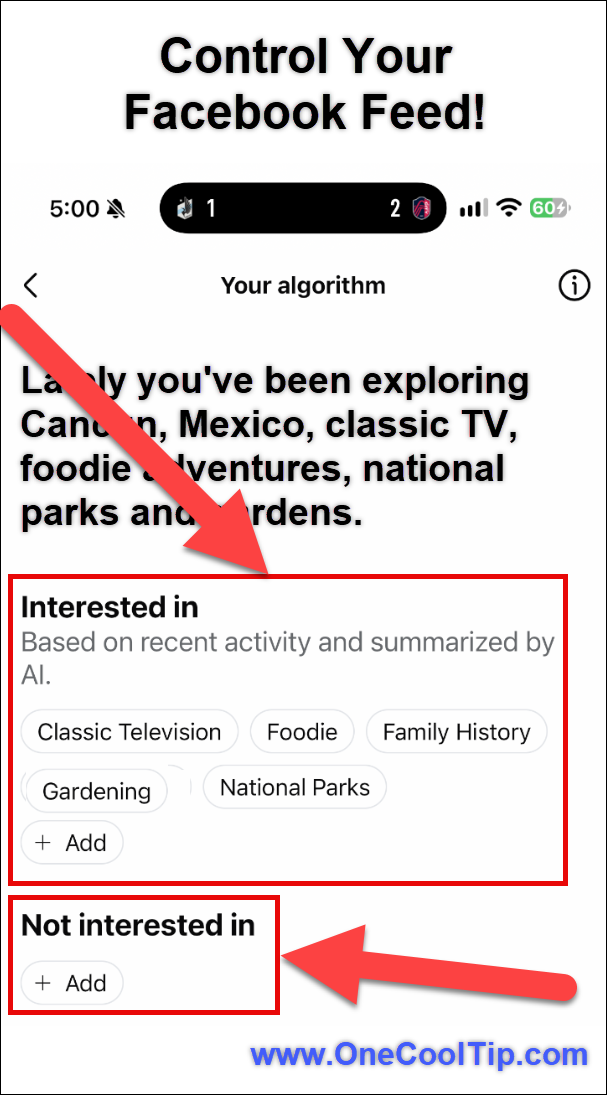
Your Algorithm is a dedicated space inside Facebook where you can directly add and manage the topics you want to see in Feed and Reels.
How it works:
- Large language models now incorporate the interests, context, and intent behind natural language, which enables an algorithm you can actually talk to.
- Your prompts are combined with existing signals like likes and watch time.
- The system updates in real time, adapting within the same session to reflect what matters to you right now.
Facebook updated the three-dot menu on every post to make these tools easier to find.
After you click Interested or Not interested, Facebook may ask follow-up questions for more detail on what you liked or disliked.
Why it matters:
For years Facebook inferred what you were into from what you engaged with. This gives you direct control to correct it.
Who benefits most:
Home users, families, small businesses, and creators who use Reels for research.
It builds on the same idea Meta launched on Instagram in December 2025 and expanded in 2026.
What You’ll Gain
- Save time by reducing random recommendations you have to scroll past.
- Reduce confusion when Facebook misreads a single click as a long-term interest.
- Improve relevance by telling the system exactly what topics to dial up or down.
- Make daily use easier by shaping Reels and Feed in one place.
Step-by-Step Instructions
Here's how to do it.
Web/Desktop (facebook.com):
-
Go to facebook.com and log in.
-
In Feed or Reels, click the three-dot menu on any post or video.
-
Look for Your algorithm or Your Algorithm. Click to open your topics dashboard.
-
Select "Add."
-
In the text box, type interests in natural language, for example: "More backyard birding tips and Missouri conservation news. Less viral prank videos."
- Save or confirm. Scroll Feed to see updated recommendations within the same session.
-
For extra tuning, tap Interested or Not interested on a post, then answer the follow-up prompt in your own words when it appears.
| | fig. 1 - Control Your Facebook Feed | | |
iPhone/iPad (Facebook app for iOS):
-
Open the Facebook app and make sure it is updated to the latest version in the App Store.
-
Tap any post's three-dot menu in Feed or Reels.
-
Tap Your algorithm.
-
Tap Add.
-
Add topics using plain English prompts.
-
Tap Done and continue scrolling to trigger real-time updates.
Android (Facebook app for Android):
-
Open the Facebook app and update it from Google Play if available.
-
Tap the three-dot menu on a Feed post or Reel.
-
Choose Your algorithm.
- Tap Add.
-
Enter what you want more or less of. For example: "More beginner photography tutorials, less political debate clips."
-
Confirm and keep browsing. Recommendations should adapt quickly.
-
Example: You are planning a kitchen remodel. Type: "Show me more small kitchen remodels under $15k and DIY storage ideas. Less luxury kitchen tours." Then tap Interested on two useful remodel Reels.
Pros and Cons
Pros:
- Direct control with natural language, no need to learn special keywords.
- Real-time feedback means you see changes without waiting days.
- Works across both Feed and Reels from one place.
- Builds on existing Interested / Not interested controls, so it feels familiar.
- Helps families and small businesses filter out noise.
Cons:
- Rolling out gradually with no public list of regions or accounts, so some users will not see it yet.
- Requires a compatible device and latest app version, which can be a hurdle for older phones.
- Natural language is powerful but still relies on interpretation, so vague prompts may need refinement.
- Meta has not published creator guidance, so businesses cannot yet know how it impacts Page reach.
Who Should Skip This
You may not need this if:
- You rarely use Feed or Reels,
- You prefer to manually curate by following only specific Pages and Groups,
- You use a business account locked by IT policy that blocks new Facebook features, or
- You live in a region where rollout has not arrived.
Troubleshooting And Limitations
Problem: The Your algorithm entry does not appear in the three-dot menu.
-
Why it happens: Feature is currently rolling out and may not have reached your account or region.
-
Fix or workaround: Update the Facebook app, force-close and reopen, log out and back in, and check again in a few days. Try both mobile app and web.
Problem: You type a prompt but Feed does not change.
-
Why it happens: Prompts that are too vague or too broad are harder for ranking to act on.
-
Fix or workaround: Be specific. Instead of "less annoying stuff," try "less celebrity breakup news and car crash videos."
Problem: Reels still show unwanted topics.
-
Why it happens: Feed and Reels use overlapping but separate ranking models.
-
Fix or workaround: Apply prompts in both surfaces and use the Interested / Not interested follow-up prompts on Reels directly.
Privacy and Data Notes
What data may be used: The freeform text you enter, plus your interactions with Interested / Not interested prompts, and existing activity signals.
What may be shared: Your topics are used internally for ranking. They are not posted publicly.
What may be stored: Prompts you save in Your algorithm management space persist until you delete them.
What may be visible to others: No. Other users do not see your algorithm preferences.
How to turn off or limit sharing: Remove topics from Your algorithm, limit Ad Preferences personalization, and use the Not interested option.
Review Facebook Settings > Privacy for broader controls.
Feature Access
-
Who gets the feature: Facebook users on supported platforms.
-
Supported platforms: Web, iOS, Android. Accessed via three-dot menu on every post.
-
Supported versions: Latest Facebook app and modern browsers. Requires compatible device, app version, or account.
-
Region or language limits: Not published. Availability may vary by account, region, device, or app version.
-
Subscription: Free. No subscription required.
-
Rollout status: Currently rolling out. If you do not see it, availability may vary by account, region, device, or app version.
Score
Criterion | Score (0–10) | Justification
Value | 8
Solves a real everyday problem of irrelevant Feed recommendations by letting users correct it directly.
Usability | 7
Found in a familiar three-dot menu and uses plain English, but gradual rollout creates inconsistency.
Wow Factor | 8
Talking to your algorithm with LLMs feels novel and finally gives users a steering wheel.
Total: 23/30 | 👍 Good
A long-overdue control that makes Facebook feel more personal and less guessed.
Similar to Instagram's Your Algorithm and Threads' Dear Algo, but now unified in Facebook Feed and Reels with real-time response.
Key Takeaways
Your Algorithm moves Facebook from guessing your interests to listening to them.
By typing what you want in your own words and using the follow-up prompts after Interested or Not interested, you get a Feed and Reels mix that responds in the same session.
That means less scrolling past noise and more of what you actually opened Facebook to find.
Cool Tip Snapshot
-
Feature Name: Your Algorithm.
-
Platform(s): Web, iOS, Android, Windows via browser, macOS via browser.
-
Quick Benefit: Shape Feed and Reels by describing interests in plain English..
-
Best For: Home users, families, creators, small businesses.
-
Access Type: Rolling Out, Free.
-
Difficulty: Easy.
Learn More
Facebook explains how Your Algorithm uses natural language prompts and real-time ranking to personalize Feed and Reels.
Try It Yourself
Open Facebook today, tap the three-dot menu on any post, and tell Your Algorithm one topic you want more of and one you want less of.
See how your Feed changes in the next five minutes, then come back and tell us what worked.
If this Cool Tip helped, subscribe to OneCoolTip and share it with family, friends, and coworkers.
READ MORE
Read the Full Cool Tip!
| | |
Check Out These Cool Tips & Tricks
-
Prompt Clearly: Write prompts like you would tell a friend what you want. How to do it: Instead of "less bad stuff," type "less prank videos and celebrity gossip."
-
Use Both Places: Tune Feed and Reels separately for best results. How to do it: Open Your algorithm from a Feed post and again from a Reel.
-
Follow Up Fast: Answer the Interested prompts when they appear. How to do it: After tapping Interested, type one sentence about why you liked it.
-
One Topic At A Time: Add one or two interests, then scroll to see changes. How to do it: Add "more local hiking," check Feed, then add next interest.
-
Delete Old Prompts: Remove topics you no longer care about. How to do it: Go to three-dot menu > Your algorithm > Manage and delete.
-
Be Specific Locally: Include your city or interest niche for better matches. How to do it: Type "Missouri gardening tips" not just "gardening."
-
Check Weekly: Review Your algorithm settings once a week at first. How to do it: Set a reminder to open Your algorithm every Monday.
-
Combine With Favorites: Use Favorites feed for must-see accounts. How to do it: Use Your algorithm for topics, Favorites for people.
-
Negative Prompts Help: Telling what you dislike is as powerful as likes. How to do it: Type "Less AI-generated art and get-rich-quick Reels."
-
Test In Real Time: Stay in same session after changing prompts to see impact. How to do it: Don't close Facebook. Change prompt and keep scrolling for 2 minutes.
| | ICYMI - In Case You Missed It ... | | | | |
Find a Forgotten Movie by Describing What You Remember
You remember the chase, the strange ending, or one perfect line, but not the movie title. WhatIsMyMovie.com lets you search using those scattered details instead of forcing you to know the exact name.
Read the Full Version.
Read the Newsletter Version.
| | |
Tomorrow's Cool Tip is waiting to amaze you.
Until then, go forth and conquer the tech world with your newfound knowledge!
Be sure to visit www.OneCoolTip.com for Cool Tech Tips for a Cooler Life!
And if you Like One Cool Tip, please support with TipJar!
Enjoy!
Rodger
Chief Cool Tipper
onecooltip.com@gmail.com
| |
| What do you think of today's One Cool Tip Newsletter?
| | | | Connect with One Cool Tip! | | |
|
As an Amazon Associate, One Cool Tip may earn a small commission from qualifying purchases.
Our media content is intended solely for informational purposes. Please do not construe anything here as legal, tax, investment, financial, marital or other advice.
Copyright © 2026 | www.OneCoolTip.com | All Rights Reserved
|
| | | |