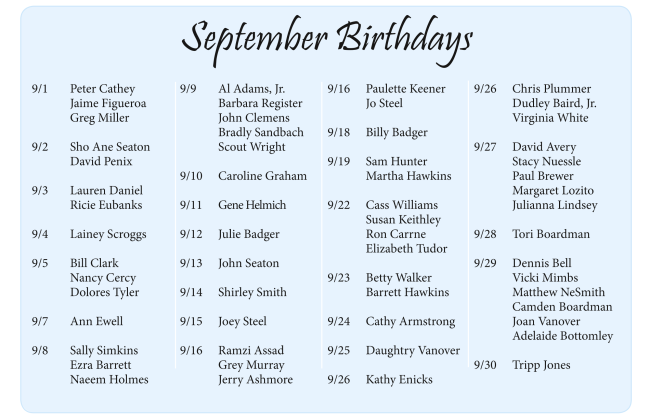
Help us celebrate our friends with September birthdays during Coffee and Conversation THIS Sunday, September 13, at 10:35 a.m. Members from the Saint Paul's choir have even prepared us a fun song that you don't want to miss!
We invite all those with a September birthday to download the Zoom Virtual Background below and wear your birthday sticker you received in the mail. For instructions on how to download a Zoom Virtual Background, click here.
Download the Virtual Background!
On your computer, double click on the image and then left click. Select "Save As". Make sure to save the picture somewhere you will be able to find it!
See Who's Celebrating!
Zoom Tips & Tricks
Since we have been fortunate enough to continue connecting online as a parish family through Zoom, we wanted to provide some helpful guidelines & tips.
You do not need to have a Zoom account to participate - Everyone can join!
You can access the link either through your smartphone, tablet, computer, or by calling in by phone
If you use your smartphone, you should download the Zoom app beforehand
You can enable both audio and video, or just audio if you prefer not to be seen
**You MUST enable audio to be able to hear and speak. If using a computer: "Join with computer Audio" may appear when you log in. If using cellphone/tablet: Select the option to Dial in using Wifi.
Use the mute feature when you are not talking—this will make the call better for everyone
If you have trouble connecting (some people can connect their video but not their audio), leave the meeting and try again