The IEP team determines the assistive technology (AT) needs of a child through an assessment process. A child's AT needs will change depending on their environment — at home, at school, or out in public. Here is a list of questions to consider asking as part of your child's IEP meeting.
Self-Care in the Time of Coronavirus
When you’re a parent, self-care often slips to the bottom of the list. But taking care of yourself isn’t a luxury. It’s essential. And during this difficult time, when children are home and stress is running high, it’s more important than ever. Here are five tips from that can help.
This accessible, online series provides short introductions to key concepts and skills needed to support students in becoming self-determined and engaging in their educational planning.
A New App for Speech and Communication
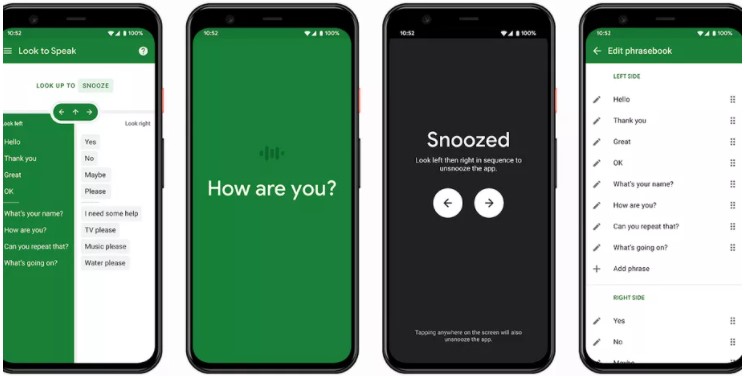
A new experimental application on Android aims to make communication easier for people with speech and motor impairments. The Look to Speak app lets users choose preselected phrases on their phone screen with their eyes. Read more about this new technology here.
"I appreciate you being there. It helped tremendously! We just never had any guidance in that area before."
~ Kansas parent
Opportunities to Support Families Together
Dillons will make a donation to Families Together every time you shop if you select us as your charity of choice. Visitwww.dillons.com/communityrewards.Choose Families Together Inc. ( LJ162) Select "Families Together Inc."
Amazon Smiles - Support Families Together, Inc. by shopping at www.smile.amazon.com. Amazon will donate 0.5% of the price of your eligible AmazonSmile purchases to Families Together, Inc.
Sign in with your Amazon ID and password. Under the heading "Select a Charity" choose "Pick your own Charitable Organization". In the box, type Families Together Inc. Be sure to choose Families Together Inc. - Wichita.
You can now shop AmazonSmiles from your mobile Amazon App!
Simply follow these instructions to turn on AmazonSmile and start generating donations.
Open the Amazon Shopping app on your device.
Go into the main menu of the Amazon Shopping app and tap into 'Settings'.
Tap 'AmazonSmile' and follow the on-screen instructions to complete the process.