|
Do you use AI tools a lot? Most of us do now. You can get much more accessibility help from them than most people get. Most teams ask AI to “write some HTML” or “describe this image.” Then they take whatever comes back. That leaves real value on the table. The trick is to be clear about what you want. (The request you type to an AI tool is called a prompt.) Here are a few prompts and patterns that work.
First, two quick terms:
- A screen reader is software that reads what is on a screen out loud, for people who are blind or have low vision.
- Alt text is a short written description of an image. A screen reader can read it out loud.
Getting accessible code
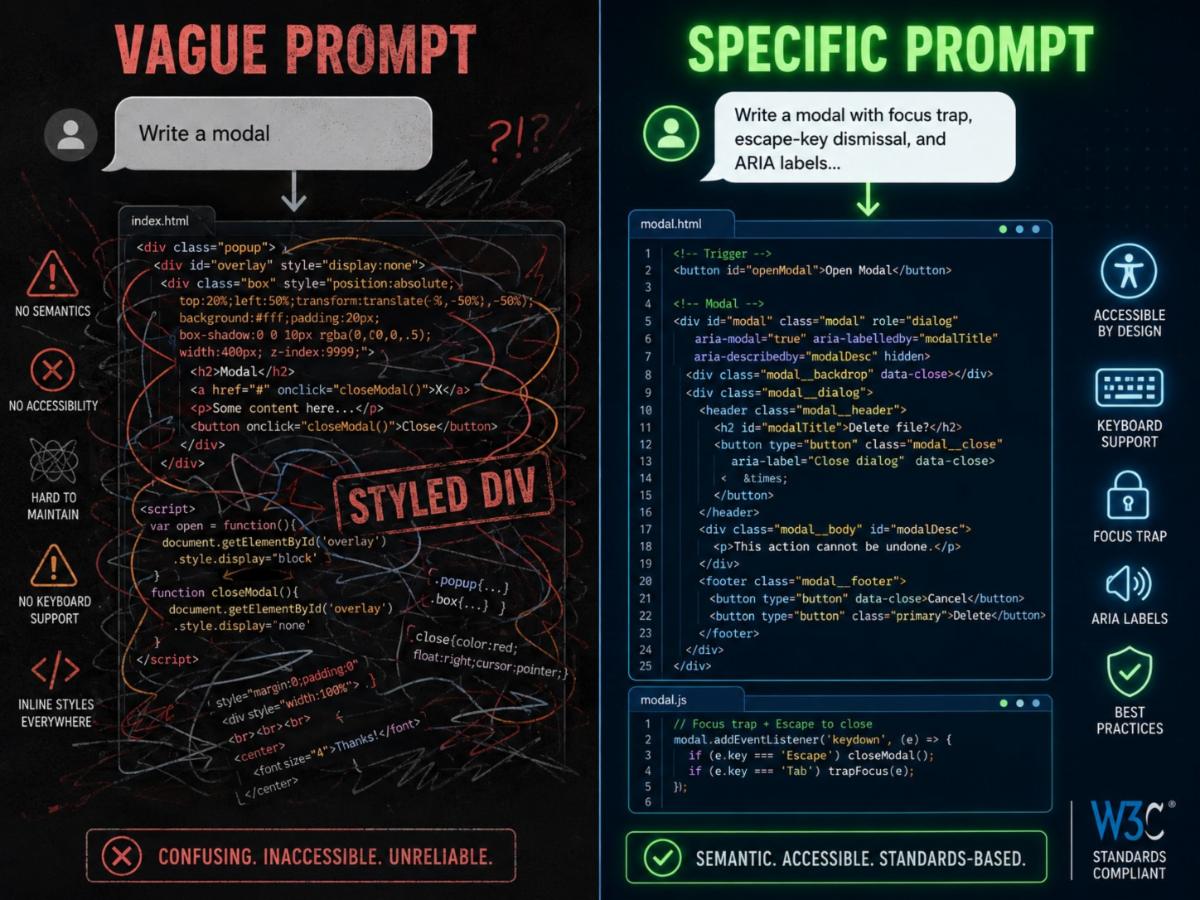
- Don’t ask: “Write a modal.” (A modal is a popup box that opens on top of a page.)
- Do ask: “Write a modal dialog. Keep the keyboard focus inside it while it is open. Let the Escape key close it. Add ARIA labels. Send focus back to the button that opened it when it closes.” (ARIA is code that tells screen readers about parts of a page.)
The first prompt gets you a plain box. The second gets you something a screen reader can use. You do not need to memorize the rules. Naming what you want is usually enough.
A few other useful asks:
- “Use semantic HTML. Real headings, buttons, and lists, not plain boxes dressed up to look like them.” (Semantic HTML means using the right code tag for each part of a page.)
- “Make this work with a keyboard. Show me the tab order.”
- "Add ARIA only where it is really needed. Use plain HTML first.”
Getting better alt text
- Don’t ask: “Write alt text for this image.”
- Do ask: “Write alt text for this image. Here is the context: it sits in a section about how sales grew this quarter. The alt text should say what the image tells the reader. Not just what it shows.”
Alt text is about purpose, not just looks. AI does not know your purpose unless you tell it. For images that are just decoration, you can ask: “Is this image just decoration, or does it carry real information? If it is decoration, suggest empty alt text. If it carries information, write alt text based on its purpose.”
Plain-language rewrites
- Don’t ask: “Make this simpler.”
- Do ask: “Rewrite this at a sixth-grade reading level. Use short sentences. Spell out any acronyms the first time you use them. Keep the meaning. Cut anything that does not help the reader.”
You can push further: “Now read your rewrite. Did any jargon slip through? Cut it.” (Jargon means special words that only experts use.)
Checking work you already have
AI can catch problems you missed. Try:
- “Check this HTML for accessibility problems. List them worst first.”
- “Read this page the way a screen reader would. What is confusing, missing, or out of order?”
- “Here is a list of alt text from our site. Flag any that tell the reader nothing useful.”
These work better than asking “Is this accessible?” That question tends to get a vague yes.
One pattern that works for almost anything
When you want a more careful answer, ask the AI to explain its thinking. Try: “Write accessible HTML. Then tell me which tags you chose and why.”
It is a small trick. But it makes the AI think through the structure. Without it, the AI often just copies the most common example, which is often not accessible.
You can also ask it to grade its own work: “Now look back at what you wrote. What could be more accessible?” You will be surprised how often it catches things the second time.
Here is the thread through all of this. AI will do as much accessibility work as you ask it to. Most people do not ask. If you do, the boring parts get a head start. That leaves you more brain space for the parts only you can do.
|