|
Supply Chain Management News
August 2025
| | |
Dear Campus Community,
Supply Chain Management (SCM) has important updates and upcoming events to share with you.
This month's features:
- UC Procurement AI
- BearBUY Enhancements
- BearBUY Bears that Buy Open Office Hours: Here to Make Purchasing BEARable
- Reminder: Tango Punchout Catalog Improvements
- Tariffs and International Shipping
If you have any questions, don't hesitate to contact the BearBUY Help Desk at 510-664-9000 (options 1, 2) or bearbuyhelp@berkeley.edu for immediate assistance.
Go Bears!
Thank you for your continued support,
Supply Chain Management
| | | |
We’re excited to share a new feature now available in BearBUY: the UC Procurement AI Assistant. Berkeley is the first UC campus to pilot this new tool, and we’re proud to be leading the way in exploring how technology can help streamline our work.
The "UC AI Assistant" can provide answers to questions about procurement and other related University Policies. This assistant is trained on UC policies and processes and can answer many common questions about what and how you can buy. This new AI tool reflects Berkeley’s ongoing commitment to making UC administrative processes more accessible and easier to navigate. By using AI thoughtfully, we aim to enhance efficiency, support informed decision-making, and continually improve the tools you rely on.
We encourage you to give it a try and share your experience. This tool is in initial release, so we encourage you to try it out and submit your feedback directly through the assistant. Although this data is not shared outside of UC for training purposes, please do not include personal identifying information for yourself or anyone else in queries (P1-2 data only).
| | |
We're excited to announce upcoming enhancements to BearBUY designed to make your purchasing experience easier and more intuitive.
These improvements include in-app guidance with walk-throughs and hover-over text, providing you with on-demand help to simplify navigation and streamline your purchasing process. You will also see pop-up messages and notifications to keep you informed about system changes and new features.
To get you started, the first two new guides available this fall are:
- How to Set Your Defaults in BearBUY
- How to Use the Non-Catalog Items Form
Additional guides and helpful resources will be added continuously throughout the fall to further enhance your experience.
| | |
Bears that Buy Open Office Hours:
Here to Make Purchasing BEARable
| | |
Please join us for our next remote office hour tomorrow, Tuesday, August 19, 2025, from 10:00 a.m. to 10:50 a.m. We will be giving a demo of the two new BearBUY guides we have created to enhance your experience and provide in-app help.
We encourage you to submit topics of discussion and/or questions in advance using this Google form.
Individuals from the Procurement, BearBUY Solutions, Account Payable, and BRS teams will be present to address your questions and provide information about purchasing at the University of California, Berkeley. The Open Office Hours will be held every third Tuesday of the month from 10:00 to 10:50 a.m.
Instructions and Zoom URL:
| | | | Tango Punchout Catalog Improvements | | |
In February 2025, we launched the digital reward links with Tango, a BHN company, that may be used for either allowable gift and recognition programs or research participation incentives (must be able to provide participant names and email addresses).
Research Recipients:
We received feedback from the campus community indicating that additional privacy protection was needed for research recipients in BearBUY, so we updated the system to prevent recipient names from being sent back from Tango to BearBUY. Names and email addresses are still required in Tango for reward delivery and financial reporting; however, this information is only accessible to the department shopper and the program management team for compliance purposes.
Campaign Field:
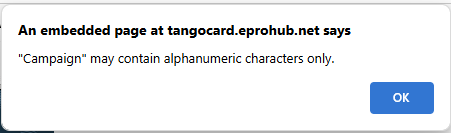
We collaborated with Tango to resolve issues with order failures caused by invalid symbols and special characters in the Campaign field. Now, shoppers will see the following live warning in the Tango punchout if they enter non-alphanumeric characters.
| | |
As a reminder, the campaign field is designated for internal tracking, including details like the department name and business purpose, such as Supply Chain Employee Recognition or BearBUY Survey Response Incentives. This field serves as an internal note and is NOT shared with the recipient.
To confirm that your digital gift card order through Tango has been processed, check if a voucher has been created for your Tango purchase order. The presence of a voucher means the recipient has been sent their digital reward link. If a voucher has not been created within a few days of the PO being issued, please email us at bearbuyhelp@berkeley.edu and include the PO number in your message.
Please refer to the Tango Gift Cards Job Aid to learn how to navigate the Tango site and how to add custom messaging to the Tango Rewards links.
| | Tariffs and International Shipping | | |
We encourage you to use our contracted suppliers primarily, as UC Berkeley and the UC System are working to minimize the tariff increases. The most effective action shoppers can take is to prioritize ordering through catalog suppliers within BearBUY and use UC system-wide contracted suppliers whenever possible, since they are the best options for procuring most goods. UC is negotiating with these suppliers to minimize tariff impacts on prices. Catalog orders do not require users to add tariff lines to the quotes. Tariffs, if applicable, will be listed as ‘misc’ on the invoice fees field or bundled into line item prices.
If using a non-contracted supplier, please work with your supplier to determine if there will be any tariffs and get a quote for the tariff charge before requesting a PO. Tariffs for non-catalog spend must be added as a separate line item field using the non-catalog form, with the taxable flag set to a green check mark. The Office of the President has advised UC Berkeley that tariffs are subject to taxation within the state of California.
Additionally, we strongly advise campus shoppers who are placing orders from foreign suppliers to contact Berkeley’s official customs broker, American Cargoservice, Inc., before placing an order to request quotes or get advice on tariff rates. Call or email American Cargo at 858-565-4125, UC@ACSSAN.COM. American Cargo can work with you directly to create the required customs documentation and apply for any applicable and available discounts or waivers.
For more information, approved tariff rate changes for contracted suppliers will be listed on BearBUY Dashboards under “News”. Or visit our website for International Shipping.
| | |
Order Status
If you need assistance with determining the status of your order in BearBUY, visit the How to Find the Status of Your Order page on the SCM website.
Please note that your SCM assigned Buyer will not receive the requisition until it has been approved by the department Org Node approver.
| | |
Who is My Department's Assigned Buyer?
If you are unsure of how to start your purchasing transaction, contact your Buyer for assistance by using your Org Node and Department Name to find your assigned Buyer located in this matrix.
| | |
Contracts in BearBUY
If you need help searching for a contract and applying it to your cart in BearBUY, please view the Searching for Contracts and Applying a Contract to Your Cart in BearBUY job aid.
| |
Splitting Chart of Accounts (COA) At Header Level Vs. Line Level
Splitting COA at the Header Level will apply the split to all lines on the PO.
Splitting COA by Line Level allows you to customize COA percentage allocated to that specific line.
BEST PRACTICE for Subawards
-
Line 2 should always be set at the Header Level Chartstring using Account Code 57810.
-
Line 1 should be overridden at the Line Level Chartstring using Account Code 57811.
| |
SCM Service Level Turnaround Times
Urgent requests will be handled on a first-in-first-out basis. Standard turnaround time (Service Level Agreements) for purchase and contract types are available on our Service Level web page.
Please be aware that contract negotiations with suppliers may cause delays.
| |
Ship To Address vs Final Destination
A Ship To Address is the address that is sent to the supplier. When the supplier is delivering items, they will deliver to the ship to address (which is also visible on the PO they receive).
A Final Destination code is an address only associated to UC Berkeley. Final destination code are used when departments have a central receiving location. The ship to address is the central receiving facility. When the packages are received, the department central receiver looks the PO up in BearBUY and looks for the final destination code. The final destination code is then the office/room number of where shopper needs the items. Final destination codes are never sent to the supplier and are NOT reflected anywhere on the PO.
| |
Below are links to the BearBUY homepage, instructional aids, training courses, and information on how to create Service Now tickets for BearBUY related issues.
| | |
Whether you are an experienced or a new BearBUY shopper, it is always best practice to take the BearBUY: Basics for Shoppers training if you haven't already.
To take this ESSENTIAL training, please click on this course #: BEESS950-Online.
| | | | |