|
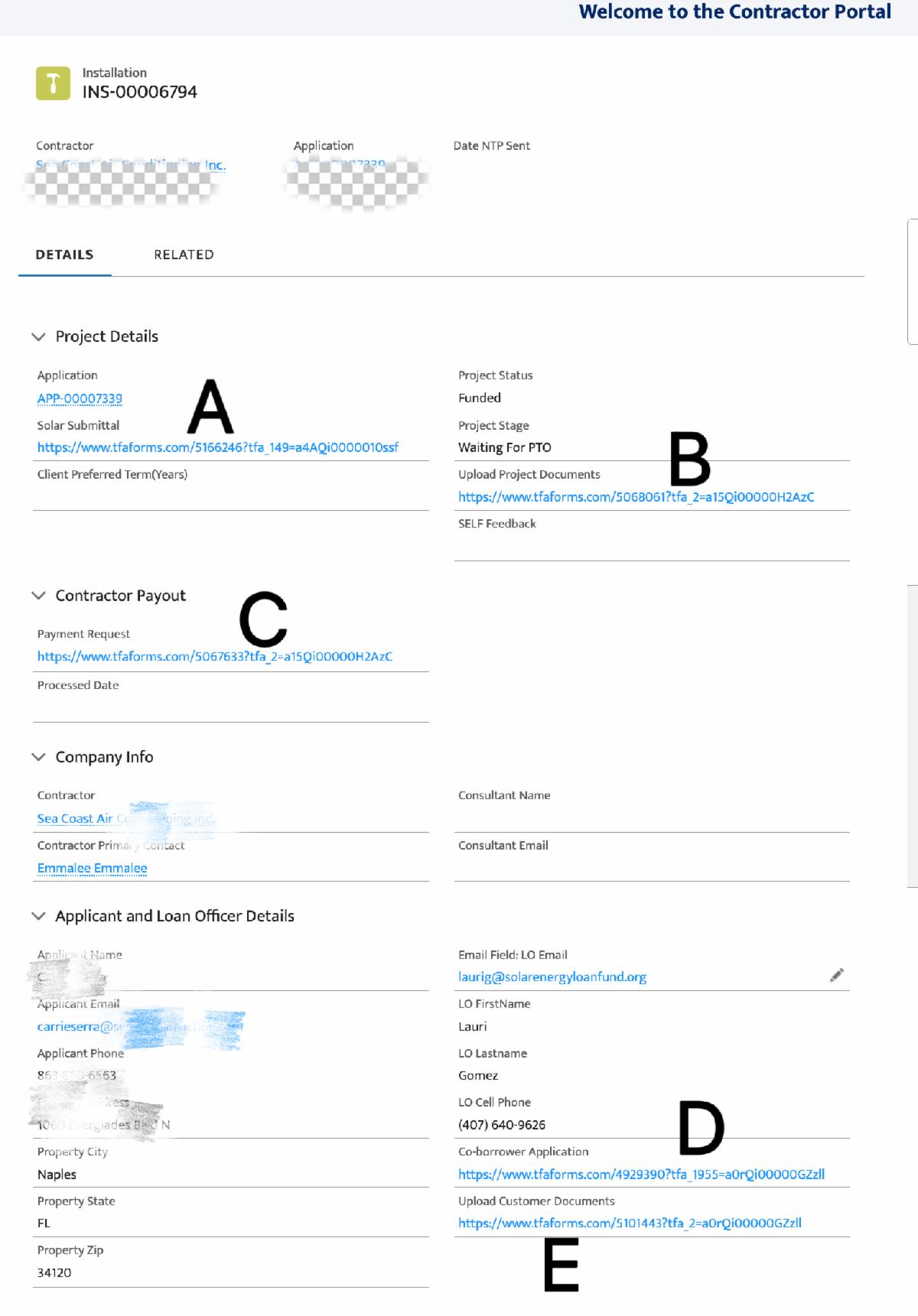
A – Solar Submittal Link For solar projects only. Use this link to complete the Solar Project Intake Form, including:
- Solar project details
- Solar system information
- Pricing details
- Additional required solar information
B – Upload Project Documents Use this link to upload your quote and related project documents.
C – Payment Request Once you complete the project, use this link to complete the contractor installation report and begin the payment process. You must use this link to get paid.
D – Co-Borrower Application If your customer needs a co-borrower, this link directs them to their co-borrower application. Generally, you will not need to share this link, but occasionally a customer will delete the email that Underwriting sent them.
E – Upload Customer Documents Use this link to upload customer documents such as:
- Income documents
- Driver's License
- Electric Bill
- Other documents Underwriting requests
Please note: emails to the customer about the application also include these links. The portal simply makes it easier to locate, use, and reference them while following up with customers.
2. What Do the Project Stages Mean?
The project stage helps you track where the customer is in the loan process and understand the next steps.
Some common stages include:
Application Submitted – Application received, under review, and needs documents.
Co-Applicant Needed – The customer needs a co-borrower to continue the review process.
Final Review – Underwriting finalizes the loan terms.
Approved – Underwriting approves the loan and sends loan documents for signature.
NTP Granted – Underwriting issues the Notice to Proceed, and work can begin.
Funds Requested – Confirms you submitted a payment request.
Waiting for PTO – Solar projects only; the project still needs PTO documentation.
Project Complete – The project is complete and fully funded.
Decision Finalized – The application cannot move forward.
Please stay in close contact with the assigned loan officer during each stage to help keep projects moving smoothly.
3. Who Is My Point of Contact?
Your main point of contact is the assigned Loan Officer listed inside the portal. Find that information on the Project Details tab under the "Applicant and Loan Officer Details" section of the project page.
For more information, please consult the Contractor User Guide.
If you would like to open a Contractor Portal account, please contact: Lulu Wang – lwang@solarenergyloanfund.org
|