|
Computer Shortcuts/Tips
(on using a Keyboard)
Shortcuts using the keyboard on your computer can make your life easier.
This particular shortcut is but one simple example.
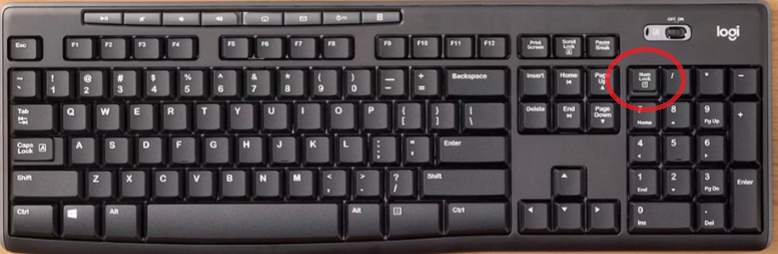
If you have a keyboard with the numbers section on the right side of the keyboard (as well as along one row on the top of the entire keyboard) then this tip is for you.
If you put on "Number Lock" that allows you to use the "end", "home", "page down", and "page up" features. Quite helpful to get to the end of a line of text (or beginning).
The up/down/sideways arrows can get tedious. If you put on the Num lock (numbers lock) it will make the numerical pad on the right hand side of a keyboard non-operational.
However, if you use the numerical pad on the right side (like an accountant does) - then this isn't necessarily helpful because you won't be able to use the numerical pad while the Num Lock is active.
Also, some keyboards don't have the numerical pad on the right side at all (and in that type of keyboard option, all the number keys are across the top of the keyboards).
We will share other "tips and hints" relating to technology and your computer in a future newsletter.
Any questions? Call 508-370-8080.
|