PUBLIC SERVICE ANNOUNCEMENT

BEWARE USING USPO MAILBOXES

Mailbox Fishing & Check Washing


Whether you’re sending holiday cards or gifts, or just mailing your monthly rent check, you may want to avoid using those large, blue collection boxes—at least for the next few months, United States Postal Service (USPS) officials have advised.


Not only have reports of mail fraud and theft been on the rise year-round, but crime also tends to peak during the holiday season—and those blue mailboxes are becoming more frequent targets. Here’s what to know.


Why you should avoid blue mailboxes during the holiday season


According to USPS officials, “groups of criminals across the country are using the internet and social media to coordinate strategic targeting of post office collection boxes,” AL.com reports. In other words, people you probably don’t want having access to your mail.


If you do opt to use the blue collection boxes, be sure to do so before the last collection of the day, so your mail isn’t sitting in there overnight. (The time should be listed on the front of the box.) This is especially true on Saturday, as the mail would be in there overnight, plus all of Sunday.


How to safely send and receive mail this holiday season


  1. “Take it directly into the post office,” Shade added. “And obviously, it would have to be during regular business hours, but that’s the most secure way to protect your mail.”
  2. Never send cash in the mail. If it’s stolen, consider it gone.
  3. If you expect to receive something of value in the mail, let the sender know when (and if) you’ve received it. Similarly, if you’re sending someone something valuable, (partially) ruin the surprise and let them know that a package is on its way.
  4. Sign up for USPS Informed Delivery, so you know when your mail is arriving.
  5. Some recommend handing your mail to a postal carrier directly, but recently reports have indicated that this isn't entirely safe. (editor's comment)


Thanx to Lifehacker.com


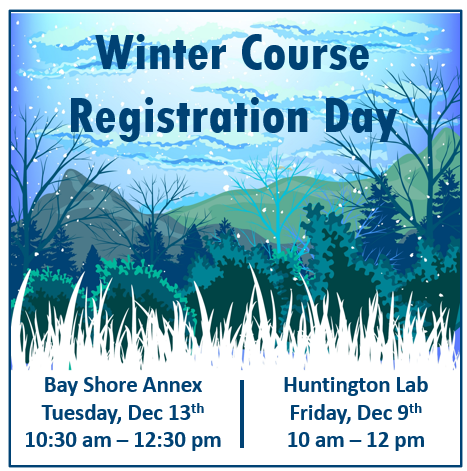
Join us on Registration Day


Bay Shore Dec 13 from 10:30 AM to 12:30 PM

Huntington Dec 9 from 10 AM to Noon


Register in-person &

learn more about SeniorNet and our Courses.


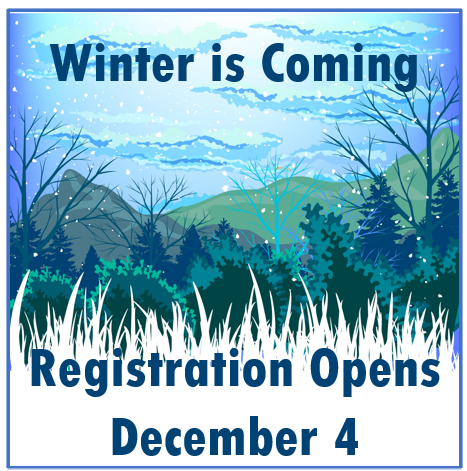
On-line registration opens Dec 4th

and continues until classes are filled.

HUNTINGTON LAB CLASSES

FSL SeniorNet at Family Service League, Olsten Family Center

790 Park Avenue, Huntington, NY 11743 1-631-470-6757

Private Instruction also available at this location.

We're busy preparing our Winter schedule which will be posted on December 4th to our website.

BAY SHORE ANNEX

FSL SeniorNet at Family Service League, South Shore Iovino Family Center

1444 Fifth Avenue, Bay Shore, NY 11706 1-631-647-3100

Private Instruction also available at this location.

We're busy preparing our Winter schedule which will be posted on December 4th to our website.

UPCOMING FREE WEBINARS

Webinars are held over Zoom,

the free video chat program.

Buying a New Cell Phone –

Thursday, December 8 at 2 PM

Register Now!

Buying a New TV – Wednesday, December 14 at 2 PM

Registration opens December 4 at 5 AM

January webinar schedule will be posted on December 1st to our website.

PRIVATE INSTRUCTION REQUEST FORM
IMPORTANT STUFF TO KNOW!

✨COVID PRECAUTIONS✨

The COVID situation is very fluid, and restrictions are subject to change.


Huntington Lab and Bay Shore Annex

FSL Facilities:


All students, as well as FSL SeniorNet volunteers, attending in-person classes must be vaccinated and boosted against COVID. Please bring documentation of such to the first class.


Family Service League is a healthcare provider, therefore everyone in the building must wear a mask and social distancing will also be enforced.


Blue Point Cottage:


All students, as well as FSL SeniorNet volunteers, attending in-person classes must be vaccinated and boosted against COVID. Please bring documentation of such to the first class.


Masking is optional and social distancing will be enforced. 

-------------------------------

ALL CLASSES:

Registration is open until 10 AM sharp one day before the start of a class.

To participate in our classes, register and pay online with a credit or debit card. If you prefer to pay by check or cash, contact the office at 631-470-6757, or register in person on Registration Days at Huntington, Bay Shore & Blue Point.


ONLINE CLASSES:

To participate in our online courses, you need to download Zoom on your computing device*. The Zoom link will be included in the confirmation sent by ezregister.com. The teacher will also send the Zoom link and manual before the class.


WEBINARS ARE ONLINE:

Registration is open until one hour prior to the webinar's start time.

The Zoom link will be included in the confirmation sent by ezregister.com. The teacher will also send the Zoom link and handout before the webinar.


SEMINARS ARE IN-PERSON & LIBRARY HOSTED:

Registration is managed by our host library. Their registration link will be provided on their website, our email blasts and our webpage.


SOLD OUT:

Please call 631-470-6757 or send an email to fslseniornet@fsl-li.org

to receive an email with information as to when the course (webinar, seminar or class) is offered again.

Please include the name of the course you are interested in.


COMPUTING DEVICES:

*Computing devices include Windows and Mac Desktops & Laptops,

iPads, and Android Tablets.

It is NOT recommended to Zoom using your smartphone

due to the smaller screen size.


ZOOM HELP IS AVAILABLE:

 If you need instructions on downloading and using Zoom, click here:

HOW TO JOIN A ZOOM CHAT. 

REGISTRATION PROCESS
SeniorNet Community Programs
COMPUTER DONATION / REFURBISHMENT PROGRAM
TECH CONNECT LIBRARY
FSL SENIORNET WEBSITE
FAMILY SERVICE LEAGUE WEBSITE