|
One Cool Tip Newsletter
May 23, 2025
| Your daily dose of tech-savvy brilliance! | |
😀Hello Rodger, Happy Friday, Cool Tipper!
Get ready to streamline your digital life with simple, actionable tips delivered straight to your inbox.
Today's Cool Tip Theme: Friday Funday with Internet Road Trip
IN THIS ISSUE
- 🚨 Fake Social Security Messages!
- 🚀 Exciting New Google Features Unveiled!
- 🧠 Let AI Help with Your Holiday Planning.
- 📸 Cool ChatGPT AI Prompt.
- 🗺️ Internet Roadtrip.
- 🌍 Explore the World.
- 🤔 Escape the Ordinary?
- 🚶♀️ Take a Random Trip.
New here? Subscribe to the One Cool Tip Newsletter for daily updates. It's FREE!
-
😂 Laugh with Us! Enjoy our Tech Joke of the Day, Haiku and Cool Tip Comics.
-
🌐 Stay Informed! Check out ICYMI, and our One Cool Tip Video.
🔔 Is your email provider (Gmail, Yahoo, Outlook...) not delivering the newsletter?
Check the Junk folder - Move the newsletter to your Inbox. And reply to this email with a “Hey, Rodger” or “I got it.” That tells your mail service you want this newsletter!
Today's Tech Trivia
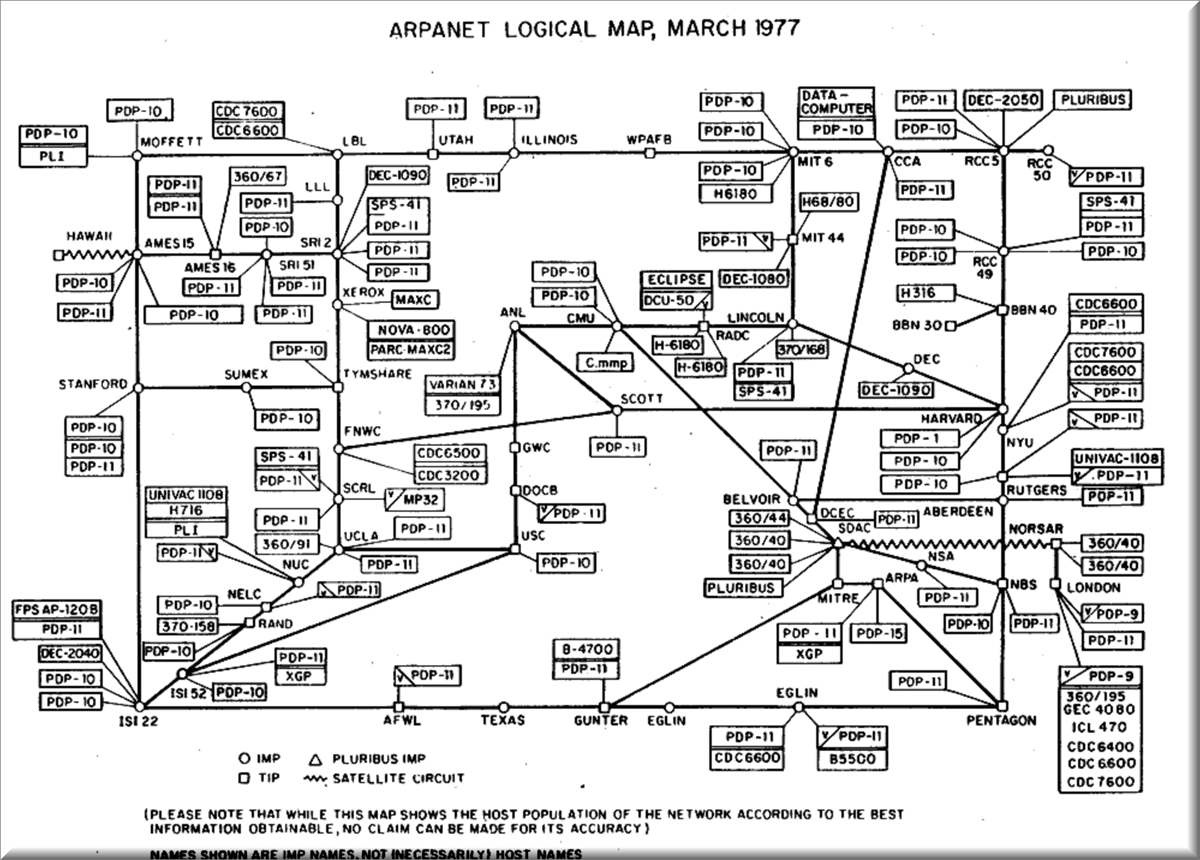
What was the original name of the internet, developed by the U.S. Department of Defense's Advanced Research Projects Agency (ARPA)?
A) World Wide Web
B) NSFNET
C) ARPANET
D) Interweb
Answer at the end of this newsletter.
| | |
3️⃣
If you enjoy the One Cool Tip newsletter, please forward this newsletter to THREE friends or colleagues or share it on social media using the links below.
Share this One Cool Tip Newsletter!
| |
🚨 Beware of Fake Social Security Messages! 🚨
Scammers are impersonating the Social Security Administration (SSA), sending fake calls, emails, and texts to steal personal information.
They may threaten legal action, claim your Social Security number is suspended, or demand immediate payment via gift cards or wire transfers.
How to Stay Safe:
✅ Ignore suspicious messages: SSA will never threaten or demand payment.
✅ Verify directly: Contact SSA through their official website, not links in messages.
✅ Report scams: Visit the SSA Scam Awareness page to report fraudulent activity.
Stay alert and protect your personal information! 🔒
And in Other News...
Exciting New Features announced this week at Google's developer conference!
Google just unveiled powerful AI upgrades at I/O 2025, including Gemini Live, which lets you interact with AI using your camera and screen, and AI Mode in Search, transforming Google Search into a fully AI-powered experience.
🔹 What’s New?
-
Gemini Live: AI can now see what you see and assist in real time.
-
AI Mode in Search: Get expert-level reports with citations instead of basic search results.
-
Agent Mode: AI can book tickets, make reservations, and complete tasks for you.
-
Imagen 4: A new AI image generator with better textures and photorealism.
Look for more Cool Tips soon on these exciting AI updates!
- 🚀 Let AI Help with Your Holiday Planning
Let's get going this Memorial Day weekend with AI!
Copy/Paste this AI-powered prompt. Use with your favorite AI assistant: Gemini, Copilot, Grok, DuckAI, Meta and ChatGPT.
"Help me plan my Memorial Day weekend. I want suggestions for fun activities, local events, family-friendly options, and affordable travel or staycation ideas. Include weather-based recommendations, grilling recipes, and tips for avoiding traffic."
| | |
🖼️ Cool ChatGPT AI Prompt of the Day: Transform Your Photos!
- Upload a portrait photo.
- Enter this prompt:
"Here’s a photo of me. Make it look like I’m standing on a mountain peak with dragons flying in the background—Game of Thrones style."
| | | |
Internet Roadtrip: The Crowd-Powered Virtual Journey Taking Over Google Street View
Have You Ever Been in a Car with 900 Backseat Drivers?
Imagine cruising through the scenic routes of America, not behind the wheel, but as part of a massive online community deciding every turn, honk, and radio station.
Welcome to Internet Roadtrip - a digital experiment where the journey is as unpredictable as the collective whims of its participants.
What Is Internet Roadtrip?
Launched on May 6, 2025, by developer Neal Agarwal, Internet Roadtrip is a web-based social experiment that transforms Google Street View into a communal driving experience.
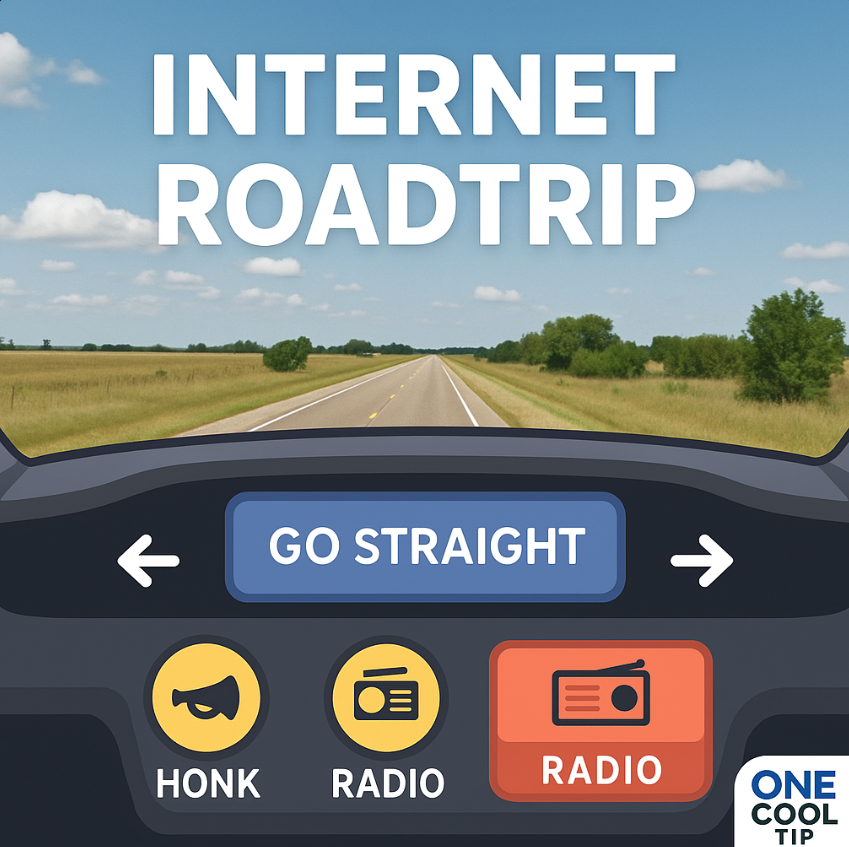
Every 10 seconds, users vote on the car's next move—left, right, straight, honk the horn, or change the radio station. The direction with the most votes dictates the car's path, creating a journey steered entirely by the crowd.
The virtual car moves at approximately 3 mph, and its route is displayed on a mini-map, allowing participants to see the journey's progression.
The experience is enhanced with live radio streams from the car's current location, adding an authentic touch to the virtual road trip.
What You'll Gain
- Discover a unique, collaborative way to explore the world virtually.
- Learn how to participate in a real-time, crowd-driven navigation experience.
- Understand the potential applications of collective decision-making in digital platforms.
Step-by-Step Instructions
Here's how to do it.
-
Visit Internet Roadtrip, neal.fun/internet-roadtrip/.
-
Observe the current location and direction of the virtual car.
-
Participate by voting on the car's next move or interacting with the horn and radio features.
- Choose a direction or action: Every 10 seconds, a voting panel appears with multiple options:
- 🚗 Turn Left
- 🚗 Go Straight
- 🚗 Turn Right
- 📻 Change the Radio
- 📯 Honk the Horn
- Simply click the button that corresponds to your preferred action. Your vote is registered instantly.
- After the timer expires, the system tallies all votes and takes the most popular action. The car then updates its direction or behavior accordingly.
- The process loops continuously, allowing you to keep participating.
Platform Compatibility:
-
Web/Desktop: Fully supported on modern browsers.
-
iOS/Android: Accessible through mobile browsers; ensure JavaScript is enabled for optimal experience.
Pros and Cons
Pros:
-
Community Engagement: Fosters a sense of global community through shared decision-making.
-
Educational Potential: Offers a unique way to explore geography and cultural landmarks.
-
Entertainment Value: Unpredictable routes and real-time interaction keep the experience fresh and engaging.
Cons:
-
Limited Control: Individual influence is minimal; the majority dictates the journey.
-
Potential for Chaos: Without coordination, the route can become erratic or repetitive.
-
Dependence on Street View Coverage: The journey is confined to areas covered by Google Street View, limiting exploration in some regions.
Feature Access
Internet Roadtrip is freely accessible to anyone with an internet connection and a modern web browser.
No account or download is necessary.
Key Takeaways
- Internet Roadtrip transforms passive browsing into an active, communal experience.
- It exemplifies the potential of collective decision-making in digital spaces.
- The platform serves as both an educational tool and a source of entertainment.
Try It Yourself
Ready to embark on a journey steered by the collective?
Visit Internet Roadtrip and become part of this unique digital expedition.
READ MORE
Read the Full Cool Tip
| | |
Help support One Cool Tip. Use this Amazon link when you shop online.
Look at these Cool Products:
|
-
📷 Insta360 X4 360 Camera: Capture your own roadtrips like Street View with immersive 360° footage. 👉 Check it out on Amazon $485: Insta360 X4
-
🎧 Sony WH-1000XM5 Noise-Canceling Headphones: Perfect for tuning into digital roadtrip radio while working or relaxing. 👉 Check it out on Amazon: $298 Sony WH-1000XM5
-
🖥️ LG UltraWide 34-Inch Monitor: Get a panoramic view of your virtual travels. 👉 Check it out on Amazon: $299.06 LG UltraWide
| | |
🆒Tell Me More
-
Internet Roadtrip lets thousands of users vote on the next move every 10 seconds.
- It streams location-based radio stations as you drive virtually.
- Users can honk, change music, or take the wheel democratically.
- The virtual car moves at 3 mph and is always live.
- There's a vibrant community on Discord where users coordinate, chat, and meme.
⏩Quick Tips
-
🚗 Vote Every 10 Seconds: Click on the pop-up choice to guide the car—straight, left, right, honk, or radio. Just visit the page and wait for the vote buttons to appear.
-
📻 Change the Station: Users can vote to switch local radio stations tied to the car's location. Click the “radio” button during the voting cycle.
-
💬 Join the Community: Connect on Discord to strategize or laugh along with others. The Discord link is embedded at the bottom of the site.
-
🗺️ Follow the Route: A live minimap shows where you’ve traveled across America. Watch the map overlay in the corner as the journey unfolds.
| | |
✅ More Must-Read Tech Tips
| | |
Have you ever wanted to explore the world without leaving your home? Are you curious about what your hometown looks like from space?
Here's a Cool Tip: check out Google Earth on the Web.
Besides the Google Earth app (iPhone, Android, Pro-PC, Mac, Linux), Google Earth on the Web gives users easy access to most of the popular Google Earth features.
Here's how to use Google Earth on the Web:
-
Go to https://earth.google.com/web/
- Click and drag the globe to spin it. Hold Shift at the same time to tilt.
- Click Ctrl key to go to first-person perspective.
- Scroll your mouse wheel to zoom in and out (alternatively, use the plus and minus icons in the bottom-right.)
- As you get closer to the Earth, you’ll see the names of countries appear.
- Google Earth on the Web
Google Earth Voyager
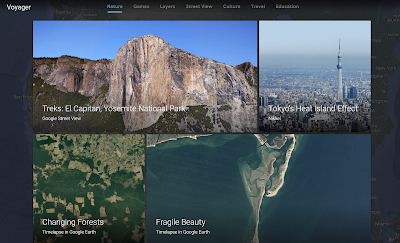
Google Earth’s Voyager is a showcase of interactive guided tours, quizzes, and layers that aim to help educate everyone about the world, locations near and far.
Here’s how to use it:
-
Open Voyager on Google Earth.
- Try selecting great Treks like El Capitan at Yosemite, or Tokyo's Heat Island Effect or Changing Forests or Fragile Beauty.
Google Earth Web Voyager
- View 3-D high-res images of the world’s most toured places, such as the Eiffel Tower in France or the Parthenon in Greece or the Gateway Arch in St. Louis Missouri.
Discover more HERE.
| |
🤔 Have You Ever Wondered How to Escape the Ordinary?
Have you ever wished you could teleport to some random corner of the globe?
Do you get that feeling of wandering a distant city without leaving your chair?
Here's a Cool Tip. Visit Random Street View, your portal to unexpected sights.
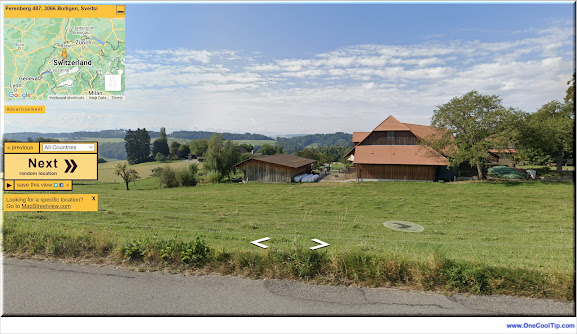
RandomStreetView taps into the vast network of Google Street View imagery.
Each click of the "Take Me Somewhere Random" button whisks you off to a new, unpredictable location on the planet.
From bustling urban centers to remote landscapes, every view offers a glimpse into different cultures and environments.
Here's how to use it.
-
Navigate to randomstreetview.com .
-
Explore! Google Street View's familiar controls let you 'walk' around your random destination.
-
Click "Next Random Location" to go to a new street view.
-
Want to explore a specific region? Use the map to focus on a continent or country.
-
Found an intriguing location? Share it with friends or save it for later.
Fuel your wanderlust when time or budget restrict real-world adventures.
Random Street View is a testament to the reach of technology.
It's a tool for the curious, turning your computer screen into a window onto the world.
Whether you crave inspiration, education, or just a dash of surprise, let it guide you on your next virtual adventure.
Find more HERE.
| |
🙋♂️ Here's How to Take a Random Trip with MapCrunch
Waste a few minutes today visiting a random place in the world with MapCrunch.www.mapcrunch.com/
Just press the Go button and you'll be taken to a new random street view somewhere in the world.
MapCrunch uses Google's Street View photos from around the world to let you visit a random location.
You can use the arrows to explore your destination.
So enjoy your day and happy travelling!
Learn more HERE.
| | |
❓Did you share this newsletter with three friends yet?
⌨️Today's Cool Keyboard Shortcuts
-
🪟 Windows: Ctrl + Tab: Switch browser tabs during the journey
-
🍎 Mac: Cmd + Shift + R: Refresh and re-sync your view
-
🖱️ Universal: F11: Enter full-screen mode for immersive exploration
✍️Today's Haiku
Crowds drive with one vote,
Digital wheels turn gently—
Google maps the dream.
🔎 Do you have a Cool Tip or tech question? Email us at onecooltip.com@gmail.com.
😜 Tech Joke of the Day 😅
Why don’t Internet Roadtrip drivers ever get lost?
Because a hundred people always think they know where they’re going.
| |
| 🤔 What would YOU do on a virtual road trip? | | | |
Did You See These Cool Tips This Week?
| | | | Google’s NotebookLM Goes Mobile: Your AI Research Assistant, Now in Your Pocket | The long-awaited NotebookLM mobile app is here, bringing Google’s AI-powered research and note-taking tool to Android and iOS. | | | | How to Check Screen Time on Windows 11 | Want to track your screen time on Windows 11? Whether you're monitoring productivity, managing digital habits, or simply curious about your device usage, Windows 11 provides built-in tools to check your screen-on time. This Cool Tip guides you through the process step by step. | |
ICYMI - In Case You Missed It ...
| | | | How to Master Symbols in Windows 11 | Unlock the full potential of your Windows 11 keyboard with this expert guide to entering symbols. Learn how to access hidden characters, use shortcuts, and boost your productivity. | | When democracy honks, nobody sleeps. 🥴📢 | | |
Trivia Answer: C) ARPANET
The internet as we know it today evolved from the ARPANET (Advanced Research Projects Agency Network).
It was initially created in the late 1960s to allow computers at different universities and research institutions to communicate with each other, primarily for sharing resources and research.
This groundbreaking project laid the foundation for the global network we all use today.
----------
Tomorrow's Cool Tip is waiting to amaze you.
Until then, go forth and conquer the tech world with your newfound knowledge!
And be sure to visit www.OneCoolTip.com for Cool Tech Tips for a Cooler Life!
Enjoy!
Rodger
Chief Cool Tipper
onecooltip.com@gmail.com
| |
| What do you think of today's OneCoolTip newsletter? | | | |
Please Share the One Cool Tip Newsletter!
You asked for it. You got it. There is now a One Cool Tip Newsletter archive. Did you delete a newsletter and want to read it again? Check it out HERE.
Want to help One Cool Tip grow? Please forward this email using the link above. And if you see an OCT social media post, please LIKE, COMMENT and SHARE!
Have you subscribed to the One Cool Tip YouTube channel? Subscribe HERE.
| | Connect with One Cool Tip!! | | |
|
As an Amazon Associate, One Cool Tip may earn a small commission from qualifying purchases.
Our media content is intended solely for informational purposes only. Please do not construe anything here as legal, tax, investment, financial, marital or other advice.
Copyright © 2025 | www.OneCoolTip.com | All Rights Reserved
|
| | | |