Mobile Device Keyboard Tips
(Android & iPhone)
Gboard is the keyboard from Google for your Android or iPhone, packed with features to make typing effortless.

On top of GIFs, emoji search, and Glide Typing, the power of Google is at your fingertips with Google Search built in.

If your phone doesn’t have it, it's a free download.
Download Gboard from Google’s Play Store or Apple's App Store.

We will highlight a few features, and to learn more click here .
Accent marks
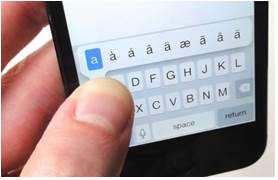
You can access a generous portion of accent marks—acute, grave, circumflex, numbers and otherwise—by tapping and holding a letter key (like “a”).

Just hold down a letter on the keyboard and you get many options to choose.

A note for iPhone users - this works on the native Apple keyboard too.
[Native App means that it came with your iPhone or iPad]
Caps Lock
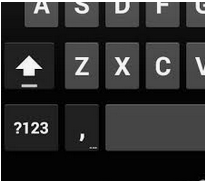
Double tap the Shift key and your keyboard will be ‘locked’ for all caps.

Tap the Shift key again when done, to return it to standard mode.

A note for iPhone users - this works on the native Apple keyboard too.
Editing Text

Many times when you want to edit a word in a text, it’s hard to position the cursor exactly where you want it.

A little trick: tap anywhere on the line that has the word you want to edit, press and hold your finger on the space bar for 2 seconds, without raising your finger slide your finger to the right or left. This will more the cursor to the position you want with ease.

A note for iPhone users - this works on the native Apple keyboard too.
Talk to Your Phone
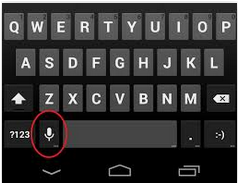
Android phones will take dictation whenever you’re not in the mood to type. Just tap the little microphone icon on the keyboard.

Your phone will then transcribe what you say. Don’t forget to tap on the microphone again when finished, so the phone will know when to stop transcribing.

Hint - you have to say the punctuation.

A note for Apple users - Press the microphone icon in the native keyboard to dictate, even without enabling Siri.
Enable in Settings > General > Keyboard > Enable Dictation.
Quick Access to Punctuation Marks
Not many keyboards give the comfort of selecting punctuation marks on the go.
It often involves the tedious three-step process which is to tap on the 123 key, select the punctuation and then tap again to get the alphabet keyboard.

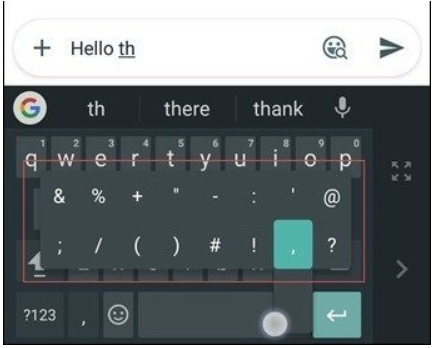
With Gboard, one can quickly access the special keyboard as follows:

Hold down the period key (right of the space bar) and you get the punctuation marks right there at your fingertips.
Double Space Acts as Period
Most of the time I end up inserting a space when all I wanted was a period. Sigh, phones with smaller displays!

Gboard automatically inserts a period and space in your sentence when you double-tap on the space bar.

This is a very convenient feature as it saves you from the hassle of pressing the wrong key.

A note for iPhone users - this works on the native Apple keyboard too.
Enable in Settings > General > Keyboard > Enable "." Shortcut
Swipe to Type
Lifting your finger to type each letter is so yesterday! Try swiping.

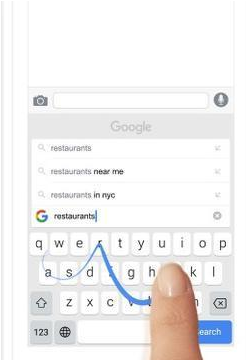
Rather than tapping each individual key when typing a word, swipe-to-type keyboards let you slide your fingertip from one key to the next.

As your finger loops around the keys, your phone predicts the work you’re trying to type swipe.

It takes a little practice, but once you master it you’ll never go back to the ‘hunt and peck’ method.

A note for iPhone users - this works on the native Apple keyboard too.
Enable in Settings > General > Keyboard > Enable Slide to Type

see our previous blast describing this feature Keyboard Tips
Type Fractions
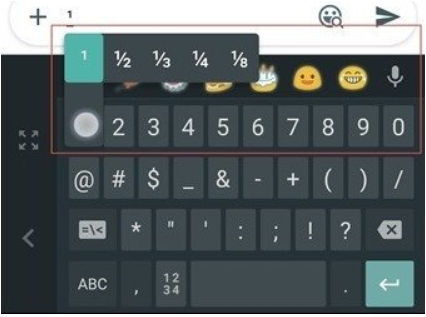
This terrific feature of Gboard lets you type in fractions with just a single finger tap.

Long-tap on any of the numeric keys and it will bring up options for fractions such as 1/2, 1/3 or 3/8.
We're here for you - email us at
The Computer Help Desk supports students’ classroom learning, provides guidance with Windows and computer operations, and advice on selecting the computer for your needs.
Stay safe & healthy!
We want to keep you apprised of technology during this health crisis.
SeniorNet at FSL is looking forward to re-engaging with everyone.