TECH TIP: reCAPCHA SCAMS

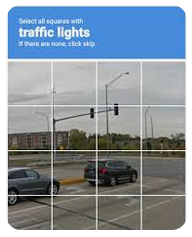
What is reCAPTCHA? reCAPTCHA analyzes user behavior and other factors to determine if an action is being performed by a human or a bot


What's the scam? This strategy works by making you think you’re clicking a reCAPTCHA checkbox, which actually copies a line of code to your clipboard. The fake reCAPTCHA box will then instruct you to press the Windows Key and R Key, which opens the Run dialogue box, a tool in Windows that is used to run code. The instructions tell you to then press Ctrl + V (which then pastes the code into the Run box) and hit enter. This, of course, will then run the malicious code and install malware onto your machine.


Thankfully, this trick is currently only targeting Windows users, so if you use a Mac, there’s not much to be worried about. Although, it would not be difficult for bad actors to adapt this strategy to the Mac, so it’s important to stay vigilant.


The Bottom Line: Whether you’re a Windows or Mac user, do not listen to instructions that tell you to open programs and paste text into them. A legitimate reCAPTCHA box will never ask you to open a separate app to verify that you are not a bot.


Reminder:

  • If you ever have to press the Windows Key for ANY reason, its a scam.
  • If it looks like a thumbnail as above, it's legit.
  • If it tells you to paste code into a RUN box, it's a scam.


thx to Malwarebytes.

REGISTER FOR OUR SPRING SEMESTER
REGISTRATION TIPS
REGISTER FOR HUNTINGTON LAB

FSL SeniorNet at Family Service League, Olsten Family Center

790 Park Avenue, Huntington, NY 11743 1-631-470-6757

MOBILE DEVICES

  • iPhone: What's Next starts on May 15
  • iPad: Getting Started starts on May 28
  • Apple's iCloud: An Introduction starts on Jun 5

THE COMPUTER

  • PC Computing Basics 2 starts on June 2
  • Exploring Files & Folders with Windows 11 starts on May 14

MEDIA

  • Mac Photos: Organizing Your Pictures starts on May 28
  • Smartphone Photography starts on May 27

Refer to our webpage for additional class dates, descriptions, and times.

Available for Tech Help

REGISTER FOR BAY SHORE ANNEX

FSL SeniorNet at Family Service League, South Shore Iovino Family Center

1444 Fifth Avenue, Bay Shore, NY 11706 1-631-647-3100

  • Artificial Intelligence: Hands On on May 13
  • PC Computing Basics 2 starts on May 15
  • Exploring Files and Folders with Windows 11 starts on June 12

Refer to our webpage for additional class dates, descriptions, and times.

Available for Tech Help

REGISTER FOR YAPHANK - LONGWOOD YOUTH SPORTS ASSOCIATION

210 Meadows Blvd. West, Yaphank, NY 11980

  • PC Computing Basics 2 starts on May 20

Refer to our webpage for additional class dates, descriptions, and times.

Available for Tech Help

REGISTER FOR FREE WEBINARS

Webinars are held over Zoom

  • Smartphone Photography on May 6
  • Preventing Fraud & Identity Theft on May 7
  • Internet Security on May 21
  • Computer Security on June 4
  • Google: More than a Search Engine on June 11


Refer to our webpage for descriptions and times.

TECH HELP
IMPORTANT STUFF TO KNOW!

ALL CLASSES:

Registration is open until 10 AM sharp one day before the start of a class.

To participate in our classes, register and pay online with a credit or debit card. If you prefer to pay by check or cash, contact the office at 631-470-6757, or register in person at Open House/ Registration Day in Huntington, Bay Shore, & Blue Point. Reminder emails are sent by fslseniornet@fsl-li.org two days before the first class in a series.


ONLINE CLASSES:

To participate in our online courses, you need to download Zoom on your computing device*. The Zoom link will be included in the confirmation sent by ezregister.com. The teacher will also send the Zoom link and manual before the class.


WEBINARS ARE ONLINE:

Registration is open until one hour prior to the webinar's start time.

The Zoom link will be included in the confirmation sent by ezregister.com. Reminder emails are sent by fslseniornet@fsl-li.org five days before the webinar. Additionally, the teacher will also send the Zoom link and handout the day before the webinar. 


SEMINARS ARE IN-PERSON & LIBRARY HOSTED:

Registration is managed by our host library. Their registration link will be provided on their website, our email blasts, and our webpage.


SOLD OUT:

Please call 631-470-6757 or send an email to fslseniornet@fsl-li.org

to receive an email with information as to when the course (webinar, seminar, class or workshop) is offered again. Please include the name of the course you are interested in.


COMPUTING DEVICES:

Computing devices include Windows and Mac Desktops & Laptops,

iPads, and Android Tablets. It is NOT recommended to Zoom using your smartphone due to the smaller screen size.


ZOOM HELP IS AVAILABLE:

 If you need instructions on downloading and using Zoom, click here:

HOW TO JOIN A ZOOM CHAT. 


REGISTRATION INFORMATION
SeniorNet Community Programs
COMPUTER DONATION & REFURBISHMENT PROGRAM
TECH CONNECT LIBRARY / PUBLIC SERVICE ANNOUNCEMENTS / TECH TIPS
Email  Facebook  Web
FSL SENIORNET WEBSITE
FAMILY SERVICE LEAGUE WEBSITE