One Cool Tip Newsletter

April 26, 2026

Your daily dose of tech-savvy brilliance!

😀Greetings! Happy Sunday, Cool Tipper!


Get ready to streamline your digital life with simple, actionable tips delivered straight to your inbox.


Cool Tip Theme: Bluesky Drafts


New here? Subscribe to the One Cool Tip Newsletter for daily updates. It's FREE!

3️⃣

If you enjoy the One Cool Tip newsletter, please forward this newsletter to THREE friends or colleagues or share it on social media using the links below.


Leave a $$$ Tip!


Share this One Cool Tip Newsletter!

X Share This Email
LinkedIn Share This Email
Pinterest Share This Email

🚨StubHub Refunds Coming for May 2025 Ticket Buyers🚨


If you bought tickets on StubHub between May 12 and May 14, 2025, you may be getting money back.


The FTC announced that StubHub will pay $10 million in refunds after allegedly failing to show the full ticket price, including mandatory fees, during those dates.


Eligible customers don’t need to do anything.


StubHub will email affected buyers with details and automatically issue refunds within 90 days.


The FTC reminds all ticket sellers and short-term lodging platforms to be upfront about fees.


If you suspect a company isn’t playing fair, report it at ReportFraud.ftc.gov.


Cool Deals of the Day

Help support One Cool Tip. Use this Amazon link when you shop online.


Check out these Cool Deals:


  • 🖱️ Logitech MX Master 3S: The ultimate precision mouse for navigating Bluesky drafts. Save 10% $89.99 Check it out on Amazon!


  • 🖥️ ASUS ProArt Display 27": Perfect color accuracy for viewing your social media posts and images. $299 Check it out on Amazon!


  • 💡 Elgato Key Light Air: Look your best on those video calls where you show off your Bluesky posts. Overall Pick $154.99 Check it out on Amazon!


*Prices accurate when originally published.

One Cool Tip may earn a commission from qualifying purchases.

Fuel Your Adventure

Try Big Mike's Jerky!


bigmikesjerky.com


Now on TikTok!


Today's Cool Tip

Save Your Best Ideas for Later with Bluesky Drafts


Bluesky now lets you save drafts so you never lose a great idea before you’re ready to post. It’s a small feature with a big productivity payoff for creators, professionals, and everyday users.


Ever think of the perfect post at the wrong time, only to forget it later? 


That’s been a long-standing frustration on social platforms. 


Here's a Cool Tip:  Save Your Drafts in Bluesky.


Bluesky’s new drafts feature fixes that gap, giving you a place to capture ideas instantly and refine them when you have time.


Feature Explanation


Bluesky drafts allow you to save unfinished posts directly inside the app instead of publishing immediately. 


You can start writing a post, exit the screen, and return later without losing your work.


This matters because it introduces a workflow that serious users already rely on in tools like email and document editors. 


It turns Bluesky from a real-time posting platform into something more deliberate and strategic.


Think of it as a staging area for your content.


What You’ll Gain


  • Capture ideas instantly without pressure to publish.
  • Improve quality by editing before posting.
  • Maintain consistency in messaging and tone.
  • Build a backlog of content for future use.


Step-by-Step Instructions


Here's how to do it.


Web / Desktop


  1. Navigate to bsky.app/.
  2. Click New Post. 
  3. Start typing your message.
  4. Close the compose window without posting.
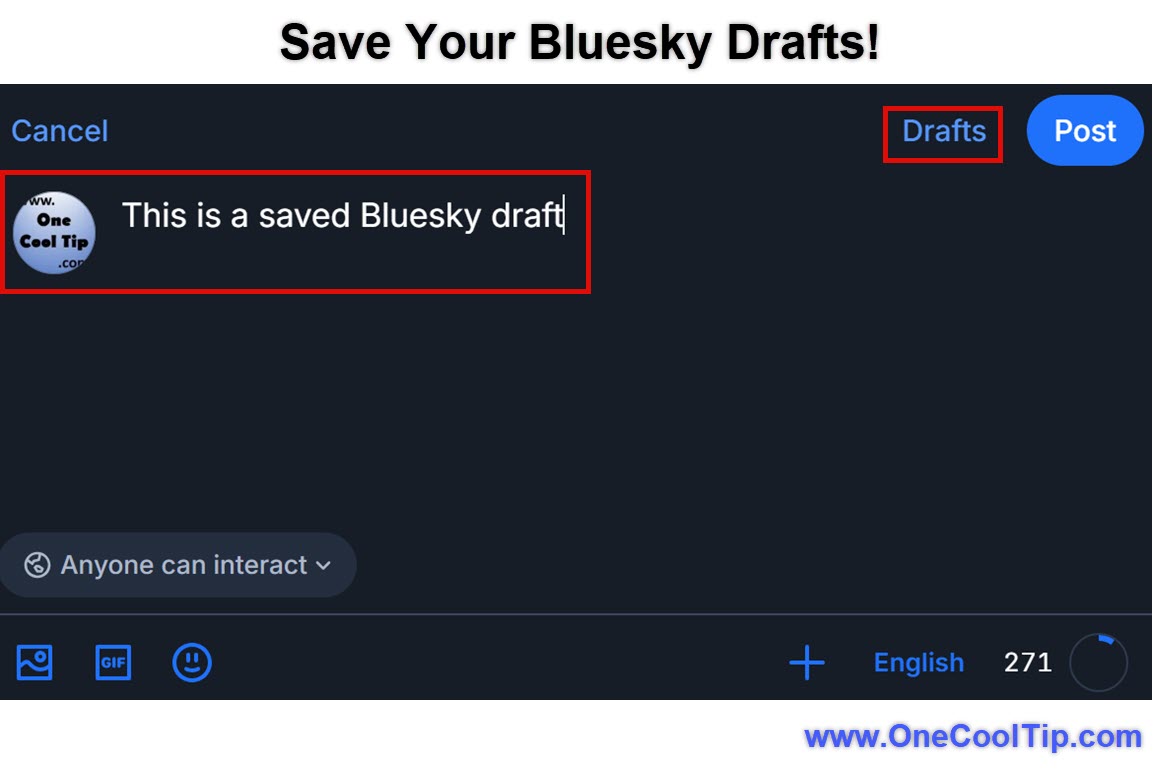
  5. Bluesky automatically saves your draft.
  6. Return to drafts via the compose screen to continue editing.


fig. 1 - Example of Saved Bluesky Draft

iOS


  1. Open the Bluesky iOS app.
  2. Tap the compose icon.
  3. Enter your post content.
  4. Swipe down or navigate away.
  5. The draft is saved automatically.
  6. Tap compose again to reopen and edit your draft.


Android


  1. Open the Bluesky Android app.
  2. Tap the + or compose button.
  3. Write your post.
  4. Exit the screen.
  5. Draft is stored automatically.
  6. Reopen compose to continue editing.


Pros and Cons


Pros:


  • Reduces pressure to post instantly.
  • Improves content quality.
  • Supports planning and batching posts.
  • Simple and automatic with no setup required.


Cons:


  • Limited organization for multiple drafts.
  • No tagging or categorization yet.
  • Drafts may not sync seamlessly across all devices (varies by rollout stage).


Feature Access


The drafts feature is currently rolling out across Bluesky platforms. 


Availability may vary depending on app version and region.


Score

Criterion | Score (0–10) | Justification
Value 9 
Dramatically improves workflow and content quality for frequent users.
Usability 9 
Seamless and automatic with no learning curve.
Wow Factor 7 
Not flashy, but highly practical and impactful.
Total: 25/30 🌟 Excellent
A simple feature that elevates Bluesky into a more professional-grade publishing tool, comparable to draft workflows in email and blogging platforms.


Key Takeaways


Bluesky drafts remove the pressure to post instantly and allow more thoughtful, polished communication.


It’s especially valuable for users who treat social media as a strategic channel rather than a spontaneous one.


Cool Tip Snapshot


  • Feature Name: Bluesky Drafts
  • Platform(s): Web, iOS, Android
  • Quick Benefit: Save unfinished posts and edit later
  • Access Type: Free, currently rolling out


Try It Yourself


Open Bluesky, start a post, then exit without publishing. 


Come back later and finish it. 


If you find it useful, share this tip with your team!


READ MORE


Read the Cool Tip on OneCoolTip.com.

Check out these Cool Tips & Tricks.


  • Quick Save: Close the compose screen to auto-save your draft. Just exit without posting.


  • Edit Later: Return anytime to refine your message. Open compose again to access it.


  • Batch Ideas: Write multiple drafts in one sitting. Repeat the process for each post.


  • Better Timing: Save now and post when engagement is higher. Return later to publish.


  • Polish Tone: Draft quickly, then edit for clarity later. Reopen and revise before posting.


  • Avoid Mistakes: Use drafts to double-check facts. Pause, verify, then finalize.


  • Draft Replies: Save thoughtful responses to threads. Write and revisit before posting.


  • Creative Flow: Capture ideas without interruption. Exit and continue later.


  • Content Queue: Build a backlog of ready-to-post updates. Save multiple drafts.


  • Stress-Free Posting: Remove pressure to publish instantly. Draft first, decide later.


ICYMI - In Case You Missed It ...

Apple Releases iOS 26.4: New Emojis, Video Podcasts, and Smarter iPhone Features You’ll Actually Use


Apple’s latest update is not just about polish. iOS 26.4 adds visible, practical features including new emojis, video podcasts, and smarter system behavior. 


Read the Full Cool Tip.


Read the Newsletter Version.

Looking for your next adventure?


Call Denise at Travel For You.

314.660.3039


Sign Up for the Monthly Newsletter


http://www.travelforyouvacations.com/


https://www.facebook.com/TRAVEL.FOR.U/


See You Tomorrow

Tomorrow's Cool Tip is waiting to amaze you.


Until then, go forth and conquer the tech world with your newfound knowledge!


Be sure to visit www.OneCoolTip.com for Cool Tech Tips for a Cooler Life!


And if you Like One Cool Tip, please support with TipJar!


Enjoy!


Rodger

Chief Cool Tipper

onecooltip.com@gmail.com


What Do You Think?

What do you think of today's OneCoolTip newsletter?
Positive        Neutral        Negative
X Share This Email
LinkedIn Share This Email

Connect with One Cool Tip!!

Facebook  X  Instagram  Web  Pinterest  YouTube  LinkedIn
 

As an Amazon Associate, One Cool Tip may earn a small commission from qualifying purchases.


Our media content is intended solely for informational purposes only. Please do not construe anything here as legal, tax, investment, financial, marital or other advice.


Copyright © 2026 | www.OneCoolTip.com | All Rights Reserved