Welcome to ITS Powertivity eNews | March 2024 | Issue 14

Powertivity image banner

Microsoft 365 Tips!

Today's newsletter is 361 words... a 1.5-minute read.

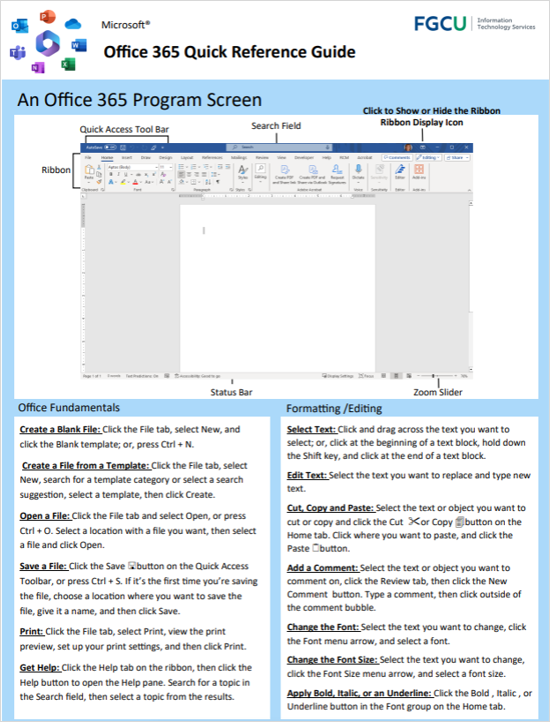
Access the Microsoft 365 Overview Quick Reference Guide

 
Thum

We've got you covered. In the future, we'll feature a Microsoft 365 Quick Reference Guide created specifically with our FGCU customers in mind.


<<< The first Quick Reference Guide overviews elements of Microsoft 365 that are applicable across the most common Office apps.


Access the Microsoft 365 Overview Quick Reference Guide.


"Phew!" ~ Just in Time Tips!

>> This great tip provided by Amber Pacheco, IT Project Manager ll in ITS <<


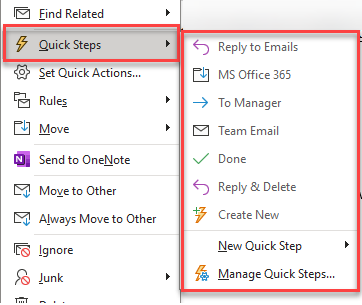
Did you know? You can define a series of actions for a received email to save time, called Quick Steps.


For example, move an unread email to a specific sub-folder and mark it as read. This alleviates you from having to read/mark it as read and then drag and drop it to a specific folder manually.

>>> Simply right-click the email listed and hover the mouse over 'Quick Steps' and the drop-down options display.


For complete instructions access the Outlook: Quick Start Steps & Quick Parts Knowledge Base article.


One More Tip Before You Go - Shared Mailboxes & Calendars

Shared Mailbox


The problem: You're not seeing the contents of the shared mailbox you previously had access to.


The solution: Quickly add the contents to your mailbox view with the Troubleshooting Microsoft 365 Knowledge Base article.


Don't forget! You also have access to helpful articles for using the Outlook Mailbox.

Shared Calendar


The problem: You're not seeing current appointments in a shared calendar you previously had access to.


The solution: Quickly add the calendar to your display view with the Troubleshooting Microsoft 365 Knowledge Base article.


Don't forget! You also have access to helpful articles for using the Outlook Calendar.

Like to see a specific powertivity topic covered?

Send your suggestion to: itschange@fgcu.edu

Powertivity eNews archive

Need to Report an Issue or Have a Question?

Contact the University Help Desk:


helpdesk@fgcu.edu or 239.590.1188


Be your own help desk, click to visit the Knowledge Base

 
FGCU ITS Logo image
 

Empowering the University Community to achieve new digital possibilities