Supply Chain Management News
December 2021
|
|
Dear Campus Community,
Supply Chain Management (SCM) would like to inform you of important updates and events.
This month's features:
- Amazon Business Punch-Out will be Temporarily Unavailable during Winter Curtailment
- FYI - Workflow Section on Documents in BearBUY is Collapsed by Default
- NEW! Small Business Partner: Stygian
- NEW! Rainin Service Clinic Dates for 2022
- NEW! Supplier Search Platform (Supplier.io) Upgrade
- REMINDER: Holiday Departmental Closures for Business Services Units: BearBUY, Procurement, and Business Contracts
If you have any questions, please contact the BearBUY Help Desk at
Thank you for your continued support,
Supply Chain Management
|
|
|
Amazon Business Punch-Out will be
Temporarily Unavailable during Winter Curtailment
|
|
We are temporarily disabling the Amazon Business punch-out catalog for maintenance and upgrades to the payment process from Wednesday, December 22, 2021, at 5:00 p.m. to Sunday, January 2, 2022, at 12:00 p.m. (noon).
If you need to make an Amazon purchase during these times, please log directly into Amazon Business using your Amazon Business p-card holder account (Berkeley email address and individual password).
If you have not used your p-card for Amazon Business directly in the past, please contact creditcard@berkeley.edu to be added to the Amazon p-card Business account. We apologize for any inconvenience and hope that the improved payment methods and speed for Amazon purchases and credit memos will benefit the entire campus.
Please note that during Winter Curtailment days and official holidays, there may be delayed responses, or minimal support in the regional services groups. For urgent matters, please contact creditcard@berkeley.edu for assistance.
|
|
FYI - Workflow Section on Documents
in BearBUY is Collapsed by Default
|
|
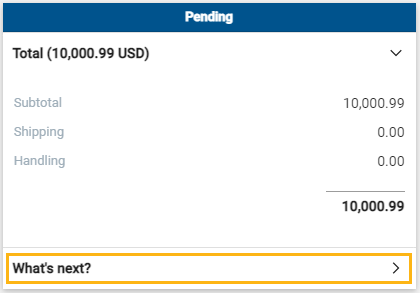
Since BearBUY experienced recent performance issues, the system’s provider, Jaggaer, updated the workflow section on documents to collapse by default for better performance.
If you would like to see the workflow section on your reqs, POs, invoices, etc. in BearBUY, simply click on the What’s next? section to expand it.
|
|
|
NEW! Small Business Partner: Stygian |
|
Supply Chain is pleased to announce our new small business partner, Stygian. Stygian is part of our Small Business First program and is powered by Grainger!
Stygian’s partnership with Grainger provides local warehouses and inventory so you will shop in the same Grainger catalog environment and receive the same Grainger service and pricing. Stygian provides an easy and familiar solution for Small Business in BearBUY!
The Stygian team will be making campus visits in January to meet with BearBUY users and joint visits with the Grainger team to make introductions. You can also reach out to JD Stewart or Andrew Guzzon at Stygian if you have any questions or would like a quote on products. They can be reached at jd@stygianhc.com or andrew@stygianhc.com.
Please visit the Stygian tile under the Facility Supplies section in BearBUY to start shopping.
|
|
NEW! Raining Service Clinic Dates for 2022 |
|
|
|
For those of you who use Rainin’s pipette calibration services, we are pleased to announce new dates for service clinics.
|
|
NEW! Supplier Search Platform (Supplier.io) Upgrade |
|
The Explorer Professional supplier search platform is now open to all UC staff with SSO/Campus ID credentials. All users will now go through the familiar SSO/Campus ID login process to access Explorer Professional.
Please use the link above (and bookmark it!) to access the Explorer Professional platform and use your SSO/Campus ID credentials to complete your login. (Going forward, you will only use SSO credentials to login, your former login credentials will no longer work.)
|
|
REMINDER: Holiday Departmental Closures for Business Services Units: BearBUY, Procurement, and Business Contracts |
|
SCM Procurement and Business Contracts & Brand Protection (BCBP) will be closed during the holidays (noon on December 17 - January 3). They will reopen on Tuesday, January 4.
BearBUY will remain open for shopping, ordering and payments although any items that require approvals or help desk services will be limited due to reduced staffing as most campus departments will observe the winter break.
If you have an emergency procurement impacting campus operations during winter break, please email supplychain@berkeley.edu with “EMERGENCY ACQUISITION” in the subject line and a PO or Requisition number. This email will be checked daily.
While BCBP will make every effort to complete new projects before December 31, please note that approved matters submitted after Wednesday, December 1 may not be finalized by the end of this calendar year.
Please work directly with your Business Contracts Specialist in regard to the timing of any critical agreements, and they will do their best to accommodate your request.
|
|
Order Status
Please note that your SCM assigned Buyer will not receive the requisition until it has been approved by the department Org Node approver.
|
|
Expediting an Order
If an order warrants expedited handling, please change the priority on the requisition to "Urgent". If you have already submitted the requisition, please contact your assigned Buyer via email and be sure to include the requisition number.
|
|
Who is My Department's Assigned Buyer?
If you are unsure of how to start your purchasing transaction, contact your Buyer for assistance by using your Org Node and Department Name to find your assigned Buyer located in this matrix.
|
|
Splitting Chart of Accounts (COA) At Header Level Vs. Line Level
Splitting COA at the Header Level will apply the split to all lines on the PO.
Splitting COA by Line Level allows you to customize COA percentage allocated to that specific line.
BEST PRACTICE for Subawards
-
Line 2 should always be set at the Header Level Chartstring using Account Code 57810.
-
Line 1 should be overridden at the Line Level Chartstring using Account Code 57811.
|
|
SCM Service Level Turnaround Times
Urgent requests will be handled on a first-in-first-out basis. Standard turnaround time (Service Level Agreements) for purchase and contract types are available on our Service Level web page.
Please be aware that contract negotiations with suppliers may cause delays.
|
|
Ship To Address vs Final Destination
A Ship To Address is the address that is sent to the supplier. When the supplier is delivering items, they will deliver to the ship to address (which is also visible on the PO they receive).
A Final Destination code is an address only associated to UC Berkeley. Final destination code are used when departments have a central receiving location. The ship to address is the central receiving facility. When the packages are received, the department central receiver looks the PO up in BearBUY and looks for the final destination code. The final destination code is then the office/room number of where shopper needs the items. Final destination codes are never sent to the supplier and are NOT reflected anywhere on the PO.
|
|
Below are links to the BearBUY homepage, instructional aids, training courses, and information on how to create Service Now tickets for BearBUY related issues.
|
|
Whether you are an experienced or a new BearBUY shopper, it is always best practice to take the BearBUY: Basics for Shoppers training if you haven't already.
To take this ESSENTIAL training, please click on this course #: BEESS950-Online
|
|
|
|
|
|
|