|
ChatGPT Branched Chats Arrive on Mobile
ChatGPT’s new Branched Chats on mobile let you split a conversation at any point and explore multiple directions without losing your original thread. For anyone who thinks in drafts, alternatives, or parallel ideas, this quietly changes how productive mobile AI can be.
Have you ever asked ChatGPT a follow-up question and immediately regretted it because the entire conversation veered off course?
On desktop, you could recover by scrolling or copying.
On mobile, that detour often meant starting over.
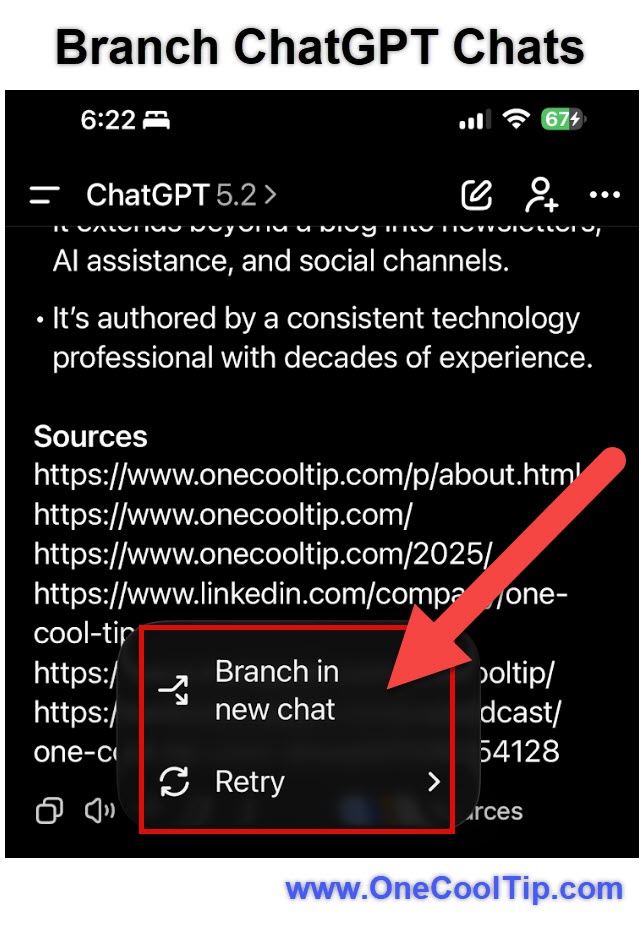
Here's a Cool Tip: Use Branched Chats in ChatGPT mobile apps.
That friction is exactly what ChatGPT’s new Branched Chats feature is designed to remove.
Feature Explanation
Branched Chats allow you to fork a conversation at a specific message and continue in a new direction while preserving the original path.
Think of it as version control for your prompts.
You can explore alternatives, test ideas, or refine answers without overwriting prior context.
On mobile, this matters more than it sounds.
Small screens encourage linear thinking.
Branched Chats introduce structured divergence, which is how real problem-solving actually works.
Why it matters:
- You keep context intact.
- You avoid re-prompting or duplicating work.
- You can compare outcomes side by side later.
What You’ll Gain
- Explore multiple answers without losing your original thread.
- Reduce prompt rewriting and rework.
- Keep complex thinking organized on a phone.
Step-by-Step Instructions
Here's how to do it.
iOS
-
Open the ChatGPT app and navigate to an existing conversation.
- Tap the ... menu at the end of the chat.
-
Select "Branch in new chat" from the menu.
-
Enter your new prompt and continue the conversation in that branch.
|