|
Potentially Time-Saving Tips For Windows
We're all looking to get through the day and, of course, we'd prefer to do it with a bit more effectiveness and ease. That's why we thought it might be best to go over some potentially time-saving tips for users to try out on their Windows computers if they think it'd be beneficial to them.
Clipboard History
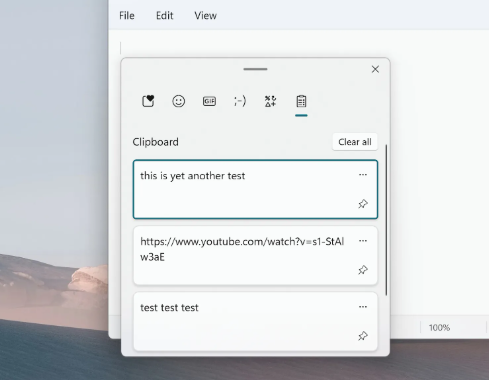
This one may be the most universally helpful of the options. Almost everyone uses the copy and paste feature these days - that said, not everyone is aware that there's a history option. By pressing the Windows and V buttons at the same time, a user is able to bring up their clipboard history. This could store up to the last 25 things that have been copied throughout the different programs on the computer. It won't be active right away, so if it's of interest to you, you should open the program and enable it sooner than later. After that, it's available for tasks where you may need to copy and paste the same few things repeatedly.
File Explorer Favorites
This may be the most widely-know and/or used of the bunch, but in your file explorer you are able to set favorites. If you've got a few file locations that you use frequently and like to save to or open from a lot, it provides a quick and easy way for you to conveniently access the location from the sidebar rather than navigating to it manually.
Window Switcher
This one might be a bit more unique, but is certainly helpful if you've got multiple tabs open, particularly within the same program. By hitting the Windows key and tab at the same time, you can open up the Windows Switcher ability. This pulls up a summary of all the different Windows you have open (and on each individual screen for multi-monitor setups). This can be helpful to see which window you wanted to access since it provides convenient previews of each.
Voice Typing Most likely this would apply to those using laptops since a microphone is required. That said, those that have a microphone and want to try it out could try what is essentially a speak to text option in Windows. By clicking the Windows key and H at the same time, it will bring up the built-in Windows program that you could try for text to speech if that may assist in things like writing emails or other documents.
If you have questions about any of these features or would like to discuss ways to look at implementing time-saving abilities for your organization, please feel free to reach out to our office to discuss.
|