Welcome to ITS Powertivity Tips! | September 2023 | Issue 11
We're here to help you SOAR!
Use 'FindTime' in Outlook Instead of Doodle for Scheduling Meetings
The Problem: Tired of wasting time with back-and-forth emails among your team to decide a meeting time that works for everyone?

The solution: Use the Outlook FindTime add-in to poll participants for the perfect time!
It's as easy to use as 1-2-3...

1) In an Outlook email, add the meeting participants, then select the FindTime New Meeting Poll button.

2) Select the desired meeting options for:
  • Meeting duration
  • Time zone
  • Shared availability (dates/times) for all participants

3) Select the Next and Add to email buttons.

A poll is automatically created and inserted into the email. Once sent, the group votes on the preferred meeting date/time, alerting you to the best meeting time, which can be automatically created and sent to the group. Brilliant!

Note: FindTime uses your Microsoft 365 account to access your calendar and attendees' calendars directly in FGCU to determine availability. Non-FGCU email addresses will be able to select preferred time slots, similar to a Doodle poll.


Handling Recurring Meetings' End Date Correctly
Image of post-it notes that say 'Don't Do This!'
Do this instead!
Microsoft recommends scheduling every recurring meeting with an end date and NOT selecting the 'never ending' option. Ensuring an end date for recurring meetings can help prevent problems in the long run.

"Phew!" ~ Just in Time Tips!
>> This great tip provided by Rick Shonak, Interim Director, Business Applications in ITS <<
The problem: You need to access a file you recently created or worked on, but can't remember where you saved it.

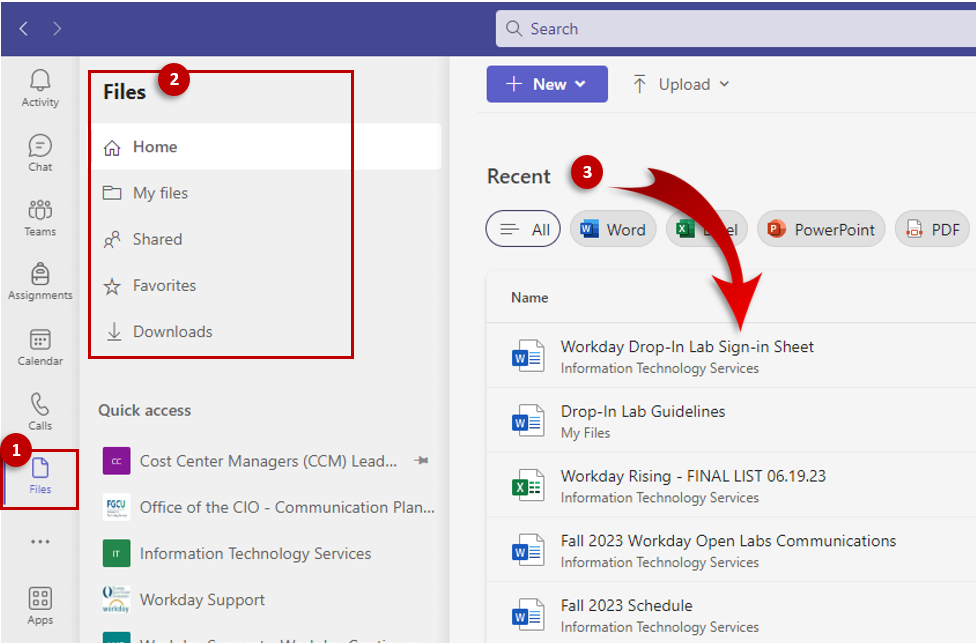
The solution: Use the 'Files' feed in Teams to locate files you've recently worked with.
Image of the Files feed selected within Microsoft Teams.
Like to see a specific powertivity topic covered?
Send your suggestion to: itschange@fgcu.edu
Need to Report an Issue or Have a Question?
Contact the University Help Desk:

helpdesk@fgcu.edu or 239.590.1188