Did you Know?
Security does not have to come in ten separate boxes!
Most mid-sized businesses end up buying security one worry at a time..... a firewall here, an antivirus there, a VPN tool, an alerting tool, and a stack of consoles that never quite talk to each other. The result is more alerts, more blind spots, and a small team trying to stitch the story together by hand.
There is a simpler way, and right now there is a very good reason to look at it.
First Technology Group, through BUI, can now offer Palo Alto's "Security in a Box".
It is a single, pre-packaged bundle that pairs a Palo Alto next-generation firewall with Cortex XDR endpoint protection, deployment and local support all included, on a fixed three-year term. One offer, two market leaders, scoped so it can be quoted and delivered quickly.
Why it matters:
It is built for the commercial mid-market, the 200 to 2,000 user range that is usually stuck choosing between enterprise-grade security and something affordable.
This is both.
The firewall and the endpoint work as one. Threats seen anywhere in Palo Alto's global base are analysed and blocked for everyone on the platform in near real time, so your defences update themselves rather than waiting for someone to notice.
Support is local. Deployment, configuration, an annual health check and a knowledge-transfer session are part of the package, with 8x5 break-fix and 24x7 cover for critical incidents, handled in-country and not offshore.
The proof is independent: Palo Alto is an 11-time Gartner Magic Quadrant Leader for network firewalls, protects more than 70,000 customers worldwide, and its endpoint achieved a 100% detection rate in the MITRE ATT&CK Round 6 testing.
The surprising part. Because this is a limited Palo Alto year-end campaign available in our region only through First Technology's distribution partner, the pricing is exceptional.
In one real example, a business paying for legacy antivirus alone was shown that the full bundle, firewall and 200 protected endpoints included, would actually cost them around R5,000 a month less than what they were already paying.
Better security, fewer tools, and a lower bill is a rare combination!
The campaign runs to the end of July 2026, so the window is genuinely limited.
If your firewall is ageing, your antivirus is doing the heavy lifting on its own, or you are simply tired of juggling disconnected security tools, this is worth a conversation.
Please contact your First Technology Group account manager to see how "Security in a Box" can consolidate and strengthen your security, at a price that is hard to ignore.
One platform. Network and endpoint. Less admin. Fewer surprises.
| |
Microsoft New Promotions
There are going to be MANY promotions coming, so these have been moved to their own home page.
| |
Teams gets better at detecting bot activity
Bot meeting assistants are becoming useful, but also risky.
They can join meetings, record discussions, transcribe sensitive information and move that data into third-party systems without enough visibility.
It becomes a bigger problem if you are running a meeting with hundreds joining and kicking bots out at the same time - you always miss some.
Microsoft is now tightening this up in Teams with a new admin policy called Manage external bots and their access to meetings.
When Teams detects a bot, it can force it into the lobby, clearly mark it for the organiser and require explicit approval before it joins. Microsoft is also adding safeguards so organisers do not accidentally admit bots with one careless click.
This matters. As AI meeting assistants become normal, companies need to know exactly which people and which tools are inside their meetings. Teams is becoming more powerful, but it also needs to become more controlled.
This is a good reminder to review Teams meeting policies, lobby settings and third-party meeting tools before the bots quietly take a seat at the table.
Please contact your First Technology Group account manager to connect you with our Teams specialists to assist in enabling these new features and tightening up policies.
| |
Microsoft allows you to switch off CoPilot, Facilitator & Teams AI mid-meeting
In additon to makeing Teams better at detecting meeting bots, Microsoft is now adding another useful control, the ability to turn Meeting AI on or off during a live meeting.
Licensed organisers and presenters will be able to switch Copilot, Facilitator, and Recap on or off from within the meeting, while still respecting tenant policies.
This is the right approach. AI meeting notes are useful, until the meeting turns sensitive, legal, HR, commercial, or just awkward.
Then the last thing you need is an over-eager digital intern taking notes for the record.
The important catch, transcription and Meeting AI are linked. If a meeting must be AI-free, both need to stay off.
Please contact your First Technology Group account manager to connect you with our Teams specialists to assist in enabling these new features and tightening up policies.
| |
Microsoft announces a new consulting business
I wonder how many of these 6000 engineers will be "real" humans?
The pitch is simple, no more endless AI pilots, Microsoft wants customers moving to production and consuming Azure, Copilot and other AI services faster.
Directions on Microsoft makes an additional important point: this looks very much like the old Azure migration playbook- help customers deploy, then recover the money through consumption.
Useful, but customers must be careful. When Microsoft engineers help design your AI architecture, Microsoft’s roadmap can very quickly become your roadmap.
This is exactly where customers need independent guidance before they lock in architecture, costs and renewals.
Please contact your First Technology Group account manager to connect you with our licensing, Azure, FinOps, security, AI and even Directions on Microsoft Analysts to help make sure this is fully understood and addressed in your new agreements with Microsoft.
| |
Entra ID backup and Recovery GA
This is a very important announcement from Microsoft, yet there is almost no media coverage!
Actually, this is a VERY BIG DEAL
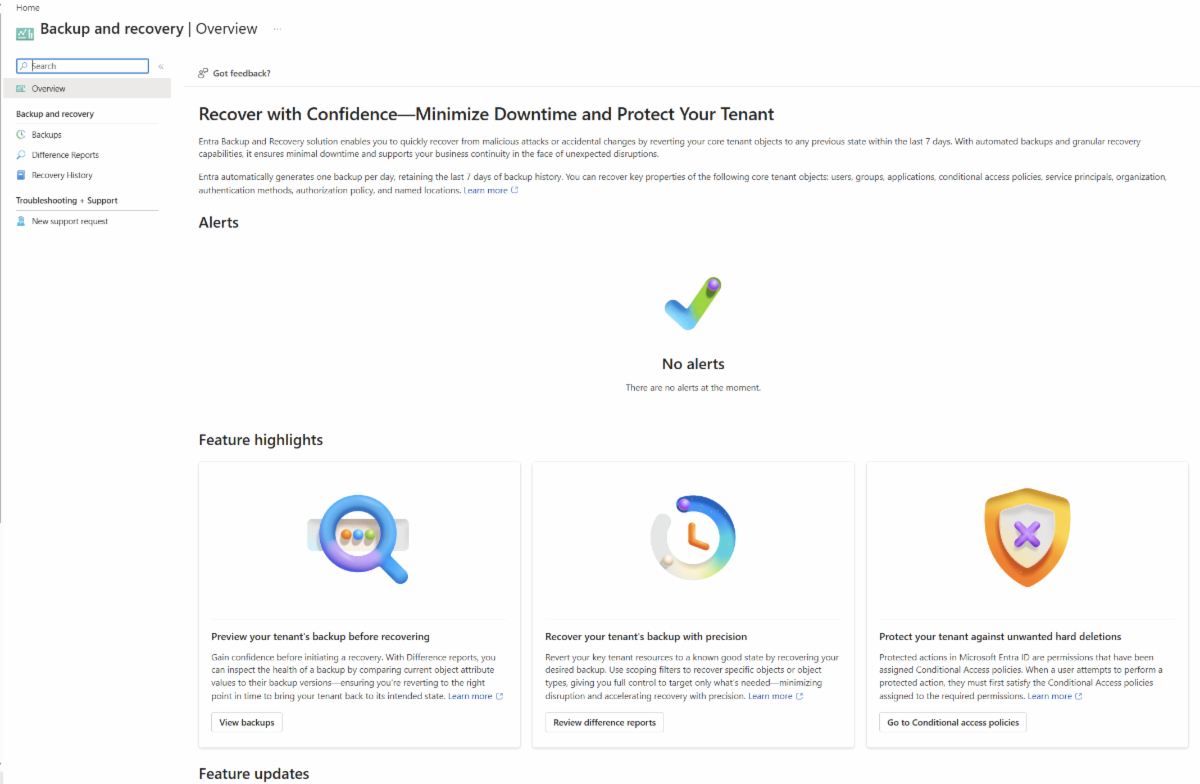
Microsoft now automatically backs up supported Entra directory objects once a day and keeps up to 7 days of backup history, allowing administrators to restore supported identity configuration to a previously known good state after accidental changes, misconfiguration or malicious updates.
Why does this matter?
Entra ID is no longer “just your user directory”. It is the front door, the key cupboard, the policy engine, the Conditional Access brain, and in many cases the thing standing between your business and a very bad day.
Supported objects include users, groups, applications, service principals, managed identities, Conditional Access policies, named locations, Agent IDs, and authentication and authorisation policy. Microsoft’s own overview also confirms that administrators can view available backups, create difference reports, recover supported objects, and review recovery history.
The clever bit is that these backups are Microsoft-managed and protected from deletion or modification. In other words, even if somebody has very high privileges, the backups themselves are not meant to be something they can simply switch off or delete.
That is exactly what you want when the person making the change is either a tired admin at 2am, or somebody who should never have had admin access in the first place.
BUT..... and there is always a BUT.....This is not a full magic undo button.
Microsoft is clear that recovery only applies to supported properties and does not imply a full object rollback. It also does not recover or recreate hard-deleted objects. For hybrid identity environments, changes to on-premises synced objects may appear in difference reports, but recovery must be handled at the on-premises Active Directory source of authority unless the object has been moved to cloud management.
So please do not read this as “we no longer need backup”. That would be like saying you do not need insurance because you found the spare key.
This as an important new identity resilience capability built into Entra P1 and P2.
It provides administrators with a native safety net for tenant configuration errors and identity attacks, but it still needs to be part of a broader recovery plan that covers Microsoft 365 data, Azure resources, endpoint configuration, SaaS applications, and your hybrid identity environment.
Please contact your First Technology Group account manager to connect you with our Microsoft identity, security and data protection specialists to review your Entra recovery plan. Having a backup button is good.
Knowing who is allowed to press it, when to press it, and what happens afterwards..... is even better, but does need some planning.
| |
Microsoft Scout is available
Microsoft has announced Microsoft Scout, the first of a new category of always-on autonomous agents called Autopilots.
Unlike Copilot, which mostly waits for you to prompt it, Scout runs in the background and uses Work IQ to learn how you work. It can monitor your Microsoft 365 world — email, calendar, Teams, files and meetings — to spot important actions, flag missed decisions, prepare for meetings and generally chase the things that usually fall through the cracks.
Of course, an always-on AI agent sounds terrifying..... like Clippy came back, got an Entra identity, and started reading your inbox.
Microsoft is therefore emphasising the governance side: Scout has its own Entra identity, works within organisational permissions, requires approval for sensitive actions, and is auditable.
This is still early-access technology and requires the Frontier Preview Programme, along with Microsoft 365 Copilot, Intune, and GitHub Copilot Business or Enterprise for usage-based billing.
The big point is this: Microsoft is moving AI from “ask me something” to “I’m already working on it”. That could be very powerful, but only if your permissions, data governance, Intune, Purview and Copilot readiness are in good shape first.
Please contact your First Technology Group account manager to connect you with our Microsoft 365, Copilot, Intune, Purview and security specialists to assess whether your environment is ready for this next generation of AI agents, because before you let an AI start working in the background, you really want to know exactly what it can see, what it can do, and who gets the blame when it does something naughty.
| |
CoPilot CoWork gets a Calculator
Microsoft has now published more formal guidance for Copilot Cowork, including examples of what CoWork can do and a Customer Cowork Estimator to model light, medium and heavy tasks. That is useful, because as covered in TOP STORIES #172, the licence is only the start. The real question is how quickly the meter runs once users start handing work to background agents.
Please contact your First Technology Group Account manager to connect you with our AI specialists to assist in using this calculator to try and anticipate what this will cost you when converted from CoPilot credits to $$$
| |
New Outlook gets Advanced PST support...... BUT......
Microsoft says the New Outlook is now closer to Classic Outlook, with more advanced PST support, including better import, export, search, calendar and contact handling.
The funny bit is that, for now, you still need the Old Outlook installed in the background to make some of this work. Yes, the New Outlook still needs the Old Outlook to behave like New Outlook.
Microsoft says this dependency should be removed later this year, and more fixes are coming, including better handling of calendar update notifications and Sent Items for delegated mailboxes.
So, progress is real, but don’t assume Classic Outlook can be switched off everywhere just yet.
Please contact your First Technology Group account manager to connect you with our specialists in helping work out your migration to the New Outlook, as you STILL need to be finding those old Add-ins which everybody has forgotten about but are probably critical for a small number of your users in your business.
| | | | |
Deepfake attacks surge as criminals target trust
This is no longer just “don’t click the dodgy link” territory.
At the ITWeb Security Summit 2026, BUI’s Yunus Scheepers warned that deepfake attacks are moving from technical compromise to trust compromise.
The numbers are ugly: deepfake attacks are reportedly up more than 2 000% globally over three years, and 62% of organisations have experienced at least one deepfake attack in the last year.
The Arup example says it all. One finance employee joined what looked like a normal executive video call. The CFO was there. Other executives were there. Except they were not. Deepfakes. Result? $25 million gone.
Ferrari avoided a similar attack only because an employee asked the “CEO” a personal verification question, and the call ended immediately.
The TechRadar/Huntress EvilTokens story adds the missing context: cybercrime is becoming productised. EvilTokens-style Phishing-as-a-Service attacks are using AI to personalise phishing at scale, with device-code phishing up 1380% between July–December 2025 and January–April 2026. These attacks can abuse legitimate Microsoft authentication flows and may bypass traditional MFA thinking.
So the message is simple….. MFA is not enough if your process is weak.
Finance, HR, IT and executives need a new rule: any unusual payment, password reset, MFA change, access request, or confidential instruction must be verified through a second trusted channel. Microsoft also recommends blocking device-code flow where it is not needed.
If your staff are afraid to challenge a senior person, then your security problem is not just technical….. it is cultural.
Please contact your First Technology Group account manager to connect with the BUI cyber security specialists to review zero-trust processes, incident response readiness, executive awareness training, and deepfake simulation options.
Training remains essential and through these programs, relevant training will be recommended.
| |
Phishing is getting industrialised, and your users are the target
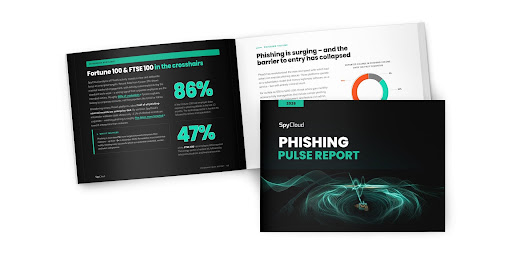
KnowBe4 has highlighted a new SpyCloud report showing that phishing attacks exposed employee data at 86% of Fortune 100 companies over the last 12 months.
The worst affected sectors were technology, airlines and automotive, which should make everybody sit up a bit straighter..... because if the largest companies in the world are being hit this hard, nobody should be feeling too comfortable.
The same report found that 78% of organisations saw phishing volumes increase over the past year, while 84% said AI-generated phishing is becoming more prevalent or harder to defend against. Business Email Compromise remains a major worry at 58%, vendor impersonation at 52%, collaboration-tool phishing at 36%, and session hijacking at 20%.
The really nasty part is how easy this has become. Phishing-as-a-Service platforms now let criminals buy ready-made phishing kits for around $50 to $250 per month, with sample phishing pages, one-click deployment and admin panels. In other words, the bad guys no longer need to be good developers..... they can just subscribe, click, and start stealing.
The report also points to a dangerous response gap. Only 38% of organisations are very confident they can detect and respond to credential theft within 24 hours, while 58% struggle to identify which credentials or session tokens were exposed after a phishing incident. This matters because attackers are not only stealing usernames and passwords anymore, they are also after session cookies and refresh tokens, which can keep them inside long after a password has been reset.
This is why security awareness training is no longer a nice-to-have annual tick-box exercise. Users need to be trained continuously, because the attacks are now continuous, personalised and increasingly AI-assisted. Please contact your First Technology Group account manager to get in touch with our training specialists, who can help you review the right security awareness and phishing simulation options for your organisation..
| | | | |