|
|
Why Are You Getting This?
You signed up to receive The Privacy Professor® Tips, or initiated contact to stay in touch with Rebecca and/or Privacy & Security Brainiacs® (PSB) and consented to receive the Tips. Please read our Privacy Notice & Communication Info at the bottom of this message for more information. You may unsubscribe from there as well.
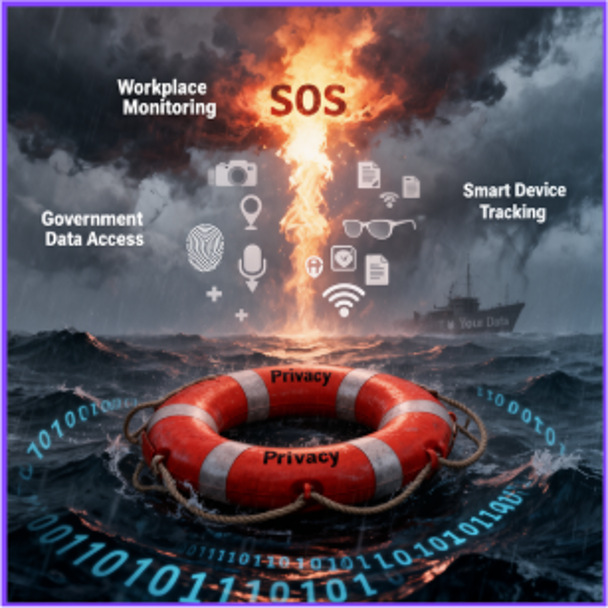
| | Image created by Rebecca Herold using OpenArt AI. | | Mayday Moment: Why Privacy Needs Immediate Rescue | | |
If privacy had a ship’s log, May would be the month where every entry reads “rough seas ahead.” Between workplaces rolling out monitoring tools that feel more like onboard surveillance radars, public spaces adding cameras faster than a ship can hoist sails, and consumer gadgets quietly charting your every move, your data is basically waving a flare from a lifeboat. Even government agencies and data brokers seem to be circling like curious seagulls, eager to scoop up whatever personal details fall overboard. In this month’s edition, we’re decoding the latest distress calls, navigating the choppy waters of lawsuits and tracking tech, and answering your questions so you can steer your digital life safely back to shore.
In the Q&A section of this newsletter we’ve also included answers (that we wrote using our own expertise and experience, not using AI) to some great reader questions covering our Question of the Month about Atlassian changes removing opt-out for meta data use. Other questions cover: HIPAA, security and privacy risks during EHR migrations; mobile apps reservations booking risks; how to find hidden cameras in hotel rooms; malware threats to industrial control systems (ICS); and HIPAA restrictions for BAs using their CAs' PHI. Thank you for sending them in!
Please read to the end where we provide some information about an event for which you may be interested.
Since 2005, we have been freely distributing the Privacy Professor Tips monthly publication to help both businesses and individuals, of all ages, identify risks throughout their daily lives, within their own businesses, and to help them know how to prevent security incidents, privacy breaches, and to keep from being a victim of scams.
By sharing this Tips issue with others in your organization, you are also supporting a wide range of regulatory and other legal compliance requirements to sending such awareness communications. Thank you for reading and sharing!
| | |
We would love to hear from you!
Did you find the tips we provided useful? Did you like this issue? Do you have questions for us to answer? Please let us know at info@privacysecuritybrainiacs.com.
| | |
May Tips of the Month
- News You May Have Missed
- Privacy & Security Questions and Tips
- Where to Find the Privacy Professor
| | |
Fun fact! The international distress signal "Mayday!" was coined in 1923 by Frederick Stanley Mockford, a senior radio officer at Croydon Airport in London. He developed it as a phonetic equivalent to the French phrase m’aider ("help me") or venez m’aider ("come help me"), providing a clear voice alternative to "SOS". In 1927, the United States formally adopted it as an official radiotelegraph distress signal, helpfully explaining in Article 19 of their resolution that mayday corresponds "to the French pronunciation of the expression m'aider." Thanks for Merriam-Webster for this information!
Many readers are sending us alerts of privacy related news on a wide range of privacy topics. Thank you! We love getting your notices. With your help we are finding more unique news stories to share with you than ever before, along with news items that we believe are important for most folks to know, but that often do not get much mention in traditional news, or even in security and privacy news outlets.
Here are just a few of the 150+ news stories we discovered throughout the past month that provide a wide range of interesting security and privacy related news. These news items demonstrate that such types of risks exist basically anywhere in the world, and that everyone needs awareness.
This month we list 40 news items. We are grouping them into four broad categories: the first is for this month’s topic of “Mayday Moment: Why Privacy Needs Immediate Rescue!” with tips and news to raise awareness for everyone. Followed by privacy related news in the categories, “Of Broad Interest,” “Privacy in Businesses, Governments, and Other Organizations,” and “Laws, Legal Issues, and Lawsuits About or Significantly Involving Privacy and/or Security Issues.” Within each category the items are in no particular order. Some include “INSIGHTS” to provide some advice or additional insights to specific news items. Thanks to those many readers who sent your positive feedback; we appreciate it!
Do you have interesting, unusual, bizarre or odd stories involving security and privacy? Some of the most surprising items are in local news! Or questions about any of the notes we included for the stories we listed this month? Let us know!
| | Mayday Signals Rising: The State of Privacy in Peril | | |
Be on the lookout for devices, practices, scams and crimes that could cause you to scream, “Mayday! Mayday!”
1. ‘That wasn’t me’: How facial recognition led to a woman being jailed for 6 months. Kimberlee Williams, who lived in Oklahoma, was jailed after being accused of crimes in Maryland, a state she told investigators she had never visited. "Williams was charged in three Maryland counties — Montgomery, Prince George’s and Anne Arundel — and jailed for six months before the charges were dismissed, according to court records. She would not learn for years how she came to be accused: A bank investigator reported to Montgomery County police that facial recognition technology had identified Williams as the suspect in the Maryland fraud cases." "Williams’s case, criminal justice experts said, shows the limits of facial recognition software and how faulty tips generated by the technology can be used by both police and non-law-enforcement groups to inform arrests and charges."
2. Meta Is Warned That Facial Recognition Glasses Will Arm Sexual Predators. More than 70 organizations, including the ACLU, EPIC, and Fight for the Future, say the AI smart glasses feature would endanger abuse victims, immigrants, and LGBTQ+ people.
3. The Shocking Secrets of Madison Square Garden’s Surveillance Machine. Famously vengeful Knicks owner Jim Dolan has long spied on people at his iconic arenas. WIRED goes deep inside the operation that allegedly tracked a trans woman, lawyers, protesters, and more.
4. Police in Des Moines metro defend Flock cameras as privacy fears grow. At busy intersections, entrances to cities and high traffic roads in the Des Moines metro, cameras are watching cars drive by, taking photos and collecting information. All that data aids police investigations on the local, state and national levels by connecting to a national crime database. There are more than 300 license plate reader cameras around the metro, most of which are operated by Flock Safety, a company under scrutiny for privacy concerns. “The city of Coralville nixed its contract with Flock Safety after public outcry over possible privacy violations. The Iowa Attorney General’s Office also admonished the city for its policy against using the camera for immigration purposes.”
5. Did You Download the White House App? Here Are Its Hidden Security Risks. Cybersecurity researchers have serious concerns about how the app was built. "The app's threats to your personal data, online security and privacy concerns make it something you should think twice about downloading." "The Android app tracks your location as often as every 4.5 minutes and shares a lot of other information, like your notifications and perhaps even your phone number, with a third-party server." "The code for YouTube embeds comes from a personal GitHub account...if that GitHub account gets compromised, it can affect every user of the White House's app."
6. Don’t tell your AI chatbot these 5 things to keep your money safe. Artificial intelligence tools have made financial advice more accessible, but they have also created a significant privacy risk. “A Cisco survey found that 29 percent of global AI users entered personal or confidential information — including financial and health details — into chatbots, even though 84 percent were concerned their data would be made public.” “A Stanford study examining the privacy policies of six major AI companies — Amazon, Anthropic, Google, Meta, Microsoft and OpenAI — found that all six use chat data by default to train their models, and some keep this information indefinitely.”
7. Palantir Employees Are Starting to Wonder if They’re the Bad Guys. Interviews with current and former Palantir employees, along with internal Slack messages obtained by WIRED, suggest a workforce in turmoil.
8. iPhone privacy report: How to check which apps are tracking you and accessing your data. Here's how to find the report on your iPhone.
9. Your data is everywhere. The government is buying it without a warrant. “A whole industry of data brokers buys up vast quantities of electronic information from cell phone apps and web browsers and sells it to advertisers who use that data to target ads. The same industry also sells that data, including bulk cell phone location data, to police departments and federal government agencies in ways that can reveal intimate details about Americans without a warrant.”
10. How to Tell if Someone Else's Apple AirTag Is Tracking You. These settings can help make sure your iPhone alerts you to unwanted location trackers. One of the biggest complaints about AirTags, however, is that someone with malicious intent could easily slip one of the tiny tags into your bag and then track your movements without your consent. Multiple people have reported AirTag-related stalking incidents where the victims didn't know the trackers were placed on them until much later. The second-generation AirTag debuted in January 2026. Relative to its predecessor, the AirTag 2 offers more precise tracking from a longer range, a louder speaker with a bigger speaker coil, a thinner motherboard, and enhanced security features.
| | Image created by Rebecca Herold using Adobe Firefly. Man hiding an AirTag-like tracking device in a purse while everyone is distracted. | | |
11. Sports Illustrated model Brooks Nader claims she was stalked via Apple AirTag device. The model claims someone placed the electronic tracking device in her coat. In a series of Instagram video stories, Nader described what she said was the "scariest moment" of her life and claimed she was stalked through New York City by an electronic device that she wasn't aware of. After leaving a bar in Tribeca, Nader said she got a notification from her cellphone, saying, "Someone's tracking you and has been for a while."
12. Hackers accessed personal information for up to 70,000 people in Canada Life data breach. A breach linked to hacking group ShinyHunters exposed the personal data of up to 70,000 Canada Life customers, largely tied to a single large corporate client. The breach was discovered within the past two weeks and traced to a compromised employee account; Canada Life says the incident has been contained. The attack is part of a broader wave of cyber incidents in Canada, with ShinyHunters also claiming responsibility for a recent Telus breach.
13. How to spot the top scams that started on social media. “FTC data shows that losses to scams on social media have been increasing dramatically since 2020 — people reported losing $2.1 billion to these scams in 2025 alone.”
14. Majority of Americans want stronger oversight of government data-sharing. As the federal government continues to seek more of the personal data held by state governments, three in four Americans report wanting stronger oversight. The report draws from a survey, conducted last month, of more than 1,000 United States residents. Seventy-four percent were concerned about the privacy and security of personal data held by government agencies.
15. The Promise of Wearable AI: Opportunities Across Emergency Response. "Wearable AI combines AI technology with physical products such as eyeglasses, rings, watches, and helmets to give users hands-free access to AI’s information processing and decision-making abilities. Wearable AI enables first responders, including law enforcement, firefighters, and emergency medical technicians, to make faster, more informed decisions without the distraction of screens. Wearables track vital signs, detect hazards, support coordination, and enhance accountability across the emergency services sector. INSIGHTS: While wearable AI has the possibilities of dramatically enhancing emergency response activities, it is very important that such devices include comprehensive security and privacy protections, and capabilities that have user options built into the devices.
16. FTC says OkCupid, Match shared millions of customers' personal information with third party. OkCupid and its affiliate Match are accused of deceiving the users of their dating app by giving personal information, including photos and locations, to an unrelated third party, contrary to OkCupid's privacy promises. Three million customers are involved.
17. Police investigate hidden camera arrest at local TV station. Police say a television employee has been arrested after an investigation revealed hidden cameras found inside a dressing room at a media outlet. According to authorities, its office was notified of unauthorized photographic/video equipment discovered in the private dressing room areas within KWTV News 9’s building in downtown Oklahoma City by the janitorial staff. Investigators retrieved two photographic/video cameras and two portable battery packs that included images and videos stored on SD cards and device information that included activity logs. INSIGHTS: There are increasingly more of these reports, such as, “Sheriff’s office seeks dressing room users in Machesney Park TJ Maxx hidden camera case. Winnebago County deputies ask anyone who used the women’s dressing rooms at the Machesney Park TJ Maxx during a specific 10-month window to reach out.” With more tiny recorders available than ever before, at low prices, it is worth taking a few seconds to check your surroundings in areas where you need privacy, such as dressing rooms, rest rooms, and on your own property.
18. How to check if there is a hidden camera in your yard. Southern California authorities are advising residents to be alert and watch out for hidden cameras in their yards placed there by burglars. The L.A County Sheriff’s Department Santa Clarita Valley Station took to social media to highlight steps that can be taken by residents to look for and prevent hidden cameras from being placed.
19. Atlassian’s new data collection policy protects rich customers while AI eats the rest. From August 17, the outfit will collect customer metadata by default unless you pay for the top tier. Unless a customer pays for the most expensive enterprise license, or the law forbids it, Atlassian is going to collect their data to train its AI models. And you can't fully opt out. INSIGHTS: See the Q&A section for an answer to a reader question about this.
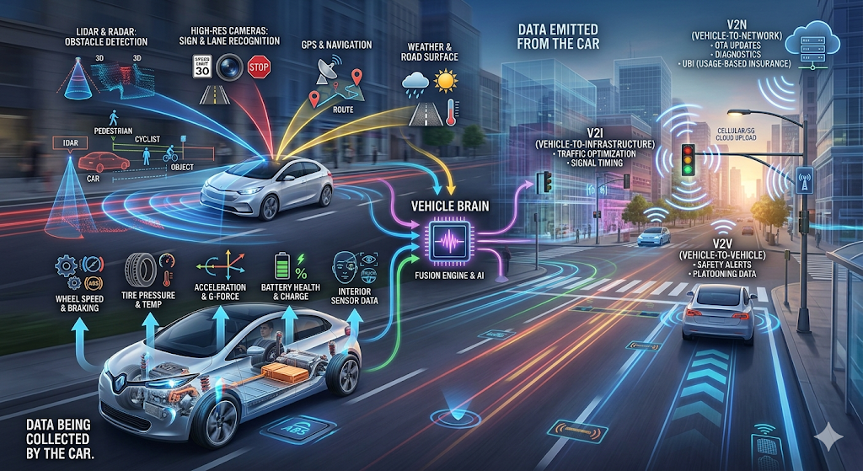
20. Your car might know more about you than your partner—What data are cars collecting? Modern cars track far more than driving habits, quietly gathering personal data most drivers never realize they’re sharing. “They are connected devices that continuously collect and transmit data every time you drive. From your routes and driving behavior to in-car preferences and even smartphone activity, today’s cars can quietly build a detailed profile of your habits, often without you ever realizing it.”
| | Image created by Rebecca Herold using Gemini. | | Privacy In Businesses, Governments, and Other Organizations… | |
21. She raised concerns about her company's contracts with ICE. Then she lost her job. During Billie Little's roughly two decades working at Thomson Reuters, she felt pride in the company, which is known for its legal database Westlaw, its media company Reuters, and its role as a major data broker. “Little and other colleagues grew alarmed that ICE agents could be abusing Thomson Reuters investigative tools that provide vast quantities of personal data on people including license plate information. Little, who worked in legal publishing, was part of a committee of employees that sent a letter to company management in February flagging that ICE could be using Thomson Reuters products unlawfully and asking for greater transparency about the company's oversight of its contracts with the Department of Homeland Security and ICE.”
22. Behavioral Credentials: Why Static Authorization Fails Autonomous Agents. “Enterprise AI governance still authorizes agents as if they were stable software artifacts. They are not. “An enterprise deploys a LangChain-based research agent to analyze market trends and draft internal briefs. During preproduction review, the system behaves within acceptable bounds: It routes queries to approved data sources, expresses uncertainty appropriately in ambiguous cases, and maintains source attribution discipline. On that basis, it receives OAuth credentials and API tokens and enters production. Six weeks later, telemetry shows a different behavioral profile.” “The credentials remain valid. Authentication checks still pass. But the behavioral basis on which that authorization was granted has changed. The decision patterns that justified access to sensitive data no longer match the runtime system now operating in production.” INSIGHTS: All CISOs, CPOs, and IT directors in organizations using generative AI agents need to understand this. It creates constantly shifting security and privacy risks.
23. Employers are using your personal data to figure out the lowest salary you’ll accept. A growing number of employers are using surveillance wages to negotiate your next paycheck. “According to Nina DiSalvo, policy director at labor advocacy group Towards Justice, some systems use signals associated with financial vulnerability — including data on whether a prospective employee has taken out a payday loan or has a high credit-card balance — to infer the lowest pay a candidate might accept. Companies can also scrape candidates’ public personal social-media pages, she said, to determine if they are more likely to join a union or could become pregnant. The data can be used to determine wage increases after an employee is hired, and the practice can veer into discrimination, experts say.”
24. The European Central Bank (ECB) to quiz bankers about risks of Anthropic's new AI model, source says. Anthropic's Mythos is seen by cybersecurity experts as posing significant cybersecurity challenges to the banking industry and its legacy technology systems, raising alarm bells among regulators in Britain and the U.S.
25. One Tech Tip: Logging on at a cafe? Privacy and security guidelines for remote workers. Working in public areas creates security and privacy risks, many of which do not exist within business facilities. Organizations need to establish additional security and privacy rules for such public working.
26. Japan-based China nurse criticized for posting work clips, raising privacy, ethics concerns. ‘Irresponsible’ member of medical staff posts videos showing patients’ medicine bags, hospital beds; forces bosses to apologize. The Tokyo-based woman, identified as “Zhaozhaozzz”, has around 21,000 followers on social media where she regularly shares content about her life and work. “[One]video also appeared to expose patients’ private and medical information, including medication records, along with visible details such as medicine bags and hospital beds shown in the vlog.”
27. Meta tracks employee keystroke data for agentic AI model training amid privacy furor. Employees and AI agents not likely to sue. “The company is looking for new growth engines, as its core social media business has been fined hundreds of millions of dollars and faces potential liability above a billion, and the backlash to its smart glasses with native facial recognition threatens to kickstart another round of expensive fees and settlements for privacy violations. If businesses will pay for Meta’s agentic AI tools, it could yet find a business line that generates less litigation.” Employees cannot opt-out of the tracking. Read the full memo to employees here.
28. Inside the Privacy Breach: How AI Models Scour Your Work Emails. Big tech is mining your Slack and email for AI training data. Your workplace privacy is vanishing. The implications for intellectual property are dire.
29. Woman filmed at Cork workplace by influencer using smart glasses calls for tougher privacy laws. Retail worker unknowingly filmed for viral prank raises concerns over smart glasses, consent, and gaps in privacy protections.
30. The Log4j1XmlLayout from the Apache Log4j 1-to-Log4j 2 bridge fails to escape characters forbidden by the XML 1.0 standard, producing malformed XML output. Conforming XML parsers are required to reject documents containing such characters with a fatal error, which may cause downstream log processing systems to drop or fail to index affected records. Two groups of users are affected: * Those using Log4j1XmlLayout directly in a Log4j Core 2 configuration file. * Those using the Log4j 1 configuration compatibility layer with org.apache.log4j.xml.XMLLayout specified as the layout class. Users are advised to upgrade to Apache Log4j 1-to-Log4j 2 bridge version 2.25.4, which corrects this issue.
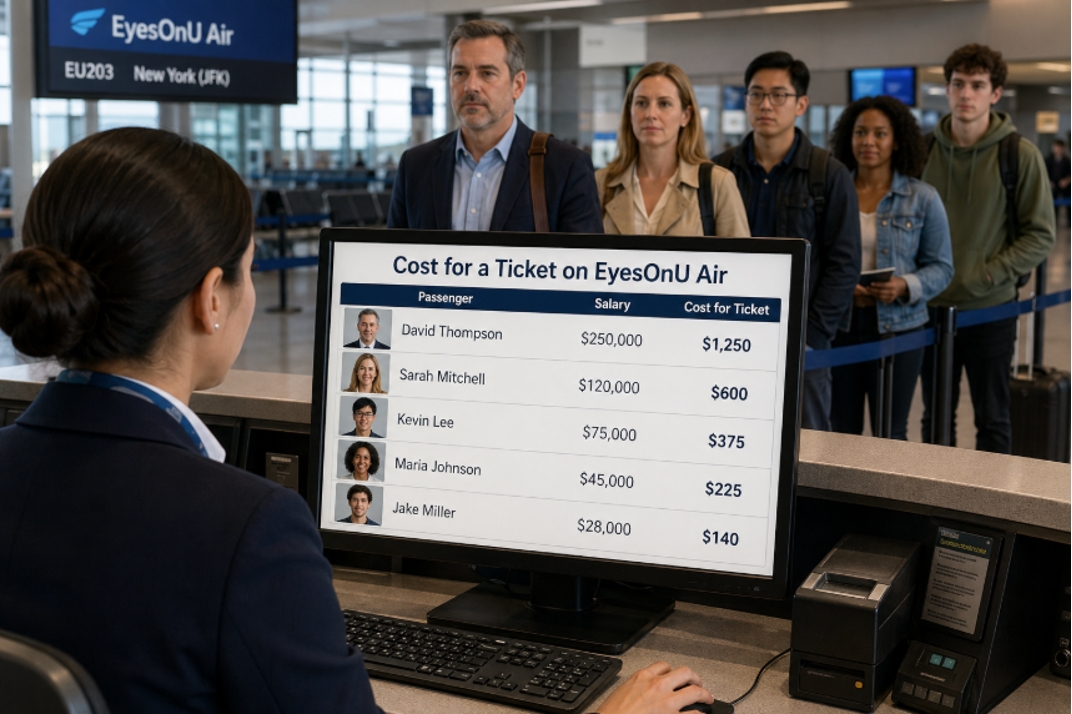
| | Laws, Legal Issues, and Lawsuits About Or Significantly Involving Privacy and/or Security Issues… | Image created by Rebecca Herold using DALL.E. | | |
31. JetBlue used customers' personal data to set ticket prices, lawsuit alleges. A new lawsuit alleges that JetBlue collected customers' personal data without their consent and used it to set ticket prices. The lawsuit claims JetBlue effectively acknowledged that it uses surveillance pricing in a recent social media exchange with a customer.
32. As DOJ prepares to share state voter data with DHS, a key privacy officer resigns. As Department of Justice officials are working to acquire sensitive voter registration data from states and have recently disclosed a plan to share it with the Department of Homeland Security, a key privacy officer in DOJ's division tasked with enforcing civil and voting rights laws has resigned.
33. Jury finds Meta and YouTube negligent in landmark lawsuit on social media safety. The jurors awarded the plaintiff $3 million in damages, finding Meta 70% responsible for harm caused to her, and YouTube responsible for 30%.
34. Maryland could become the first state to ban 'surveillance pricing' for groceries. Consumer Reports' Grace Gedye answers questions about a Maryland law that seeks to prevent retailers from using shoppers' personal data to customize prices.
35. A bank robber’s cellphone gave him away. Okello Chatrie’s cellphone gave him away. Now the Supreme Court is hearing his case. This Supreme Court case could redefine your digital privacy. “Geofencing allows the government to draw a virtual fence around a geographic area where a crime was committed. After that, the government seeks a warrant — not to search a home or office, but to require a tech company to search its data to identify any of its millions of users who were within the geofence line at the time of the crime.” INSIGHTS: This article includes an informative 10:46 min video about geofencing that we encourage you to watch. We also answered a reader’s question about privacy implications of geofence warrants in our February 2026 Tips issue that will support even deeper understanding of this issue that will be considered by the US Supreme Court.
36. Maine enacts renter anti-retaliation law barring landlords from sharing personal data. “The law bans a landlord from disclosing personal information about a tenant with the intent to harass, intimidate, or get them to leave a property. The personal information includes things like name, phone number, sexual orientation, race, or immigration status. The law includes exceptions like a legal eviction process.”
37. Use Perplexity? Lawsuit Accuses It of Sharing Personal Data With Google and Meta Without Permission. The lawsuit claims that Perplexity incorporated ad trackers such as Facebook Meta Pixel, Google Ads, and Google DoubleClick into its code, which would share information with Meta and Google without consent. The court document, spotted by Ars Technica, highlights how Perplexity would encourage users to engage with its AI in an interactive dialogue. For example, it might ask a user seeking treatment for liver cancer a series of suggested questions. The tech giants could then use this data to target the cancer-suffering user with ads for alternative treatments or nearby clinics. The plaintiff, John Doe, claims that his private conversations, in which he asked Perplexity for advice on things like stock investments and retirement fund planning, were shared with Meta and Google.
38. Washington State Governor Ferguson signs Driver Privacy Act, Senate Bill 6002, regulating license plate readers, personal data sharing into law, creating new statewide rules for automated license plate readers, cameras commonly referred to as “Flock Cameras,” that scan and store license plate data and can allow government agencies to track where people drive and when. The new law places several limits on how agencies can use automated license plate readers, including prohibiting agencies from collecting data around sensitive locations, including facilities offering protected health care or immigration-related services, places of worship, and schools.
39. 'If You Can Keep It': Privacy Protections Under The Trump Administration. “Is the Trump administration creating a centralized database that tracks the activities Americans? Americans who are not suspected of committing a crime? That’s the question at the heart of a new lawsuit filed against the administration by the Freedom of the Press Foundation. That’s an organization advocating for press freedoms. These allegations stem from an executive order signed by Donald Trump last year encouraging data sharing between federal agencies and the elimination of “information silos.” In the last year, the Trump administration has loosened restrictions around the Central Intelligence Agency’s access law enforcement data. It has also allowed Immigration and Customs Enforcement to access Medicaid data and given ICE access to data from the Internal Revenue Service.”
40. Mercor Faces Lawsuits After AI Training Data Breach Exposes Sensitive Worker Information. Mercor, a $10 billion AI startup supplying training data to firms like OpenAI, Anthropic, and Meta, faces at least seven class-action lawsuits after a third-party data breach exposed sensitive contractor information, including biometrics and computer screenshots. Plaintiffs allege improper data collection, monitoring, and sharing practices in violation of privacy and labor laws.
| | Check out our Privacy & Security Brainiacs blog page for more unique security and privacy news items. Have you run across any surprising, odd, offbeat or bizarre security and/or privacy news? Please let us know! We may include it in an upcoming issue. | | |
Privacy & Security Questions and Tips
Rebecca answers hot-topic questions from Tips readers
May 2026
| | |
We continue to receive a wide variety of questions about security and privacy. Questions about current hot topics in society, and increasingly more about healthcare privacy and security. Thank you for sending them in! This month in addition to our Question of the Month about Atlassian changes removing opt-out for meta data use we also answer others covering: HIPAA, security and privacy risks during EHR migrations; mobile apps reservations booking risks; how to find hidden cameras in hotel rooms; malware threats to industrial control systems (ICS); and HIPAA restrictions for BAs using their CAs' PHI.
Are the answers interesting and/or useful to you? Please let us know! Keep your questions coming!
| | Q1: I just read that unless an Atlassian customer (they have 300,000+ customers) pays for the most expensive enterprise license, or the law forbids it, Atlassian is going to collect their data to train its AI models, and their clients cannot fully opt out. They claim that, “All metadata is de-identified and aggregated before it is used to improve apps and experiences for all customers. We remove information that directly identifies individuals, such as name and email addresses.” Wait. What? Can’t my privacy be breached using other types of data beyond name and email addresses? | | |
A1:
I read those articles about this also. I also read the information on Atlassian’s website describing their definitions of “metadata.” I immediately recognized the way in which their description of metadata is trying very hard to make data that can be associated with specific individuals into something that, in their words, is not associated to them simply because, “We remove information that directly identifies an individual, such as name or email.”
The gap between "de-identified" as a legal and marketing term and what it means in practice is one of the most consequential privacy issues of the current moment. Atlassian's policy is a clear example of how that gap gets exploited, and is actively being exploited by those whose actions show they are actually collecting and using a large amount of valuable personal information that is not necessarily widely viewed as being personal information in the traditional legal sense, but that still can be linked to individuals.
More specifically, Atlassian's page describes two categories of metadata: content attributes and common patterns. While Atlassian frames these as de-identified and aggregated, several ways exist for associating individuals with this data. For example, using behavioral fingerprinting through content attributes, search query patterns, Rovo chat prompts, custom configuration values, in-app residual data, by retaining the data for seven years, and more.
At the big-picture level there are several privacy concerns. Here are some of the most significant:
-
Opt-out is tiered by wealth. It is indicated that for Free or Standard plan customers, metadata is always contributed and that setting cannot be changed. For Enterprise plan customers, the metadata contribution can be changed to “Off.” This means the ability to protect your organization's data is explicitly a privilege of the highest-paying tier. Smaller organizations, which less financial and human resources available to understand or respond to privacy risks, have no recourse on the collection and downstream use of metadata.
-
The data is fed into a commercial AI product. This isn't product improvement in the traditional sense. From the information provided by Atlassian, the data feeds AI (Rovo and related tools), which is itself a monetized product. Customers' work patterns, search behaviors, and internal terminologies are being used to train AI that is then sold back to them and to the market at large. The competitive implications (especially for organizations with sensitive or proprietary workflows) should be seriously scrutinized by organizations using Atlassian, potentially leaking confidential data and intellectual property (IP).
-
Consent is structural, not meaningful. The policy changes are opt-out-by-default for most customers, and the opt-out for the most sensitive tier (metadata) is unavailable except at Enterprise pricing. This is consent by contract revision; it is not informed, active, affirmative consent. This is a more commonly used (“tricky”) model that increasingly more regulators in the EU, UK, and the US are scrutinizing. So legal actions could be on the horizon.
-
Re-identification risk compounds over time. The more data an entity obtains, the more linkages that can be made from that data to specific individuals. AI is evolving at lightning speed. A seven-year retention window for behavioral patterns is a long time in the context of advancing AI capabilities. Data that is genuinely difficult to re-identify today may not be difficult (and indeed, may be simple) in three or five years…or even three or five months…possibly weeks. The general public isn’t aware of the capabilities that already exist that simply have not been put into public production yet, or if they have, they may not have been announced yet.
Advice for organizations to consider
Metadata can be used in many ways to take what does not appear to the human eyes to be “directly identifying” by an individual, but can often be used to do just that with a growing number of tracking technologies, put into hyperdrive by AI. To demonstrate due diligence, organizations should consider taking the following actions:
-
Audit the organization’s Atlassian plan tier and settings. You should be able to do this by: Navigating to Atlassian Administration → Security → Data Contribution and documenting your current defaults. Atlassian will begin using data according to data contribution settings on August 17, 2026, so you have time to act. Don’t wait, because if you want to switch to one of Atlassian’s many other competitor services providers, you will want to take some time to choose the one that has the capabilities, and privacy and security protections, your organization needs.
-
Upgrade to Enterprise if metadata privacy is a necessary requirement. It appears that only Enterprise plan customers can change the metadata contribution setting to “Off.” However, there is ambiguous wording around this on the Atlassian web site. Call your Atlassian representative to confirm this. If the opt-out *does* apply to all metadata, and if your organization handles sensitive client data, operates in a regulated industry, or has competitive concerns about workflow exposure, this may be a necessary cost your organization will need to take, if you must stick with Atlassian. If the cost is prohibitive, document this risk and escalate internally, then look to see if there is another option you can move to; Atlassian has at least a couple dozen competitors.
-
Opt-out of in-app data even on lower tiers. For Free or Standard plan customers, the in-app data contribution is “On” by default, but you can reportedly change this setting to “Off.” Do this immediately if you haven't already. It will not protect metadata, but it should limit the most substantively informative category of your data (the actual intellectual and organizational content of your work) from Atlassian's AI training pipeline. This is another issue you may want to confirm with your representative.
-
Use space-level exclusions strategically. It is my understanding that when the in-app data contribution setting is “On,” you can choose to exclude in-app data from any specific spaces, apps, or Teamwork Graph connectors that you don't want to contribute (check with your resident Atlassian expert on this). If a full opt-out isn't available or practical, isolate your most sensitive projects into dedicated spaces and exclude those.
-
Review contracts and data processing agreements. Many organizations have data processing agreements (DPAs) with Atlassian. Review that closely and determine whether this policy change constitutes a material modification. This is particularly important if you operate under GDPR, CCPA, HIPAA, or other data protection regulations and legal requirements. In some jurisdictions, the forced collection of behavioral metadata for AI training may trigger specific consent or processing requirements that Atlassian must honor regardless of their default settings. Your organization could be caught in the middle. Another item on your list to cover with your Atlassian representative.
-
Evaluate migration risk honestly and realistically. For organizations with the most sensitive data workflows, it is worth thoughtfully assessing alternatives. This includes Atlassian's own Data Center (self-hosted) products, which are not subject to cloud data contribution policies, or competing tools with stronger privacy commitments. This is most likely not a trivial migration, but the results of the impact are different if your metadata includes sensitive client information, defense or government work, or proprietary intellectual property (IP).
-
Document your objection in writing. Send a formal notice to your Atlassian account representative stating that your organization objects to metadata use for AI training purposes. Then request a contractual exception. Even if Atlassian declines, this formal notice establishes valuable documentation that could be relevant to future regulatory proceedings or litigation.
The bottom line is that Atlassian's framing of data as "de-identified" is doing a lot of tricky wordsmithing. That trickiness should not be blindly accepted by organizations. The real question isn't whether the data being collected is labeled with names or email addresses that humans can recognize with their own eyes; it's whether the data patterns (which are typically non-sensical to human eyes) it captures are unique to individuals through the use of technology. In many/most cases, that data will be.
| | |
(Somewhat) Quick Hits:
Here are five more questions, most of which we are answering at a comparatively high level. We provide more in-depth information and associated details about these topics in separate blog posts, videos on our YouTube channel, in infographics and e-books, LinkedIn posts to our business page, and within our online training and awareness courses.
| | |
Q2: With regard to HIPAA security and privacy compliance, as well as the wider issue of computer and data security and privacy, what are the risks involved with electronic health records (EHR) migration projects?
A2:
Great question! It is critically important to consider security and privacy risks before starting the implementation of EHR migration projects. The full answer including details would fill several pages. However, here are the high-level risks you need to make sure are mitigated.
Data Integrity & Mapping Risks. Significant harms can occur to patients if their data is modified inappropriately, or linkages between the legacy and new databases are made in error, omitted, etc. Make sure you establish protections to prevent the following from happening.
· PHI truncation
· Cross-patient data exposure or misidentification resulting from mapping logic errors and failures
· Loss of metadata, audit trails, and other data necessary under HIPAA.
· Data normalization errors resulting from automating the standardization of unstructured notes or legacy data formats, impacting the accuracy of future automated diagnostics, clinical decision support, etc.
Access and Security Control Risks. Access permissions to data are often unexpectedly or unknowingly changed during migrations, so organizations need to make sure they keep an eye on who and what has access to digital assets during migrations. Such changes often result in access privilege creep (generally, accumulating privileges but not having any taken away as job roles change). This accumulation of access privileges leads to excessive, active, inappropriate permissions from legacy systems, service accounts and user accounts from legacy systems. Such excessive access, which is often not monitored, creates easy targets for unauthorized entry, use of production datasets for staging migrations without adequate encryption and other protections, and failing to enforce strong encryption standards during the process of moving an exact copy of applications, data, and operating systems between on-premises locations. The risks significantly increase when moving data across hybrid or cloud-based networks.
Technical & Architectural Risks. Without careful review, analysis and planning for the engineering details of the new products, systems and services, new risks are created that can be exploited and subsequently create significant harms. Here are a few common risks:
- EHRs rely heavily on application programming interfaces (APIs) for interoperability. If the associated endpoints are misconfigured during migration, unprotected pathways to internal healthcare systems can allow external threats to be exploited.
- When organizations do not create, test and validate a rollback strategy, it can force organizations to choose between patient safety by continued use of a now broken system, and dealing with data integrity problems and lack of access to data. Such situations have happened for many organizations not having a rollback plan.
- Data masking and anonymization activities generally must also be used during migrations. However, too many organizations utilize flawed algorithms used to deidentify records for migration testing, allowing attackers to reidentify data, often by combining the test dataset with external datasets.
- Last-minute and spur-of-the-moment “fixes” are common during migrations. However, when the production environment deviates from the already validated staging environment due to such situations, it often causes security vulnerabilities that are unseen, and then later exploited.
Regulatory & Compliance Risks. HIPAA requirements, as well as many other legal issues, get overlooked, forgotten, or put-off to a later time, and then that time never comes. Common problems include the following:
- Engaging new vendors (migration consultants, etc.) without updating or establishing Business Associate Agreements (BAAs) before allowing them access to PHI.
- Failing to apply data minimization techniques during the data extraction and testing activities, leading to exposure of more patient data than is required for system validation.
- Failing to scrub or physically destroy the legacy storage media after the migration is complete, leaving behind unprotected PHI.
- Creating blind spots where neither the legacy monitoring tools nor the new EHR security suite fully captures irregular and potentially malicious activities during the transition periods.
Operational & Human Factor Risks. Sadly, providing preparatory training and dry-walkthroughs rarely occur or is insufficient, resulting is significant risks in operations and errors made by the humans involved. Often workers under pressure to get the migration completed resort to bad decisions. Some include:
- Workforce members often create unauthorized workarounds (e.g., creating local copies of spreadsheets containing PHI) when the migration process slows down, is viewed as being unnecessarily difficult, of simply too slow because of system delays. Such unauthorized changes, unknown by others in the enterprise and so unsecured, increases the attack surface.
- Workforce members are often trained on the clinical features of the new EHR but not the new security and privacy capabilities and how to use them. For example, this lack of training has resulted in many migrations resulting in problems and error because the workforce members were never trained on how to appropriately trigger a "break-the-glass" access, which then created other problems.
- Malicious insiders have often seen opportunities during the flurry of activities inthe period when the new production system and processes go live to access, change, export, or do other harmful activities while the project leaders’ attention is focused elsewhere on ensuring system uptime and accessibility instead of on monitoring security and privacy.
- Incident response plans are often overlooked and not updated to fit the new EHR systems. So if a security incident or privacy breach occurs during or immediately following the migration, the team basically does not know what to do in an efficient and effective manner if a breach or incident occurs.
If you want to discuss the details in more depth, let us know. We’d be happy to help you.
| | Q3: My family is planning a summer vacation. We are thinking about using apps to book reservations. Do you have any security and privacy tips for those types of mobile apps? | | |
A3:
We are happy to know you are thinking of security and privacy when using mobile apps! There are many new cybercrime tactics occurring, such as fake rebooking texts that are very pervasive right now. This is in addition to longtime cybercrime tactics. Here are some actions you can take throughout your full planning-to-after-trip activities to help keep you, your family, and data, safe:
1. Before booking.
- Enable transaction alerts on your bank and credit card accounts so you're notified of every charge in real time.
- Only use trusted, official apps. Download them directly from the App Store or Google Play, and verify the developer’s name matches the brand name. Closely check ratings and reviews.
- Before you start booking enable multi-factor authentication (MFA) on all travel accounts. Airlines, hotels, rental cars, payment apps, etc.
- Use a strong, unique password for each travel app.
- Check app permissions. Apps often enable access to a huge amount of your data and also enable capabilities so they can actually use your phone to do the same actions you can do. Booking apps do not need access to your contacts, microphone, camera, etc. to make a reservation. Deny all permissions unnecessary for the purpose of the app.
2. Only use secure networks.
- Never book over public Wi-Fi (airports, coffee shops, hotel lobbies). Don’t do other activities on them either. These networks are prime targets for cybercrooks also on those networks to access your phone and other computing devices, and your data.
- Use your phone telecommunications connection, or a trusted VPN that you installed yourself, instead.
3. Secure your device.
- Keep your phone's (and all other computing devices’) operating system (OS) and apps updated to stop cybercrooks from exploiting newly discovered vulnerabilities by enabling automatic updates directly from the verified manufacturer or authorized vendor. Applying privacy and security patches are absolutely necessary to protect yourself and your device, especially when traveling.
- Establish a strong screen lock (PIN, fingerprint, or Face ID) so others in your vicinity cannot see or record what you have on it.
- Enable remote wipe capability for your phone. You can do so via free tools from manufacturers such as Find My (iOS) or Find My Device (Android).
- Back up your trip documents (confirmations, itineraries, IDs) to a secure, encrypted cloud service or encrypted notes app so you're not stranded if your phone is lost or stolen. Also make a printout of them, and keep them with you. Hard copies of such information have saved many folks’ travel plans when technologies fail.
- Turn off Bluetooth and location sharing when you do not actively need to use them. This reduces your attack surface, making you harder to find by cybercrooks.
4. Protect your payment data.
- Use a credit card over a debit card to make reservations; they provide much better fraud protection and dispute resolution.
- Consider using a virtual card number (offered by many banks) for one-time transactions to limit exposure.
- Do not save payment info in apps unless absolutely necessary. If you do, make sure you regularly review the apps that have your card on file, and delete the ones that you no longer need.
5. Don’t give more data than necessary.
- Don't overshare data that is not necessary. Many booking apps ask for optional profile info (birthdate, phone, nationality). Only fill in what's required to complete the booking.
-
Use a dedicated email address for travel bookings to contain spam and phishing attempts to one inbox. You can set one up for free by using one of these.
- Do not use "Sign in with Facebook/Google." Even though you may be tempted by the convenience, know that it links your social profile data to your travel account, which will then track your activities through such uses. A standalone account is a better option.
6. Watch out for scams and criminals.
- As mentioned at the beginning of this answer, beware of phishing emails and texts that impersonate airlines, hotels, or booking platforms. Always go directly to the app or official website to download the apps. Do not click links in unsolicited messages.
- Verify confirmation emails by logging into your account directly. Do not simply click email links, especially if anything looks slightly "off" (wrong sender domain, odd formatting, urgency tactics, etc.).
- Do not succumb to third-party deals sent via social media DMs. Only use well-known, established booking platforms.
7. Think twice when using other devices while traveling.
- Log completely out of apps when using shared or hotel devices, and completely shut them down to remove your data in memory. Do not log into sensitive accounts or into your employer network when using them if you can avoid doing so.
- Monitor your financial, medical, employer, and social media accounts regularly using only your own computing device(s) throughout your trip to identify any unauthorized activity.
- Use your backup plan. Keep a digital and hard copy of your bank's international fraud hotline number in case one of your bank cards is compromised abroad, and of your trusted family members and friends. For international travel, also keep the number for your country’s government agency that provides help for their citizens abroad. In the U.S. this is the Department of State, and their phone number is +1-202-501-4444.
You can find travel tools for security and privacy by downloading our “Protecting Privacy and Security While Traveling” PDF.
| | Image by Didi Lecatompessy from Pexels. | | |
Q4: How can I find hidden cameras in my hotel room without purchasing any special tools?
A4:
Great question! Especially as more and more people are going on vacation and traveling for other reasons. The news stories provided at the beginning of this month’s Tips demonstrate how such devices are increasingly being used. Here are a few ways to find hidden cameras. If any readers have other methods to suggest, please let us know.
-
Use your mobile/smart phone. Here is how to locate infrared illuminators, which many night-vision cameras use. Success depends on the level of IR-blocking filters in your phone camera, so it is not foolproof and may miss some.
1. Turn off all the lights and close the curtains to make the room as dark as possible.
2. Open your phone's camera app (using the standard built-in camera, not a special app).
3. Slowly scan the entire room, paying close attention to smoke detectors, alarm clocks, vents, wall outlets, mirrors, plants, lamps, tissue boxes, shelves, and decorative items.
4. Look for small pinkish or purplish glowing dots on your screen. Many hidden cameras use infrared (IR) LEDs for night vision. The human eye can't see IR light, but most smartphone cameras can detect it.
5. Some newer iPhones filter out IR on the rear camera, so also try your front-facing (selfie) camera since it typically lacks that filter and is more sensitive to IR light.
6. Use your phone's flashlight to look for small, circular lens reflections (a tiny glint of light bouncing back at you).
-
Check for two-way mirrors. These are sometimes used to hide cameras.
1. Use the “fingernail test.” Touch the mirror with your fingernail. On a normal mirror, there will be a small gap between your fingertip and its reflection. If your fingernail touches its reflection directly with no gap, it may be a two-way mirror. While some folks scoff at this method, others claim they’ve uncovered cameras using this method.
2. Shine your phone flashlight directly at the mirror in a darkened room and cup your hands around your eyes against the glass to block ambient light. If there's a room or space behind it, you may be able to see through it.
-
Physically inspect the room. Here are the most common hiding spots:
1. Smoke detectors: Look for a small pinhole lens on the surface
2. Alarm clocks / radios: Look for a tiny hole facing the bed
3. USB chargers/adapters: Look for a pinhole on the face of the block
4. Air vents & grilles: Look for a camera tucked behind the slats
5. Picture frames: Look for a lens hidden in the frame edge or artwork
6. Table & floor lamps: Look for a camera in the base or bulb housing
7. Plants / decorations: Look for a device nestled among leaves or objects
8. TV: Look for a camera above or inside the bezel (the outer frame or border surrounding the screen, covering the edge of the display panel. It holds the screen in place, protects against damage, and houses internal components.)
9. Bookshelves: Look for devices disguised as books or objects
10. Wall outlets & adapters: Look for functional-looking but also recording components
11. Odd objects: Look for any objects that seem oddly positioned, such as facing the bed, shower, or changing area, and items that seem out of place for a hotel room.
12. Walls, ceiling and furniture: Check for small holes in walls, ceilings, or furniture that seem deliberately placed.
13. Anomolies: Look for objects pointing toward the bed, desk, bathroom, shower or toilet. Notice any cables that seem to be doing nothing, or that are connected to an object that doesn’t usually require power, such as a flower pot. Look for items found in other locations within the hotel that are slightly different in color or other physical characteristics, such as smoke detectors.
| | |
Q5: I am worried about, and responsible for, the malware threats to industrial control systems (ICS) at my work. Why are internet-exposed devices within an ICS a popular target of threat actors attacking ICS? I’ve been asked to explain this to my boss.
A5:
You are right to be worried about the ICS. It is of great importance to your organization and the workforce members and visitors within it. Internet-connected ICS targets are very valuable to threat actors (cybercrooks, competitors, disgruntled workers, customers, nation-state hackers, ransomware gangs, etc.) because successfully compromising vulnerabilities can result in not only disruptions to the associated networks, but it can also cause real-life harms. Threat actors generally all spend time and attention to finding vulnerabilities within ICS via their internet connections. Those internet connections turn systems that were traditionally isolated into easy, high-value attack surfaces when comprehensive protections are not engineered into them.
ICS devices have both high impact damages when they are exploited, and usually require relatively low efforts by the attackers. Because ICS’s still overwhelmingly run on legacy systems and industrial protocols that were designed for stand-alone networks, many still lack strong authentication requirements, and do not use encryption. When ICS devices are connected in basically any way to the internet, threat actors can scan, probe, read, alter, and attack them more easily than a securely segmented internal system.
Such malicious actors love targeting ICS systems and devices for many reasons.
1. They can significantly affect physical operations, not just data and network availability. For example, disrupting an exposed controller can stop production, damage equipment, and/or create physical safety hazards.
2. ICS systems and devices are typically easy to find. Threat actors often find publicly reachable ICS devices by performing broad internet scans, making them very attractive to attackers.
3. ICS systems and devices are often misconfigured, exposing internet interfaces, default credentials, and weak network protections, all of which can be used as entry points.
4. ICS systems and devices may reveal operational details that can be very useful to cyberattackers. For example, device model, sensor data, register maps, and more attackers understanding about and insights to the ICS allowing for manipulation and mayhem.
5. ICS systems and devices can be exploited by less sophisticated threat actors. Some ICS protocols were built for trusted environments, so even low-skilled attackers may be able to easily enter them and harm the associated network and devices, as well as steal, modify and delete data.
| | |
Q6: My business is increasingly providing AI services to healthcare providers. I want to de-identify the patient health data that they give to us to perform related treatment processing with, so that we can then use that data to train our AI. Do we have any restrictions for how to do such de-identification under HIPAA?
A6:
Oh, my. I have so much to say about this question. Based on your question, you are a business associate (BA) under HIPAA, and as such must comply with all HIPAA requirements to perform the actions that each of the healthcare providers, called covered entities (CEs) under HIPAA, contracted you to perform.
I will break your question answer down into two parts, providing an important overview for which you need to be aware. If you want more help with what you are doing, and you need to better understand the HIPAA requirements with which you will need to comply, get in touch with us.
1. Part 1: Your use of the patient health data, called protected health information (PHI) under HIPAA, that you receive from your healthcare providers (called covered entities, or CEs under HIPAA) to train your AI tools. Before you take any actions to start training your AI using the PHI that was entrusted to you by your CE customers, you need to check your contract with your healthcare providers.
a. Did your CE clients hire you to use the PHI they entrusted to you to train your AI tools?
b. If your CE clients did not hire you to use their PHI to train your AI tools, did they give you explicit permission to take such actions?
c. If your CE client did give you written permission to use their PHI to train your AI tools, was that so they can use those specific AI tools only within the restricted confines of each of their own unique digital ecosystems?
You need to know this before you start feeding the PHI entrusted to you from your CE clients into your AI tools for training. HIPAA only allows BAs (which as you described in your question you are) to use the PHI they are entrusted with from their CEs specifically in the activities that they hired your organization to perform. If they did not hire you to de-identify the PHI and use it for other purposes, then taking such actions is a significant violation of HIPAA, and quite likely violates other laws and regulations. Even if the service the CEs hired you to perform results in some de-identified PHI, you cannot simply take that data, which is still the CEs’ data, and use it for other purposes, such as training your AI tools.
Get a lawyer involved and check on these issues before you take actions to start using the PHI and the de-identified PHI that results from your actions, that your CE clients are entrusting to your organization, to train your AI tools. Make sure your lawyer is an expert in not only IP law, but also in HIPAA requirements, and other legal issues related.
2. Part 2: There are two types of acceptable de-identification methods under HIPAA: The “Safe Harbor” method, and the “Expert Determination” method.
The Safe Harbor method requires that the following 18 categories of identifiers of the individual, or of relatives, employers, or household members, be removed: (A) Names; (B) all geographic subdivisions smaller than a state, including street address, city, county, precinct, ZIP code, and their equivalent geocodes, except for the initial three digits of a ZIP code if the geographic unit formed by combining all ZIP codes with the same three initial digits contains more than 20,000 people; (C) all elements of dates except year for dates directly related to an individual, including birth date, admission date, discharge date, and death date, and all ages over 89; (D) telephone numbers; (E) fax numbers; (F) email addresses; (G) Social Security numbers; (H) medical record numbers; (I) health plan beneficiary numbers; (J) account numbers; (K) certificate/license numbers; (L) vehicle identifiers and serial numbers, including license plate numbers; (M) device identifiers and serial numbers; (N) web Universal Resource Locators (URLs); (O) Internet Protocol (IP) addresses; (P) biometric identifiers, including finger and voice prints; (Q) full-face photographs and any comparable images; and (R) any other unique identifying number, characteristic, or code. Additionally, the covered entity (CE) (who is responsible for PHI and makes all the decisions about how it is used) must not have actual knowledge that the remaining information could be used alone or in combination with other information to identify an individual.
The Expert Determination method requires that a person with appropriate knowledge of and experience with generally accepted statistical and scientific principles and methods for rendering information not individually identifiable: (i) apply such principles and methods, then perform analysis and determine that the risk is very small that the information could be used, alone or in combination with other reasonably available information, by an anticipated recipient to identify an individual who is a subject of the information; and (ii) document in detail the principles, methods, analysis activities and results of the analysis that justify such determination.
There are many additional actions and considerations to take related to actually applying each of these methods as they apply to the context of each CE’s and BA’s intended de-identification uses. There are requirements for what is considered to be an “expert.” You will also need to do more consideration and analysis around actual knowledge of the CEs, and your BA organization, as it relates to the use and associated risk probabilities after de-identification has occurred. Do not simply stop after reading these general descriptions. You’ll need to learn much about the issues involving context. If you want to learn more, get in touch with us.
| | We hope you found the previous news items and questions/answers interesting and/or useful! Please send us any other security, privacy and/or compliance questions you have. We thank you for reading the monthly Privacy Professor Tips! | | |
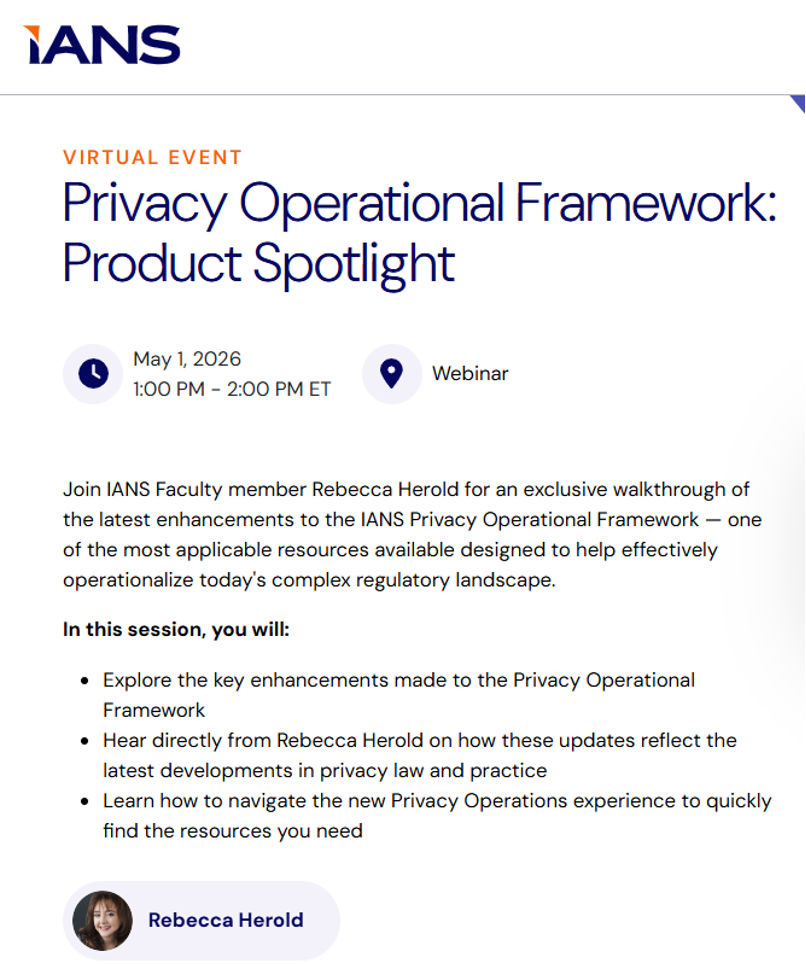
Rebecca is excited to describe, and take questions about, the IANS Privacy Operational Framework she has created and developed with IANS over the past couple of years at a free 1-hour event on Friday, May 1, 1:00 PM - 2:00 PM Eastern Time.
The Privacy Operational Framework was created to be used by practitioners for engineering, building, and putting into practice the necessary privacy protections and supporting security controls to operationalize privacy throughout an organization's business ecosystem, products, services and systems, while meeting legal requirements for data protection.
Sign up at the link below.
In this session, you will:
📣 Explore the key enhancements made to the Privacy Operational Framework
📣 Hear directly from Rebecca Herold on how these updates reflect the latest developments in privacy law and practice
📣 Learn how to navigate the new Privacy Operations experience to quickly find the resources you need
https://www.iansresearch.com/what-we-do/events/webinars/details/2026/05/1/2026-webinar/privacy-operational-framework--product-spotlight
| | |
We are excited to provide ways for MSPs, law firms, and other professional services organizations to offer our monthly tips to their clients! It is already working well for some such organizations. Get in touch with us for the details!
Here are some travel privacy and security items for you to consider in our 8-page “Protecting Privacy and Security While Traveling” guide.
What topics would you like to see us create videos, and more formal online courses, for? Let us know!
Have questions about our education offerings? Contact us!
| | |
Permission to Share
If you would like to share, please forward the Tips message in its entirety. You can share excerpts as well, with the following attribution:
Source: Rebecca Herold. May 2026 Privacy Professor Tips
www.privacysecuritybrainiacs.com.
NOTE: Permission for excerpts does not extend to images.
Privacy Notice & Communication Information
You are receiving this Privacy Professor Tips message as a result of:
1) subscribing through PrivacyGuidance.com or PrivacySecurityBrainiacs.com or
2) making a request directly to Rebecca Herold or
3) connecting with Rebecca Herold on LinkedIn.
When LinkedIn users invite Rebecca Herold to connect with them, she sends a direct message when accepting their invitation. That message states that in the spirit of networking and in support of the communications that are encouraged by LinkedIn, she will send those asking her to link with them her monthly Tips messages. If they do not want to receive the Tips messages, the new LinkedIn connections are invited to let Rebecca know by responding to that LinkedIn message or contacting her at rebeccaherold@rebeccaherold.com.
If you wish to unsubscribe, just click the SafeUnsubscribe link below.
| | | | |