Dear JogNog Teacher,

Do your students ever have difficulty finding the right class in JogNog?

Our new "Class Link" feature automatically walks the student through sign up, sign in and gets them into the right class.

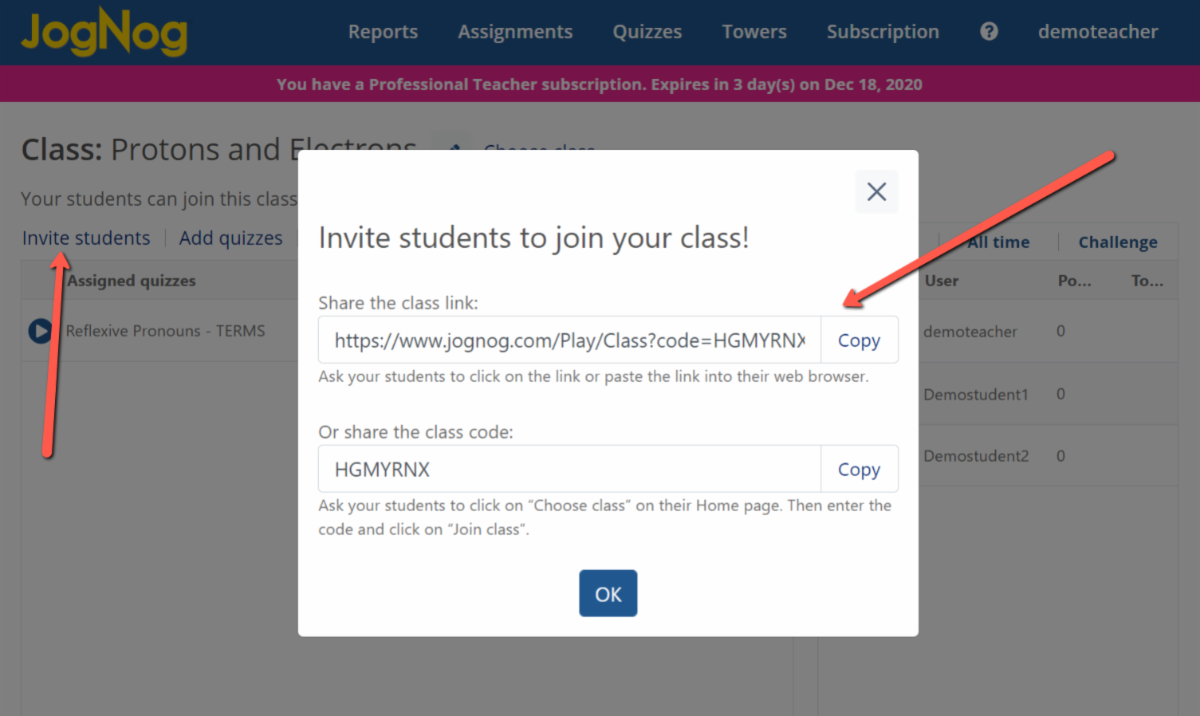
Here's how a teacher can use it:
  • Go to your Home page
  • Click on “Choose class” and select the correct class
  • Click on “Invite students”
  • Copy the link and give it to your students
  • Have your students click on the link
  • Voila! They are signed up, signed in and in the right class!
Once you copy the link you can then paste it into an email to your students, post it on your website or in Google Classroom, Microsoft Teams or your favorite learning management system (LMS).
When a student clicks on the link it will:
  • create a JogNog account for them (if they don't already have one)
  • sign them into their account (if they aren't already signed in)
  • add them to the class (if they aren't already a member)
  • take them to the class where they can play their JogNogs
FREE 30-day Professional Teacher Subscription
Just send an email to free@jognog.com

Best -= Steve

Stephen Smith || CEO,Co-Founder || JogNog
FREE 30-day Professional Teacher Subscription
Just send an email to free@jognog.com