One Cool Tip Newsletter

January 17, 2026

Your daily dose of tech-savvy brilliance!

😀Greetings! Happy Saturday, Cool Tipper!


Get ready to streamline your digital life with simple, actionable tips delivered straight to your inbox.


Cool Tip Theme: ChatGPT Translate Tool


New here? Subscribe to the One Cool Tip Newsletter for daily updates. It's FREE!

3️⃣

If you enjoy the One Cool Tip newsletter, please forward this newsletter to THREE friends or colleagues or share it on social media using the links below.


Leave a Tip!


Share this One Cool Tip Newsletter!

X Share This Email
LinkedIn Share This Email
Pinterest Share This Email

ChatGPT Go Offers GPT‑5.2 Power for Just $8/Month


OpenAI has launched ChatGPT Go, a budget-friendly subscription tier that unlocks GPT‑5.2, 10x more usage, and expanded memory, ideal for everyday writing, learning, and image creation.


ChatGPT Go is available worldwide for $8/month, giving users access to:


  • GPT‑5.2 Instant: Faster, more accurate responses.
  • 10x more messages, uploads, and image generation than the free tier.
  • Longer memory and context window for smoother conversations.
  • Ad-supported experience (ads may appear at the bottom of responses).


This tier sits below ChatGPT Plus ($20/month) and Pro ($200/month), making it a smart upgrade for users who want more power without the premium price.


Try it at chat.openai.com and explore how GPT‑5.2 can boost your productivity.


Cool Deals

Help support One Cool Tip. Use this Amazon link when you shop online.


Check out this Cool Deal:


🎧 Sony WH-1000XM5 Headphones - Perfect for listening to translations $398. Check it out on Amazon!


*Prices accurate when originally published.

One Cool Tip may earn a commission from qualifying purchases.

Fuel Your Adventure

Try Big Mike's Jerky!


bigmikesjerky.com


Now on TikTok!


Today's Cool Tip

How to Use ChatGPT’s New Dedicated Translation Tool


ChatGPT now includes a standalone translation workspace that behaves like a professional language tool rather than a chat prompt. Here’s how to use it effectively across devices and why it may replace your default translator.


By Rodger Mansfield, Technology Editor

January 17, 2026


What if translating text didn’t require crafting prompts or pasting content into a chat window every single time?


For years, ChatGPT could translate anything when asked. 


But that process always felt indirect. 


Here's a Cool Tip:  Use the new ChatGPT Translate Tool.


OpenAI has quietly introduced a focused translation interface built specifically for fast, clean language conversion with optional tone control.


This changes how professionals, educators, travelers, and everyday users can handle multilingual content.


Feature Explanation


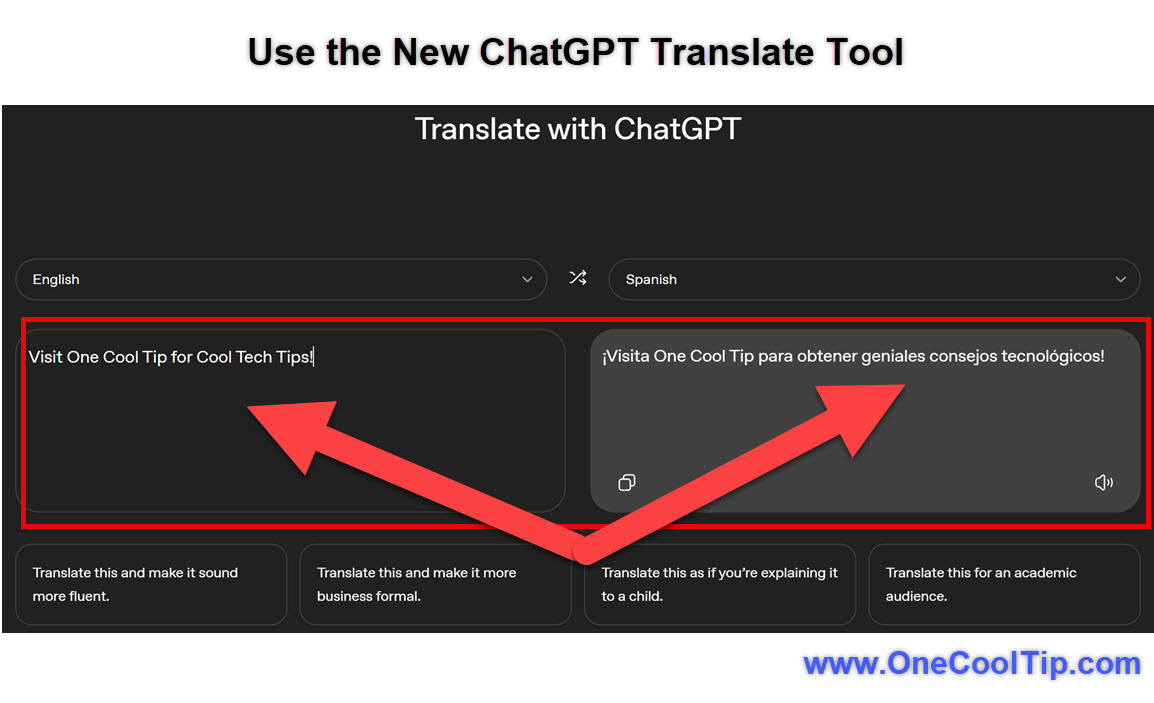
ChatGPT Translate is a dedicated translation environment hosted at ChatGPT.com that removes the conversational layer and replaces it with a structured translator-style layout.


Instead of typing “translate this,” you get:


  • A left panel for source text.
  • A right panel for translated output.
  • Language selectors at the top.
  • Instant conversion as you type or paste.
  • Tone and style refinement options.


The tool uses the same core intelligence as ChatGPT, but optimized for translation speed and consistency. 


It functions more like Google Translate, while preserving ChatGPT’s contextual strengths.


This matters because it eliminates friction. 


No prompts. 


No extra wording. 


Just paste and translate.


What You’ll Gain


  • Faster translations without writing prompts.
  • Cleaner side-by-side language comparison.
  • Optional tone control (formal, casual, simplified).
  • Better handling of longer structured text.


Step by Step Instructions


Here's how to do it.


Web (Desktop or Laptop)


  1. Open chatgpt.com/translate/.
  2. Choose the source language (or leave Auto Detect).
  3. Select your target language.
  4. Paste or type your text in the left panel.
  5. Watch the translation appear instantly on the right.
  6. Use the tone/style options if you want a refined version, for example, more fluent or business formal.


fig. 1 - Use the New ChatGPT Translate Tool

iOS


  1. Open Safari or Chrome.
  2. Go to chatgpt.com/translate/.
  3. Paste text into the source box.
  4. Select languages from the dropdown.


Android


  1. Open Chrome.
  2. Visit chatgpt.com/translate/.
  3. Paste or type text.
  4. Adjust language pair as needed.


Pros and Cons


Pros


  • No prompting required.
  • Cleaner than chat-based translation.
  • Tone adjustment improves usability for business writing.
  • Handles longer passages well.


Cons


  • Fewer languages than Google Translate.
  • No live camera translation yet.
  • No document upload mode.

Feature Access


Currently available via the web to ChatGPT users. 


No separate subscription tier announced. 


Score

Criterion | Score (0–10) | Justification
Value 9
Removes friction and speeds multilingual workflows.
Usability 9
Clean interface mirrors familiar translators.
Wow Factor 7
Not flashy, but extremely practical.
Total: 25/30 🌟 Excellent
A faster, cleaner alternative to chat-based translation that rivals DeepL for structured text.


Key Takeaways


ChatGPT Translate removes the conversational barrier and turns ChatGPT into a true productivity translator. 


It’s faster, cleaner, and easier for professional use. 


If you translate frequently, this tool is significantly more efficient.


Cool Tip Snapshot


  • Feature Name: ChatGPT Translate
  • Platforms: Web, Mobile Browsers
  • Quick Benefit: Instant structured translation
  • Access Type: Rolling out


Try It Yourself


Open ChatGPT Translate and paste a recent email or paragraph. 


Try different tones, then share your results with your team and subscribe to One Cool Tip for more daily discoveries.


READ MORE


Read the Full Cool Tip.

Check out these Cool Tips & Tricks for Using the ChatGPT Translate Tool:


  • Quick Swap: Tap arrows to flip languages. Use the swap icon.


  • Tone Fix: Make translations formal. Select tone buttons.


  • Auto Detect: Let ChatGPT guess language. Leave default.


  • Long Text: Paste full emails. Use large text box.


  • Clean Copy: Copy only translated side. Tap copy icon.


  • Multi Try: Compare tones. Re translate with tone.


  • Travel Mode: Use on phone abroad. Open browser.


  • Fast Paste: Windows Keyboard shortcut paste. Ctrl+V.


  • Proof First: Read output before sending. Scan translation.


  • Bookmark Tool: Save page for instant access. Add bookmark.

ICYMI - In Case You Missed It ...

New Windows 11 Themes Bring Personal Style to the Microsoft Store


Windows 11 is getting more personal. Microsoft has introduced a new wave of curated themes in the Microsoft Store, making it easier to customize your PC with just a few clicks.


Read the Full Cool Tip.

Read the Newsletter Version.

Looking for your next adventure?


Call Denise at Travel For You.

314.660.3039


Sign Up for the Monthly Newsletter


http://www.travelforyouvacations.com/


https://www.facebook.com/TRAVEL.FOR.U/


See You Tomorrow

Tomorrow's Cool Tip is waiting to amaze you.


Until then, go forth and conquer the tech world with your newfound knowledge!


Be sure to visit www.OneCoolTip.com for Cool Tech Tips for a Cooler Life!


And if you Like One Cool Tip, please support with TipJar!


Enjoy!


Rodger

Chief Cool Tipper

onecooltip.com@gmail.com


What Do You Think?

What do you think of today's OneCoolTip newsletter?
Positive        Neutral        Negative
X Share This Email
LinkedIn Share This Email

Connect with One Cool Tip!!

Facebook  X  Instagram  Web  Pinterest  YouTube  LinkedIn
 

As an Amazon Associate, One Cool Tip may earn a small commission from qualifying purchases.


Our media content is intended solely for informational purposes only. Please do not construe anything here as legal, tax, investment, financial, marital or other advice.


Copyright © 2026 | www.OneCoolTip.com | All Rights Reserved