One Cool Tip Newsletter

November 8, 2025

Your daily dose of tech-savvy brilliance!

😀Greetings! Happy Saturday, Cool Tipper!


Get ready to streamline your digital life with simple, actionable tips delivered straight to your inbox.


Cool Tip Theme: Set NotebookLM Chat Goals


Enjoy today's abbreviated Cool Tip Newsletter while Cool Tip is searching the world for more Cool Tips.


New here? Subscribe to the One Cool Tip Newsletter for daily updates. It's FREE!


🔔 Is your email provider (Gmail, Yahoo, Outlook...) not delivering the newsletter? 


Check the Junk folder - Move the newsletter to your Inbox. And reply to this email with a “Hey, Rodger” or “I got it.” That tells your mail service you want this newsletter!

3️⃣

If you enjoy the One Cool Tip newsletter, please forward this newsletter to THREE friends or colleagues or share it on social media using the links below.


Leave a Tip!


Share this One Cool Tip Newsletter!

X Share This Email
LinkedIn Share This Email
Pinterest Share This Email

Cool Deals

Help support One Cool Tip. Use this Amazon link when you shop online.


Look at these Cool Products:


  • 💻 Dell XPS 14: premium laptop with ample memory and screen for multitasking NotebookLM web sessions. $2,099.99 Check It Out on Amazon!


  • 🖱️ Logitech MX Master 3S: ergonomic mouse with customizable buttons, helpful when navigating large notebooks and long chat sessions. Save 8% $109.99 Check It Out on Amazon!


  • 🎧 Sony WH-1000XM5: premium headphones for listening to NotebookLM audio overviews while defining your chat goal. Save 18% $328 Check It Out on Amazon!

*prices accurate when originally published.

Fuel Your Adventure

Try Big Mike's Jerky!


bigmikesjerky.com


Now on TikTok!


Today's Cool Tip

Personalize Your Chat in NotebookLM with Custom Goals


Set a clear goal for your chat in NotebookLM and watch how the AI adapts to behave like a strategist, researcher or storyteller. The latest upgrade unlocks deeper context, longer memory and smarter responses tied to your defined intent.


What if your AI research assistant didn’t just answer your questions but knew your objective and aligned itself around it? 


With the latest upgrade to NotebookLM, that scenario is now real. Google has helped turn a generic chat assistant into a goal-driven, persona-aware companion that can follow your defined agenda. 


Feature Explanation


In plain terms, the latest version of NotebookLM includes two major enhancements: first, a massive expansion of context window (up to about 1 million tokens) and conversation memory (about 6x longer), enabling much more sustained and coherent chat sessions based on large documents. 


Second, NotebookLM now supports a Goals (or custom persona) setting. 


You open the chat configuration and specify the AI's role, voice, and objective before or during a session.


For example: "Act as my marketing strategist and give me an action plan," or "Treat me as a PhD candidate and challenge my assumptions." 


Why it matters: 


By anchoring the AI’s behavior to a goal or role, you move from general Q&A toward task-oriented, aligned conversations, especially useful for business reports, research projects and productivity workflows. 


With deeper context and longer chat memory, your conversation retains thread, context and intent over time.


What You’ll Gain


  • Better alignment between your objective and the AI’s responses (e.g., strategic plan rather than generic advice)
  • Longer conversations that retain context across turns and even sessions, reducing repetition and lost thread
  • Smarter document synthesis: large files, many sources, deeper insights.


Step-by-Step Instructions


Here's how to do it.


Microsoft Web/Desktop (Browser)


  1. Sign in to NotebookLM via browser at notebooklm.google/
  2. Create or open a notebook and upload your sources (PDFs, Docs, websites) as usual.
  3. Locate the “Chat Settings” icon in the Chat window.
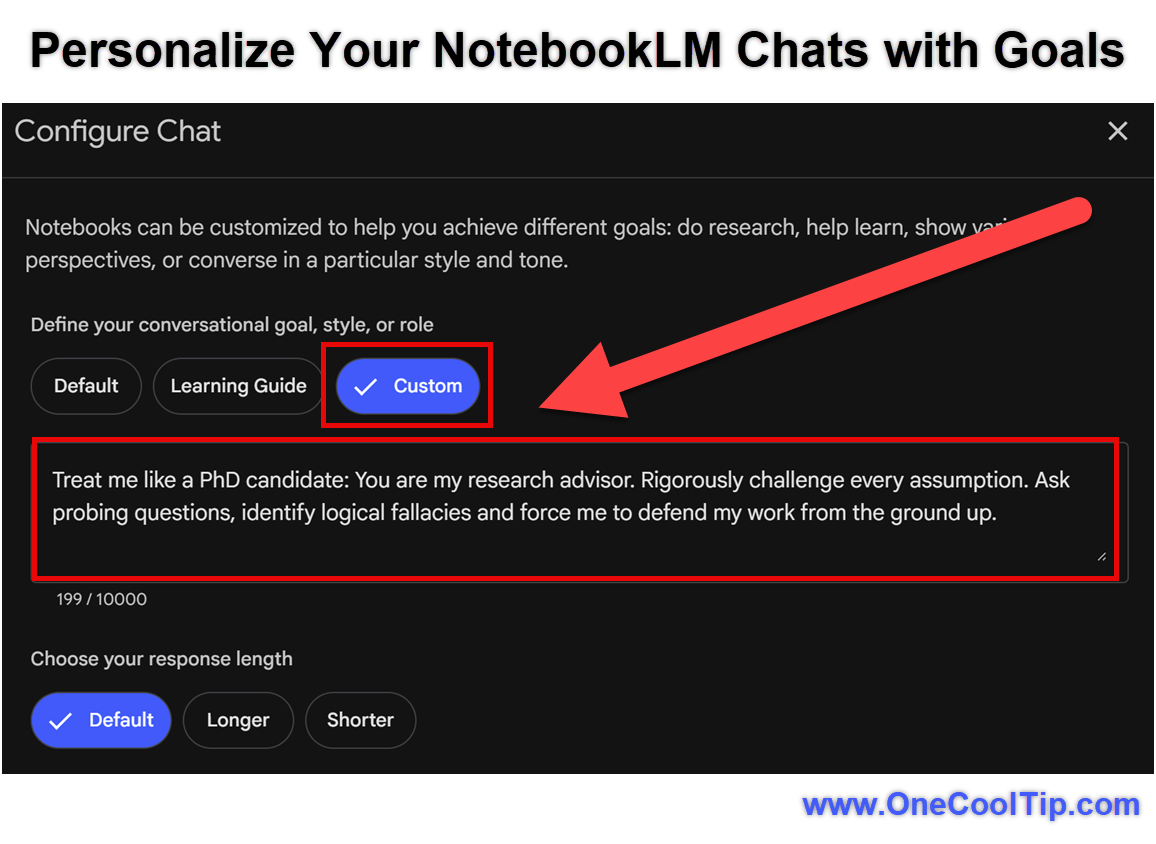
  4. Select "Custom" for Conversational goal.
  5. In the “Goal / Personal” field, type a description such as: “Treat me like a PhD candidate: You are my research advisor. Rigorously challenge every assumption. Ask probing questions, identify logical fallacies and force me to defend my work from the ground up.”
  6. Click “Save”.
  7. Ask your question or start the conversation: e.g., “Review these documents and recommend five strategic opportunities for our project.”
  8. When you close the session and return later, the chat retains history and remembers context so you can resume. 

fig. 1 - Example: Personalize Your NotebookLM Chats with Goals

Pros and Cons


Pros


  • Enables very tailored conversations: For a marketing team you can set “act as lead marketing strategist”, resulting in concrete, business-ready outputs rather than generic answers.
  • Supports large scale inputs: With ~1 million tokens of context, you can load heavy research files, transcripts, reports and the chat will still track thread.
  • Memory retention: Longer conversations mean less repetition, more coherence, especially for ongoing projects.


Cons


  • Learning curve: Crafting the right goal/persona prompt takes experimentation; if the prompt is vague you might get ordinary results.
  • Availability details unclear: Some memory/history features are in roll-out. If you rely on notebook for enterprise workflows the timeline may vary.
  • Over-reliance risk: Because the assistant aligns to your goal, you must ensure your goal/prompt is well-defined, otherwise you may get persuasive but superficial outputs.


Feature Access


The core upgrade, including the Goals feature, applies to NotebookLM across all plans, with enhanced limits for context window (up to approximately 1 million tokens, 8x previous) and conversation memory (up to 6x longer).


Platform: Web first; mobile app availability may vary by region and OS.


Subscription/extras: Basic free NotebookLM offers core functions; Pro or Premium tiers give higher limits. 


Region: Supports ~180+ regions where Gemini models are available. 


Score

Criterion Score (0–10) Justification
Value 9
The ability to steer chat toward a defined goal adds substantial productivity and alignment for knowledge workers.
Usability 8
The UI is straightforward, but crafting effective persona prompts may require practice.
Wow Factor 8
The 1 million token context window and goal-setting make it feel like a major leap in AI chat assistants.
Total: 25/30 🌟 25–30 Excellent
This feature marks a strong evolution of NotebookLM, offering a distinctive advantage compared to standard chatbots by combining large-scale document context with goal-driven persona settings.


Key Takeaways


This upgrade turns NotebookLM into a more intelligent, aligned research companion by letting you define the “role” and “objective” of the chat and by backing that with much deeper context and memory. 


For business users, educators or freelancers working with large sources or ongoing workflows, this means more relevant, task-specific outputs and less time lost in context switches.


Cool Tip Snapshot


  • Feature Name: Custom Goals / Persona Chat in NotebookLM
  • Platform(s): Web
  • Quick Benefit: Define how you want your AI to behave and get aligned, context-aware responses from large document sets
  • Access Type (Free, Subscription, Beta): Free tier supports the feature, enhanced limits via subscription


Try It Yourself


Open a notebook in NotebookLM, upload a relevant document set (e.g., your next report or lecture material), then configure the chat with a clear goal such as “You are my strategic advisor, provide the next-quarter action plan”. 


Ask your first question and observe how the AI’s tone, structure and output align with your goal.


If this tip helped, share the article with your team, family and friends, comment with how your goal-setting experiment turned out.


READ MORE


Read the Full Cool Tip HERE.

ICYMI - In Case You Missed It ...

What Happens When Windows 10 Support Ends and What You Should Do Next


Microsoft ended free updates and support for Windows 10. Here’s what that means for your computer, your security, and the steps you should take to stay protected.


Read the Full Cool Tip.

Looking for your next adventure?


Call Denise at Travel For You.

314.660.3039


Sign Up for the Monthly Newsletter


http://www.travelforyouvacations.com/


https://www.facebook.com/TRAVEL.FOR.U/


See You Tomorrow

Tomorrow's Cool Tip is waiting to amaze you.


Until then, go forth and conquer the tech world with your newfound knowledge!


Be sure to visit www.OneCoolTip.com for Cool Tech Tips for a Cooler Life!


And if you Like One Cool Tip, please support with TipJar!


Enjoy!


Rodger

Chief Cool Tipper

onecooltip.com@gmail.com


What Do You Think?

What do you think of today's OneCoolTip newsletter?
Positive        Neutral        Negative
X Share This Email
LinkedIn Share This Email

Connect with One Cool Tip!!

Facebook  X  Instagram  Web  Pinterest  YouTube  LinkedIn
 

As an Amazon Associate, One Cool Tip may earn a small commission from qualifying purchases.


Our media content is intended solely for informational purposes only. Please do not construe anything here as legal, tax, investment, financial, marital or other advice.


Copyright © 2025 | www.OneCoolTip.com | All Rights Reserved