One Cool Tip Newsletter

January 18, 2026

Your daily dose of tech-savvy brilliance!

😀Greetings! Happy Sunday, Cool Tipper!


Get ready to streamline your digital life with simple, actionable tips delivered straight to your inbox.


Cool Tip Theme: Google Gemini's Personal Intelligence


New here? Subscribe to the One Cool Tip Newsletter for daily updates. It's FREE!

3️⃣

If you enjoy the One Cool Tip newsletter, please forward this newsletter to THREE friends or colleagues or share it on social media using the links below.


Leave a Tip!


Share this One Cool Tip Newsletter!

X Share This Email
LinkedIn Share This Email
Pinterest Share This Email

Illinois DHS Data Breach


A major privacy lapse at the Illinois Department of Human Services exposed protected health information for more than 700,000 residents after internal planning maps were mistakenly made public for years.


The agency says the issue stemmed from incorrect privacy settings on a mapping tool and has since been locked down, with no evidence of misuse so far.


What You Should Do


  • Watch for notification letters: IDHS is contacting affected individuals as required by federal law.
  • Monitor accounts: Keep an eye on insurance statements and state benefit accounts for unusual activity.
  • Review privacy practices: If your organization uses mapping or analytics tools, double-check access controls to avoid similar exposure risks.

Cool Deals

Help support One Cool Tip. Use this Amazon link when you shop online.


Check out this Cool Deal:


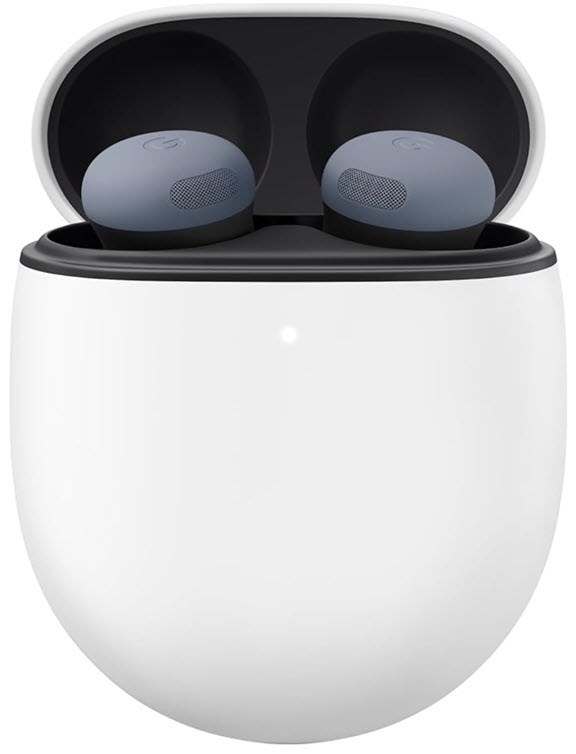
Google Pixel Buds Pro 2 - Hands free Gemini access for voice memory prompts. Overall Pick! $229. Check it out on Amazon!


*Prices accurate when originally published.

One Cool Tip may earn a commission from qualifying purchases.

Fuel Your Adventure

Try Big Mike's Jerky!


bigmikesjerky.com


Now on TikTok!


Today's Cool Tip

How Google Gemini’s New AI Feature Connects Your Apps for Smarter Answers


Imagine an AI that doesn't just know general facts, but knows you; finding your lost frequent flyer number or that specific vacation photo in seconds. Google Gemini’s new Personal Intelligence upgrade connects Gemini to your personal apps to transform how you manage your digital life.


By Rodger Mansfield, Technology Editor

January 18, 2026


Have you ever stood in line at a service counter, frantically searching your phone for a license plate number or a specific document buried in your email? 


We have all been there. Most AI chatbots can tell you the capital of France, but they cannot tell you what tire size your car needs or when your next dentist appointment is scheduled. 


Here's a Cool Tip:  Try Google Gemini's New Personal Intelligence.


Google just announced a major upgrade to Gemini called "Personal Intelligence" that bridges the gap between general knowledge and your personal digital life.


Feature Explanation


Personal Intelligence is a new opt-in feature that allows Gemini to securely connect with your Google apps, including Gmail, Google Photos, YouTube, and Search. 


Instead of just relying on public internet data, Gemini can now "reason" across your personal information to give you tailored answers. 


It can find a specific receipt in your inbox, cross-reference it with a photo of the item, and tell you exactly when you bought it. 


It is designed to be a proactive assistant that knows you, not just the world.


What You’ll Gain


Instant Recall: Find details like membership numbers or dates from emails and photos in seconds.


Complex Planning: Plan trips or projects by combining personal preferences from your history with real-world data.


Smarter Search: Ask natural language questions about your own life, like "Show me photos of the house we rented last summer."


Step-by-Step Instructions


Here's how to do it.


Android, iOS & Web


  1. Open the Gemini app on your phone (Android / iOS) or visit gemini.google.com.
  2. Tap your profile picture or the Settings Link to access Settings.
  3. Tap on the new Personal Intelligence menu option.
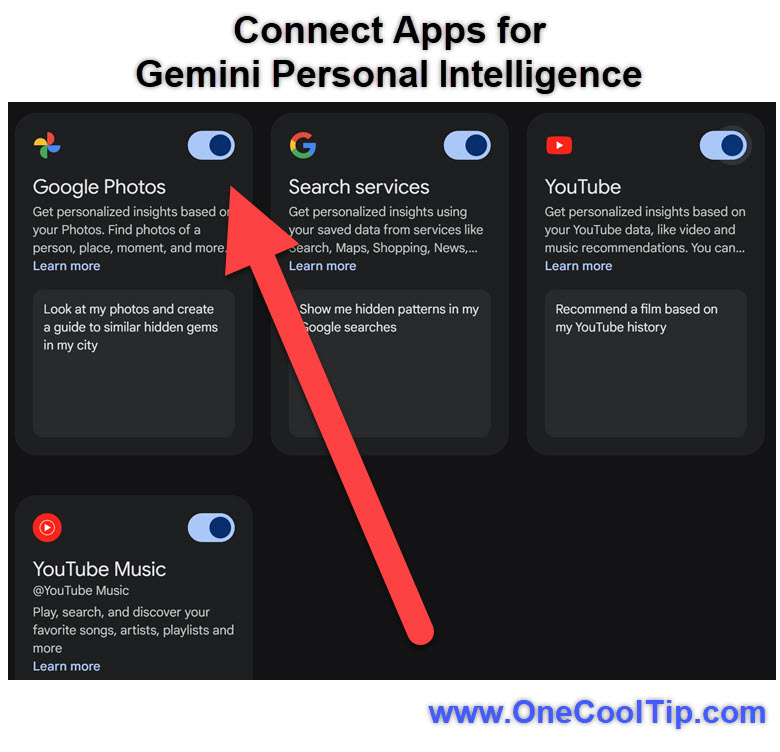
  4. Select Connected Apps.
  5. Toggle the switches for the apps you want to connect (Gmail, Photos, YouTube).
  6. Review the permissions and confirm to start using the feature.


fig. 1 - Gemini Personal Intelligence Setting Example

Pros and Cons


Pros 


  • Contextual Awareness. Gemini understands your specific life events and data for highly relevant answers.
  • Time Saving. Eliminates the need to manually search through multiple apps for simple information.
  • Privacy Control. You explicitly choose which apps to connect and can disconnect them at any time.


Cons


  • Limited Availability. Currently only available to paid subscribers (AI Pro/Ultra) in the US.
  • AI Hiccups. It might occasionally misinterpret context or "hallucinate" connections. Always double-check answers.


Feature Access


  • Availability: Rolling out now (January 2026).
  • Eligibility: Google AI Pro and AI Ultra subscribers.
  • Region: United States.
  • Platform: Web, Android, iOS.
  • Note: Not currently available for Google Workspace business or education accounts.


Score

Criterion | Score (0–10) | Justification
Value 9
Saves significant time by retrieving personal data instantly.
Usability 8
Easy setup, though effectiveness depends on data quality.
Wow Factor 9
The ability to "talk" to your own data feels futuristic.
Total: 26/30  🌟 Excellent
A game-changer for productivity that finally makes AI personal, significantly outpacing standard chatbots in daily utility.


Key Takeaways


Gemini can now access your Gmail, Photos, and other Google apps to answer questions about your personal life. 


The feature is secure, private, and requires an opt-in for each app you connect. 


It transforms Gemini from a general chatbot into a personalized digital assistant.


Cool Tip Snapshot


  • Feature Name: Personal Intelligence
  • Platform(s): Android, iOS, Web
  • Quick Benefit: Search and query your own emails and photos with AI.
  • Access Type: Subscription (Google AI Pro/Ultra)


Try It Yourself


Open your Gemini settings today and connect just one app, like Google Photos, to see if it can find that specific vacation memory you have been looking for. 


Please leave a comment below or share this tip with your friends!


READ MORE


Read the Full Cool Tip.

Check out these Cool Tips & Tricks for Using Gemini Personal Intelligence:


  • Check Eligibility: You must be a Google AI Pro or Ultra subscriber to access this beta feature.


  • Enable Manually: The feature is off by default so you must go to Settings to turn it on.


  • Select Apps: Choose only the specific apps you want Gemini to access for better privacy control.


  • Verify Answers: Always double check Gemini's answers against the source email or photo provided in the citation.


  • Use Natural Language: Ask questions like "When is my flight?" rather than using keywords.


  • Find Receipts: Query "Show me the receipt for my last Amazon purchase" to save search time.


  • Identify Objects: Ask "What is the model number of my TV?" if you have a photo of the label.


  • Plan Trips: Say "Plan a weekend trip based on the hotel confirmation in my email."


  • Disconnect Anytime: You can instantly revoke access to any app if you change your mind about privacy.


ICYMI - In Case You Missed It ...

New Adaptive Power in iOS 26


Apple’s new Adaptive Power mode in iOS 26 quietly reshapes how your iPhone manages energy throughout the day. It promises longer battery life with fewer compromises, especially when your phone senses heavy use ahead.


Read the Full Cool Tip.

Read the Newsletter Version.

Looking for your next adventure?


Call Denise at Travel For You.

314.660.3039


Sign Up for the Monthly Newsletter


http://www.travelforyouvacations.com/


https://www.facebook.com/TRAVEL.FOR.U/


See You Tomorrow

Tomorrow's Cool Tip is waiting to amaze you.


Until then, go forth and conquer the tech world with your newfound knowledge!


Be sure to visit www.OneCoolTip.com for Cool Tech Tips for a Cooler Life!


And if you Like One Cool Tip, please support with TipJar!


Enjoy!


Rodger

Chief Cool Tipper

onecooltip.com@gmail.com


What Do You Think?

What do you think of today's OneCoolTip newsletter?
Positive        Neutral        Negative
X Share This Email
LinkedIn Share This Email

Connect with One Cool Tip!!

Facebook  X  Instagram  Web  Pinterest  YouTube  LinkedIn
 

As an Amazon Associate, One Cool Tip may earn a small commission from qualifying purchases.


Our media content is intended solely for informational purposes only. Please do not construe anything here as legal, tax, investment, financial, marital or other advice.


Copyright © 2026 | www.OneCoolTip.com | All Rights Reserved