Your Weekly guide in a Changing World.

Written and edited independently by Barry Neethling
Sponsored by First Technology Group

26th October #190

New for this Week

This is long newsletter - the headlines in red are the important ones

  • As a user of Microsoft technologies, you are receiving this publication to stay informed about critical topics such as Microsoft licensing, price increases, end-of-life dates, technical updates, security notices, and more.
    If you do not want
    to continue receiving TOP STORIES, click on the unsubscribe link at the bottom of the mail.
    
  • Another 3 New vendors: MobaXterm, maxon and Nutrient are added.
  • DarkWeb Weekly Intelligence Report #190- Been a very busy Week!
  • Did you Know - CoPilot can give you meaningless, sensible answers!
  • Your Next Notebook - Getting the performance you pay for
  • Now you have your Notebook - You need the right Settings.
  • AI Is getting cheaper -but can you control it?
  • Teams Getting AI Phishing Detection - Users STILL NEED TRAINING!
  • Outlook Classic - 3 Years of warnings - It's going like it or not!
  • Windows Teams - Also getting leaner for 8GB
  • CoPIlot Value - Value needs to grow after the license purchase
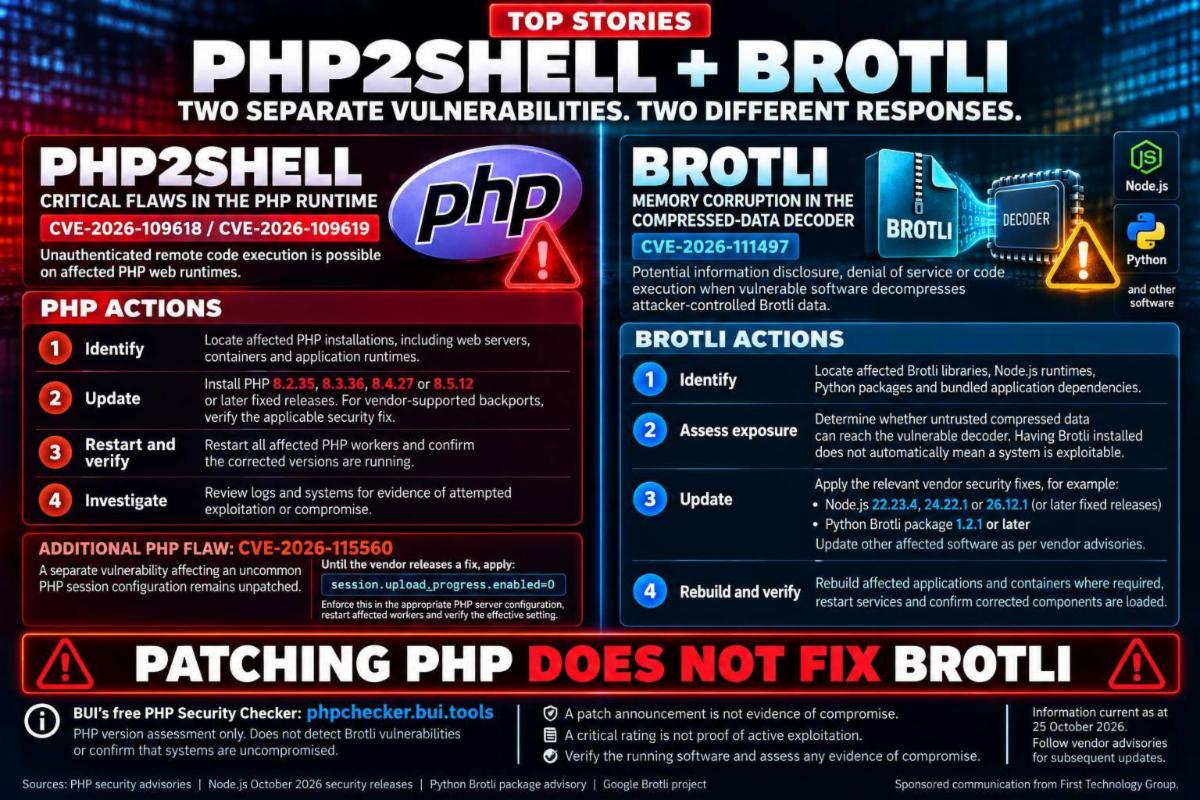
  • PHP2SHELL - 70% of the Internet Vulnerable - ASK FOR HELP!!
  • Brotli Decoder flaw needs patching - More work to protect systems
  • Phishing Scams - Which ones catch you out....?
  • OpenAI locking it's models away- They REALLY want to be free!!!!!

CTA - Sponsored message from First Technology Group

Forward this mail to others who may find this useful and invite them to subscribe using the button below.


CTA - Sponsored message from BUI

BUI scans the DarkWeb continuously for Hacker signals and Ransomware attacks.

Click above for the report from our live dashboard that we will publish weekly (but is actually updated continuously).

This is part of the DarkWeb monitoring services included with many of BUI's managed services offerings. This report is live, and this is a "snapshot" of the top 10 events as of Sunday Afternoon.


You can click the top button for last week's edition or sign up for access to the archive with AI assistance to read from #1

CTA - Sponsored message from FirstMarketPlace

MobaXterm
maxon
Nutrient


Are added for this week.
Click the link above for more infomation on these vendors

Ebeneser looks like it will be a very different take on the traditional Story

CTA - Sponsored message from First Technology Group

Did You Know… Copilot can give a perfectly sensible answer that is worth nothing?


First Digital asked Copilot how to name the company in a press release, with Microsoft’s Work IQ switched off.
“First Digital.” Reasonable enough, picked up from the website at some point.


Work IQ switched on, same question.
Now it gives the actual rule: First Digital in the headline, “First Digital, a First Technology Group company” on first mention, First Technology Digital (Pty) Ltd in the legal boilerplate.


The first answer is not wrong, but it was ungrounded, and plausible enough that nobody checks it. 
Repeat that across everyone in your business writing anything, and the company ends up with several voices and several versions of its own facts.


Documents are the easy part.
Structured data is where agents fall over.


An approval matrix reading G5, 6100, FM is just a grid of strings and numbers to an agent. Tell it G5 is a Senior Analyst grade, 6100 is computer hardware capital expenditure and FM is the finance manager, add the rule that nobody approves their own request, and it can work out who signs off a new laptop.


So if your artificial intelligence (AI) tools cannot yet produce a consistent slide deck or use your own terminology….. how far away is the agent that approves a purchase order?


Please contact your First Technology Group account manager to connect you with our First Digital, Advanced Technology and FirstNet specialist teams to ground your AI in your own knowledge and data, served from one source to Copilot, ChatGPT Enterprise or a Teams bot.


Microsoft is the right foundation. What you build on top decides whether the answers are actually yours.

CTA - Sponsored message from First Technology Group

20261008_152148_3 image

Your next notebook..... Ensuring performance you are paying for!


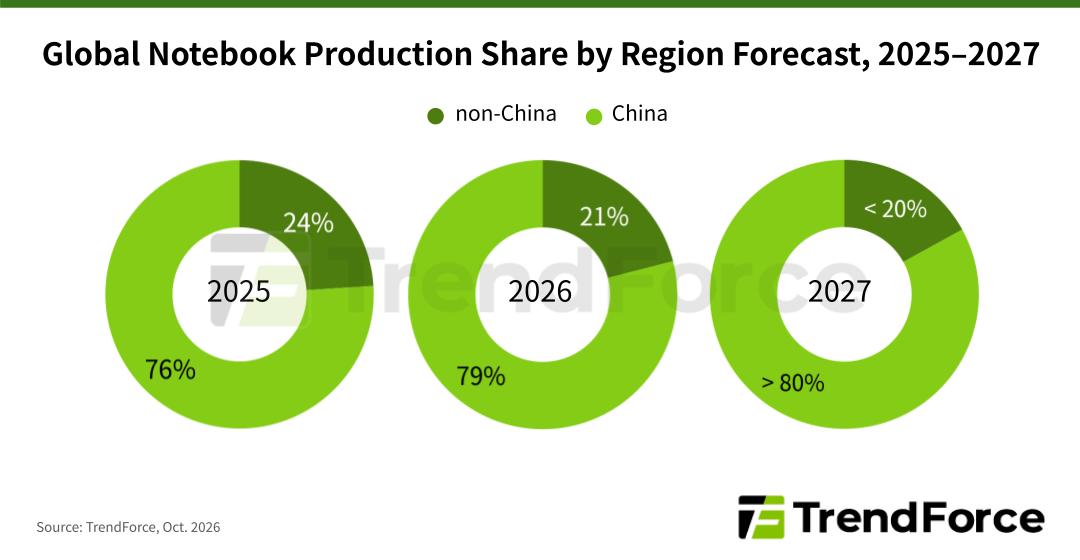
TOP STORIES has been warning about computer shortages and rising prices for some time.


CPU availability has improved, but memory, storage and processor costs continue to put pressure on notebook pricing.


Waiting for everything to return to “normal” is becoming an increasingly questionable purchasing strategy.


It's time to look more carefully at WHAT you are buying.

Intel has already raised prices on selected notebook processors. Companies that have been specifying Intel for years should now insist on evaluating an AMD alternative. “That is what we have always bought” is a habit..... it is not a technical requirement.


AMD Ryzen PRO systems offer commercial security and management capabilities, with options from established corporate suppliers. Evaluate the actual applications, management requirements, price and availability.
AMD deserves a proper hearing, without assuming it automatically wins every comparison.


Look beyond the processor sticker.

A sexy, slim notebook looks wonderful in the boardroom..... until the going gets tough and the expensive processor starts sweating and slowing down.


Cooling and power limits determine how much performance the machine can sustain.
Notebookcheck’s Dell 16 Premium testing illustrates the point: CPU benchmark scores fell almost 15% during repeated runs, while the lower-power allowance of 60W for the RTX 5070 delivered less graphics performance than most other notebooks carrying the same GPU model.


Now compare the Lenovo Yoga Pro 9i 16 G10. The tested configuration had the same Intel Core Ultra 7 255H processor and 32GB RAM, but a lower-tier RTX 5060, allowed to operate at up to 100W.


The result? The Lenovo scored approximately 8% higher in the Time Spy graphics benchmark, and averaged 10% higher across repeated CPU benchmark runs.
Same processor. Lower graphics model number. Better results in both tests.
The specification sheet only tells part of the story.

Not all generations from the same brand are built the same, and in other comparisons the Dell may outclass Lenovo - you have to select wisely!


Cooling, power allowances and the complete system design determine what those expensive components actually deliver. Make the supplier demonstrate performance under your workload before you pay for the promise.

Buying an expensive CPU and GPU makes little sense if the notebook cannot sustain the performance your work requires.


Gaming and creator notebooks therefore deserve consideration for demanding business users.
Designs with sufficient cooling and power capacity can make very capable working machines.
A coloured keyboard should not automatically disqualify one from running the company’s applications!


BUT..... choose carefully for the task.


A frequent traveller may reasonably prioritise weight, battery life and quiet operation.
A developer, engineer or video editor waiting for demanding work to finish may benefit considerably more from sustained performance.

Neither should have their machine selected purely because somebody likes how thin it is.


There is also room to look beyond the usual corporate brands.


Allow reputable alternative brands and specialist suppliers onto the shortlist where their configurations, performance and confirmed availability make sense.


BUT..... investigate who will support the machine AFTER the invoice has been paid.


Check local repair facilities, spare parts, warranty turnaround, firmware updates, security, device management and application compatibility. Start with evaluation units and a small deployment.
A cheaper, faster notebook that spends weeks waiting for a replacement motherboard can become a very expensive "saving".


32GB remains the minimum for a new corporate PC.

Rising memory prices do NOT change that recommendation.
More demanding applications, virtual machines and local AI may require considerably more.


Before approving a purchase, run the actual workload long enough for the notebook to warm up. Include the company’s security software and background applications.
Check the charger, docks, fan noise and battery behaviour too.

Also check that the monitor's Power Delivery rating is high enough to power the notebook at maximum performance, as many are not.


Please contact your First Technology Group account manager to connect with FTG’s hardware specialists. Ask them to compare Intel and AMD configurations, assess suitable alternative brands, confirm local stock and support, and arrange evaluation equipment where available.
A full catalogue is available on FirstShop to get started!

CTA - Sponsored message from First Technology Group

You Paid for Performance, but are you getting it?

Now that you have gone through all the effort of buying a notebook that can actually give you the performance that the specifications promise, are you making sure that the power settings allow it to perform as intended?


PCGamer has quite an impressive example of how much the "wrong" setting can impact performance, so it is worth paying close attention to this....


There is little sense in buying an expensive processor and then configuring the notebook to prioritise silence (or just accept default settings) when the user needs speed.


Dell’s own documentation confirms that its Quiet profile reduces processor speed..... Take the label seriously!


For demanding work while plugged into mains power, start by checking Settings → System → Power & battery → Power mode → Best performance, together with the manufacturer’s own performance setting.

Battery operation can have a separate, more economical setting.


And check the power supply. A charger that keeps the battery icon happy may still provide too little power for the notebook to perform properly.

This can also be a problem when you power the notebook from the monitor.


Dell lists slower performance amongst the consequences of an underpowered adapter. Dell’s power-supply guidance.


BUT..... test against what you are doing.
A higher performance setting is worthwhile when it gets the work done or jobs completed in the background faster.
Extra fan noise, on its own, is not productivity!


Ask FTG’s specialists to check the notebook, its power supply and its performance settings against the actual workload before standardising a corporate configuration.