Mobile App Continuing Updates | | |
The Mid-Hudson Library System (MHLS) Mobile App continues to get updates, so we wanted to share a few of the visual preferences, here in one place. So far, the Mobile App has been downloaded more than 2,875 times!
-
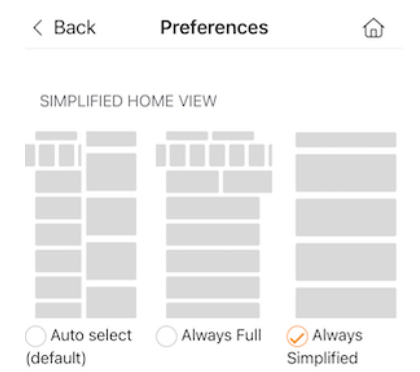
The Mobile App's View Preference allows patrons to choose how the home screen is displayed. Patrons can select the Always Full layout, which shows all configured tabs as designed in the Content Management System, or switch to an Always Simplified layout, which reduces visual noise by displaying a more streamlined version of the home screen. This feature is available by default in the app and does not require any configuration from the library. This flexibility makes the app more user-friendly by allowing patrons to tailor the experience to their needs. The Always Simplified layout is especially helpful for those who prefer a cleaner layout or find too many options overwhelming. Patrons can update their preferences at any time by going to the My Account menu, selecting Preferences, and navigating to the Simplified Home View section.
| | 💡 Pro Tip: Always Include a Library Account Tab!: If the app is set to Always Simplified by a patron, the hamburger menu is hidden, meaning patrons can no longer access menu-based navigation. To ensure they still have access to account features (including the ability to change their view preference), it's best to always include a Library Account Tab on the home screen. This guarantees a consistent way for patrons to manage their account and personalize their app experience, even in Always Simplified layout. | |
-
The Patron Mobile App lets patrons personalize their viewing experience with the Theme Preference setting. Patrons can choose between Light theme, Dark theme, or Auto theme, which follows their device’s system theme. This feature is available by default in the app and does not require any configuration from the library. It helps make the app more comfortable to use in different lighting conditions and supports individual accessibility preferences.
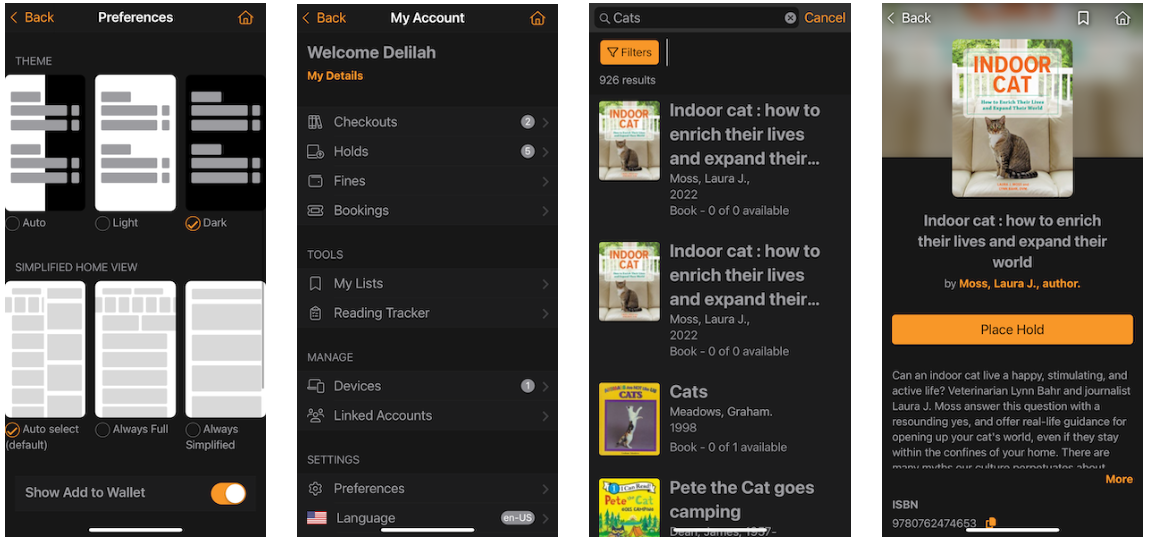
Patrons can change their preferred theme by navigating to the My Account menu and selecting Preferences. From there, locate the Theme section. Within that section, there are three options: Auto, Light, Dark. By default, the Auto will be selected. Selecting any of the other options will immediately update to reflect the patrons choice.
Changing to Dark theme does not override the color scheme on the app’s home screen. For example, if your home screen has a white background, gray tabs, and black text, those colors will remain the same. The Dark theme applies only to the My Account menu and related screens within that area, such as the Checkouts display, search display, and Item Details display.
💡 Pro Tip: Choose Link Button Colors with Dark Theme in Mind!: When setting the color of the Link Button, it’s best to pick a shade that remains clearly visible against the dark theme’s black background, just in case a patron has enabled Dark mode within their app. This helps ensure buttons are easy to find and interact with, providing a smooth experience regardless of the theme selected.
| | -
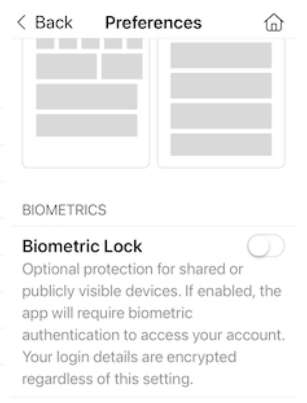
In APP Biometric Lock - Enabling biometric lock for your library account in the Solus Library App adds an extra layer of security by requiring either facial recognition or a fingerprint to access your account. This helps protect your account information, making sure only you can view and manage your library account details. To activate this feature, start by opening the My Account menu and selecting Preferences. From there, locate the Biometric Lock option and toggle it on. Once enabled, your device will prompt you to use your stored biometric credentials, either Face ID or fingerprint—each time you access your account.
| | |
Great news to report – on Friday, June 27th, the Supreme Court upheld the funding mechanism for the $9 billion Universal Service Fund, which distributes money annually under the E-rate program to connect schools and libraries to the internet. By providing significant discounts, the program helps bridge the digital divide in our communities.
American Library Association (ALA) President Cindy Hohl said, “Since the program was established in 1996,” Hohl said, “E-Rate has transformed and revolutionized access to information. Virtually all libraries in the country now have high-speed broadband, which powers modern library services that range from online tutoring and employment assistance to telehealth appointments.”
Want to know more about Erate? Is this the year you start? We have an Introduction Erate webinar coming up on August 5th. We also have an Erate series on MHLS Training on Demand: Technology. If you are not sure how to begin, reach out to Laurie Shedrick at extension 220, or email lshedrick@midhudson.org.
| | Summer Reading has begun! Our member libraries are exploring what it means to Color Our World: | Left to right: Adriance Memorial Library, Poughkeepsie; Pleasant Valley Free Library; Catskill Public Library. | | |
NYLA is hosting a virtual Library Skills Academy this summer and fall – this program is open to individuals already working or newly hired in libraries, or people interested in working in public and academic libraries. This is an eight-week academy running from August 19th through October 7th. The intention of this program is to be an interactive experience for both presenters and participants. To receive a certificate, participants must attend all sessions within the program. Deadline to apply is August 5th. REGISTER HERE.
| | Resource Sharing & Sierra | |
REMINDER: Decision Center Reports | July 10 | 10 AM – 12 PM | Online | REGISTER
Decision Center offers reporting tools that can help you to better evaluate your transactions in larger context. There are tools for collection development that examine your current collection for usage trends and weeding tools that will help you to locate the most appropriate titles for weeding based on no use or overuse. Once the reports are created, they can be further filtered. The export to review file or excel will make the next step in your project a breeze. Registration is required for this online event.
| | Administration & Management | |
A reminder from the MHLS Delivery Department: Please factor in MHLS holidays when forward sorting materials to expedite delivery of materials on route. Always forward sort for your next MHLS scheduled delivery day after a holiday. We will send a reminder to the MHLS-Notice List prior to any holiday. View delivery routes by day and library.
For questions regarding MHLS delivery operations please contact Tom Finnigan, Delivery Operations Manager.
| | |
Library Director, LaGrange Association Library
The LaGrange Library Board of Trustees seeks a Library Director to manage all aspects of library operations and services. The director supervises all library employees, administers both short-term and long-term library operations, and fosters partnerships with outside organizations in providing services to the residents of LaGrange. The director has principal responsibility for library finances, information systems and technology, interior building maintenance, human resources, collection development, public relations, community outreach, and customer service. The Library Director prioritizes and manages many projects simultaneously. They must foster strong working relationships with the library’s Board of Trustees, staff members, patrons, the Town Board, and other stakeholders.
Salary range $60,000-$80,000. See the complete job description here.
MHLS recommends that the minimum starting salary of a full or part-time librarian with an MLS degree be at least equal to that of a teacher with a master’s degree in the same community.
| | | | |