CERVIS Tips Header.png
β€Š
β€Š
β€Š

CERVIS is honored to stand alongside those who connect people with purpose! Thank you for the time, heart, and dedication you pour into your everyday work to create meaningful change in communities around the world.


Happy International Volunteer Managers Day!

β€Š
β€Š
β€Š

Quick Sign-Ins Are Just a Tap Away

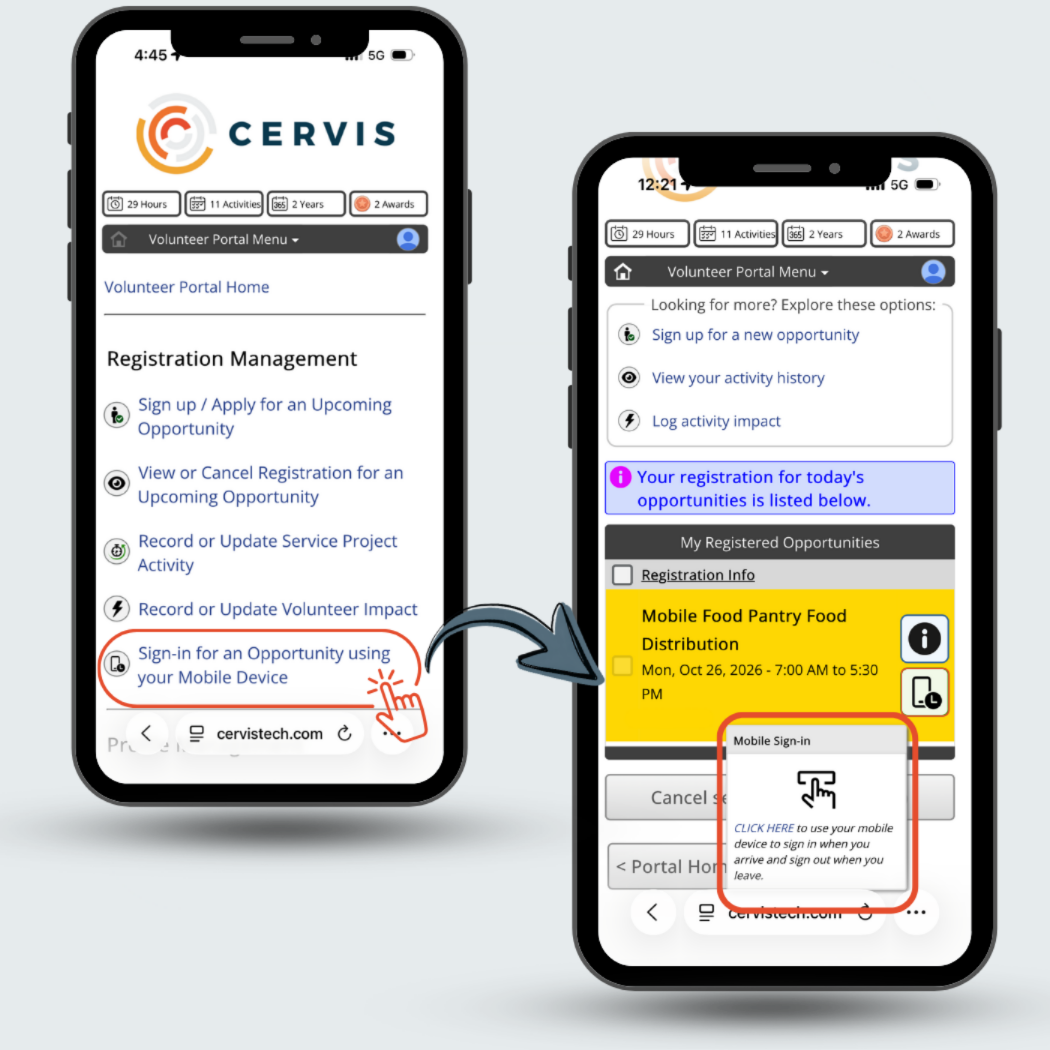
New dedicated link added to the Volunteer Portal

We’re making volunteer check-in even more convenient! CERVIS now offers a dedicated link to Mobile Sign-In functionality right within the Volunteer Portal, giving volunteers an easy way to use their phones to sign in for their registered events.


The Volunteer Portal is your volunteers’ go-to place for managing their CERVIS experience. It provides quick access to Registration Management, Profile Management, and Report Management tools. And now, mobile users can also enjoy greater convenience by accessing sign-in functionality directly from this Portal.

β€Š

With no need for your volunteers to locate their confirmation email, your event check-in is smoother and more accessible than ever!


Less hassle, easier check-ins, and more time for what matters most - this link is already added to the Portal Home. Check out how your volunteers can utilize it here!

β€Š
β€Š
β€Š
β€Š

Time-Savers You'll Love for All Your End-of-Year Mailings

Search and send these messages with ease

We know the end of the year is fast approaching, and with it, your to-do list is likely filling up with holiday cards, year-end appeals, thank-you notes, and final updates to your volunteers. Good news! CERVIS has tools to help you tackle your year-end tasks with less hassle and more efficiency.


Using the Advanced Search function, you can customize your audience and get the right message to the right people at the right time. Filter your database to fit your needs, then put that list to work with these options:


  • Print Address Labels: Create mailing labels for all your year-end needs. Simply build your list, download the labels, and get your mailings ready to go!

ο»Ώ

  • Send Bulk Email & Text Blasts: Skip the individual reaches and share important updates, seasonal greetings, or year-end messages with a targeted group or your entire volunteer database.


Whether you're stuffing envelopes or spreading cheer with bulk messages, we want to make it easy to stay connected and wrap up the year on a high note!


Ready to get started? Click here to use the Advanced Search tool to build your desired list for year-end outreach!

β€Š

Checklist Management Just Got Easier

Linking Checklist Items to Opportunities is a game-changer

Did you know you can link Checklist Items directly to specific volunteer opportunities? This handy new feature helps streamline volunteer onboarding by automatically marking a Checklist Item as 'Complete' when a volunteer participates in the associated opportunity.


For example, if your organization requires new volunteers to attend an orientation or training before signing up for regular shifts, you can link the corresponding Checklist Item to that opportunity. Once volunteers attend and complete their training, CERVIS will automatically update their checklist status; no manual updates needed!

A QUICK NOTE ABOUT TIMING: Checklist Items are not marked complete immediately after a volunteer's shift. CERVIS will automatically update the linked item the evening of the second day following their shift. This delay gives your team time to review attendance records and mark any No-Shows before the Checklist is updated.

With linked Checklist Items, you can spend less time managing onboarding tasks and more time getting volunteers ready to make a difference! Learn more here.

β€Š
β€Š
β€Š
β€Š

A wealth of knowledge and training is just a click away! At CERVIS, we are committed to providing you with excellent customer support as well as comprehensive training. As part of that commitment, you have access to 70+ videos, including the full library of past CERVIS Webinars.

β€Š
β€Š
β€Š
β€Š

Additional Questions? Contact our Customer Support Team by emailing them at support@cervistech.com or by opening a Support Ticket on the CERVIS Main Dashboard.

β€Š
Facebook  X  YouTube
β€Š