|
MLS & Practice Changes Coming Soon
| |
Commission Field Removal - Friday, August 16th
-
Fields for Subagent and Buyer Agent Commission will be removed for all listings. As the MLS offer of compensation will no longer apply after August 16, make certain you have a written commission agreement in place for any transaction in progress for which you do not yet have an accepted offer.
- The Yes/No questions for Variable Commission and Subject to Policy Letter will be removed.
- The current sale concessions field (for sold listings) will be changed from free-form to numeric.
| Communicating Seller Concessions | |
The NAR settlement allows seller offered concessions to continue being communicated via the MLS. However, per the settlement, a concession offered via the MLS cannot be conditioned on the payment to a buyer’s firm.
As has always been the case, concessions offered by the seller are allowed in the public and private MLS remarks fields. As transparency has been in the forefront of the NAR settlement, we recommend including any concession your seller is making to a buyer within the public MLS remarks.
- Concessions in the MLS remarks should be specific as to what the concession is for (i.e. roof repair, carpet allowance, buyer closing costs).
- Do not include concessions in the MLS that are conditioned on the payment to a buyer’s agent/firm.
-
Concessions communicated via the MLS are not a replacement for communicating offers of compensation or commission.
| NAR Settlement News & Updates | |
As a valued member of the South Central Wisconsin MLS, we want to provide you easy access to necessary information and resources. To stay informed about important MLS practice changes and resources related to the NAR settlement, visit the SCWMLS NAR Settlement News & Updates Page.
| | |
|
|
Listing Scam Alert!
The MLS has received several reports of a scam in which an agent is contacted to list a property (often vacant land) by someone posing as the property owner. The scammer will typically handle all communication remotely and request the property be listed for less than its value in order to generate immediate interest.
This helpful article from the WRA explains the scam and how to avoid it.
Another resource is PropertyFraudAlert.com. This free public service is monitored by the county land records offices and will alert a property owner of potential fraudulent recordings that affect their property. Although it does not prevent fraud from happening, it provides an early warning system so the property owner can take the appropriate action if fraudulent activity has occurred. It may be particularly helpful to share this with a property owner who has had someone pose as them and attempt to list their property. Sign up is quick & easy.
Go to PropertyFraudAlert.com, select the state & county in which the property is located, and choose how you’d like to be notified.
| |
How MLS can help
If a fraudulent lead comes from Realtor.com or Homes.com, please forward the info to: listings@wisre.com. MLS staff can assist in getting the user blocked. Agents may also forward any suspected spam leads from Realtor.com directly to customercare@realtor.com
| | | | |
|
Client Security: Confirm Appointments Before Entry
The security of clients and their properties is a top priority. Agents accessing a keybox without a confirmed appointment, even for a vacant home, may be fined $500 (along with their broker). These fines double, and Supra eKEY access may be suspended, for a second offense. Penalties can be more severe depending on circumstances. Sellers may also bring trespass charges against any agent without a confirmed appointment. Always confirm your appointments and double-check the address and date & time of your showing before accessing a property to ensure proper permission.
| | |
|
Property Matches Not Delivered?
Your Client May Be Unsubscribed
Little is as frustrating as learning your hand-picked home searches aren't getting through. While unsubscribes and opt-outs can happen for a variety of reasons, if you receive an email alerting you that a client has opted out of receiving emails via Paragon, you can opt them back into the system by following this opt-in link.
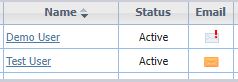
You can also proactively confirm notifications are received within Paragon. In "View/Manage Contacts", clients with a verified email address should have an orange envelope in the email column. If you see a white envelope with a red exclamation point, the client has unsubscribed or opted-out and is not receiving emails.
| |
You can use the opt-in link to send an email containing an opt-in option link. They will need to click on that link within 72 hours to opt back in.
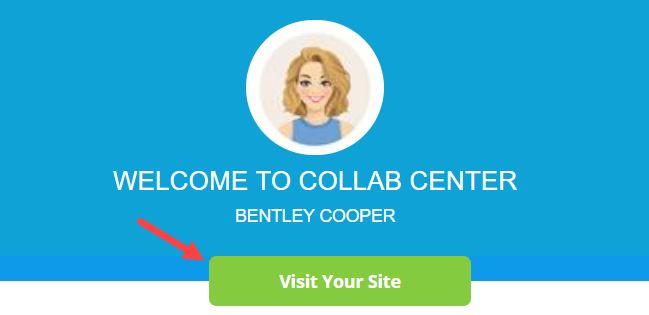
The email opt back in link can always be found on the Paragon home screen banner as shown below.
| |
Send Listings via Text
It's Easy in Paragon
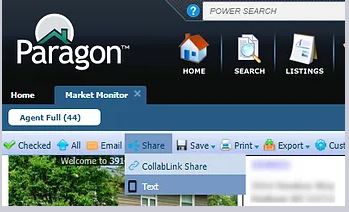
Listings can be sent via text from Paragon to any contact. The text option can be found within the "Share" link when viewing a listing. The "Share" link is located within the blue menu bar, to the right of the "Email" button. You can text any existing contact in Paragon or create a contact on the fly after selecting to text.
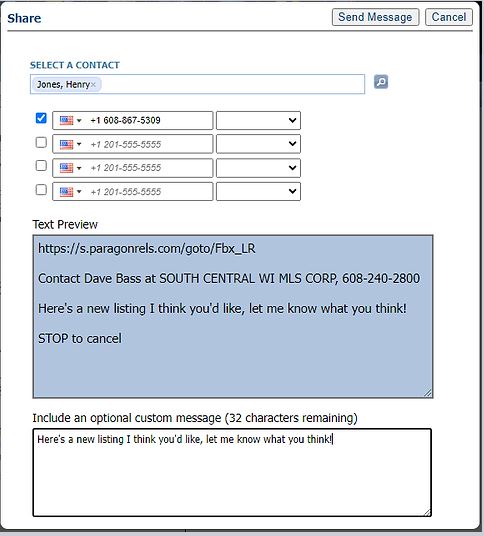
If you receive an alert stating your mobile number is not configured, simply click on the option to "Configure Settings" and enter your mobile phone number. You need to configure your mobile number just once.
You also have the option to add a custom message. Once the text is sent, it will be recorded in the contact’s Message History.
| |  |
| |
Paragon Contact Cleanup
With the summer home buying season in full swing, now is a great time to confirm your main contact list is clean so that active clients are easy to access. Here are a few steps to follow in Paragon Contact Manager to manage inactive contacts.
| |
|
REMOVE A CONTACT
You can delete no longer needed contacts. Contacts with no searches running will have zeroes under the "Matches", "New", and "Changed" columns. To delete, check the box next to their name and then click the "Delete" button at the top.
| |
|
MAKE A CONTACT INACTIVE
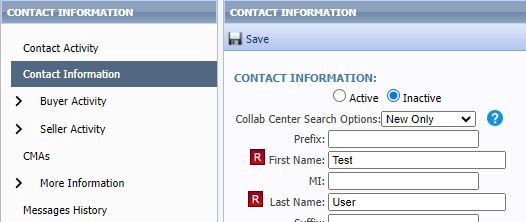
For inactive contacts you would like to keep but hide, mark them inactive. Click the contact name, then click "Contact Information" on the left panel. At the top select "Inactive", then click "Save". This will also disable any auto searches they have running.
| |
Example: Inactive Contact Selection | |
Updating Existing Auto-search Criteria in Paragon
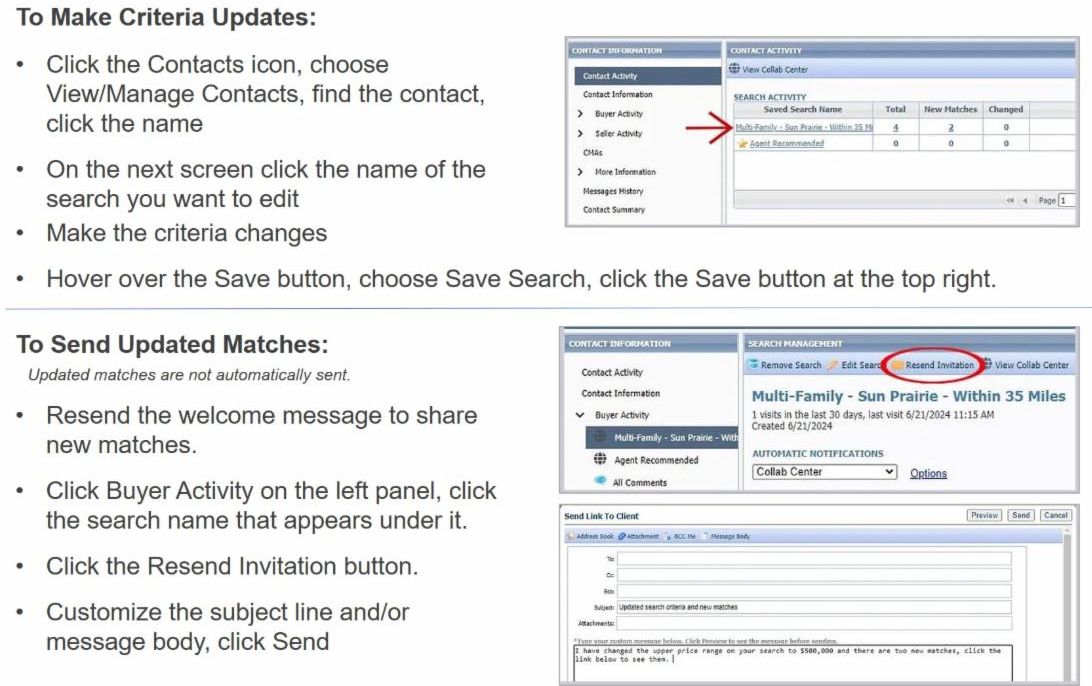
Want to change the criteria in an existing search to yield more results or adjust criteria to more closely match what your clients are looking for? Follow this step-by-step process for editing an existing auto-search in Paragon.
| |
We are excited to offer members access to industry-leading tools and resources designed to maximize connection, enhance efficiency, and increase safety. These enhancements underscore our commitment to innovation, excellence, and providing value for our members. We invite you to explore these recent additions to our products and services. | | |
|
Increase safety and gain instant insights with FOREWARN©.
Free for SCWMLS members, this easy-to-use app allows you to verify identity and learn critical details about a new prospect prior to meeting them for a showing.
Learn about FOREWARN and register.
| | |
|
According to NAR research, a floor plan is the single most desired add-on to a listing by consumers, after standard photos and listing data.
SCWMLS is pleased to offer this free, innovative floor plan solution to you. With no special training or equipment required, CubiCasa makes creating floor plans a breeze!
Learn about CubiCasa and sign up.
| | |
|
|
Continued Inventory and Sales Growth in May
For the seventh consecutive month, the number of homes for sale in Dane County and the South Central Wisconsin area exceeded 2023 and 2022 figures. In fact, active residential listings were 37.2% higher than in May of 2023.
In addition, sales increased by 21.8% across the South Central Wisconsin area compared to May of 2023.
| | | |
UPCOMING TRAINING OPPORTUNITIES | |
|
Paragon Basics
Virtual Learning
| |
Join us online for this free, introductory session on the most common and helpful features in Paragon.
Next Session:
Date: JULY 12, 2024
Time: 9:30 a.m. - 12:30 p.m.
Location: Webinar
| |
|
Paragon Basics
In Person
| |
Bring your laptop or tablet for this introductory session on the most common and helpful features in Paragon.
Next Session:
Date: JULY 19, 2024
Time: 9:30 a.m. - 12:30 p.m.
Location: SCWMLS Office
| |
Map Search Virtual Learning | |
Learn to use Paragon's Map Search functions to hone in on specific geographies and opportunities quickly.
Next Session:
Date: JULY 11, 2024
Time: 10:00 a.m. - 10:30 a.m.
Location: Webinar
| |
|
Collab Center
Virtual Learning
| |
The Collab Center can help with property notifications and provide buyer preference insights. Learn to build sites for your buyers.
Next Session:
Date: JULY 18, 2024
Time: 10:00 a.m. - 10:30 a.m.
Location: Webinar
| |
|
Paragon Connect
Virtual Learning
| |
Join Dave for a 30-minute class via Zoom where you will learn how to use the mobile version of Paragon, Paragon Connect, on your smartphone.
Next Session:
Date: JULY 24, 2024
Time: 11:00 a.m. - 11:30 a.m.
Location: Webinar
| | | | |