Learn21's Weekly EdTech Update

March 14, 2024

Creating your Second Brain 


Over 325 million terabytes of data are created every day. Let's look at how you can store your contribution to the human experience.


Why do we need a second brain?

Each and every day we are inundated with information and responsibilities. A lot of us try to keep everything we need to know in our working memory, which works until it doesn't. In Getting Things Done, David Allen shares how to get things out of your head and reach a level of what he calls "relaxed control." Tiago Forte introduced the idea of a second brain in his book Building a Second Brain. As teachers we are constantly thinking and overthinking tasks we have to get done, concepts we have to learn, events we have to attend. Being able to store all of that somewhere else is the key to getting things done.


The second brain is your metaphorical hard drive where you take data from your working memory to be recalled later. Once you create your second brain, things seem to fall into place, and even the most stressful situations aren't as stressful anymore.


START SMALL!

Sorry for yelling, but if you're like me, you want to get this show on the road and speed up this trip to Stresslessville, population 1. The journey is more akin to traveling to Mordor and less like following the yellow brick road. What I propose may or may not work for you. If you search YouTube for "building a second brain" you will get hundreds of different videos attempting to help you in this quest. You have to figure out what works for you, and that means you may be using a system for 3 months before deciding to chuck it all and learn something new.


What do we need to organize?

A lot of life boils down to three things: information, events, and tasks. If we are going to rely on our second brain for everything, then we are going to need a system that:

  • is available everywhere and futureproof
  • can quickly capture what is happening RIGHT NOW
  • allows us to organize and curate that data
  • guides us to what we have to do and what we can do right now


Using a to do list as our second brain

What I'm proposing may seem a little off the beaten path. A lot of productivity experts promote note taking software such as Notion, Evernote, Google Keep, and others. Those are great but with great power comes great responsibility...and a steep learning curve. As you start out, you want to get into the habit of offloading to your second brain, not spending time figuring out how to organize it. That's why I'm recommending a to do list called TickTick.


I settled on TickTick after experimenting with several different apps, ideas, and organizational methods. TickTick came out on top for a few reasons.

Besides adding tasks to a list, a list can also contain notes. This opens up the possibility of recording longer form content or grouping a bunch of disparate ideas into one place. For example, you could keep a journal in a note. I use my journal for all of the one off ideas or memories that happen during the day.

Cost is always at the back of my mind, am I getting the utility out of this service for what it is costing me. TickTick's free level is generous, allowing 9 lists. Each list can have up to 99 items. That's enough to get started and use it for months! And if you hit those limits, a year subscription is $35.99.


Finally, a to-do list by its very nature helps start out organized. You don't have to worry about folders and file names, plus you can easily drag and drop items to put them in different places.


Getting stuff into our second brain

Now that we're signed up, let's get some of these tasks and memories out of our head. You have a few different ways to add items:

  • Using the web interface or phone app - Enter your data directly into the list where you want to save it.
  • Using your phone's sharing functionality - on any content, click your share icon on your phone and send that directly to TickTick.
  • Using a browser extension - On any webpage, you can right click and select Add to TickTick to add the current page and address to your inbox.
  • Use your private TickTick email address - Each account has a private email address which allows you to send items to your Inbox for you to triage later.


Triage

Added content to TickTick starts out in your inbox. From there you can organize it, set due dates, set tasks to repeat, etc. I triage my information throughout the day or at the very least, right before I go to bed. By getting everything out of my head before bedtime, I get to sleep without worrying; well, in theory. At least once a night it seems I wake up thinking about something I forgot to write down. But, since I sleep with my AppleWatch, I can add that item to my list and go back to sleep without ruminating about it the rest of the night.


One tip for organizing your lists is to set a due date for every item. That helps resurface the item in case you've forgotten.


At least once a week (set a repeating task if it helps). I'll go through and see what I need to do in the upcoming weeks and what items I need to offload or move to my archive. I have a folder named Alexandria which contains a list for the year. Items in this list are just things I want to remember but have no time commitment.


Busier than ever

We are busier than ever and by lowering our cognitive load we can work smarter, stress less, and most of all, have fun! Yes, I mean it, life isn't for the weak and fun should be at the top of your list!

Tips and Tricks

Creating screencasts on the Chromebook is getting better and better! ChromeOS 122 is beginning to allow users to edit their screencasts based on the transcriptions. Users can also mute segments and title sections. Google has a support page on using recording screencasts. If you really like this capability but want to do more, check out Descript. They started out as a podcast editor, but have now added video editing. With Descript, you work with the transcript, not the timeline.


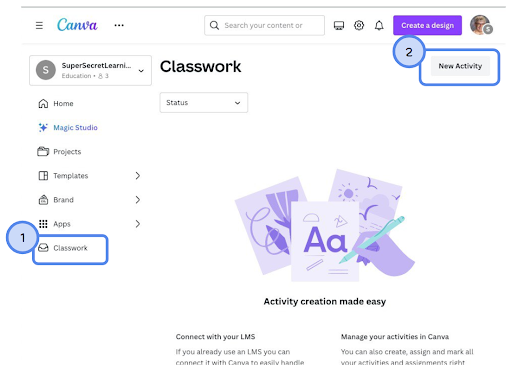
If you use Canva and a learning management system (LMS), you may want to check out assigning Canva projects to your students. To get started, click on Classwork at the bottom of the menu on the left side, and then click on New Activity in the upper right.

You'll be able to select the type of project you want them to complete. After modifying the template, click on Assign in the upper right corner and select your LMS. Then choose if you want a copy of the design for each student or if you want to use the design as instructions. If you already have a design you want to use as an assignment, open it up. Under the Share button you can select Assignment and follow the same steps.


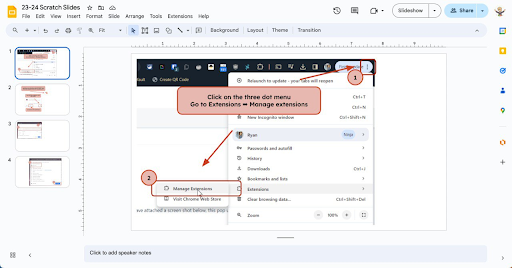
Annotate your screenshots with Google Slides, PowerPoint, Keynote, etc. During the day I share a lot of screenshots and I like to mark them up to make them clearer. However, I'm not happy with the built in tools for annotating so what I've started doing is using Google Slides (this works with any presentation software). I'll take my screenshot, then open up my 23-24 Scratch Slides presentation. After creating a blank slide, I'll paste my screenshot and proceed to mark it up.

Reader Tip of the Week 

We want to feature your tech tips and tricks! If you have any tips and tricks you would like to share with the Bytes and Insights crew please reply to this email (newsletters@learn21.org) and your tip may be featured in an upcoming newsletter!

Innovation in Instruction

Learn21 Update


Spotlight on Learn21 Innovators in Instruction Award Winners Continued

Last week we looked closer at the work our first two Innovators in Instruction have brought to their schools. This week we are excited to highlight the work of the other recipients of Learn21’s Innovator in Instruction Award. Julieanne McClain teaches Journalism, AP Seminar, a student-run news course called Talisman at Rutherford B Hayes High School in the Delaware City School District. We are also excited to highlight the work of four instructors at the Davidson Academy Online, DAO, Andrea Linardi de Minten, Arthur Pascual, Tracy Sangster, Yunxin Zhang, who supervise the student-run tutoring programs at DAO. 


Julieanne McClain, a high school journalism and AP Seminar teacher at Rutherford B. Hayes High School in Ohio, has significantly impacted digital learning through her transformative approach to student journalism. With over fifteen years of experience, her leadership in transitioning the school's newspaper, The Talisman, to a digital format exemplifies her innovative spirit. This shift not only keeps pace with the rapid flow of news but also enhances the learning experience for her students by incorporating online news sites and podcast formats.


Julieanne's initiatives have profoundly influenced both the school's curriculum and the professional development of fellow educators. Her roles as the State Director for Ohio in the Journalism Education Association and President of the Ohio Scholastic Media Association highlight her commitment to advancing journalism education in the digital era. Through her efforts, Julieanne has created a collaborative environment that fosters significant growth in digital journalism skills among students and educators alike. Her work culminated in The Talisman being recognized as a Distinguished Site by School Newspapers Online, a testament to the excellence achieved under her guidance.


We are also excited to celebrate the collaborative achievement of the team from Davidson Academy Online’s student-run tutoring centers: Andrea Linardi de Minten, Arthur Pascual, Tracy Sangster, and Yunxin Zhang. This group of educators, distinguished by their extensive experience and advanced degrees in their disciplines, has set a new benchmark in online education through their pioneering student-run tutoring services. Their collective expertise has cultivated an enriching learning environment that champions student engagement, personalized instruction, and a sense of community among online learners.


The team’s initiative to migrate these tutoring services to Canvas was a strategic move that enhanced privacy, accessibility, and the use of cutting-edge digital tools. This transition not only streamlined the tutoring process but also empowered students by giving them ownership of their learning journey, fostering a collaborative and inclusive online community. Their efforts have significantly contributed to the success of DAO’s mission to provide a rigorous, personalized education that caters to the unique needs of profoundly gifted students. Through their dedication and innovative approach, this team has exemplified the values Learn21 seeks to promote in education, demonstrating the profound impact of collaborative teaching and the thoughtful integration of technology in enriching students' educational experiences.


These educators exemplify what it means to innovate in instruction. We are so excited to honor their commitment to helping students reach learn and innovate! We are excited to see what these teachers do to continue paving the way for innovation in education in the future!

ETLA Conference Update

Registration is now open for the ETLA Conference, formerly titled the Ohio CoSN-ISTE Conference. The conference will take place October 20-22, 2024 at the Nationwide Conference Center in Columbus.


Our call for proposals is open through Friday, March 15th. We are looking presenters for our four session types:


  • Workshops - 2.5 hour sessions on Monday, 10/21 only. These are hands-on opportunities to dive deep into a topic. Participants should be able to leave with something they can apply in their practice.
  • Presentations - 45 minute sessions offered on Monday, 10/21 and Tuesday, 10/22. More traditional conference-type session but instructional best practices are expected to apply.
  • OH Talks - 10-minute talks on the main stage at 4pm on Monday, 10/21 or online at a pre-conference session. These are an excellent opportunity for engaging speakers to pontificate on an educational topic about which they are passionate.
  • L21 Talks - 21 slides for 21 seconds (no exceptions) on Tuesday, 10/22. These talks are for the adventurous presenter.


We can't wait to see what you put together in your proposals!

Conference Website
Submit Your Proposal

Extra Credit

AI is great if it has someone prompting it, other than that, it just sits there. That's why I'm not that worried about AI being better at creative thinking than humans. The researchers used tests that measure creativeness (which I didn't know you could) and found that ChatGPT-4 was better than the human participants. However, there was a big caveat: “AI, unlike humans, does not have agency” and is “dependent on the assistance of a human user. Therefore, the creative potential of AI is in a constant state of stagnation unless prompted.” We don't have to worry about Skynet anytime soon.


Time and again the importance of exercise has been proven to increase your overall health. It can also help you be creative. There is a physical limit to this exercise. Going all out for 30 minutes is not going to make you more creative.


This year marks the 20th anniversary of Mean Girls and the release of the musical version which opens up comparisons of how teenage life has changed over the last 20 years (Archive).

🙋‍♂️ Bytes and Insights is written by Eduk8me’s Ryan Collins who writes about education and educational technology. He is also the Director of Technology for Kenton City Schools in Ohio. Sign up for his Of Bits and Bytes newsletter at https://eduk8.me!


If you'd like to take a hiatus from Bytes & Insights, please use the Update Profile link below. This will allow you control over which emails you receive from Learn21.

www.learn21.org

LinkedIn        X        Instagram