Empower Your Teaching with Innovative Assistive Tech Solutions Now!
AT in RA: How Can Assistive Technology be used within Related Arts?
By Clarice Nolan
Related Arts are often a highlight during the school day. From playing games in P.E. to constructing new and exciting things in the art room, each of these classes have an emphasis on creativity and fun. However, are these environments equally as fun for your students with alternative access needs? Let us help you brainstorm ways to better meet the needs of all students on your roster.
Physical Education (P.E.)
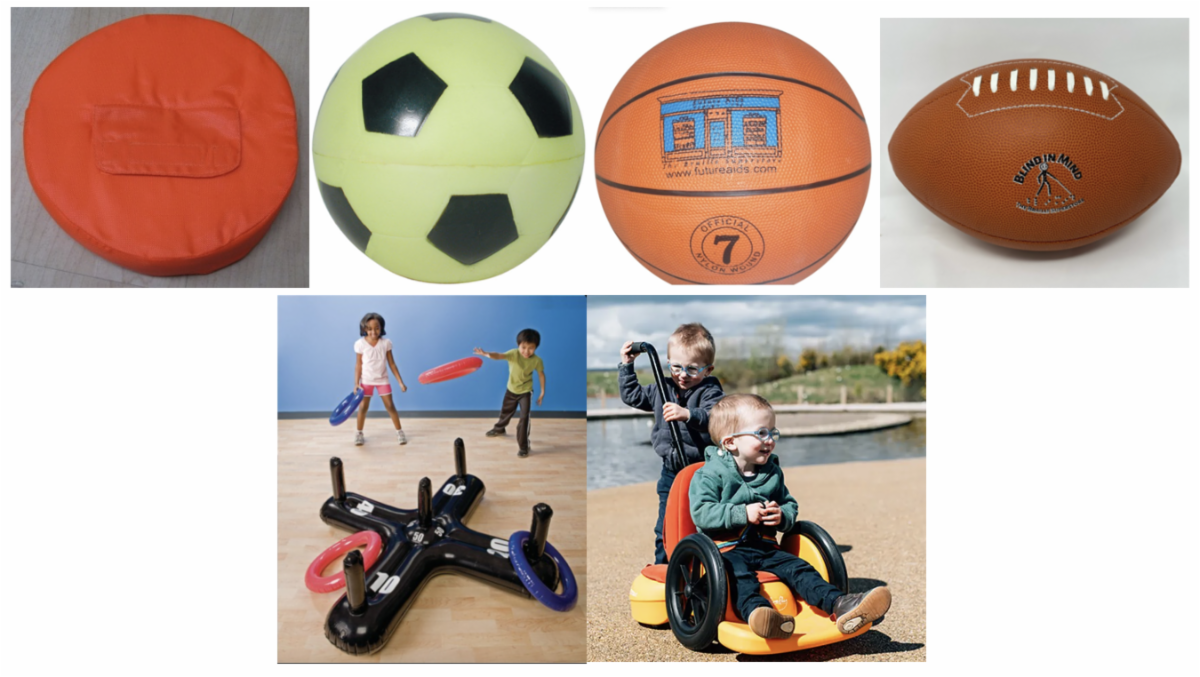
Physical Education also come with many physical barriers. Help your students who may have visual impairments participate by using sound-adapted equipment; such as a beeping frisbee, beeping soccer ball, or basketball and football that jingle when in motion. A jumbo inflatable ring toss game can help involve those who may have limited mobility by presenting a hard-to-miss target. The Scooot, featured below, can be configured in 4 different ways so that students may participate by crawling, scooting, riding, or being assisted around the environment.
Pictured L to R: Beeping Orange Foam Frisbee, Beeping Foam Soccer Ball, Sound Adapted Basketball, Sound Adapted Football, Jumbo Inflatable Ring Toss, Scooot (4 different configurations to crawl, scoot, ride, or be pushed)
Music
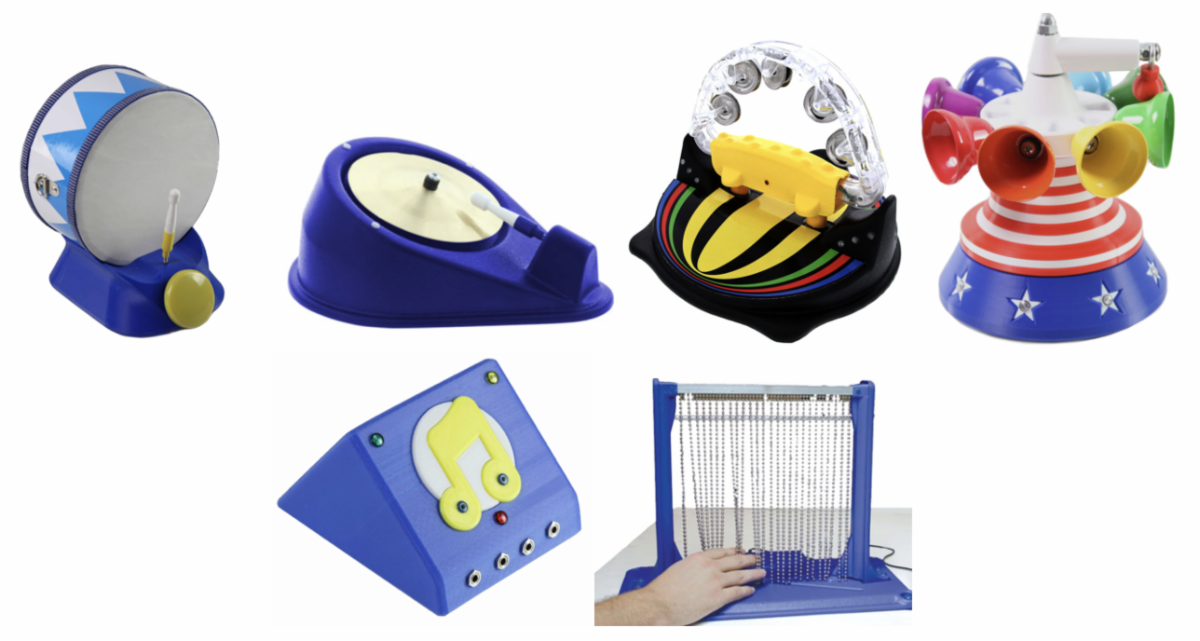
There are multiple ways that students may be able to more easily access music. Some examples are through switch-adapted instruments, such as the drum and cymbal featured here. Other music-playing items, like the musical flashing tambourine, melody bells, and music box, are great ways to teach the cause-and-effect correlation of creating these sounds themselves. The Somatosensory music bead chain switch is another great tool to incorporate sensory input while also initiating the playing of music.
Pictured L to R: Drum Switch Adapted, Adapted Musical Cymbal, Musical Flashing Tambourine, Melody Bells, Music Box, Somatosensory Musical Bead Chain Switch
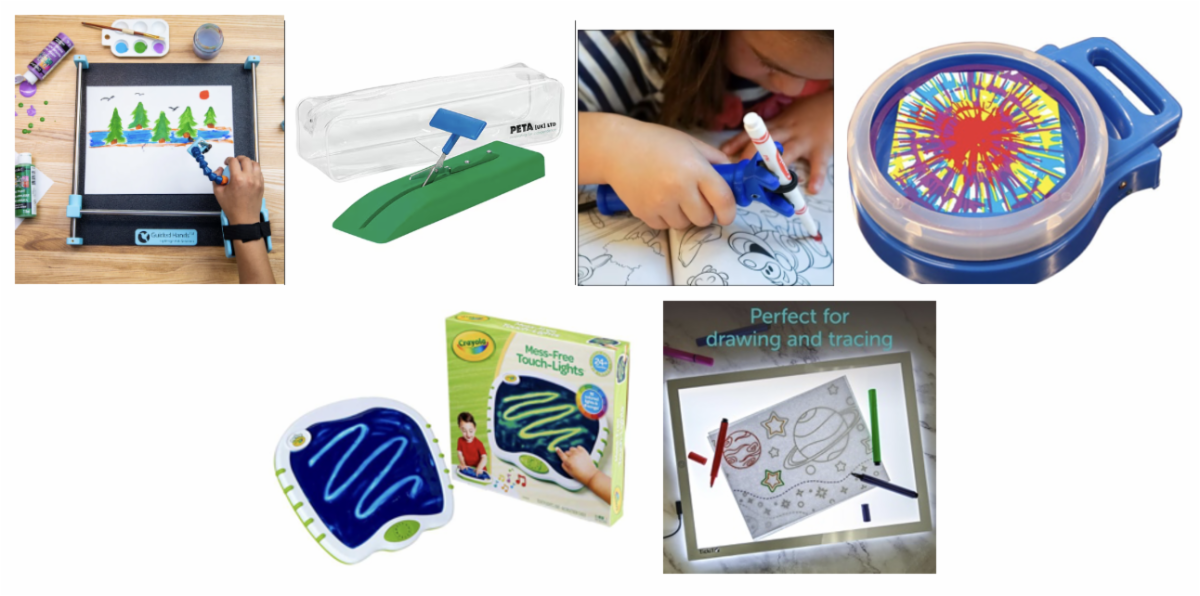
Pictured L to R: Guided Hands, Mounted Tabletop Scissors, Functional Hand, Swirl Art, Crayola Touch Lights Doodle Board, LED Light Box
Art
Art comes in many different forms and mediums. What easier way to incorporate assistive technology! Aid those with fine motor deficits by using items such as adapted tabletop scissors or grip assistance tools like Guided Hands or Functional Hand. Access an alternative way to paint and draw using Swirl Art or the Crayola Touch Lights Doodle Board. Additionally, the LED Light Box may be used to trace, create a high contrast board for students with visual impairments, or act as a guide to create items out of tangible objects.
STEM
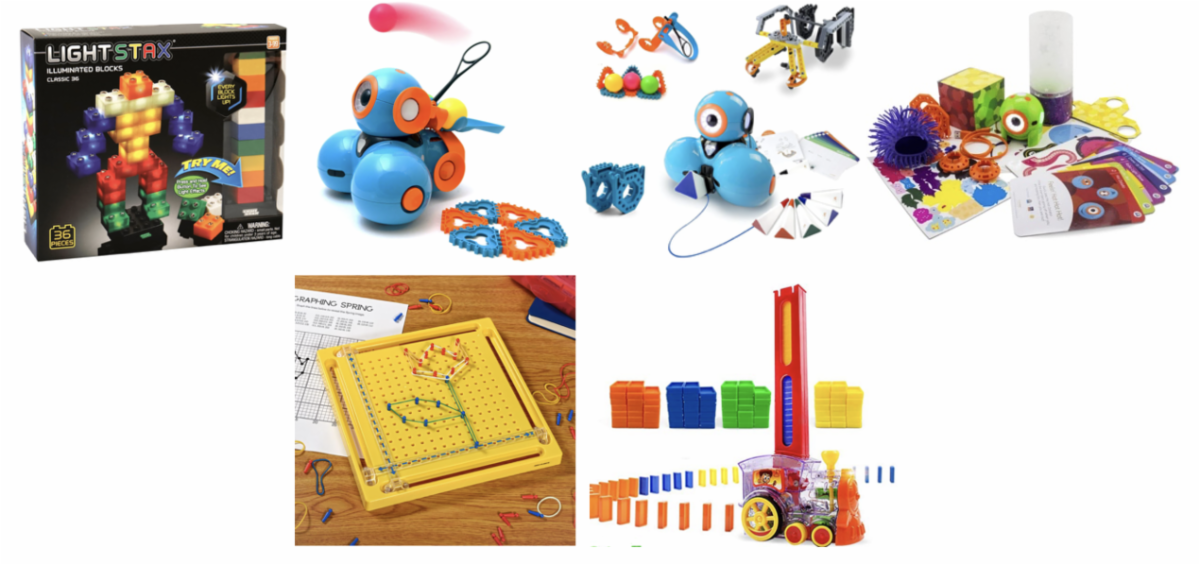
With science, technology, engineering, and math joining the ranks of related arts across the state, here are some items from our library that may serve some of these classrooms! Create different structures with the LightStax Illuminated Blocks or form pictures on the X-Y coordinate pegboard. For students with limited mobility access, a switch adapted domino train is a great way to access what would otherwise be a challenging fine motor task. Last, but definitely not least, are the programmable Dash and Dot robots that pair with a variety of accessories and activities!
Pictured L to R: LightStax Illuminated Blocks, Dash Robot with Launcher, Dash Robot with Accessories, Dot Creativity Set, X-Y Coordinate Pegboard, Domino Train Switch Adapted
All Settings
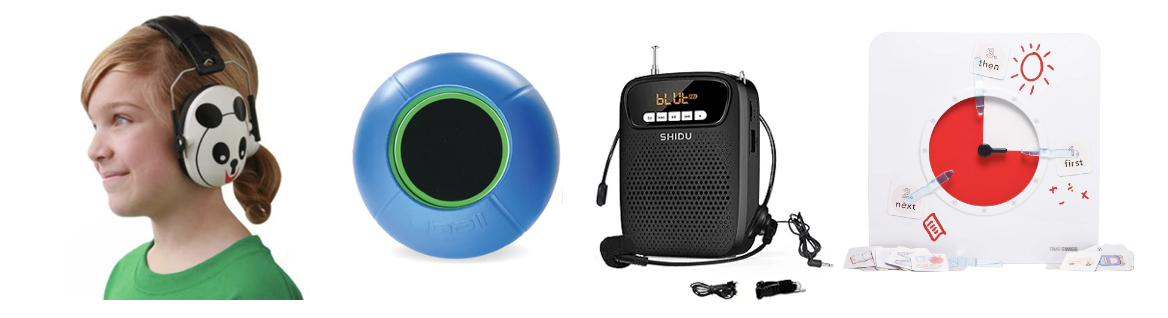
Although subject-specific items may help to access the activities themselves, there are multiple forms of assistive technology that may benefit students across environments, no matter what the class may be. Noise cancelling headphones help decrease the overwhelm of auditory input, while personal amplification systems may benefit the whole classroom in hearing the teacher’s voice directly. The Qball is a durable ball-shaped microphone that may be passed around the room—perfect for amplifying voices in a gymnasium for example! Another great tool is a visual schedule timer that can be changed to show what is going to happen within that specific class period.
Pictured L to R: Hush Buddy Hearing Protective Earmuffs, Qball, Original Voice Amplifier, Time Timer 8” + Visual Scheduler
There are so many ways to support your students and promote accessibility for all within your classroom. Each of these tools are available to borrow from the ATLAS Lending Library, free of charge!
Need assistance? Our AT Specialists will help you find the right options for your students and environment. Contact us today!
Schedule ATLAS for your
January PD now!
The ATLAS Project offers a wide range of professional learning sessions designed to equip Indiana educators with the knowledge and tools to support all learners through the effective use of assistive technology.
Whether you're looking for a quick overview or an in-depth training, we offer flexible session formats tailored to your needs. Choose from our existing session topics or request a customized session designed specifically for your staff. Sessions range from 30 to 60 minutes and are available both in-person and virtually.
Let us help you empower your educators and enhance access for every student.
The audiobook movement started as an accessibility tool!
In the 1930s, the U.S. Library of Congress began recording books on vinyl records so that people who were blind or had low vision could access literature. What started as “Talking Books” for blind readers later evolved into modern audiobooks — now loved by millions of students, commuters, and multitaskers worldwide.
Check out two of our newest items!
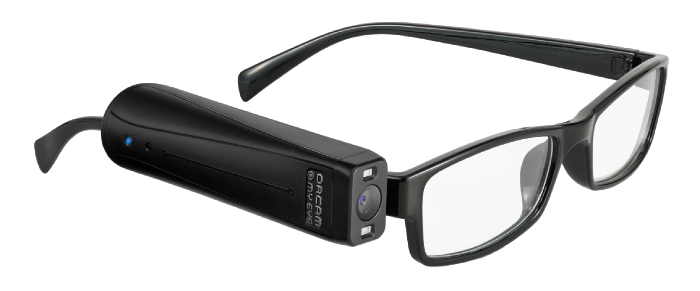
OrCam MyEye 3 Pro
OrCam MyEye is suitable for all eye conditions and all levels of vision loss, as well as for people with reading fatigue and reading difficulties. The device increases independence by allowing individuals to access visual information (text, faces, products, colors, money notes), conveyed by audio. OrCam MyEye also requires the user to have full control over their head and hand movements. Get text read to you from any book or screen, recognize faces, accurately identify products, and with the new smart magnifier feature, you can quickly get information and ask questions interactively. Includes a set of non-prescriptions glasses, lanyard and carrying case.
Computer Mouse Interface
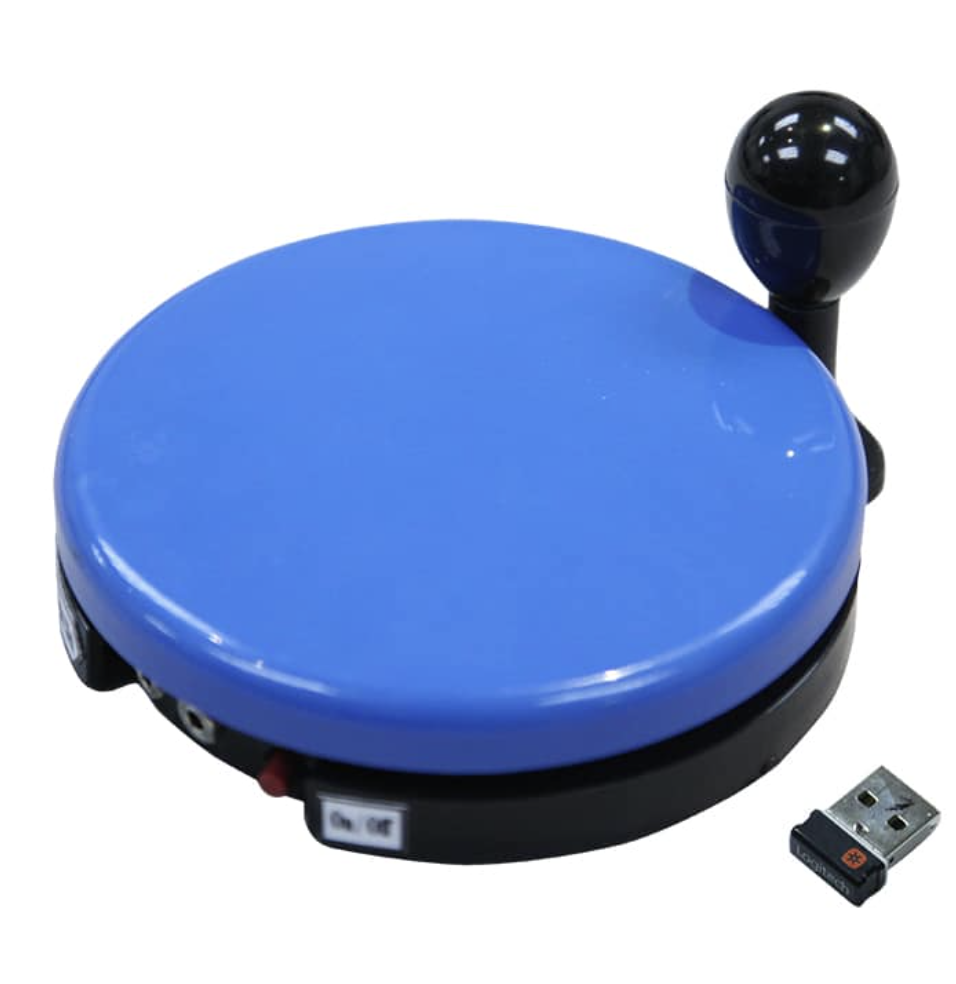
This wireless mouse interface can be used for cursor movement or for computer switch access. Connects wirelessly to a computer and can be used with its 5" built-in switch plate or by connecting two switches to the device, to mimic mouse clicks or key strokes. Mouse comes with a removable T-handle and joystick ball. Works with Windows 7 or newer, Mac OS10, Chrome OS and Linux 9.0 or newer. Free downloadable software can be used to configure each button to any keystroke or mouse-click.