|
Google Maps New Explore Tab is Your Personal Local Assistant
A recent update to Google Maps’ Explore tab transforms it from a generic directory into a personalized local search engine, making it easier than ever to discover relevant points of interest. This feature is particularly useful for travelers and local explorers who want to find highly-rated, timely, and specific activities based on their current location and personal interests.
How many times have you opened a map application intending to find a quick, quality place for lunch, only to spend ten minutes scrolling through endless generic categories?
The traditional “Explore” function in mapping tools has always been a static, one-size-fits-all list: Restaurants, Gas Stations, Groceries.
This approach often leaves out the crucial elements of personalization and immediacy. Finding “the best patio dining that’s open right now and not a long drive from my office” required multiple searches, filters, and cross-referencing.
Here's a Cool Tip: Try the New Explore Tab in Google Maps.
Google recognized this pain point, giving its Explore tab a significant, necessary overhaul to become a truly useful local discovery tool.
Feature Explanation
The updated Explore tab in the Google Maps mobile app leverages sophisticated machine learning to become a dynamic, personalized guide to your surroundings.
Instead of simply presenting broad categories, it surfaces hyper-relevant suggestions based on your location, the time of day, current local trends, and crucially, your previous searches and saved lists.
The core functionality operates by analyzing numerous data points simultaneously.
For instance, if you are near Chicago, IL at 6:00 PM on a Tuesday, the tab might prominently feature categories like "Dinner Spots with Short Wait Times," "Live Music Tonight," or "Highly-Rated Local Breweries."
This is a major improvement over merely showing "Restaurants."
Why does this matter?
It shifts the focus of the map application from a tool for navigation to a tool for discovery and decision-making.
By surfacing better, more timely information upfront, Google Maps saves users valuable time and helps them make higher-quality choices, whether they are a local resident looking for a new spot or a visitor trying to maximize a short trip.
It also integrates smoothly with other Maps features, allowing users to save places, check prices, and jump straight into navigation.
What You’ll Gain
Eliminate decision fatigue by seeing the most relevant local options instantly.
Discover high-quality, non-tourist-trap locations based on aggregated community data.
Save time by bypassing multiple searches and filter applications.
Plan spontaneous outings with confidence, knowing hours and wait times are prioritized.
Step-by-Step Instructions
The updated Explore tab is primarily a mobile-first feature.
Here's how to do it.
iOS
-
Ensure you have the latest Google Maps mobile app from the Apple Store.
-
Tap the Google Maps icon on your iPhone or iPad.
-
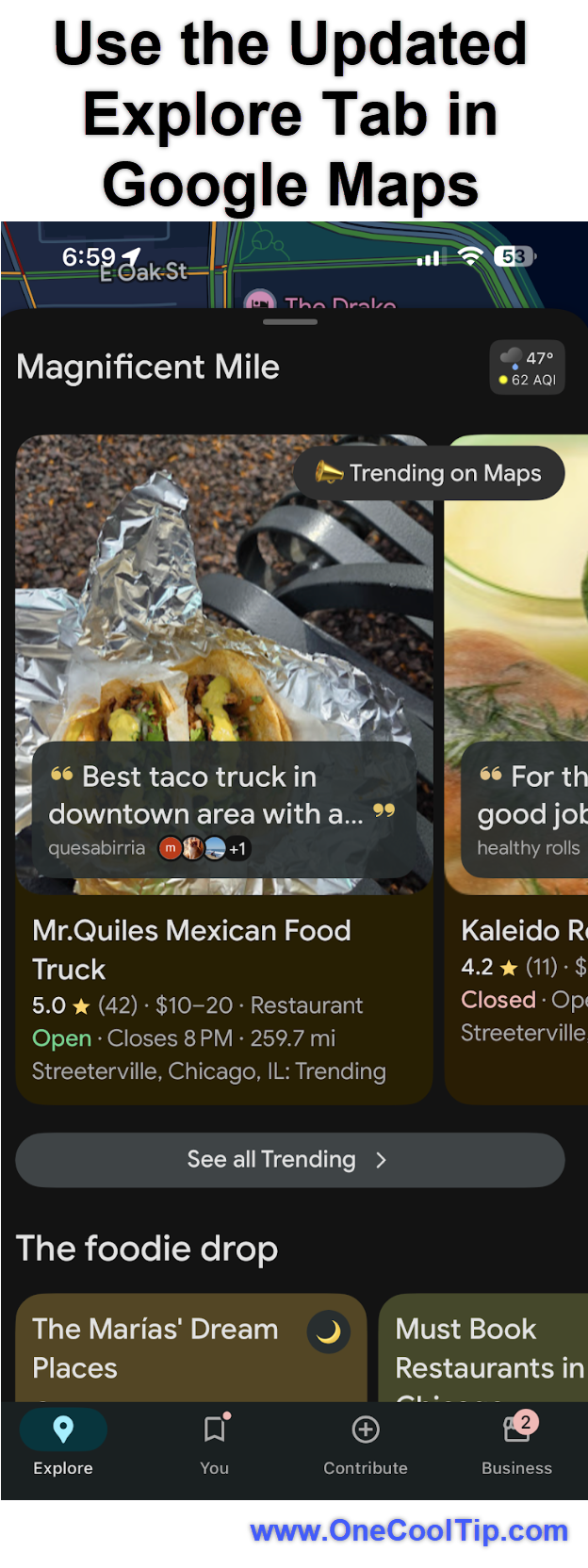
Look for the Explore tab, located in the bottom menu bar of the screen.
-
The top of the screen will now display a carousel of highly personalized categories or 'Neighborhood Gems' based on the time and your location. Scroll horizontally through these suggestions.
-
Tap a category, such as Patio Dining or Best Breakfast, to instantly filter the map and the resulting list view below with only relevant locations.
-
After tapping a category, you can still use the traditional search bar at the top to add specific keywords, like “BBQ” or “Vegan,” further refining the results.
|