|
One Cool Tip Newsletter
March 13, 2026
| Your daily dose of tech-savvy brilliance! | |
😀Greetings!, Happy Friday Funday, Cool Tipper!
Get ready to streamline your digital life with simple, actionable tips delivered straight to your inbox.
Today's Cool Tip Theme: Wiki Game
IN THIS ISSUE
- 🎙️ Alexa’s New Personality: Amazon introduces a "Sassy" voice style for Alexa+, adding wit and playful sarcasm to your smart home interactions.
- 🤖 Wiki Game AI Prompt: Use our custom prompt to master Wiki Game strategies and discover clever categorical paths between articles.
- 🏃 Master the Wiki Game: Turn your Wikipedia "rabbit hole" browsing into a competitive race that sharpens your research and scanning skills.
- 🔢 Solve the 2048 Puzzle: A quick guide to the addictive browser-based tile-merging game that tests your strategic thinking.
- 🎵 Play Musical Wordle: Put your music knowledge to the test with Heardle, the daily challenge where you identify songs from short audio snippets.
- 🚪 Step Through the Secret Door: Experience a virtual adventure that transports you to random, hidden locations around the globe with one click.
New here? Subscribe to the One Cool Tip Newsletter for daily updates. It's FREE!
-
😂 Laugh with Us! Enjoy our Tech Joke of the Day, Haiku and Cool Tip Comics.
-
🌐 Stay Informed! Check out ICYMI, and our One Cool Tip Video.
| | |
3️⃣
If you enjoy the One Cool Tip newsletter, please forward this newsletter to THREE friends or colleagues or share it on social media using the links below.
Leave a Tip!
Share this One Cool Tip Newsletter!
| | |
Today's Tech Trivia
Answer at the end of this newsletter.
| |
| Which of these was the first wiki-based website? | | | | |
⚠️ Surprise Letter About Unemployment Benefits? It Could Be Identity Theft⚠️
If you get a letter about unemployment benefits you never applied for, treat it as a red flag.
The FTC warns that scammers are using stolen personal information, including Social Security numbers, to file fraudulent unemployment claims in someone else’s name.
Ignoring the notice can lead to bigger problems like wage garnishment or tax‑related identity theft.
What to do right now:
- Tell your employer so they can flag the fraudulent claim.
- Report it to your state workforce agency and follow their instructions.
- Go to IdentityTheft.gov to report the fraud and get a personalized recovery plan.
- Freeze your credit with Equifax, Experian, and TransUnion to block new accounts.
- Check your credit reports weekly at AnnualCreditReport.com and dispute anything suspicious.
- Consider an IRS Identity Protection PIN to help prevent tax‑related identity theft.
Share this alert with coworkers, friends, and family.
A quick heads‑up can stop identity theft before it spreads.
And in Other News...
- 🗣️ Alexa+ Gets Sassy, Literally
Amazon’s Alexa+ just added a new “Sassy” personality style, giving users a voice assistant with attitude, wit, and a touch of sarcasm.
It’s part of Alexa’s expanding lineup of conversational styles designed to match your mood or household vibe.
We first told you about these new Alexa+ personalities last month.
The new Sassy Alexa responds with playful comebacks, dry humor, and a confident tone, perfect for users who want a little spice with their smart home commands.
You can switch personality styles in the Alexa app or say, “Alexa, change your personality.”
Try asking, “Alexa, what’s the weather?” and brace yourself for a snarky forecast.
| | |
Try this Cool AI prompt. Copy and paste to ChatGPT, Gemini or Copilot.
"I’m playing The Wiki Game.
Give me a simple strategy guide for getting from one Wikipedia article to another using only internal links.
Explain how to think in categories, identify hub pages, avoid dead ends, and improve my speed over time.
Then give me three sample start-and-target article pairs with suggested thinking paths, but do not spoil the exact clicks unless I ask."
| | |
Play the Wiki Game and Get Smarter, One Click at a Time
Sharpen your search instincts, test your Wikipedia knowledge, and turn idle screen time into something surprisingly useful. The Wiki Game is a simple browser and mobile challenge that rewards curiosity, pattern recognition, and fast thinking.
How often do you jump from one Wikipedia article to another and suddenly realize you have wandered from Abraham Lincoln to black holes to the history of paper clips?
Here's a Cool Tip: Play the Wiki Game.
That rabbit-hole behavior is basically the whole point of The Wiki Game.
Instead of treating random clicks as a distraction, it turns them into a race.
You start on one article, aim for another, and try to get there using only the links inside Wikipedia pages.
The result is part puzzle, part knowledge hunt, and part speed challenge.
Feature Explanation
The Wiki Game is a Wikipedia navigation challenge.
You begin on one page and try to reach a target page by clicking only internal article links.
The web version currently promotes phone play, 5 game modes, 200 unique levels, and minimal-path unlocking.
The iPhone app describes the same core concept while also highlighting practice mode, friend challenges, and the ability to choose your own topics or articles.
Why it matters is simple.
This is one of those rare online games that feels light and playful but still exercises useful skills.
You practice scanning, link selection, category thinking, and fast decision-making.
It also has that great “one more round” quality that makes it easy to revisit when you have five spare minutes between meetings or while waiting in line.
That makes it a strong fit for home users, students, trivia fans, and even business professionals who want a smarter kind of break.
This educational angle is consistent with the broader “Wiki Game” format, which has long been used as a knowledge-oriented navigation challenge on Wikipedia.
What You’ll Gain
- Faster information scanning.
- Better link-spotting and pattern recognition.
- A more entertaining way to explore Wikipedia.
- A low-friction brain break that feels productive.
Step-by-Step Instructions
Here's how to do it.
Microsoft Web/Desktop (Browser)
-
Open your browser and go to The Wiki Game website, www.thewikigame.com
-
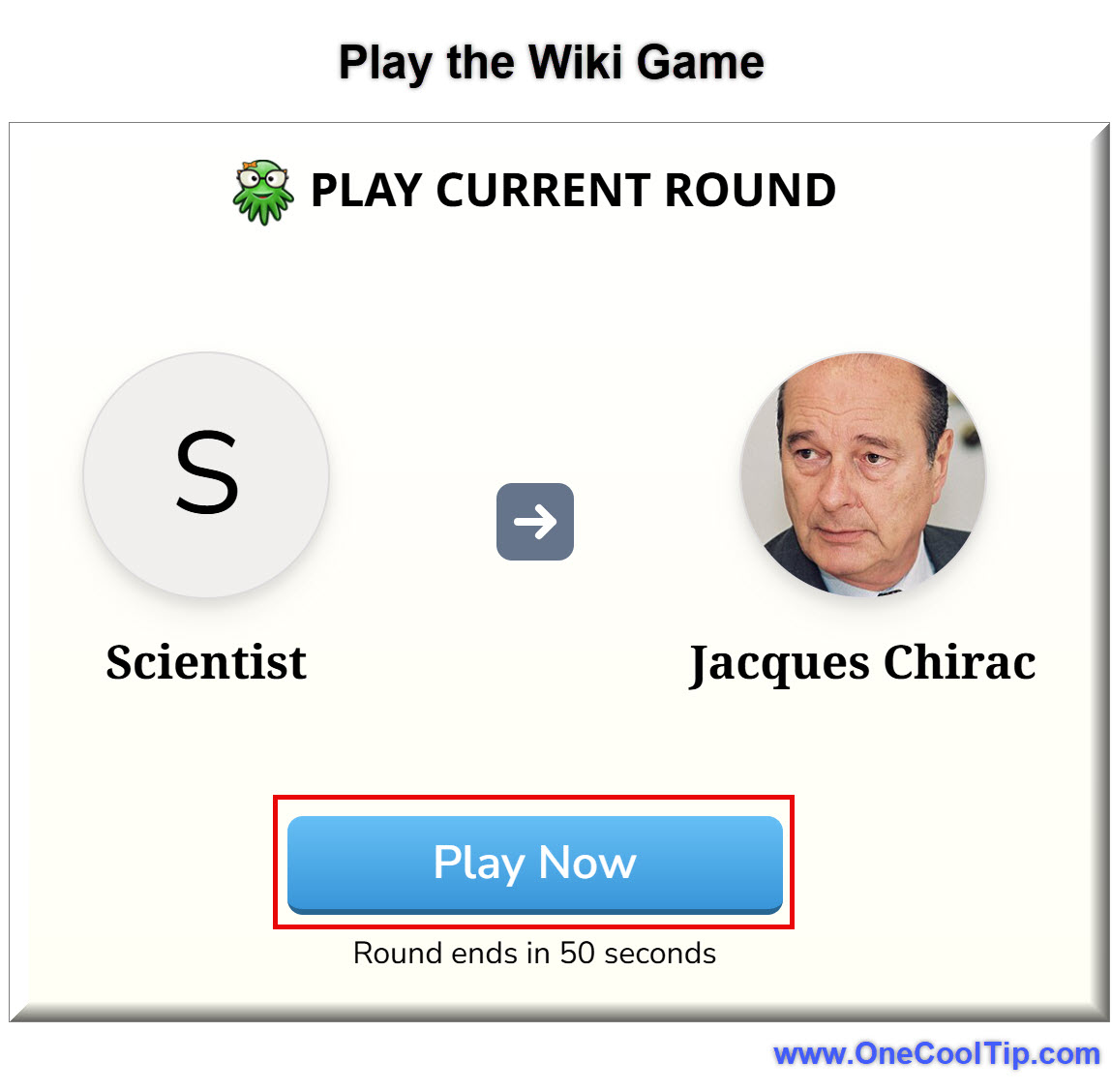
Look at your starting article and your destination article.
-
Select "Play Now."
-
Scan the article for useful blue links that move you closer to the destination. Think in categories, not just exact words. For example, if your target is “Coffee” and you start on “Brazil,” look for links related to agriculture, exports, beverages, or South American trade.
-
Click only internal article links and keep moving until you reach the goal page.
| | fig. 1 - Play the Wiki Game | |
iOS
-
Install The Wiki Game from the App Store.
-
Open the app and start a standard game, level, or daily challenge.
-
Review the start and target article names carefully before tapping through links.
-
Use the article links to move page by page until you reach the destination.
-
Try Practice mode if you want to learn the flow without pressure. The listing also says you can choose your own topics and send challenges to friends.
-
Replay a level and try to beat your own time or click count.
Pros and Cons
Pros
-
Quick mental workout: Great for five-minute breaks that still feel useful.
-
Low barrier to entry: If you know how hyperlinks work, you can play.
-
Educational side effect: You often learn odd facts while racing toward the target.
-
Replay value: Time, clicks, daily challenges, and levels encourage repeat sessions.
Cons
-
Some pressure by design: Timers and shortest-path thinking can make the experience feel less relaxed for users who just want to browse.
-
Not a full learning platform: You gain knowledge indirectly, but it is still a game first.
-
Can become a time sink: “One quick round” can turn into twenty minutes fast.
-
Cost: iOS game costs $1.99 with in-app purchases.
Feature Access
The Wiki Game is available on the web at the official site, and as an iPhone app.
Availability may vary by region or platform store, so it is safest to describe mobile access as currently available rather than universal.
Score
Criterion | Score (0–10) | Justification
Value | 8
It turns casual browsing into a puzzle and gives users a low-cost way to sharpen attention and navigation skills.
Usability | 7
The concept is easy to understand, but some app reviews point to bugs and occasional friction around redirects or completion logic.
Wow Factor | 8
It is clever, addictive, and surprisingly satisfying for such a simple idea.
Total: 23/30 | 👍 Good
The Wiki Game is a smart, lightweight brain break that feels more interactive than trivia and more playful than traditional learning tools.
Key Takeaways
The Wiki Game makes Wikipedia more interactive by turning linked articles into a race.
It is easy to start, surprisingly hard to master, and useful for anyone who enjoys trivia, exploration, or problem-solving.
For readers who like web-based curiosities with a practical mental edge, this is a strong Cool Tip.
Cool Tip Snapshot
-
Feature Name: The Wiki Game
-
Platform(s): Web, iPhone
-
Quick Benefit: Builds focus and link-spotting skills while making Wikipedia fun
-
Access Type (Free, Subscription, Beta): $1.99 with in-app purchases on iOS; free web access available
Try It Yourself
Play one round of The Wiki Game today, then post your fastest path in the comments, and share this article with your team, family, and friends.
READ MORE
Read the Cool Tip on One Cool Tip.com.
| | Help support One Cool Tip. Use this Amazon link when you shop online. | |
🖱️ Amazon Basics Wireless Mouse: Great for fast, precise clicking during Wiki Game races. $10.39 Check it out on Amazon!
🎧 Sony WH-1000XM5 Headphones: Block distractions and focus while playing. $304.95 Check it out on Amazon!
🔋 Anker USB-C Portable Charger: Keep your phone powered during long Wiki Game sessions. $69.99 Check it out on Amazon!
📓 Moleskine Classic Notebook: Jot down your favorite Wiki routes and discoveries. $22. Check it out on Amazon!
Prices accurate at time of publication
One Cool Tip may earn a commission from qualifying purchases.
| | |
🆒Tell Me More
- The Wiki Game’s core rule is simple: move from one article to another using only article hyperlinks, not a search box.
- The iPhone app listing highlights friend challenges, custom topics, and practice play, which makes it more than just a one-mode novelty.
- Wikipedia’s link structure is what makes this game work. Broad pages often act like highways between unrelated topics. This is why history, geography, science, and technology pages are often useful pivot points. This last point is an inference based on how Wikipedia articles interconnect and how the game works.
⏩Quick Tips
-
🔗 Think in categories. Instead of hunting for the exact target term, move toward broader related subjects. To do it, ask yourself whether the destination is best reached through geography, science, culture, business, or history.
-
🧭 Use hub pages. Big umbrella topics often connect to dozens of useful articles. To do it, aim for broad pages like countries, technologies, wars, religions, or scientific fields when you feel stuck.
-
⏱️ Play one calm round first. Rushing too early usually creates bad clicks. To do it, treat your first round as reconnaissance, then replay with a shorter path.
-
🧠 Remember your pivots. The same bridge pages appear again and again. To do it, keep a mental list of “helper pages” like United States, World War II, Internet, Music, and Science.
| | ✅ More Must-Read Tech Tips | | |
👀 How Do I Master the Addictive 2048 Puzzle Online?
Looking for a fun way to pass the time on your computer?
Play2048, the online version of the popular 2048 game, has captivated millions with its simple yet challenging gameplay.
Play2048 is a browser-based game where you slide numbered tiles on a 4x4 grid.
The goal is to combine tiles with the same number to create larger numbers, ultimately reaching the 2048 tile.
The game ends when you can no longer make any moves, either because the board is full or no tiles can be merged.
Here's how to do it.
-
Navigate to Play2048, https://2048game.com/.
-
Use the arrow keys on your keyboard to slide the tiles in the corresponding direction (up, down, left, or right).
-
When playing on a mobile device, use your fingers to slide the tiles.
-
Slide tiles with the same number into each other to combine them and create a tile with double the value.
-
Continue merging tiles and creating larger numbers until you reach the 2048 tile or run out of moves.
Play2048 is a captivating online puzzle that challenges your strategic thinking and provides hours of entertainment.
Discover more HERE.
| | |
🤔 Have You Ever Wondered How to Play Musical Wordle?
Have you ever heard a song on the radio and struggled to remember its name?
Or maybe you pride yourself on your encyclopedic music knowledge?
Heardle is a music-based spinoff of the popular word game Wordle, here to put your skills to the test.
Here's how to do it.
-
Go to the official Heardle website, https://heardlewordle.io/.
-
Turn up the volume and tap the Play button to start the track!
-
Start typing your guess into the search bar. Heardle suggests possible matches as you type.
-
If your guess is incorrect, you'll hear a slightly longer snippet of the song. You have six tries in total.
-
Once you've guessed the song (or run out of tries), you can share your results on social media.
Heardle offers a delightful blend of challenge, entertainment, and musical discovery.
Whether you're a casual listener or a die-hard music enthusiast, Heardle provides a unique way to engage with music and connect with fellow fans.
Find out more HERE.
| | |
🙋♂️ Here's How to Discover the World with the Secret Door.
Have you ever wondered what it would be like to explore the hidden corners of the world without leaving your home?
The Secret Door offers just that, a thrilling virtual journey to unexpected places around the globe.
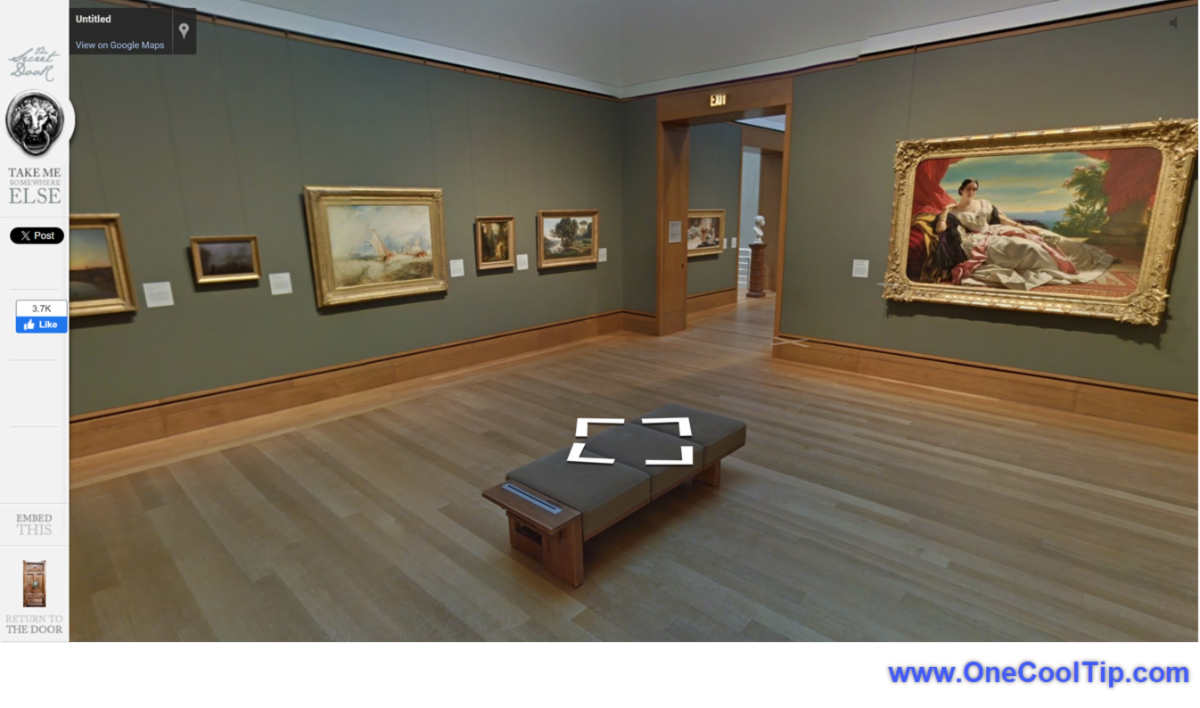
The Secret Door is an innovative website that takes users on a virtual adventure, transporting them to random locations worldwide with a single click.
Here's how to do it.
-
Go to The Secret Door, http://www.secretdoor.notepadwebdevelopment.com/
-
Click on the door icon to be transported to a random location.
- Use the navigation tools to look around and explore the new location.
- Use arrow keys to move up, down, left or right
- + and - to zoom in and out
-
Click the door knocker to visit another random place.
Explore the world without leaving your home and learn about different places and cultures.
Learn more HERE.
| | |
❓Did you share this newsletter with three friends yet?
😎 Cool Facts
-
2001: Wikipedia was founded on January 15, 2001. Source.
-
300+: Wikipedia now has more than 65 million articles across 300+ languages. Source.
-
1.5 Billion: Wikipedia is accessed on more than 1.5 billion unique devices every month. Source.
-
140 Million: OpenAI says 140 million people use ChatGPT each week to help understand math and science concepts. Source.
⌨️Today's Cool Shortcuts
-
Ctrl + F: Find keywords in Wikipedia articles faster.
-
Ctrl + Shift + T: Reopen a closed tab if you click the wrong link.
-
Ctrl + L: Instantly highlight the address bar to copy the URL.
😜 Tech Joke of the Day 😅
What did one hyperlink say to the other?
“I think we’re connected.”
🔎 Do you have a Cool Tip or tech question? Email us at onecooltip.com@gmail.com.
| | |
Links lead to new worlds,
From ancient kings to the stars,
One click finds the way.
| |
| 🤔 How would you play The Wiki Game? | | | | Did You See These Cool Tips This Week? | | | | AirDrop Goes the Distance in iOS 26 with Internet Handoff and New AirDrop Codes | |
AirDrop in iOS 26 keeps transfers moving even after you leave Bluetooth or Wi-Fi range by securely switching to the internet. A new AirDrop Code also makes fast, private sharing easy.
Read the Newsletter Version.
| | | | Freeform Rotate Comes To Windows Paint: A Tiny Button With Big Creative Power | |
Freeform Rotate is finally arriving in the classic Windows Paint app, and it quietly fixes a decades-old annoyance. If you sketch, annotate screenshots, or mock up ideas in Paint, this one control can save you time and make your work look more polished.
Read the Newsletter Version.
| |
ICYMI - In Case You Missed It ...
| | | | Master the Art of Spotting Scams with Google’s New Interactive Game | |
Discover how to sharpen your digital defense skills using a free, browser-based simulation that trains you to identify modern phishing and fraud tactics.
Read the Newsletter Version.
| | He started with one Wikipedia article and accidentally enrolled in a full-time expedition. | | |
Trivia Answer: C) WikiWikiWeb
Created by Ward Cunningham in 1995, WikiWikiWeb was the first site to use the wiki concept, allowing collaborative editing of content.
It laid the foundation for platforms like Wikipedia and countless educational tools.
WikiWikiWeb Archive from the Wayback
----------
Tomorrow's Cool Tip is waiting to amaze you.
Until then, go forth and conquer the tech world with your newfound knowledge!
Be sure to visit www.OneCoolTip.com for Cool Tech Tips for a Cooler Life!
And if you Like One Cool Tip, please support with TipJar!
Enjoy!
Rodger
Chief Cool Tipper
onecooltip.com@gmail.com
| |
| What do you think of today's OneCoolTip newsletter? | | | |
Please Share the One Cool Tip Newsletter!
You asked for it. You got it. There is now a One Cool Tip Newsletter archive. Did you delete a newsletter and want to read it again? Check it out HERE.
Want to help One Cool Tip grow? Please forward this email using the link above. And if you see an OCT social media post, please LIKE, COMMENT and SHARE!
Have you subscribed to the One Cool Tip YouTube channel? Subscribe HERE.
| | Connect with One Cool Tip!! | | |
|
As an Amazon Associate, One Cool Tip may earn a small commission from qualifying purchases.
Our media content is intended solely for informational purposes only. Please do not construe anything here as legal, tax, investment, financial, marital or other advice.
Copyright © 2026 | www.OneCoolTip.com | All Rights Reserved
|
| | | |