2026–2027 • SECONDARY• EDITION 10

BISD Focus School Software logo featuring an open book and an owl holding a magnifying glass.

Focus 13.0 Coming Tomorrow!


Focus 13.0 arrives Wednesday, November 11!

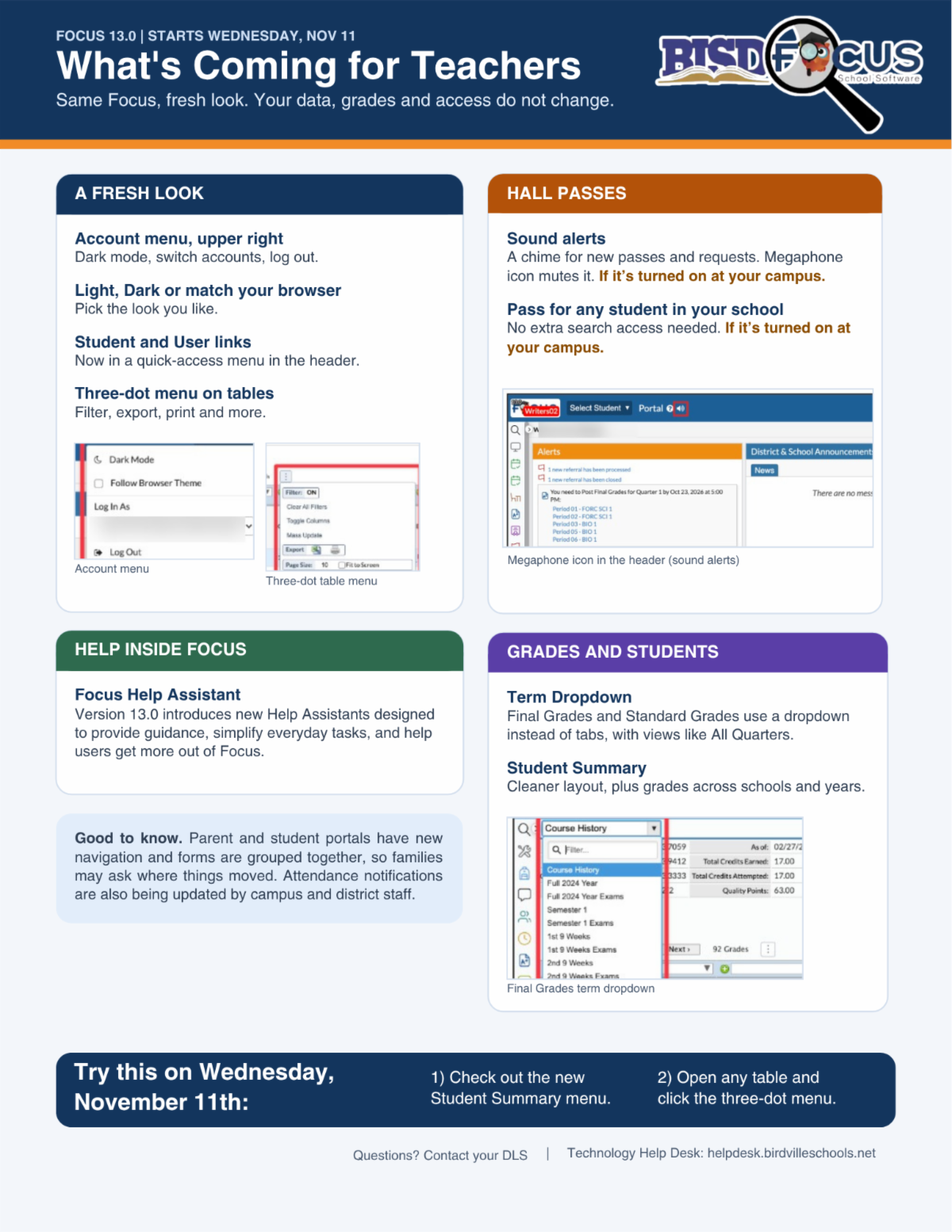
Get ready for a refreshed look, easier navigation, and some helpful new features! Explore options like dark mode, quicker access to student information, improved grade views, and new tools to help you find what you need faster!


And don't worry, the Focus you know isn't going anywhere! Your everyday tasks will still follow the same processes, and your student data, grades, and access will remain the same.


Check out the graphic below for a sneak peek at the updates coming for teachers, including a few new features to try when you log in!

Turn Your Resources into Student Supports with Gemini Notebook!

Gemini Notebook logo featuring three overlapping blue and lavender arches.

Already have lesson slides, readings, or other instructional materials? Gemini Notebook (formerly NotebookLM) can help you turn those resources into customized learning supports. Add your existing materials, then use AI to create scaffolds, review materials, and learning activities grounded in your sources.

One Notebook, Multiple Ways to Support Learning!

Explore practical ways to use Gemini Notebook to create learning supports that meet your students' needs.


  • Build Academic Language Supports: Create sentence stems and vocabulary supports using your lesson content.


  • Create Aligned Questions: Generate questions from your resources and adjust for rigor.


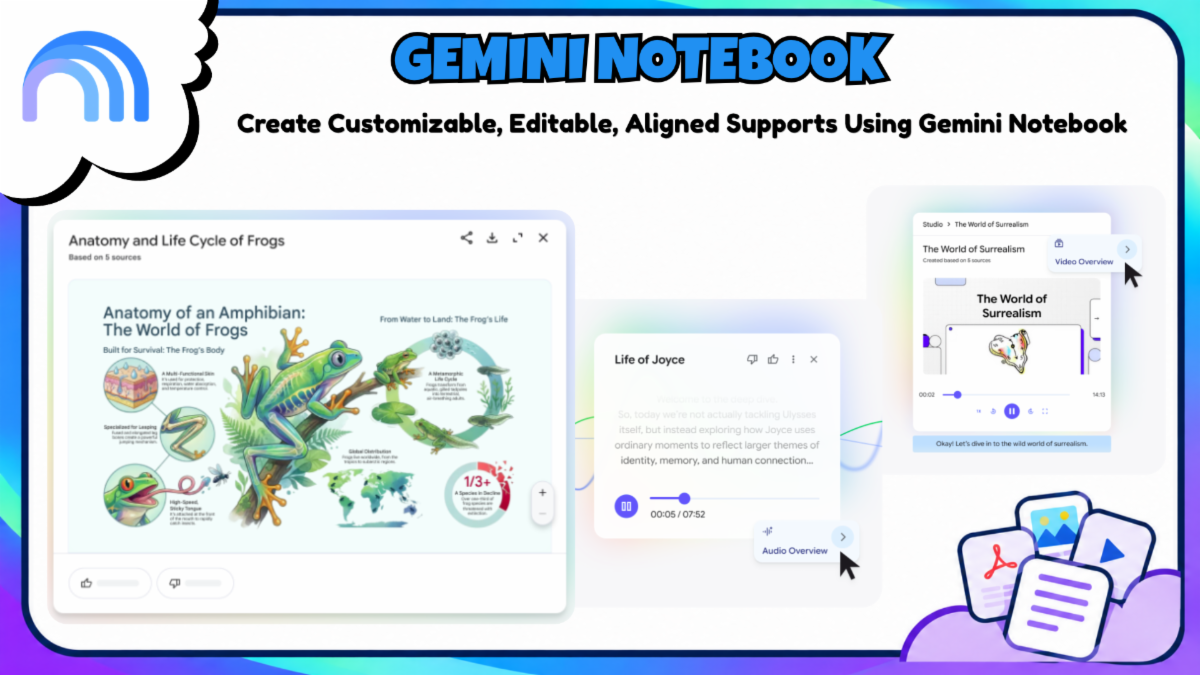
  • Design Visuals & Guided Notes: Turn materials into infographics, slides, or guided notes.


  • Create Audio & Video Supports: Generate audio and video overviews to help students review lesson content.
Gemini Notebook graphic showing AI-generated infographics, audio overviews, and video lessons.

Ready to Try Out Gemini Notebook?

Start with a lesson you already teach. Upload your resources, choose one support to create, and review the AI-generated content for accuracy, alignment, and rigor before sharing it with students.

Festive cookie-style logo for 12 Days of Innovation 2026: A Dozen Ways to Bake in Meaningful Learning.
Cookie-shaped laptop logo with “This Is My Birdville ISD” and “Birdville Digital Learning” text.

The 12 Days of Innovation Is Back, And Fresh Ideas Are Baking!


Get ready for 12 Days of Innovation 2026: A Dozen Ways to Bake in Meaningful Learning! Beginning December 2, we're serving up 12 bite-sized learning opportunities packed with fresh ideas, practical strategies, and creative ways to enhance teaching, learning, and everyday work.


Whether you're looking to save time, spark creativity, explore AI, or try something new, this year's recipe has something for everyone! Each day's learning is delivered straight to your inbox and can be completed at your own pace.


Earn up to 6 hours of Flex/CPE credit by completing the daily learning and reflections by January 19, 2027.


Ready for a fresh batch of inspiration? Register today!


From Canva to Lumio in Just a Few Clicks!

Already creating lessons or presentations in Canva? The Lumio app in Canva lets you send your designs directly to Lumio without downloading and reuploading files! Once in Lumio, you can add interactive activities to turn your slides into student learning experiences.

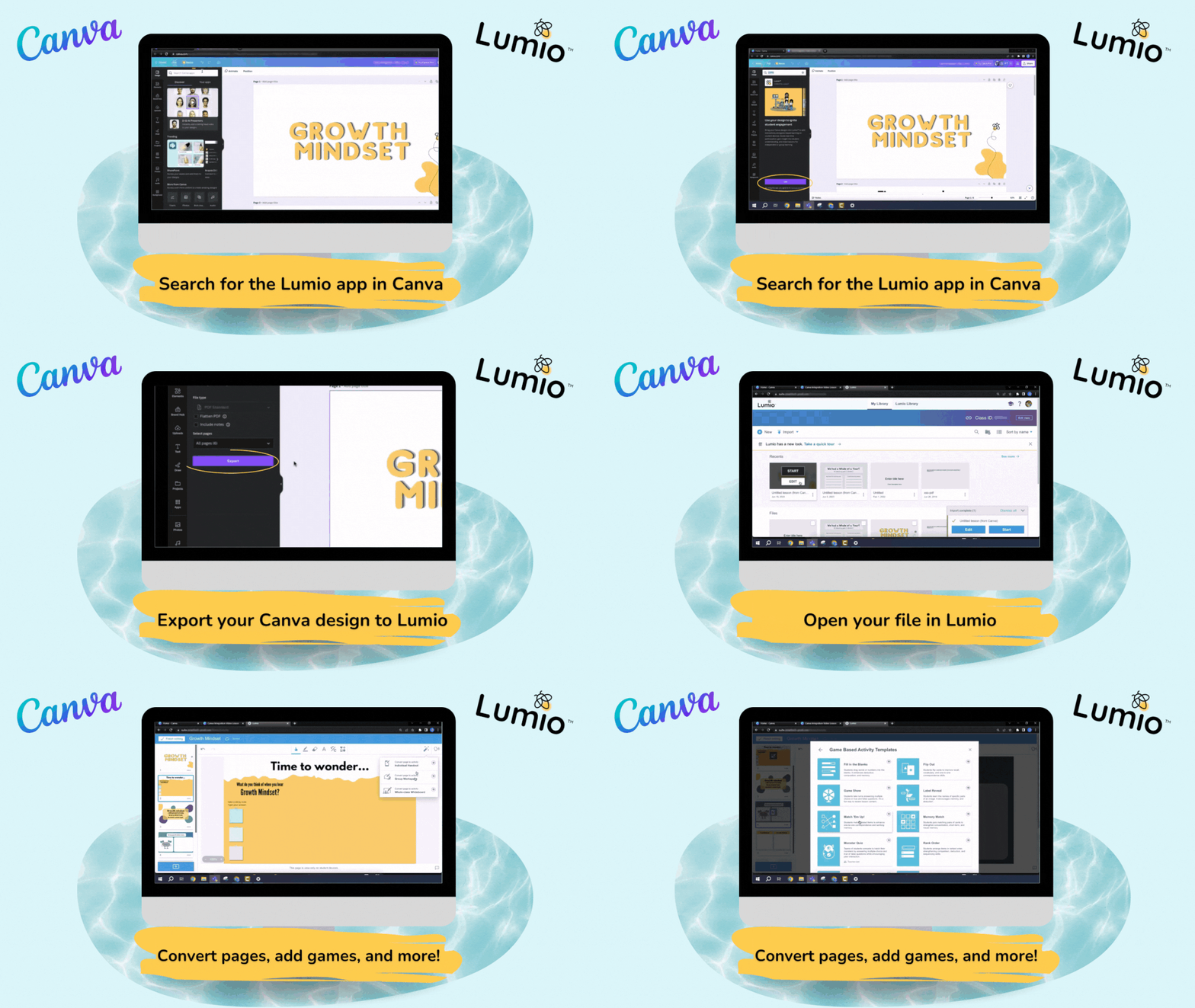
Animated tutorial showing how to find the Lumio app in Canva and export a presentation to Lumio.

Here's How

  1. Open your design in the Canva editor.
  2. Click Apps in the left sidebar.
  3. Search for Lumio and select the Lumio app.
  4. Sign in to your Lumio account if prompted.
  5. Export your design to Lumio, then add your interactive activities.
Video tutorial showing how to transfer Canva designs into Lumio for interactive lessons.

📺 Watch the Canva to Lumio Video Tutorial

Give it a try! Take a Canva presentation you've already created, send it to Lumio, and add an interactive activity to check student understanding.

 
Newsletter emerging from an envelope, representing past Digital Learning Update editions.

Looking for something we shared?

Browse Previous Digital Learning Updates

Digital Learning Quick Links

How Can We Support Your Campus?

Connect with your Digital Learning Specialist for planning, resources, technology integration, instructional support, and more!

 
Birdville Digital Learning Logo
 

Follow Digital Learning for more tips, resources, and ideas.

Instagram    Facebook    X