One Cool Tip Newsletter

June 30, 2026

Your daily dose of tech-savvy brilliance!

😀Greetings! Happy Tuesday, Cool Tipper!


Get ready to streamline your digital life with simple, actionable tips delivered straight to your inbox.


Cool Tip Theme: Gemini 3.5 AI Search


New here? Subscribe to the One Cool Tip Newsletter for daily updates. It's FREE!

3️⃣

If you enjoy the One Cool Tip newsletter, please forward this newsletter to THREE friends or colleagues or share it on social media using the links below.


Leave a $$$ Tip!


Share this One Cool Tip Newsletter!

X Share This Email
LinkedIn Share This Email
Pinterest Share This Email

🚨 REI AI Ad🚨


An REI social media ad is drawing widespread online backlash after viewers spotted something very off about the image: a bicycle with an impossible design flaw.


The issue appears tied to AI.


Meta's advertising tool automatically altered a real product photo, creating inaccurate and unrealistic details that slipped through before the ad went live.


Can you tell what's wrong in the ad photo?


The Takeaway


Even trusted brands can publish misleading visuals when AI tools are involved, so it pays to take online ads with a closer look and a bit of skepticism.


And in Other News...


  • AI Now Turns Your Data Into Custom Images


Google is rolling out a more personal version of its Gemini AI, and it’s now free for eligible U.S. users.


The new feature combines “Personal Intelligence” with Gemini’s Nano Banana image generator to create images based on your real-life interests, photos, and activity across Google apps (with your permission).


In practice, that means you can type a simple prompt like “design my dream house,” and Gemini fills in the details using what it knows about you with no long descriptions required.


It can even pull from Google Photos to include you or your favorite things in generated images automatically, making results feel uniquely tailored.


The feature is optional and adjustable, giving users control over which apps and data Gemini can access.


Bottom Line:


AI image creation is getting easier, but it comes with new decisions about how much of your data you want to share.


Cool Deals of the Day

Help support One Cool Tip. Use this Amazon link when you shop online.


Check out these Cool Deals:

🎧 Google Pixel Buds Pro: Perfect for listening to narrated AI videos and staying focused while you work.

Save 26%. Now $169.99. 4.2 Stars. Check it out on Amazon!


💻 Acer Chromebook Plus 514: An excellent, budget-friendly laptop optimized for web-based AI tools and daily productivity.

$399.98. 4.4 Stars. Check it out on Amazon!


📱 Google Pixel 10a: Experience Gemini and AI search natively on Google's newest and most affordable smartphone.

$494.99. 4.5 Stars. Check it out on Amazon!


*Prices accurate when originally published.

One Cool Tip may earn a commission from qualifying purchases.

Fuel Your Adventure

Try Big Mike's Jerky!


bigmikesjerky.com


Now on TikTok!


Today's Cool Tip

Get Faster Answers With Google Gemini 3.5 AI Search


Google recently upgraded its search experience with Gemini 3.5 Flash, an advanced model that provides incredibly fast and interactive answers. This upgrade transforms how you find information by handling complex, multi-step queries directly within your browser or mobile app.


Finding precise answers to complex questions often requires clicking through multiple websites and assembling the pieces yourself. 


Here is a Cool Tip: Activate AI Mode to Get Instant, Interactive Answers for Your Most Complex Queries.


Google announced at the recent Google I/O 2026 conference that Gemini 3.5 Flash is the default engine for AI Mode in Search. 


This update brings a massive speed increase and introduces the Neural Expressive design language, which replaces plain text walls with interactive timelines, narrated videos, and dynamic graphics. 


You no longer have to trade quality for speed when asking difficult questions. 


The new AI engine handles multi-step reasoning instantly.


Feature Explanation


Google Gemini 3.5 AI Search represents a major shift from a simple question-and-answer tool to a highly capable digital assistant. 


Running on the new Gemini 3.5 Flash model, this feature is built for what Google calls the agentic era. 


This means the AI can plan, build, and iterate to solve problems rather than just retrieving a static block of text.


When you enter a query, Gemini 3.5 Flash processes it up to four times faster than previous premium models. 


It excels at long-horizon tasks, which involve multiple variables or steps. 


For example, if you need to compare the specifications of three different laptops and then find the best prices for them, the AI completes the entire workflow in seconds.


The visual experience is completely new. 


Google calls this redesign Neural Expressive. 


Instead of returning a standard list of links or a flat text summary, the interface generates tailored responses in real time. 


Depending on your query, you might see fluid animations, vibrant colors, and dynamic graphics. 


This makes the information much easier to read and understand.


This upgrade matters because it saves a tremendous amount of time for anyone doing research, planning trips, or learning new technical concepts. 


It solves the problem of information overload by synthesizing multiple sources into one clear, authoritative, and citable answer. 


The Gemini 3.5 Flash model is currently rolling out globally to all users on the free tier, making advanced AI capabilities accessible to everyone.


What You’ll Gain


  • Save time by letting the AI synthesize information from multiple websites into one clear answer.
  • Reduce confusion when researching complex topics with new interactive graphics and timelines.
  • Make daily work easier by using the AI to handle multi-step planning and comparisons.
  • Improve productivity with responses that load up to four times faster than previous versions.


Step-by-Step Instructions


Web/Desktop:


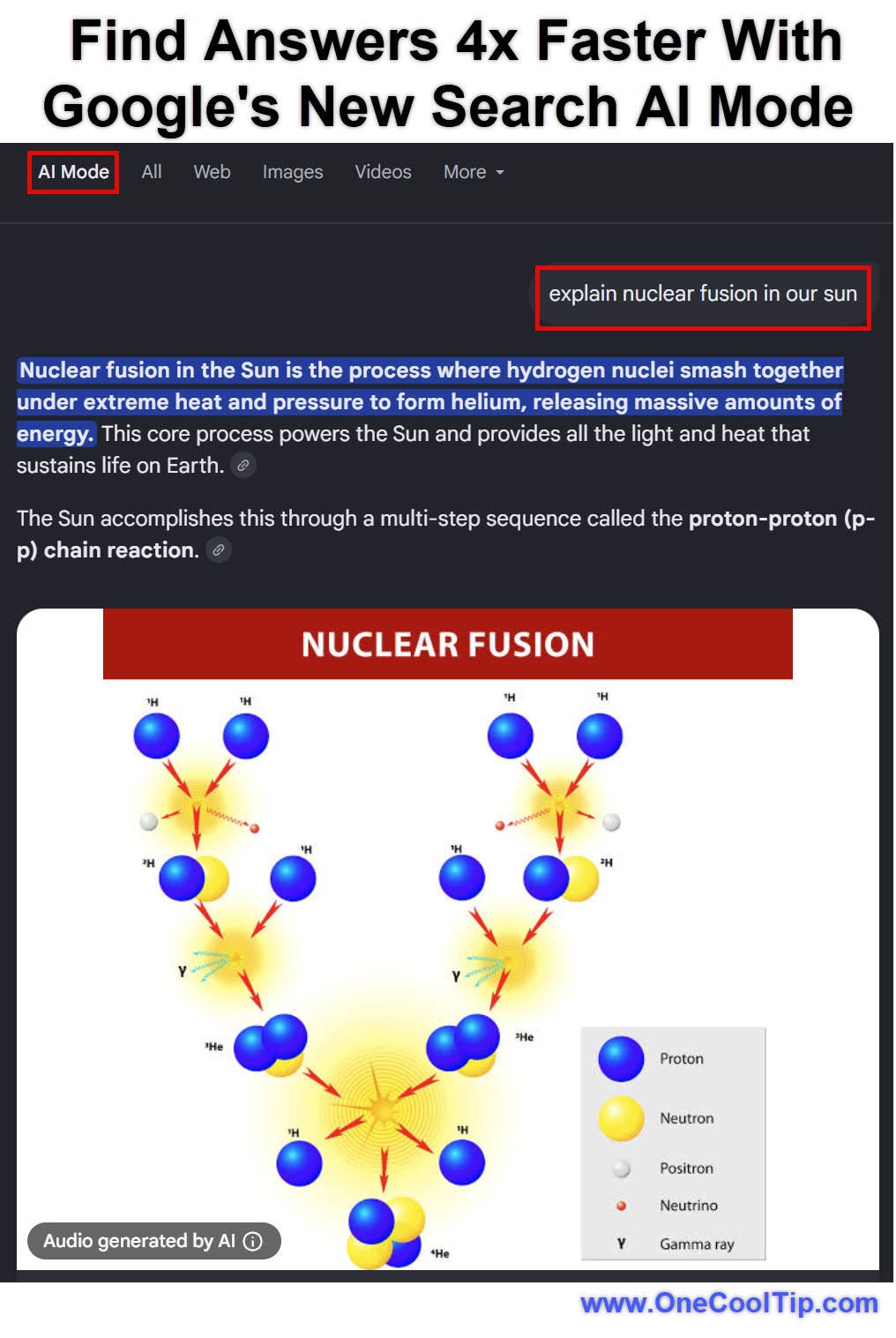
  1. Open your web browser and navigate to Google.com.
  2. Type your complex question into the search bar and press Enter.
  3. Look for the AI Mode option at the top of the search results page.
  4. Click the Generate button to activate the Gemini 3.5 Flash response.
  5. Review the custom answer and interactive graphics above the traditional results.


fig. 1 - Google Search AI Mode Example

iPhone/iPad:


  1. Open the Google app or the dedicated Gemini app on your iOS device.
  2. Tap the search bar or microphone icon to enter your prompt.
  3. Tap the Generate button at the top of the results.
  4. Watch the Neural Expressive interface build your answer.
  5. Scroll through the tailored response and tap interactive elements.


Android:


  1. Open the Gemini app or the Google app on your Android device.
  2. Type or speak your multi-step question into the search field.
  3. Submit the query to activate the Gemini 3.5 Flash model.
  4. Watch the fluid animations as the AI designs a custom layout.
  5. Review the information and tap the suggested follow-up questions.


Pros and Cons


Pros:


  • Generates answers at exceptional speeds, significantly reducing wait times for business and student users.
  • Creates highly visual and interactive responses that make data easier to digest.
  • Handles complex, multi-step queries that require reasoning and comparison.
  • Available globally on the free tier without requiring a paid subscription.


Cons:


  • AI summaries can occasionally misinterpret nuances in highly technical or niche subjects.
  • Pushes traditional website links further down the page, which requires more scrolling to find specific URLs.
  • The new Neural Expressive design features may require a learning curve for users accustomed to traditional search layouts.


Feature Access


The Gemini 3.5 Flash model is currently rolling out globally. 


It is available on the web, Android, and iOS devices. The feature is accessible to free-tier users as the new default model. 


Business, education, and enterprise users can access these features if their organizational administrators have enabled the Gemini Enterprise Agent Platform. 


Some specialized capabilities, such as creating cinematic videos with Gemini Omni or using the proactive Gemini Spark agent, require a Google AI Plus, Pro, or Ultra subscription and may be limited to users 18 and older in specific regions.


Score

Criterion | Score (0-10) |  Justification
Value |  9
It completely eliminates the need to manually sift through multiple websites for complex research.
Usability |  8
The interface is highly intuitive, though traditional searchers may need time to adjust to the new layout.
Wow Factor |  9
The Neural Expressive design creates stunning, interactive graphics that appear instantly.
Total: 26/30 | 🌟 Excellent
Gemini 3.5 AI Search is an exceptionally powerful upgrade that transforms complex research into a fast, visual, and highly efficient process. This feature strongly competes with dedicated research assistants by offering frontier-level intelligence directly within your standard search bar.

Key Takeaways


Gemini 3.5 Flash brings unprecedented speed and multi-step reasoning to your daily internet searches. 


The new Neural Expressive design makes data highly visual and interactive. 


This update changes the core search experience from a simple list of links into a comprehensive, agentic research tool.


Cool Tip Snapshot


  • Feature Name: Gemini 3.5 AI Search
  • Platform(s): Web, iOS, Android, Windows, macOS
  • Quick Benefit: Get instant, interactive answers to complex questions.
  • Best For: Students, researchers, travelers, and professionals.
  • Access Type: Free
  • Difficulty: Easy


Try It Yourself


Next time you need to research a complex topic, type a detailed, multi-step question into Google Search and click Generate to see Gemini 3.5 Flash in action. 


Please leave a comment below to share your experience.


And share this Cool Tip with your family, friends, and coworkers.


READ MORE


Read the Full Cool Tip.

Check Out These Cool Tips & Tricks


  • Use Specificity: Always include detailed requirements. Instead of asking for a laptop, ask for a laptop under $800 with 16GB of RAM.


  • Check Citations: Verify the sources carefully. Click the small link icons at the bottom of the AI summary to read the original websites.


  • Force Updates: Get the latest news. Include the current year or month in your prompt to prevent the AI from using cached data.


  • Use Voice: Speak your complex prompts. Tap the microphone icon in the app to ask long questions without typing.


  • Ask Follow-Ups: Keep the conversation going. Click the suggested questions at the bottom of the overview to dig deeper.


  • Compare Items: Build instant tables. Ask the AI to compare two products and present the data in a chart.


  • Plan Trips: Create instant itineraries. Provide your destination and timeline to receive a complete day-by-day travel plan.


  • Summarize Articles: Save time reading. Paste a URL into the search bar and ask Gemini to provide the key takeaways.


  • Find Settings: Use Search Labs. Look for the beaker icon in your Google app to toggle experimental features on or off.


  • Protect Your Privacy: Protect your data safely. Avoid typing sensitive personal or financial information into any AI search tool.


ICYMI - In Case You Missed It ...

Turn Any Topic Into a Custom Alexa Podcast


Alexa+ can now turn almost any topic into a short, AI-generated podcast episode you can listen to on an Echo device or in the Alexa app. It is a smart way to learn during a commute, prep for a trip, explain a topic at home, or catch up on a subject without searching for a traditional podcast.


Read the Full Cool Tip.


Read the Newsletter Version.

Looking for your next adventure?


Call Denise at Travel For You.

314.660.3039


Sign Up for the Monthly Newsletter


http://www.travelforyouvacations.com/


https://www.facebook.com/TRAVEL.FOR.U/


See You Tomorrow

Tomorrow's Cool Tip is waiting to amaze you.


Until then, go forth and conquer the tech world with your newfound knowledge!


Be sure to visit www.OneCoolTip.com for Cool Tech Tips for a Cooler Life!


And if you Like One Cool Tip, please support with TipJar!


Enjoy!


Rodger

Chief Cool Tipper

onecooltip.com@gmail.com


What Do You Think?

What do you think of today's OneCoolTip newsletter?
Positive        Neutral        Negative
X Share This Email
LinkedIn Share This Email

Connect with One Cool Tip!!

Facebook  X  Instagram  Web  Pinterest  YouTube  LinkedIn
 

As an Amazon Associate, One Cool Tip may earn a small commission from qualifying purchases.


Our media content is intended solely for informational purposes only. Please do not construe anything here as legal, tax, investment, financial, marital or other advice.


Copyright © 2026 | www.OneCoolTip.com | All Rights Reserved