|
One Cool Tip Newsletter
October 6, 2026
| Your daily dose of tech-savvy brilliance! | |
😀 Greetings! Happy Tuesday, Cool Tipper!
Get ready to streamline your digital life with simple, actionable tips delivered straight to your inbox.
Cool Tip Theme: Grok Bot
Grok Bot signs into your tools, finishes multi-step jobs on a cloud computer, and checks back when it needs approval. Here is how to start.
New here? Subscribe to the One Cool Tip Newsletter for daily updates. It's FREE!
| |
3️⃣
If you enjoy the One Cool Tip newsletter, please forward this newsletter to THREE friends or colleagues or share it on social media using the links below.
Leave a $$$ Tip!
Share this One Cool Tip Newsletter!
| | |
🚨 The FBI Wants You to Know About This Convincing New Scam 🚨
Think you could spot a fake FBI agent?
Scammers are making that much harder.
The FBI is warning about a new twist on an old fraud scheme where criminals use the names of real federal agents, spoof official government phone numbers, and even create fake video meeting backgrounds that look like FBI offices.
In some cases, victims call an FBI office to verify the agent's name and learn that the person actually works there, making the scam seem legitimate.
The FBI's advice is simple: never send money to anyone claiming to be a federal law enforcement agent.
If you receive a suspicious call, hang up and independently look up the agency's official phone number to verify the contact.
Federal agents will not demand immediate payments, gift cards, cryptocurrency, or cash to resolve a legal matter.
The next time someone claims to be from the FBI, remember that a caller ID, a real name, or even a professional-looking video background does not prove the person is who they say they are.
And in Other News...
- Soon, AI-Written Text May Come With a Hidden Label
As artificial intelligence becomes more common, it is getting harder to tell whether text was written by a person or generated by a machine.
OpenAI has announced a new approach to help identify AI-generated text in response to European Union transparency requirements.
The company plans to add an invisible watermark to certain AI-generated text that can be detected using specialized tools, helping researchers and organizations better understand where content came from.
OpenAI says the technology is not perfect and may become less reliable when text is edited, shortened, or rewritten.
The bigger lesson is that AI transparency is becoming increasingly important online.
Future articles, posts, and documents may include technology designed to help verify whether AI played a role in their creation.
As AI becomes a larger part of everyday life, understanding where content comes from will be just as important as understanding what it says.
| |
| 🤔 What would you hand a Grok Bot first? | | | | |
Help support One Cool Tip. Use this Amazon link when you shop online.
Check out these Cool Deals:
| | |
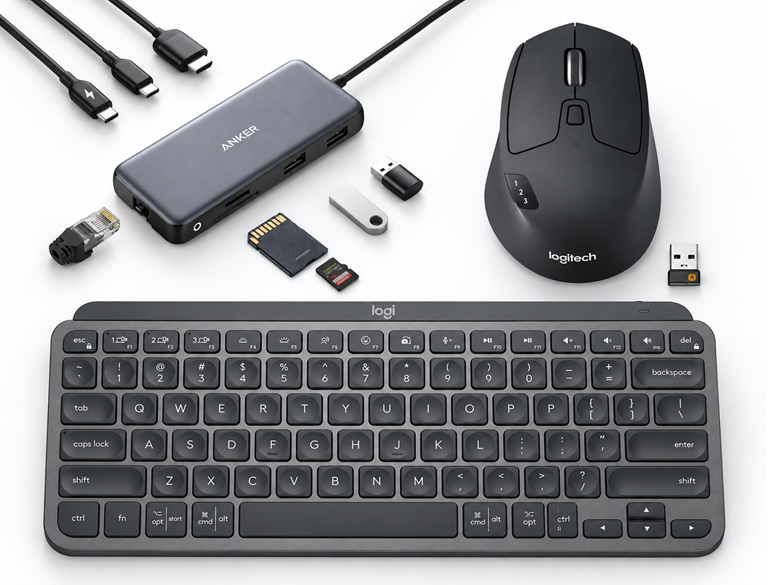
⌨️ Logitech MX Keys Mini, Graphite: A compact keyboard is a useful option for writing detailed task instructions and editing drafts.
Save 20%. Now $79.99. 4.4 Stars. Check it out on Amazon!
🖱️ Logitech M720 Triathlon Mouse: A dedicated mouse can make reviewing tables and documents more comfortable at your desk.
Save 26%. Now $33.19. 4.5 Stars. Check it out on Amazon!
🔌 Anker USB-C Hub: A hub can help organize a compatible laptop workspace with connected accessories; verify your laptop’s port capabilities before buying.
Save 32%. Now $34.19. 4.3 Stars. Check it out on Amazon!
*Prices accurate when originally published.
One Cool Tip may earn a commission from qualifying purchases.
| | Hand the Busywork to a Grok Bot | | |
A chatbot can draft the email. Grok Bot is built to open the tools, do the steps, and leave a finished draft for you to approve.
If your week is full of follow-ups, reports, and browser chores, this is the version of Grok that keeps working after you close the laptop.
| | |
By Rodger Mansfield, Technology Editor
October 6, 2026
Subscribe
You already have a chatbot that can write a first draft.
The slow part is everything after that: opening the spreadsheet, checking the inbox, pulling the numbers, and pasting the result where it belongs.
Grok Bot is SpaceXAI’s answer to that gap.
It launched in August 2026 as a team of always-on agents that share a cloud computer, sign into the apps you already use, and come back when a step needs you.
Here’s a Cool Tip: Create one focused Grok Bot, give it a single job, and make it stop before it sends or publishes anything.
It is available as desktop apps for Windows, macOS, and Linux, plus companion apps for iPhone, iPad, and Android.
Feature Explanation
Grok Bot is not the @grok reply account on X, and it is not a normal Grok chat.
A Bot can use a persistent cloud computer with a browser, files, and a terminal.
Work runs there, so closing the app, the laptop, or the phone does not stop a background turn or a routine.
You message a Bot the way you would message a coworker.
You give it a name, one primary job, and a description of how it should work.
It can use connectors where they exist, and computer use for sites that have no clean API.
When a site asks for a password, a two-factor code, or a CAPTCHA, the Bot is supposed to hand that step to you.
Every Bot on your account shares one computer.
They can share files, browser sessions, and logins, and they can message each other.
It is a poor fit if all you want is a quick answer in a chat box.
So how can you use Grok Bot?
-
Invoice and receipt cleanup. A home office or small shop can hand Grok Bot a folder of emailed invoices and ask for a spreadsheet of vendor, date, amount, and due date, with nothing paid or sent. That cuts the Sunday bookkeeping session and makes missed due dates less likely.
-
Follow-up drafts, not sent mail. After a sales call or a service visit, the Bot reads the notes, drafts the recap, and stops before sending. You approve a queue instead of writing each note from a blank page.
-
Weekly price or supply check. A household or a buyer can ask it to compare the same grocery, supply, or software list across a few sites and return the cheapest in-stock option with links. You still place the order. The time saved is the tab-hopping, and the money saved is the avoided full-price reorder.
What You'll Gain
-
Time back on repeat browser work, because the Bot can keep going after you step away.
-
Fewer half-finished drafts, because the result can land in the tool you already use.
-
A review point before sends, deletes, or purchases, if you set that rule.
-
The same Bots on desktop and phone, so an approval does not wait until you are back at the desk.
Step-by-Step Instructions
Here's how to do it.
Windows:
-
Open https://x.ai/bot and download the Windows build. Go to Settings, then System, then About, then System type, and pick x64 or Arm64.
-
Run the installer and open Grok Bot from the Start menu.
-
Choose Sign in and finish Cursor authentication in the browser. If access comes from SuperGrok, link it under Settings, then Usage & Billing.
-
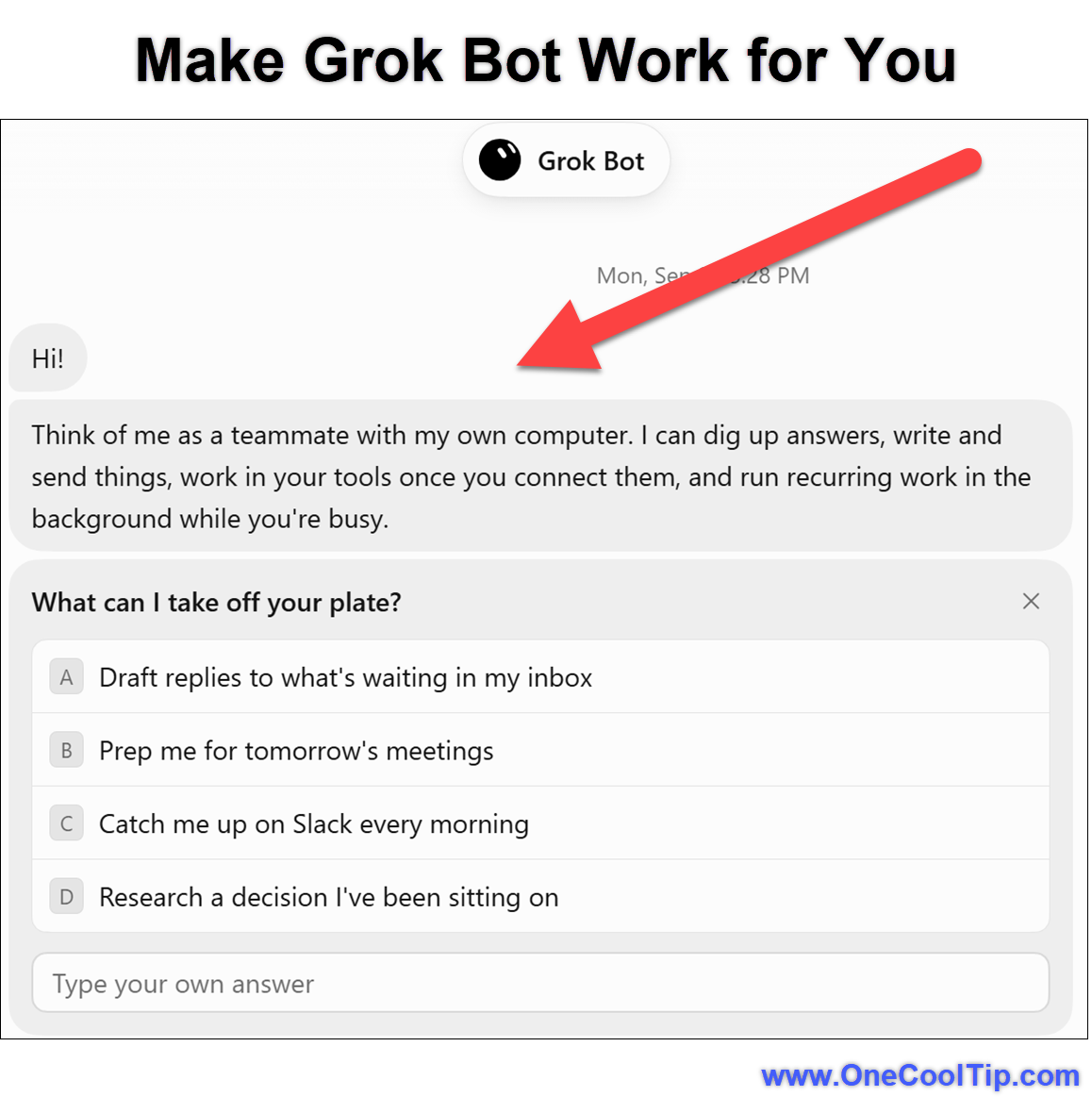
On first run, answer the tool questions. They suggest a first teammate. They do not connect those tools by themselves.
-
Choose a suggested teammate, or choose Create your own. Give it a short name, one job, and a description that says what it must not do.
-
Type a first task with an outcome, sources, constraints, and a review point. Example: “Summarize this attached brief in five bullets. List dates and open questions. Do not change the file.”
| | fig.1 - Make Grok Bot Work for You | | |
Linux:
-
Builds are under More downloads on x.ai/bot, as a .deb, .rpm, or AppImage.
-
Check the architecture with uname -m. x86_64 is x64. aarch64 is Arm64.
-
Sign-in and first-task steps match Windows.
macOS:
-
On https://x.ai/bot, choose Apple silicon or Intel. Open the Apple menu, then About This Mac. A Chip field means Apple silicon.
-
Open the disk image, drag Grok Bot to Applications, and open it. If macOS asks, choose Open.
-
Sign in the same way as on Windows, then create one Bot and hand it a no-login first task before you connect email or a CRM.
iPhone/iPad:
-
Install Grok Bot from the App Store. iPhone needs iOS 18 or later. iPad needs iPadOS 18 or later.
-
Choose Log In or Sign Up, complete Cursor authentication, then return to the app.
-
If you use SuperGrok, choose Link Grok Account, finish in the browser, then choose Finished Linking? Refresh My Status.
-
Open a Bot and dictate with Start dictation, or use Start voice chat. Turn on notifications if you want approval alerts.
Android:
-
Install Grok Bot from Google Play. Android 9 or later is the documented requirement.
-
Sign in the same way as on iPhone, including Link Grok Account if needed.
-
The Android share sheet currently accepts text only. Use the desktop app when you need to teach a browser workflow.
Pros and Cons
Pros:
- Work continues on the cloud computer after you close the laptop. That helps with an overnight research pass or a Monday scoreboard.
- Setup is a message, not a flowchart. The get-started guide says you name the Bot and describe the job.
- Sensitive steps can stop for approval, and passwords stay a human takeover.
- Phone apps sync to the same Bots, so a traveler can approve a draft without opening the laptop.
- You can later save a stable process as a skill or a scheduled routine.
Cons:
- Access is plan-limited. It is not a free feature for every Grok or X account.
- Bots share one computer and its logins. A loose permission becomes a shared permission.
- Sites can block automation, demand a new login, or show a CAPTCHA.
- Teach a task is desktop-only, may roll out gradually, and recordings are limited to ten minutes.
- Extra usage is billed from model and token cost after the included weekly usage.
Who Should Skip This
Skip it if you only want answers in chat.
The regular Grok app is the simpler tool.
Skip it if you do not have an eligible Cursor or SuperGrok plan, or if your company forbids signing work accounts into a cloud computer.
Also skip it for anything you cannot afford to have drafted wrong: payments, legal filings, medical instructions, or a send-to-all email with no review step.
Feature Access
- Grok Bot launched in beta on August 11, 2026 for SuperGrok, SuperGrok Plus, SuperGrok Heavy, Cursor Pro, Pro+, and Ultra, and Cursor Teams Standard and Premium, on desktop and iOS. The launch note said enterprise users could join a waitlist.
- Access is included with every paid individual Cursor plan and the Cursor Teams plan, or by linking an individual SuperGrok, SuperGrok Plus, or SuperGrok Heavy subscription. Weekly usage is included. On-demand usage is billed from model and token cost. If you have both Cursor and SuperGrok, Grok Bot uses whichever has more usage. Enterprise access is rolling out.
- Supported clients are macOS on Apple silicon and Intel, Windows on x64 and Arm64, Linux on x64 and Arm64, iPhone on iOS 18 or later, iPad on iPadOS 18 or later, and Android 9 or later. Availability can still depend on plan, account link, and organization policy.
Score
Criterion | Score (0–10) | Justification
Value | 8
It targets the leftover work after a chatbot draft, and it can keep going when the laptop is closed. Plan limits and shared logins keep it from a higher score.
Usability | 7
First setup is a sign-in and a message, but approvals, connectors, and the shared computer take a careful first afternoon.
Wow Factor | 8
A Bot that signs into the real tool and stops for approval is a clear step past chat. Site blocks and rollout limits keep it short of excellent.
Total: 23/30 | 👍 Good
Strong for repeat, reviewable work if you already pay for Cursor or SuperGrok, and easy to overtrust if you do not set the stop rules.
Compared with a normal Grok chat, Bot is slower to start and more useful once the job lives in email, a dashboard, or a browser tab.
Compared with a classic automation builder, you skip the flowchart and accept a cloud computer instead.
Key Takeaways
Grok Bot is a teammate with a computer, not another chat tab.
Give it one job, tell it when to stop, and review the first results before you schedule anything.
The phone apps are for approvals and follow-ups.
Teaching a workflow and connecting the messy tools still belongs on the desktop.
Cool Tip Snapshot
-
Feature Name: Grok Bot
-
Platform(s): Windows, macOS, Linux, iPhone, iPad, Android
-
Quick Benefit: Hands multi-step tool work to an agent that keeps working in the cloud
-
Best For: Business users and creators with repeat browser and inbox chores
-
Access Type: Subscription, with enterprise access rolling out
-
Difficulty: Moderate
Try It Yourself
Install the app, create one Bot, and give it a document summary that is not allowed to change the file.
If that result is clean, try one real tool and keep the send button for yourself.
Tell us what job you handed off in the comments, subscribe to the One Cool Tip newsletter for FREE, and send this to the coworker who is still copying numbers by hand.
READ MORE
Read the Full Cool Tip.
| | |
Check Out These Cool Tips & Tricks
-
One Job: Give each Bot a single role so its memory stays useful.
-
Stop Rule: Tell it to ask before sending, deleting, buying, or publishing.
-
First Task: Start with an attached document and a ban on editing the file.
-
Takeover: Enter passwords and CAPTCHA codes yourself in Agent Computer.
-
Shared PC: Remember that every Bot on the account can use the same logins.
-
Weekly Reset: Included usage resets weekly. Check Usage & Billing before a big run.
-
Phone Approvals: Use iPhone or Android to approve. Teach workflows on desktop.
-
Voice Drafts: Press Ctrl+D on Windows, or Start dictation on the phone.
-
Hide, Don’t Delete: Hiding keeps the work. Deleting can leave files on the shared computer.
-
Link the Plan: SuperGrok access appears only after you link the account.
| | ICYMI - In Case You Missed It ... | | | | |
Turn Complex Research Into Visual Summaries With Gemini Notebook Infographics
Gemini Notebook now converts pages of dry research notes into structured, visual graphics in a couple of clicks. Here is how you can use the built-in Studio tools to customize, generate, and share presentation-ready visual summaries.
Read the Full Version.
Read the Newsletter Version.
| | |
Tomorrow's Cool Tip is waiting to amaze you.
Until then, go forth and conquer the tech world with your newfound knowledge!
Be sure to visit www.OneCoolTip.com for Cool Tech Tips for a Cooler Life!
And if you Like One Cool Tip, please support with TipJar!
Enjoy!
Rodger
Chief Cool Tipper
onecooltip.com@gmail.com
| |
| What do you think of today's OneCoolTip newsletter?
| | | | Connect with One Cool Tip! | | |
|
As an Amazon Associate, One Cool Tip may earn a small commission from qualifying purchases.
Our media content is intended solely for informational purposes. Please do not construe anything here as legal, tax, investment, financial, marital or other advice.
Copyright © 2026 | www.OneCoolTip.com | All Rights Reserved
|
| | | |