|
Real-Time Scareware Protection Expands in Microsoft Edge
Microsoft is rolling out a powerful real-time scareware and support scam protection in Edge, making one of the internet’s most persistent threats a thing of the past for a wider audience. This expanded feature significantly enhances online safety by blocking deceptive websites before they can even load their malicious messages.
By Rodger Mansfield, Technology Editor
November 15, 2025
Have you ever been interrupted by a frantic, blinking pop-up warning that your computer has a critical virus, demanding you call a “support hotline” immediately?
This classic digital ambush, known as scareware or a tech support scam, plays on fear to trick you into downloading malware or paying hundreds of dollars to a criminal.
The threat is not abstract; these scams cost consumers and businesses billions annually.
Here's a Cool Tip: Use the New Microsoft Edge Browser with its built-in Scareware Blocker.
We first told you about the Microsoft Edge Scareware Blocker earlier this year.
But now Microsoft is fighting back by expanding a critical, proactive security feature in its Edge browser.
Edge’s real-time protection against scareware is now rolling out to protect a much broader set of users, acting as a digital bouncer that blocks the scammer’s door before they can start their pitch.
Feature Explanation
The core defense mechanism is Microsoft Defender SmartScreen, the technology that has long protected users from known phishing and malware sites.
The latest update specifically targets the insidious nature of scareware and deceptive support sites.
These malicious pages often rely on aggressive, non-standard browser behaviors, like generating rapid pop-up loops, hijacking the browser history, or forcing full-screen mode to trap the user and make the warning seem legitimate.
Edge’s expanded protection works in real-time.
Instead of simply relying on a pre-compiled list of known bad URLs, the browser dynamically analyzes the behavior of newly visited pages.
If a website starts exhibiting the telltale signs of a scareware attack, such as using specific scripting techniques designed to look like a critical system error message, SmartScreen intervenes instantly.
It does not just display a warning; it blocks the page load entirely, preventing the user interface from being locked down or overwhelmed.
This shifts the defense from a reactive warning to a proactive shield, neutralizing the scam’s impact before it can even register in the user’s mind.
What You’ll Gain
-
Prevent Financial Loss: Stop scams that attempt to trick employees or family members into paying for fake security software or services.
-
Reduce IT Support Load: Cut down on help desk tickets caused by trapped users or those who have accidentally installed malicious software.
-
Maintain System Integrity: Block the delivery of potential malware payloads often bundled with fake "cleaner" tools.
-
Improve Employee Focus: Eliminate disruptive, fear-inducing browser pop-ups that distract from mission-critical work.
Step-by-Step Instructions
Here's how to do it.
This powerful protection is primarily automatic, but here is how to confirm it is enabled on your desktop and mobile versions of Edge.
Microsoft Web/Desktop
-
Launch the Microsoft Edge browser, click the three-dot menu in the upper right corner, and select Settings.
-
In the left sidebar, click on Privacy, search, and services.
-
Scroll down to the Security section and tap to expand.
-
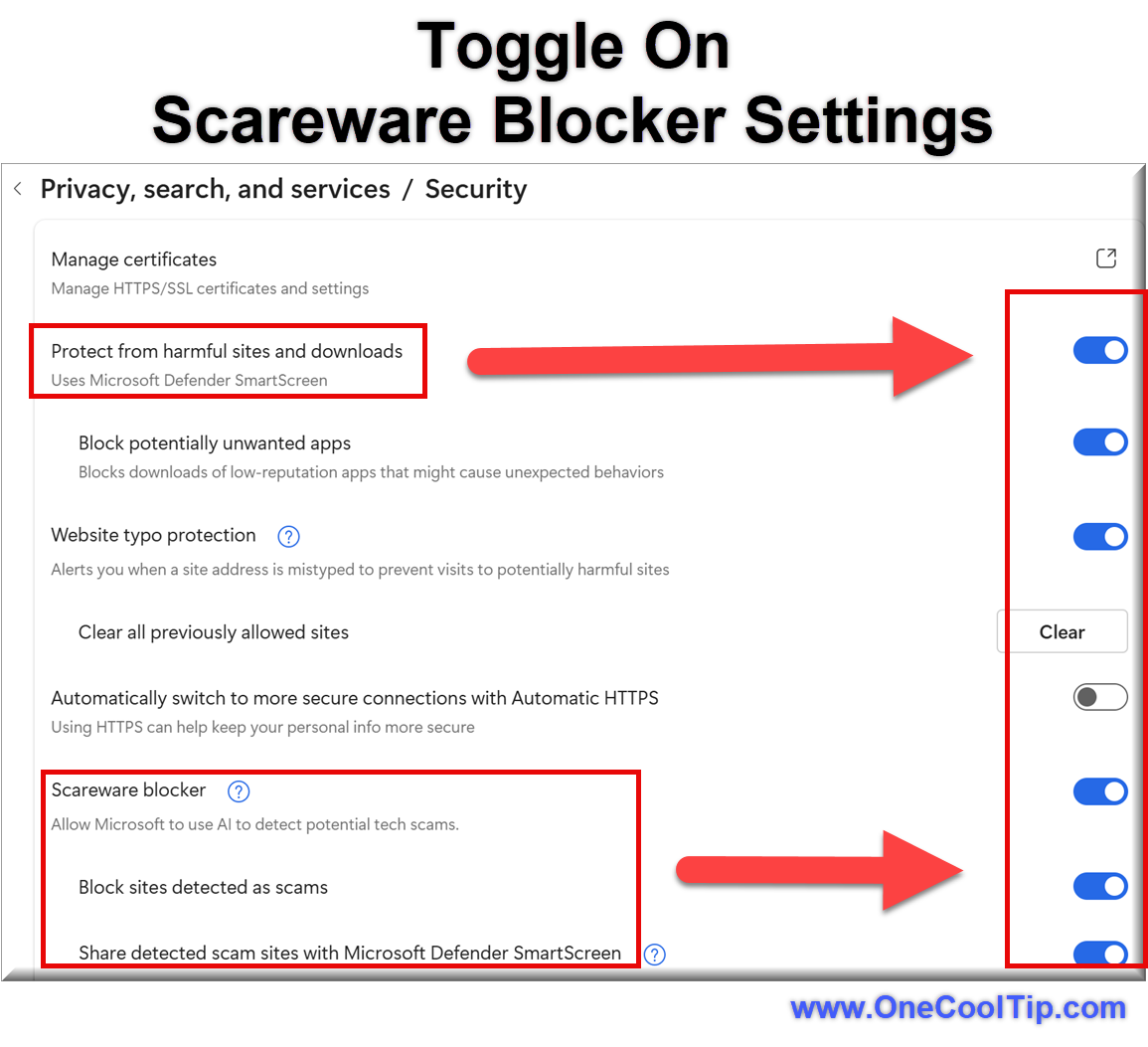
Ensure that Protect from Harmful Sites and Downloads is On.
-
Ensure that Scareware Blocker is On.
-
Ensure that Block Sites Detected as Scams is On.
- Ensure that Share Detected Scam Sites with Microsoft Defender SmartScreen is On.
|