Learn21's Weekly EdTech Update

August 1, 2024

Learn21 Shines at Ohio ACTE Conference

What is the Ohio ACTE Conference 2024?

The Ohio Association for Career and Technical Education (Ohio ACTE) is a statewide organization dedicated to promoting and supporting career and technical education (CTE) in Ohio. The association’s mission is to ensure that every student in Ohio has access to high-quality CTE programs that prepare them for successful careers and lifelong learning. The Ohio ACTE Conference 2024, also known as the ALL Ohio Conference, is the premier event for CTE professionals in Ohio. This year’s event took place from July 15-17, 2024 and brought together educators, administrators, and industry leaders to share best practices, innovative strategies, and the latest trends in CTE. The conference features a variety of sessions, workshops, and networking opportunities designed to inspire and equip attendees with the tools they need to enhance their CTE programs. Learn21 was excited to attend the Ohio ACTE conference for the first time and share edWise, our data dashboard and data warehouse solution.


Leading the Way in CTE Data Management

Learn21 partnered with Pickaway Ross Career Center to showcase the remarkable impact of edWise, which led to a substantial increase in industry credential submissions—from 445 to over 2,000—and a corresponding rise in reimbursements from $37,000 to $112,000. As reported by Joshua Younge, Director of Curriculum and Data at Pickaway Ross Career Center, this significant funding boost enabled the center to expand credential offerings, with $100,000 allocated to new credentials in 2024 alone.


Dylan Klingensmith, edWise developer and product lead from Learn21, illustrated how the platform seamlessly integrates with the career center’s student information system (SIS) to enhance data management across various domains. From industry credentials and work-based learning to Ohio Graduation Seals and end-of-course assessments, edWise’s robust reporting capabilities empower educators and administrators alike. This integration has streamlined state reporting practices, facilitating data-driven decisions that optimize student outcomes and operational efficiency.


Kevin Ghantous, CEO of Learn21, outlined future enhancements for edWise, including expanded reporting features and upcoming projects like the Student Follow Up Project and an Evaluation Portal set for the 2024-25 school year. His remarks underscore Learn21’s ongoing commitment to innovation and collaboration with career centers to address their specific challenges and needs.


What is edWise and How Does It Support Schools

edWise is an educational data platform built specifically to address the needs of today’s educators. edWise transforms complex data into clear, actionable insights through robust visualizations. Teachers and administrators can effortlessly navigate the platform, thanks to its intuitive interface that balances simplicity with depth.


edWise excels in seamless data integration, eliminating the need for technical expertise at the district level. With connectors into your SIS, student behavior trackers, assessment systems, Individualized Education Program plans, and much more edWise removes the burden of teachers collecting and combing through data exports and spreadsheets. Bringing all student data together into a single solution, edWise saves educators time and improves their effectiveness. 


edWise supports the Multi-Tiered System of Supports (MTSS) evaluation process, facilitating universal screening, progress monitoring, and data-based decision-making. District administrators can leverage specific data sets such as student performance metrics, attendance records, behavior incident reports, and intervention outcomes to evaluate the effectiveness of MTSS implementations. This ensures timely and effective interventions, promoting a positive educational environment for all students.


With the addition of CTE modules, edWise provides support for industry credential tracking CTSOs logging, and support for work-based learning initiatives, providing students with practical experience and essential skills for the workforce.


If you want to see how edWise can enhance your data access, district operations, and compliance, contact Learn21 at info@learn21.org to schedule a walkthrough. Discover how our solutions can transform your educational institution and support your goals.

The Evolutionary Impact from Revolutionary EdTech

Every year new technology has been released to revolutionize education. Starting with the pencil and paper of the late 1800s, education saw a significant shift from oral tradition to written documentation, making learning more accessible and structured. The mid-20th century introduced television and film, bringing visual and auditory elements into the classroom that engaged students in ways previously unimaginable. By the dawn of the 21st century, computers and the internet opened doors to limitless information, connecting students globally and introducing e-learning platforms. More recently, innovations like interactive whiteboards, virtual reality, and artificial intelligence have promised to transform how students learn and how teachers teach.


There has never been a time without some new technology that was going to completely change education, and for the better. However, the impact of these technologies has been more evolutionary than revolutionary. Despite the hype, each new technology has gradually integrated into the existing educational framework rather than completely overhauling it. The shift from chalkboards to whiteboards to interactive smartboards, for instance, represents a steady progression rather than a dramatic leap. These technologies have enhanced teaching methods and made learning more interactive.


Evolutionary Changes

Small changes, though often understated, are not necessarily bad. Incremental advancements allow for smoother transitions and greater acceptance among educators and students. Small changes can lead to substantial improvements over time, refining educational practices without overwhelming the system. For example, the integration of tablets into classrooms didn’t disrupt the traditional learning environment but gradually replaced textbooks, providing interactive and up-to-date content. These subtle shifts enable continuous improvement, ensuring that technology enhances rather than disrupts the learning experience.


Being Revolutionary

Teachers can be revolutionary in their classrooms, even without cutting-edge technology. They can inspire and engage their students in meaningful ways by being creative, hard-working, and supportive of new ideas. Teachers who embrace project-based learning, flipped classrooms, and personalized instruction are at the forefront of educational innovation. Their willingness to experiment with new teaching methods and technologies, while remaining dedicated to their students' needs, makes them true pioneers. Ultimately, it’s the passion and dedication of teachers that drive educational progress, proving that the human element is as crucial as any technological advancement.


Your Path Forward

Teachers should work with educational technology in a way that feels most doable to them but also pushes them a little out of their comfort zones. Embracing new tools and methods can initially be daunting, but stepping outside familiar routines can lead to incredible growth for both teachers and students. Start with small, manageable changes—perhaps integrating a new app or trying a blended learning approach for one lesson. Gradually, these small steps can build confidence and lead to more significant innovations. By continuously challenging themselves to explore and adopt new technologies, teachers can enhance their teaching practices and better prepare their students for an ever-evolving world. Remember, it’s not about becoming an overnight expert but about a willingness to experiment and learn along the way.

Tips and Tricks

Alternatives to Flip

As users of Flip have found out by now, Microsoft is moving it to Microsoft Teams, making it difficult for non-Microsoft districts to use. However, here are some alternatives for you to try out. The easiest part of the solution is recording videos. Figuring out how to provide feedback through video is the challenge. Apps and ideas in this list do have varying costs associated with them. Be sure to check if they offer free or paid services for educators.

  • Chromebook Camera App or Screencast App - Sure, you don’t get any interactive tools, but students can easily record themselves and upload as an assignment in Google Classroom. Also, Chromebook users have access to the screencast app, allowing students to record themselves (or not)along with their screen.
  • Canva - Canva also has webcam and screencast tools available under the Upload menu. Students can then add graphics or text on top of their video.
  • Padlet - Video recordings are limited to two minutes in the free version.
  • Seesaw - Students can record, view class videos, and comment.
  • Quizizz - A platform that has some video features.
  • Screencastify Submit - Screencastify does more than just create screencasts, you can now use it for video assignments.


As with any app, especially a free version, make sure you read the privacy policy and are complying with district, state, and federal privacy regulations before using.


Do you have a favorite alternative? Let us know!


Help your Students with Reading Online with Chrome’s Reading Mode


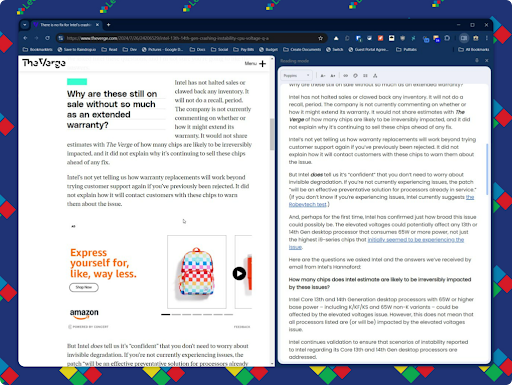
Reading mode places the content from the current web page into a side panel, stripping out everything but the actual text. The user has complete control over the look of Reading mode with the ability to set the font, colors, and size of the text.

The image above shows the web page on the left and the reading mode of the same page on the right. The middle separator can be moved, allowing you to change the size of the side panel.


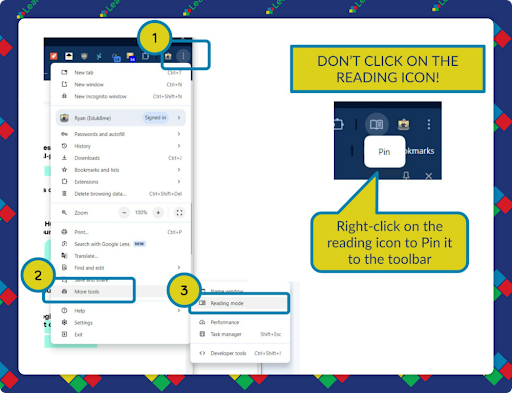
To open Reading mode, click on the Three Dot Menu on the top right of the Chrome browser to select More Tools... and then Reading mode. If you want to quickly access Reading mode, you can right-click on the icon and select Pin:

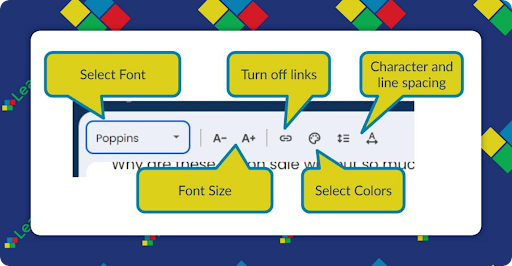
Once pinned, clicking on the icon will toggle Reading mode. At the top of the side panel you’ll see the controls to change how the text is presented:

Unfortunately, there isn’t any way to add additional fonts, you’re stuck with the defaults. Also, I couldn’t find a way for your Google Admin to add the Reading mode icon to the toolbar automatically. If you find a way, please let us know!

Extra Credit

Google's URL Shortener (goo.gl) is officially having its curtain call! Come August 25, 2025, all those short links will go poof and stop working. Although you haven’t been able to create goo.gl short links for 6 years, there are still a bunch of them floating around. Starting August 2024, some links will give users a heads-up page about the upcoming shutdown. The warnings will intensify up to the August 25, 2025 shut off date. If you are using any of these its time to update.


Computer security isn't just about tech jargon — it's also a major PR exercise! We need to make sure people actually believe the security measures we put in place are keeping their data safe. Often, this means explaining things in a way that everyone (even those who think Java is just a kind of coffee) can get on board with. When it comes to convincing others on the importance of security, remember: if they don't understand it, they won't trust it! Keep it simple, short, and sweet.


Do you ever wonder about the power of your smile? Aviva discovered just how impactful a sunny disposition can be when a mom thanked her for always being positive. It turns out, a little laughter and genuine kindness can brighten up a parent's (and a student's) day! As we prepare for the upcoming school year, keep those grins wide – a bit of cheer can truly go a long way!

Register for ETLA Conference


Early Bird Pricing ends August 20th!

🙋‍♂️ Bytes and Insights is co-authored by Eduk8me’s Ryan Collins who writes about education and educational technology. He is also the Director of Technology for Kenton City Schools in Ohio. Sign up for his Of Bits and Bytes newsletter at https://eduk8.me!


If you'd like to take a hiatus from Bytes & Insights, please use the Update Profile link below. This will allow you control over which emails you receive from Learn21.

X Share on X
LinkedIn Share on LinkedIn

www.learn21.org

LinkedIn        X        YouTube        Instagram